1. Introducere
This manual provides detailed instructions for the CooSpo BC200 GPS Bike Computer. The BC200 is a versatile device designed to track and record your cycling data, offering precise GPS positioning, extensive data display options, and compatibility with various external sensors. Please read this manual thoroughly before using your device to ensure proper operation and maintenance.

Imaginea 1.1: The CooSpo BC200 GPS Bike Computer displaying its main menu interface.
2. Ce se află în cutie
Verificați dacă toate componentele sunt prezente în pachet:
- CooSpo BC200 Bike Computer
- Manual de utilizare
- Suport de montare frontală
- USB Charging Cable (not explicitly listed but implied for rechargeable device)
3. Caracteristicile produsului
- Accurate GPS Positioning: Supports 3 global positioning modes (GPS / GPS & BEIDOU / GPS & GLONASS) for precise data worldwide.
- Large Display & Auto Backlight: Features a 2.6-inch anti-glare LCD screen with FSTN technology for clear readability in various lighting conditions. Automatic backlight activation based on ambient light.
- ANT+ & BLE Sensor Compatibility: Connects to multiple external sensors including heart rate monitors, speed sensors, cadence sensors, and power meters.
- Multi-Data Display & Customization: Displays over 70 cycling data types. Offers 5 customizable pages, each configurable to show 2 to 9 data types.
- Strava Synchronization: Upload .Fit files to Strava via USB connection to a PC or wirelessly through the CoospoRide App.
- Evaluare de impermeabilitate IP67: Designed to withstand water splashes and rain, ensuring durability in various weather conditions.
- Durată lungă de viață a bateriei: Provides up to 36 hours of operation on a single charge.
- Multi-Bike Support: Save and switch between parameters for up to 3 different bicycles.

Imaginea 3.1: The BC200's 2.6-inch anti-glare LCD screen with automatic backlight for clear visibility day and night.
4. Configurare
4.1 Poziționare GPS inițială
- For the first use, ensure you are in an open outdoor area.
- Power on the device. The initial GPS positioning may take 3 to 5 minutes.
- Once positioned, the device will display accurate GPS data.

Imaginea 4.1: The BC200 utilizes multiple satellite systems (GPS, BEIDOU, GLONASS) for accurate global positioning.
4.2 Montarea dispozitivului
Use the provided front mount bracket to securely attach the BC200 to your bicycle's handlebars.
- Attach the bracket to your handlebar using the appropriate fasteners.
- Align the BC200 with the bracket and twist to lock it into place.
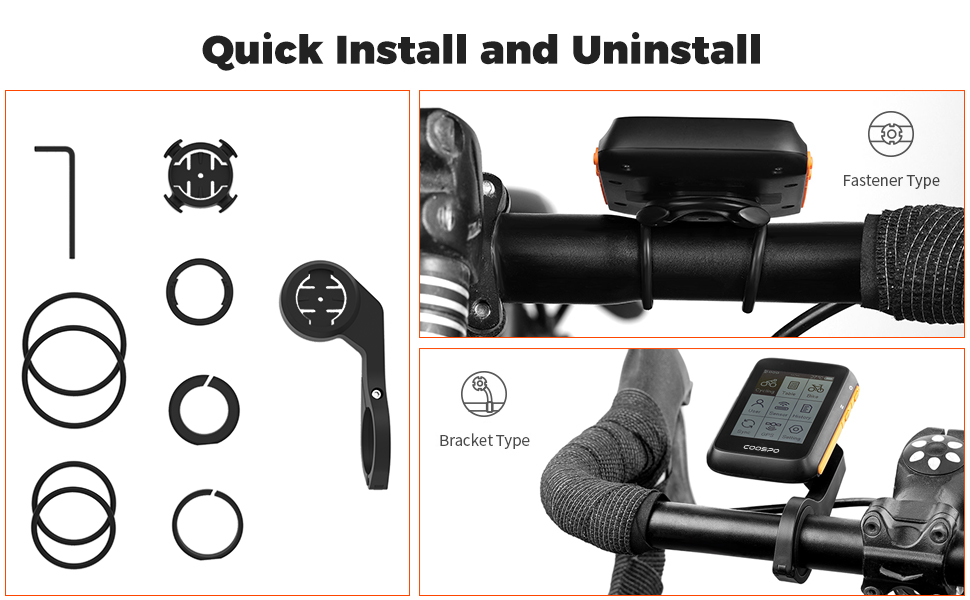
Imaginea 4.2: Visual guide for quick installation and uninstallation of the BC200 on a handlebar mount.
5. Instrucțiuni de utilizare
5.1 Navigare de bază
The BC200 is operated using its side buttons. Refer to the device's screen for on-screen prompts and menu navigation.
5.2 Personalizarea afișajului
The BC200 allows you to customize up to 5 display pages, each showing between 2 and 9 data types. This enables you to prioritize the information most relevant to your ride.

Imaginea 5.1: Various customizable data display layouts on the BC200 screen, showing speed, distance, time, heart rate, power, cadence, altitude, temperature, and calories.
5.3 Setări de limbă
The device supports multiple languages. Navigate to the settings menu to select your preferred language.

Imaginea 5.2: The BC200's language selection menu, showing options like English, Spanish, German, French, Portuguese, Russian, and Turkish.
6. Împerecherea senzorilor
The CooSpo BC200 is compatible with ANT+ and Bluetooth Low Energy (BLE) sensors, allowing you to connect various external devices for enhanced data tracking.
6.1 Compatible Sensors
- Monitoare de ritm cardiac
- Speed Sensors
- Cadence Sensors
- Contoare de putere
6.2 Procesul de împerechere
- Ensure your external sensor is active and within range of the BC200.
- Navigate to the 'Sensor' menu on your BC200.
- Select 'Add Sensor' or 'Scan' to search for available devices.
- Choose your sensor from the list and confirm pairing.

Imaginea 6.1: The BC200 displaying data while connected to various external sensors such as heart rate monitors, speed sensors, cadence sensors, and power meters via Bluetooth and ANT+.
7. Sincronizarea datelor
The BC200 allows you to synchronize your cycling data with third-party platforms like Strava for analysis and sharing.
7.1 Sync to Strava
You can upload your ride data (.Fit files) to Strava using two methods:
- Prin USB: Connect the BC200 to your PC using a USB cable and manually upload the .Fit file to Strava.
- Via CoospoRide App: Synchronize the .Fit file to Strava through the CoospoRide application on your smartphone.

Imaginea 7.1: Data flow from the BC200 to Strava, showing options for synchronization through the CoospoRide App on a phone or direct USB connection to a PC.
7.2 CoospoRide App
The CoospoRide App provides additional functionalities, including quick device setup, recording and analysis of cycling activity records, and firmware updates.

Imaginea 7.2: The CoospoRide App interface, showing options for bike computer settings, sensor binding, and activity tracking.
8. Întreținere
- curatenie: Ștergeți dispozitivul cu un material moale, damp pânză. Evitați utilizarea substanțelor chimice dure sau a agenților de curățare abrazivi.
- Rezistenta la apa: The BC200 has an IP67 waterproof rating, meaning it is protected against dust and temporary immersion in water. It is suitable for use in rain but should not be submerged for extended periods.
- Încărcare: Recharge the device using the provided USB cable. Ensure the charging port is dry before connecting the cable.
- Depozitare: Păstrați dispozitivul într-un loc răcoros și uscat atunci când nu este utilizat.

Imaginea 8.1: The BC200 demonstrating its IP67 waterproof capability under water spray.
9. Depanare
If you encounter issues with your CooSpo BC200, refer to the following common solutions:
- Dispozitivul nu pornește: Ensure the device is fully charged. Connect it to a power source and wait a few minutes before attempting to power it on again.
- Probleme cu semnalul GPS: Asigurați-vă că vă aflați într-o zonă deschisă în aer liber, cu lumină naturală view of the sky. The first positioning may take longer. If issues persist, try restarting the device.
- Senzorul nu se conectează: Check that the sensor is active, has sufficient battery, and is within range. Ensure no other devices are interfering with the connection. Try re-pairing the sensor through the device's menu.
- Data Not Syncing to Strava: Verify your internet connection. For USB sync, ensure the cable is properly connected and your computer recognizes the device. For app sync, ensure the CoospoRide App is updated and correctly linked to your Strava account.
- Ecranul nu răspunde: If the screen is frozen, try performing a soft reset by holding down the power button for an extended period (e.g., 10-15 seconds) until the device restarts.
10. Specificații
| Caracteristică | Caietul de sarcini |
|---|---|
| Numărul de model | BC200 |
| Marca | CooSpo |
| Dimensiunea ecranului | 2.6 inchi |
| Tip de ecran | LCD |
| Tehnologia de conectivitate | ANT+, Bluetooth |
| Tip senzor | Senzor GPS |
| Evaluarea internațională de protecție | IP67 |
| Tip baterie | Lithium-ion (1 Lithium metal battery included) |
| Durata de viață a bateriei | Până la 36 ore |
| Tip de montare | Suport pe ghidon |
| Tip material | Poliester |
| Culoare | Portocale |
11. Garanție și asistență
CooSpo is committed to providing excellent customer service and product support.
- Suport pentru utilizatori: 24/7 free user support is available.
- Returnări: Returns and full refunds are provided for any reason within 30 days of purchase.
- Garantie: Replacement will be provided for related quality issues within 1 year of purchase.
For further assistance, please contact CooSpo customer service.


