1. Introducere
Thank you for choosing the EZ EAR CCZ Coffee Bean Wired Earbuds. These in-ear monitors are designed to provide a high-fidelity audio experience with a focus on clear musical details and comfortable wear. This manual provides essential information for proper setup, operation, maintenance, and troubleshooting to ensure optimal performance and longevity of your earbuds.

Image 1.1: EZ EAR CCZ Coffee Bean Wired Earbuds
2. Caracteristicile produsului
The EZ EAR CCZ Coffee Bean earbuds incorporate several design and technological features for an enhanced listening experience:
- Dual Magnetic Circuit Dynamic Driver: Equipped with a 10mm dual magnetic circuit single dynamic driver unit, offering improved energy efficiency and transient response due to low impedance and high sensitivity.
- PET Composite Diaphragm: Features a PET composite diaphragm for elastic low frequencies, accurate resolution, and rich details.
- Patented Ear Tips: TPE material ear tips with a groove design and short sound guide tubes reduce sound loss and bring a more stereo sound.
- Patented Ear Hooks: Designed for comfortable, lightweight, and stable wear, preventing the cable from resting or being pulled down during movement.
- UV-Curing PC Cavity: The cavity is constructed from solid, anti-impact high-density PC materials with a German nice-fit UV varnish, resembling coffee beans in appearance.
- Design ușor: Each earbud weighs approximately 2.3g, ensuring comfortable wear without pressure.
- 4 Core 4N OFC Cable: Utilizes a 0.78MM 2-pin detachable cable made of professional 4 core 4N Oxygen-Free Copper (OFC), enhancing transparency, separation, and soundstage.

Image 2.1: 10mm Dual Magnetic Circuit Dynamic Driver

Imaginea 2.2: Caracteristici cheie de mai susview
3. Instrucțiuni de configurare și purtare
Follow these steps to properly set up and wear your EZ EAR CCZ Coffee Bean earbuds for optimal comfort and sound quality:
- Identifică stânga și dreapta: Locate the 'L' and 'R' markings on the earbuds and the cable connectors to ensure correct placement.
- Conectați cablul: Carefully align the 2-pin connectors on the cable with the corresponding ports on each earbud. Push firmly until they are securely connected.
- Selectați dopurile pentru urechi: Choose the ear tip size (small, medium, large) that provides the best seal and comfort for your ears. A good seal is crucial for bass response and sound isolation.
- Introduceți căștile: Gently insert the earbuds into your ear canals. The patented ear hooks are designed to go over your ears, securing the cable and preventing accidental dislodgement.
- Ajustați pentru potrivire: Press and hold the earbud panel to adjust the seal. Ensure the ear fins sit snugly around the inner part of your ear for stability.
- Organizare de cabluri: Fix the headset wire behind your ear to prevent it from snagging or pulling.

Image 3.1: Earbud Installation Guide
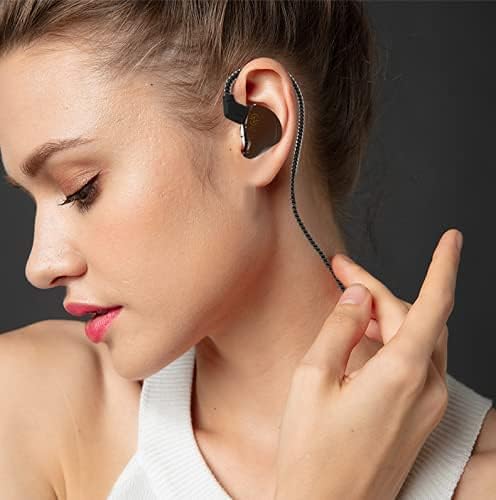
Image 3.2: Proper Wearing Technique
Video 3.1: Demonstration of earbud fit, comfort, and sound quality, including proper wearing technique.
4. Instrucțiuni de utilizare
These wired earbuds are designed for straightforward use with any device featuring a 3.5mm audio jack.
- Conectarea la un dispozitiv: Plug the 3.5mm single-end plug into the audio output jack of your smartphone, computer, game console, or other compatible device.
- Controlul volumului: Adjust the volume directly on your connected playback device. If your model includes an inline microphone with control, it may offer call control functionality.
- Call Control (if applicable): For models with a microphone, the inline control typically allows you to answer/end calls with a single press. Refer to your device's specific instructions for further control options.

Image 4.1: Device Compatibility
5. Întreținere
Proper care will extend the life and maintain the performance of your earbuds:
- Sfaturi pentru curățarea urechilor: Scoateți regulat dopurile de urechi și curățați-le cu o lavetă moale șiamp Asigurați-vă că sunt complet uscate înainte de a le atașa la loc.
- Curățarea căștilor: Wipe the earbud bodies with a dry, soft cloth. Avoid using harsh chemicals or abrasive materials.
- Îngrijirea cablului: Handle the cable gently. Avoid sharp bends or excessive pulling to prevent damage.
- Depozitare: When not in use, store your earbuds in a clean, dry place, preferably in a protective case, to prevent tangling and damage.
- Rezistenta la apa: Aceste căști sunt nu este rezistent la apă. Avoid exposure to water, sweat, or high humidity.
6. Depanare
Dacă întâmpinați probleme cu căștile, consultați următoarele soluții comune:
| Problemă | Cauza posibila | Soluţie |
|---|---|---|
| Fără sunet sau volum redus | Incorrect connection, low device volume, dirty ear tips, improper fit. | Ensure cable is fully connected. Increase device volume. Clean ear tips. Adjust earbuds for a secure fit. |
| Calitate slabă a sunetului (de exemplu, bas slab, sunet înăbușit) | Improper ear tip seal, incorrect ear tip size, dirty ear tips. | Experiment with different ear tip sizes to achieve a tight seal. Clean ear tips. Ensure earbuds are inserted correctly. |
| Căștile cad ușor | Incorrect ear tip size, improper wearing technique. | Try a larger ear tip size. Ensure ear hooks are correctly positioned over your ears. |
| Microphone not working (if applicable) | Device compatibility, cable connection issue. | Ensure your device supports inline microphone functionality. Check cable connection. |
Dacă problema persistă după ce încercați aceste soluții, vă rugăm să contactați serviciul de asistență pentru clienți.
7. Specificații
| Caracteristică | Detaliu |
|---|---|
| Numele modelului | Coffee Bean (LX668E2Brown) |
| Marca | EZ EAR |
| Tehnologia de conectivitate | Cablat |
| Mufă pentru căști | 3.5 mm Jack |
| Tip șofer | 10mm Dual Magnetic Circuit Dynamic Driver |
| Raspuns in frecventa | 20 Hz - 20,000 Hz |
| Sensibilitate | 111 dB |
| Impedanta | 18 ohmi |
| Controlul zgomotului | Izolarea sunetului |
| Material | Policarbonat (PC), Elastomer termoplastic (TPE) |
| Item Weight (single earbud) | 2.3g (0.09 Kilograms for pair / 3.2 ounces for pair) |
| Nivel de rezistență la apă | Nu este rezistent la apă |
| Caracteristica cablului | Detachable 0.78MM 2 PIN, 4 Core 4N OFC |
| Tip control | Call Control (if mic included) |
8. Garanție și asistență
Your EZ EAR CCZ Coffee Bean earbuds come with a 12 luni garantie de la data achiziției. Această garanție acoperă defectele de fabricație în condiții normale de utilizare.
Ce acoperă garanția:
- Defecte de materiale și de manoperă.
Ce nu acoperă garanția:
- Daune cauzate de utilizare necorespunzătoare, abuz, accidente sau neglijență.
- Uzură normală.
- Reparații sau modificări neautorizate.
Pentru a solicita garanție sau asistență:
If you have any questions, experience issues with your product, or need to make a warranty claim, please contact EZ EAR customer support. We aim to respond within 24 hours to assist you.
For the most up-to-date contact information, please visit the official EZ EAR store on Amazon: EZ EAR Store
Videoclipul 8.1: Terminatview of CCZ Coffee Bean features and 12-month warranty information.


