1. Produs terminatview
The Lexmark MX611DHE is a monochrome laser multifunction device designed for office environments, offering comprehensive capabilities including printing, copying, scanning, and faxing. This robust unit is engineered for high-volume output and efficient document handling.
- Multifunctionalitate: Integrates print, copy, fax, and scan functions into a single device.
- Performanță de mare viteză: Capable of printing and copying at speeds up to 50 pages per minute (ppm).
- Imprimare fata-verso: Supports automatic two-sided printing to conserve paper.
- Capacitate de intrare: Features a standard input capacity of 650 sheets, expandable for larger tasks.
- Conectivitate: Equipped with USB and Ethernet interfaces for versatile network integration.
- Control intuitiv: Features a touchscreen display for easy navigation and operation.
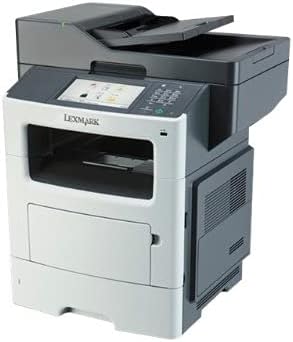
Figura 1: Față view of the Lexmark MX611DHE multifunction printer, showcasing its compact design and front-facing paper tray.
2. Ghid de instalare
Follow these steps to set up your Lexmark MX611DHE printer for initial use.
- Despachetarea: Scoateți cu grijă imprimanta din ambalaj. Îndepărtați toate benzile de protecție și materialele de ambalare de pe exteriorul și interiorul dispozitivului.
- Plasare: Place the printer on a stable, level surface with adequate ventilation. Ensure there is enough space around the printer for proper operation and maintenance.
- Conexiune de alimentare: Connect the power cord to the printer's power input and then to a grounded electrical outlet. Do not connect to a surge protector or extension cord initially.
- Încărcarea hârtiei: Open the paper tray and load the appropriate paper size (up to 8.5 x 14 inches). Adjust the paper guides to fit the paper stack snugly.
- Network/USB Connection:
- For Network (Ethernet): Conectați un cablu Ethernet de la portul Ethernet al imprimantei la routerul sau switch-ul de rețea.
- Pentru USB: Connect a USB cable from the printer's USB port to your computer.
- Pornire inițială: Press the power button to turn on the printer. Follow the on-screen prompts on the touchscreen display to select language, region, and perform initial setup configurations.
- Instalare driver: Install the necessary printer drivers on your computer. Drivers can typically be found on the Lexmark support website or on an included installation CD (if applicable).
3. Instrucțiuni de utilizare
This section provides basic instructions for using the Lexmark MX611DHE's primary functions.
3.1. Imprimare
- Asigurați-vă că imprimanta este pornită și conectată la computer sau la rețea.
- Deschideți documentul pe care doriți să îl imprimați pe computer.
- Selecta File > Imprimați (sau comanda echivalentă din aplicația dumneavoastră).
- Choose "Lexmark MX611DHE" from the list of available printers.
- Adjust print settings such as number of copies, paper size, and duplex options as needed.
- Clic Imprimare.
3.2. Copierea
- Așezați documentul cu fața în jos pe geamul scanerului sau cu fața în sus în alimentatorul automat de documente (ADF).
- Pe ecranul tactil al imprimantei, selectați Copie funcţie.
- Adjust settings such as number of copies, lightness/darkness, and paper size.
- Apăsați tasta Început butonul pentru a începe copierea.
3.3. Scanare

Figure 2: The Lexmark MX611DHE with its scanner lid open, revealing the flatbed scanner glass and the automatic document feeder mechanism.
- Așezați documentul pe geamul scanerului sau în ADF.
- Pe ecranul tactil al imprimantei, selectați Scanează funcţie.
- Choose your desired scan destination (e.g., Scan to Computer, Scan to Email, Scan to Network Folder).
- Configurați setările de scanare, cum ar fi rezoluția, modul de culoare și file format.
- Apăsați tasta Început buton pentru a iniția scanarea.
3.4. Trimiterea de faxuri
- Ensure the printer is connected to a telephone line.
- Așezați documentul pe geamul scanerului sau în ADF.
- Pe ecranul tactil al imprimantei, selectați Fax funcţie.
- Enter the recipient's fax number using the keypad on the control panel.
- Adjust any necessary fax settings.
- Apăsați tasta Început butonul pentru a trimite faxul.
4. Întreținere
Regular maintenance ensures optimal performance and extends the lifespan of your Lexmark MX611DHE.
- Curățarea exteriorului: Folosiți un moale, damp, lint-free cloth to wipe the exterior surfaces of the printer. Avoid abrasive cleaners.
- Curățarea sticlei scanerului: For clear scans, regularly clean the scanner glass with a soft, lint-free cloth and a mild glass cleaner.
- Înlocuirea cartușului de toner: When the toner low message appears, order a new Lexmark toner cartridge. Follow the instructions provided with the new cartridge for proper installation.
- Curățarea traseului hârtiei: If paper jams become frequent, consult the printer's internal guides or the Lexmark support website for instructions on cleaning the paper path rollers.
5. Depanare
This section addresses common issues you might encounter with your Lexmark MX611DHE.
| Problemă | Cauza posibila | Soluţie |
|---|---|---|
| Imprimanta nu răspunde | Cablul de alimentare este deconectat, problemă de rețea, problemă cu driverul. | Check power connections. Verify network cable or USB connection. Reinstall printer drivers. |
| Blocaj de hârtie | Incorrectly loaded paper, foreign object in paper path. | Open access covers and carefully remove jammed paper. Ensure paper is loaded correctly. |
| Calitate slabă a imprimării | Low toner, dirty print head/rollers, incorrect print settings. | Replace toner cartridge. Clean internal components as per maintenance guide. Adjust print quality settings in driver. |
| Scanerul nu funcționează | Scanner glass dirty, software issue, connectivity problem. | Clean scanner glass. Restart computer and printer. Check USB/network connection. |
6. Specificații
Detailed technical specifications for the Lexmark MX611DHE.
| Caracteristică | Detaliu |
|---|---|
| Marca | Lexmark |
| Numele modelului | MX611DHE |
| Tip de afișare | LCD (Touchscreen) |
| Tehnologia de imprimare | Laser (Monocrom) |
| Viteză maximă de imprimare (monocrom) | 50 ppm |
| Viteza maximă de copiere (alb-negru) | 50 ppm |
| Rezoluţie | 1200 x 1200 dpi |
| Capacitate de stocare a memoriei | 1024 MB |
| Suport pentru dimensiunea foii | Up to 8.5 x 14 Inches |
| Interfață hardware | USB-Ethernet |
| Dimensiunile produsului | 22.6 x 23.5 x 26.5 inci |
| Culoare | Gri/alb |
| UPC | 656942073611 |
7. Garanție și asistență
Your Lexmark MX611DHE (Renewed) product is covered by a limited warranty and support resources.
- Garantie: Acest produs vine cu un 90 de zile garanție limitată. Please refer to your purchase documentation for specific terms and conditions of the Amazon Renewed Guarantee.
- Suport tehnic: For technical assistance, driver downloads, or further troubleshooting, please visit the official Lexmark support website-ul sau contactați serviciul pentru clienți.
- Resurse online: Additional user guides, FAQs, and firmware updates may be available on the Lexmark support portal.


