Introducere
This manual provides detailed instructions for the Pyle PKBRD8100 Portable Foldable 88-Key Digital Piano Keyboard. Please read this manual thoroughly before using the product to ensure proper operation and to maximize your musical experience. Keep this manual for future reference.
Ce este în cutie
La despachetare, vă rugăm să vă asigurați că toate articolele enumerate mai jos sunt prezente și în stare bună:
- Tastatură de pian portabilă și pliabilă
- Cablu încărcător USB
- Adaptor USB
- Manual de utilizare (acest document)
- Piano Bag for Easy Storage & Travel
- Pedala de sustinere

Image: All components included in the Pyle PKBRD8100 package, neatly arranged. This includes the foldable keyboard, a sustain pedal, a USB charger, a USB cable, and a black carrying bag.
Caracteristicile produsului
The Pyle PKBRD8100 Digital Piano Keyboard offers a range of features designed for versatility and ease of use:
- 88 de taste de dimensiune completă: Provides a comprehensive range for musical expression.
- Design pliabil: Permite depozitare compactă și portabilitate.
- Conectivitate Bluetooth: Enables connection to smart devices for MIDI and audio streaming.
- 129 Selectable Tones: A wide variety of instrument sounds.
- 128 Rhythm Styles: Accompaniment options for practice and performance.
- Built-in Full Range Stereo Speakers: For clear audio output.
- Record & Playback Mode: Capturați și re-view performanțele tale.
- Intrare pedală susținută: For expressive playing.
- Aux (3.5mm) Input Jack / Mic Input: For connecting external audio sources or a microphone.
- Mufă pentru căști (3.5 mm): For private practice.
- Digital LCD Display & LED Indicators: For easy navigation and status updates.
- Baterie reîncărcabilă încorporată: For portable use.
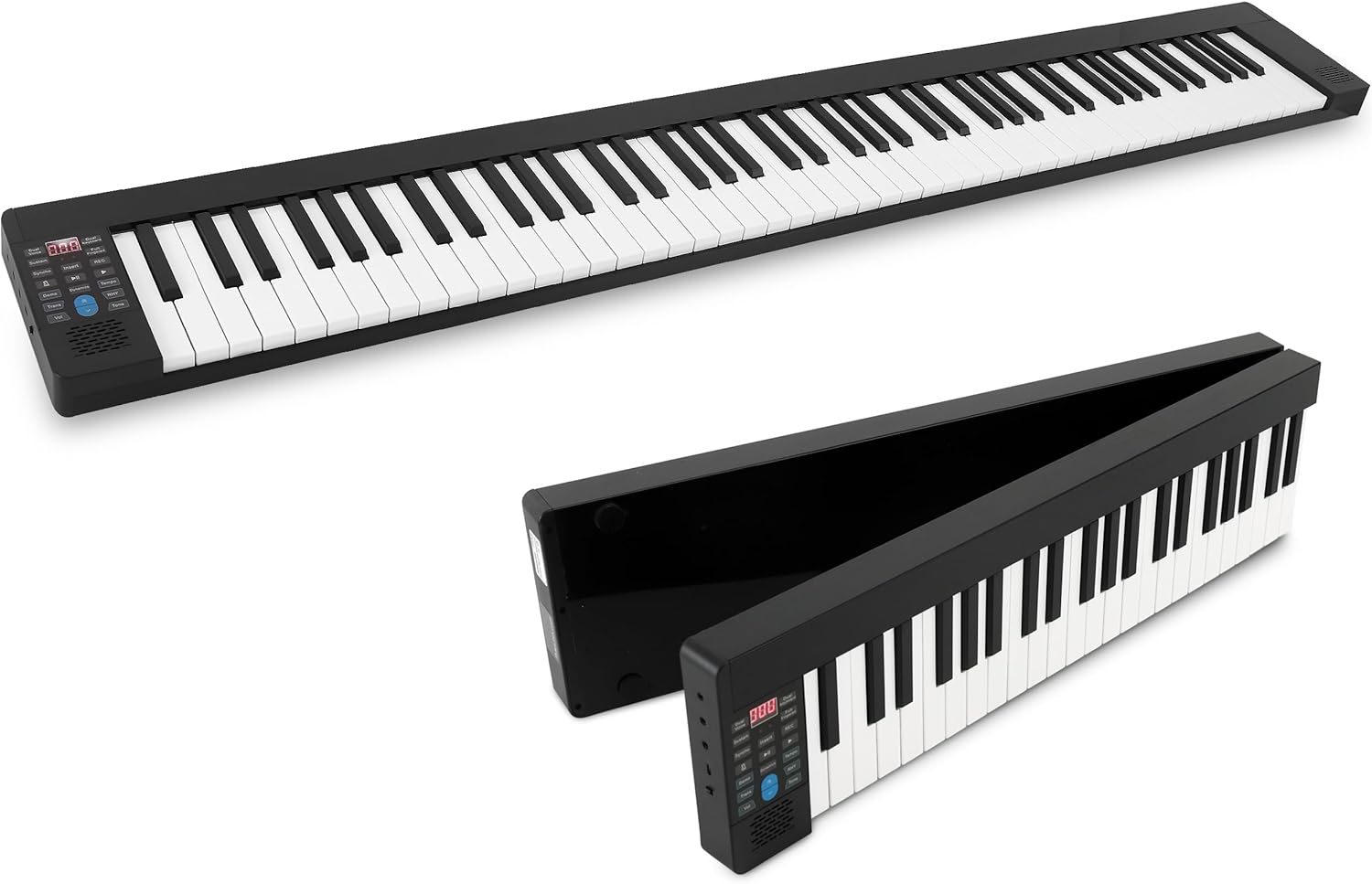
Image: The Pyle PKBRD8100 digital piano keyboard fully extended, showcasing its 88 keys and compact design.

Image: The Pyle PKBRD8100 keyboard in the process of folding, highlighting its 180-degree foldable design and a user carrying it in the included travel bag.
Înființat
- Despachetați tastatura: Scoateți cu grijă toate componentele din ambalaj.
- Desfaceți tastatura: Gently unfold the keyboard until it lies flat and locks into position. Ensure it is placed on a stable, flat surface.
- Conexiune de alimentare:
- Încărcare: Connect the USB charger cable to the keyboard's USB port and the USB adapter to a power outlet. The built-in battery will begin charging.
- Direct Power: The keyboard can also be operated directly from the power adapter while charging.
- Sustain Pedal Connection: Insert the sustain pedal cable into the designated sustain pedal interface on the keyboard.
- Headphones/External Speakers (Optional): For private practice, connect headphones to the 3.5mm headphone jack. To connect to external speakers, use the Aux (3.5mm) Input Jack.
- Asociere Bluetooth (Opțional): To connect via Bluetooth, ensure Bluetooth is enabled on your smart device. The keyboard will appear as an available device for pairing.

Imagine: Detaliată view of the input/output ports on the Pyle PKBRD8100, including the headphone jack, USB port for power/data, and the sustain pedal connection point.
Instrucțiuni de operare
Panou de control terminatview

Image: A detailed diagram illustrating the various buttons and their functions on the Pyle PKBRD8100 control panel, including LED display, volume, tone, rhythm, and function buttons.
- Pornire/Oprire: Locate the power button on the side or control panel to turn the keyboard on or off.
- Controlul volumului: Use the 'Vol' buttons (Decrease/Increase) to adjust the master volume.
- Selectarea tonului: Press the 'Tone' button, then use the arrow buttons to cycle through the 129 available tones. The selected tone number will appear on the LED display.
- Selectarea ritmului: Press the 'RHY' (Rhythm) button, then use the arrow buttons to select from the 128 rhythm styles. Press the 'START/STOP' button to begin or end the rhythm.
- Cântece demonstrative: Press the 'Demo' button to play a demonstration song. Press it again to stop.
- Înregistrare și redare:
- Press 'REC' to start recording your performance.
- Press 'PLAY' to listen to your recorded performance.
- Funcție de susținere: Press the 'Sustain' button to activate or deactivate the sustain effect. The connected sustain pedal will also control this function.
- Voce dublă: Press the 'Dual Voice' button to layer two different instrument sounds simultaneously.
- Metronom: Press the 'Metronome' button to activate the metronome function for timing practice.
- Bluetooth MIDI/Audio:
- Bluetooth MIDI: Connect to music apps on your smart device for learning or composition.
- Audio Bluetooth: Stream audio from your device through the keyboard's speakers.

Imagine: Un pesteview of the Bluetooth and MIDI capabilities, demonstrating how the keyboard connects to computers and mobile devices for editing, creating music, and using learning applications.
Întreţinere
- curatenie: Use a soft, dry cloth to wipe the surface of the keyboard. Do not use liquid cleaners, waxes, or solvents, as they may damage the finish.
- Depozitare: When not in use, fold the keyboard and store it in the provided piano bag to protect it from dust and damage. Store in a cool, dry place away from direct sunlight and extreme temperatures.
- Îngrijirea bateriei: To prolong battery life, avoid fully discharging the battery frequently. Charge the keyboard regularly, even if not in constant use.
- Manipulare: Evitați să scăpați tastatura sau să o supuneți la impacturi puternice. Nu așezați obiecte grele deasupra ei.
Depanare
| Problemă | Cauza posibila | Soluţie |
|---|---|---|
| Tastatura nu pornește. | Battery is depleted or power adapter is not connected properly. | Connect the USB charger cable and adapter to a power outlet. Ensure the power button is pressed. |
| Niciun sunet de la difuzoare. | Volume is too low, headphones are connected, or external speakers are not properly connected. | Increase the volume. Disconnect headphones if not needed. Check connections to external speakers. |
| Conexiunea Bluetooth eșuează. | Bluetooth is not enabled on the device, keyboard is not in pairing mode, or interference. | Ensure Bluetooth is active on your device. Restart both the keyboard and your device. Move closer to the keyboard. |
| Sustain pedal not working. | Pedal not fully inserted or sustain function is off. | Ensure the sustain pedal cable is securely connected. Press the 'Sustain' button on the control panel to activate the function. |
Specificații
- Tastele tastaturii: 88 de taste de dimensiune completă
- Preset Selectable Tones: 129 tonuri
- Preset Selectable Rhythms: 128 de ritmuri
- Interfață audio: Jack de intrare Aux (3.5 mm) / Intrare microfon
- Nivel maxim de sunet: Până la 110 dB
- Lungimea cablului USB/alimentare: 3.9 de picioare (1.2 metri)
- Materiale de constructie: Engineered ABS, PC, PVC
- Baterie reîncărcabilă încorporată: 3.7 V Li-ion, 1100 mAh
- Alimentare electrică: 120/240V, USB 5V/1A
- Piano Dimensions (Unfolded): 28.7'' x 9.0'' x 2.6'' inches (72.9 cm x 22.9 cm x 6.6 cm)
- Greutatea articolului: Aproximativ 12.27 lire sterline (5.57 kg)
- Tehnologie de conectivitate: Bluetooth
- Software suportat: Pop piano, GarageBand, Perfect Piano (via Bluetooth MIDI)
- Compatibilitate cu sistemul de operare: iOS, Android, Windows, macOS (via Bluetooth MIDI)
Garanție și asistență
Pentru informații despre garanție și asistență tehnică, vă rugăm să consultați site-ul oficial Pyle. website or contact their customer service directly. Details are typically provided with your purchase documentation or on the manufacturer's website-ul.
Oficialul Pyle Website: www.pyleusa.com


