1. Produs terminatview
The SV3C WiFi Camera Outdoor 1080P is a robust security camera designed for both indoor and outdoor surveillance. It features 1080P resolution, two-way audio, motion detection, and enhanced night vision capabilities. This manual provides detailed instructions for setup, operation, maintenance, and troubleshooting to ensure optimal performance of your device.
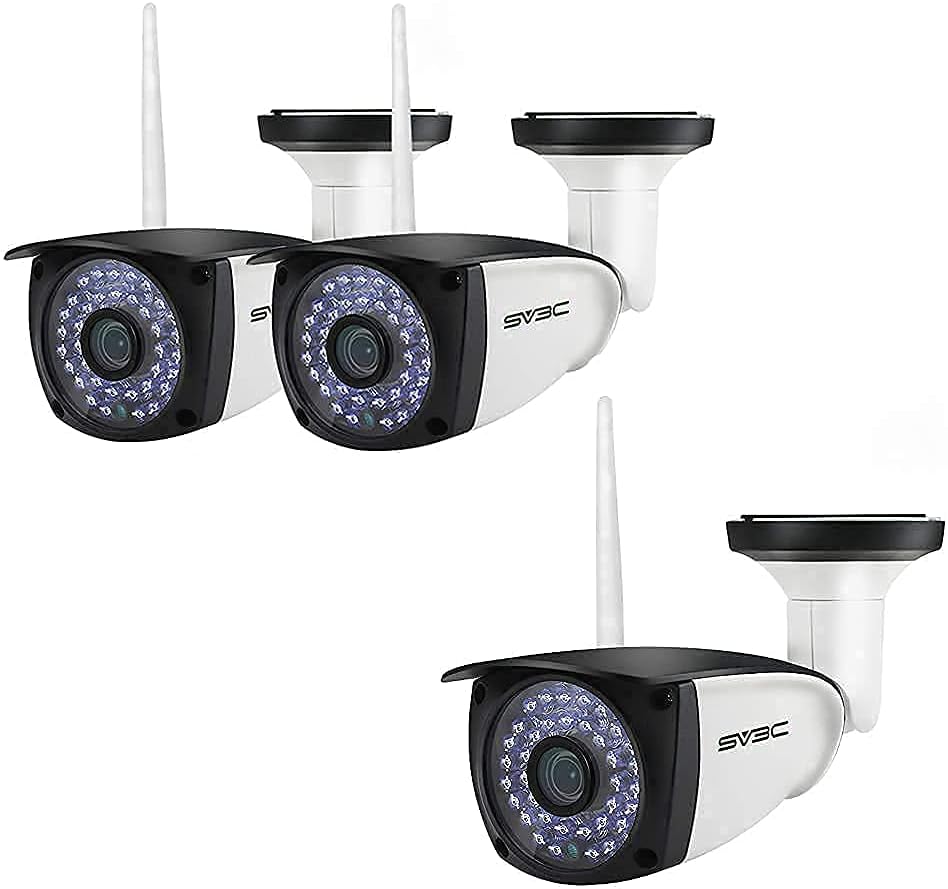
SV3C WiFi Camera Outdoor 1080P units. This image displays multiple units of the SV3C WiFi Camera, highlighting its compact design and external antenna.
1.1 Conținutul pachetului
Înainte de a continua instalarea, verificați dacă toate elementele enumerate mai jos sunt prezente în pachet:
- SV3C WiFi IP Camera
- Adaptor de alimentare
- Network Cable / Screws
- Capac impermeabil
- Ghid de pornire rapidă

Package Contents. This image displays all items included in the product package: the WiFi IP Camera, network cable/screws, power adapter, product box, waterproof lid, and the Quick Start Guide.
2. Configurare și instalare
2.1 Componentele camerei
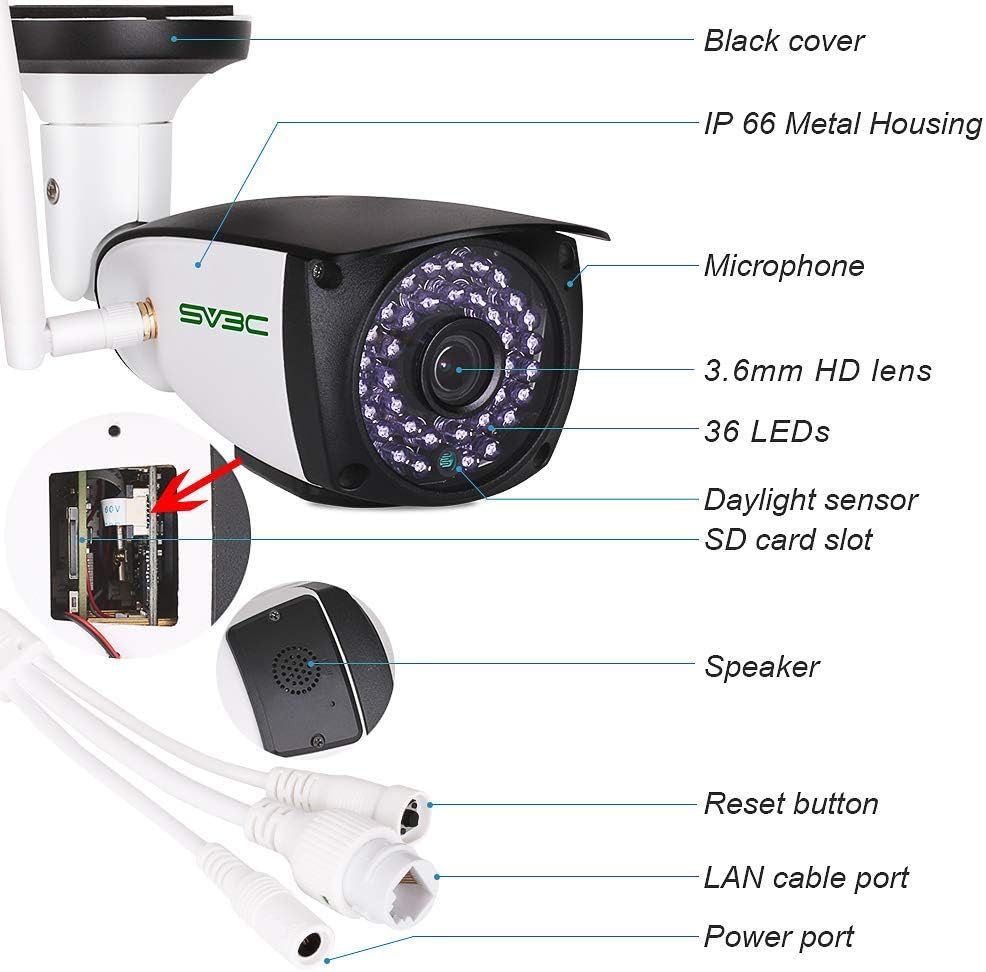
SV3C WiFi Camera Component Diagram. This detailed diagram labels key components of the SV3C WiFi Camera, including the black cover, IP66 metal housing, microphone, 3.6mm HD lens, 36 LEDs, daylight sensor, SD card slot, speaker, reset button, LAN cable port, and power port.
2.2 Pornire
Connect the camera to the provided power adapter. The camera requires a continuous power source to operate. Ensure the power outlet is easily accessible.
2.3 Conexiune de rețea
The camera supports 2.4GHz WiFi networks only. It is not compatible with 5GHz WiFi. For initial setup, a wired LAN connection can also be used.
- Conexiune wireless: Ensure your router is broadcasting a 2.4GHz WiFi signal.
- Conexiune prin cablu: Connect an Ethernet cable from the camera's LAN port to your router.
2.4 Instalarea și configurarea aplicației
Descărcați CamHi or CamHipro app from the Apple App Store (for iPhone) or Google Play Store (for Android phones). Follow the in-app instructions to add your camera. It is recommended to install the security camera through LAN Search according to the instructions, rather than scanning a QR code.
2.5 Instalarea cardului SD
The camera supports Micro SD Cards up to 128GB. To install the SD card:
- Locate the black cover on the camera body.
- Carefully remove the black cover to reveal the speaker and the SD card slot.
- Insert a Class-10, UHS-1 or higher speed Micro SD card (designed for surveillance cameras) into the slot.
- Replace the black cover securely.
3. Funcționare
3.1 Telecomandă Viewing
The SV3C WiFi IP camera supports remote viewing on Android, iPhone, and Windows/MAC OS PCs. Ensure both the camera and your viewing device have internet access to view and configure the camera from anywhere at any time.
3.2 Sunet bidirecțional
The camera features a built-in microphone and speaker, enabling two-way audio communication. This allows you to speak with individuals in the monitoring area directly through the camera via the mobile app.

Two-Way Audio Functionality. This image demonstrates the camera's two-way audio feature, showing a user communicating with a delivery person via a smartphone app.
3.3 Detectarea mișcării și alertele
The camera is equipped with smart motion detection. When motion is detected, the camera can trigger alerts through the phone app, send snapshots to your email, or upload data to an FTP server. Multiple storage methods are supported, including Micro SD Card (up to 128GB), Local Disk, and Network Video Recorder (NVR).

Smart Motion Detection Alerts. This image depicts the camera's motion detection feature, showing a smartphone receiving push notifications, email alerts, and FTP uploads when motion is detected, with a blurred image of an intruder in the background.
3.4 Vedere nocturnă
The camera provides clear surveillance both day and night. It utilizes 36 IR LEDs for enhanced night vision, ensuring visibility in low-light or dark conditions.

Day and Night Vision Comparison. This image illustrates the camera's capability to provide colorful day vision and clear infrared night vision, showing a dog and a person in both lighting conditions.
3.5 ONVIF Compatibility
The IP camera is ONVIF-conformant, allowing it to interoperate with various ONVIF-compatible IP security products and third-party software such as HiP2P, Blue Iris, iSpy, and VLC. Note that some functions may not be fully compatible with all NVRs.

ONVIF Conformance and App Integration. This image shows the SV3C WiFi Camera's compatibility with ONVIF standards and various third-party software and mobile applications like HiP2P, Blue Iris, Ispy, VLC, and CamHi/CamHipro, with a monitor displaying multiple camera feeds.
4. Întreținere
4.1 Rezistența la intemperii
The camera features a sturdy metal housing with an IP66 waterproof rating, making it suitable for both indoor and outdoor use. It is designed to withstand rough weather conditions, including storms and snowy environments. The operating temperature range is -20°C to 60°C (-4°F to 140°F).

IP66 Weatherproof Design. This image highlights the camera's IP66 waterproof rating, showing the camera under water splashes and indicating its operating temperature range (-20°C to 60°C) and resistance to lightning.
4.2 Curățare
To maintain clear image quality, periodically clean the camera lens with a soft, dry cloth. Avoid using harsh chemicals or abrasive materials that could damage the lens or housing.
4.3 Managementul cardului SD
Regularly check the status of your SD card through the app. It is recommended to format the SD card periodically to ensure optimal recording performance and prevent data corruption. Replace the SD card if it shows signs of degradation or failure.
5. Depanare
- Camera nu se conectează la WiFi: Ensure your WiFi network is 2.4GHz. The camera does not support 5GHz WiFi. Verify the WiFi password is correct.
- No image on MAC OS: PC Client and Search Tool software do not work with MAC OS. You can view the security camera on a web browser prin introducerea adresei sale IP.
- Cardul SD nu înregistrează: Ensure the SD card is a Class-10, UHS-1 or higher speed memory card designed for surveillance. Check if the card is properly inserted and formatted within the app.
- Sunetul bidirecțional nu funcționează: Check the microphone and speaker settings in the app. Ensure volume levels are adequate on both the camera and your viewdispozitiv de ing.
- Alertele de detectare a mișcării nu au fost primite: Verify motion detection settings are enabled in the app. Check alert notification settings on your phone and email spam folders.
6. Specificații
| Caracteristică | Caietul de sarcini |
|---|---|
| Rezoluţie | 1920x1080 (1080p) |
| Tip senzor | 1/3" 2 Megapixel 3.6 mm CMOS sensor |
| View Unghi | 70° Degrees |
| Putere | DC 12V 1A (Corded Electric) |
| Temperatura de operare | -20°C până la 60°C (-4°F până la 140°F) |
| Capacitate de stocare a memoriei | Max 128GB Micro SD Card |
| Tehnologia de conectivitate | Wireless (WiFi 2.4 GHz) |
| Caracteristici speciale | Senzor de mișcare, Viziune nocturnă, Sunet bidirecțional |
| Nivel impermeabil | IP66 |
| Frame Rate | 30 FPS |
| Modul de înregistrare | Video, Audio |
| Sisteme de operare compatibile | Android, iOS |
| Producător | SV3C Technology |
7. Garanție și asistență
SV3C Technology provides lifetime technical support for this product. If you encounter any issues or have questions regarding your SV3C WiFi Camera, please contact SV3C customer service. You can reach them via your Amazon order details or through the email address provided in the paper manual included with your product.


