ALFAJR CW-15 Automatic Islamic Azan Prayer Clock User Manual
Model: CW-15 | Brand: ALFAJR
Introducere
This manual provides comprehensive instructions for setting up and operating your ALFAJR CW-15 Automatic Islamic Azan Prayer Clock. Designed for both wall mounting and table placement, this digital clock automatically calculates and plays the Azan five times a day based on your set location. Please read this manual carefully to ensure proper use and to fully utilize all features of your new clock.
Conținutul pachetului
Vă rugăm să verificați dacă toate articolele sunt prezente în colet:
Automatic Azan time adjustment after initial city/time setup.
Gregorian and Hijri calendar display.
Afișarea temperaturii în Celsius sau Fahrenheit.
Daylight Saving Time (DST) option.
English and Arabic display languages.
Wall-mountable or table-standing design.
Dimensions: Approximately 9 inches (width) x 8.5 inches (height).
Powered by 4 AA batteries (included) or USB-C (cable not included).
Ghid de instalare
1. Instalarea bateriei
The ALFAJR CW-15 clock operates on 4 AA batteries. These are included in your package.
Localizați compartimentul bateriei pe spatele ceasului.
Deschideți capacul compartimentului bateriei.
Introduceți cele 4 baterii AA, asigurându-vă de polaritatea corectă (+ și -).
Închideți bine capacul compartimentului bateriei.
Alternatively, the clock can be powered via a USB-C cable (not included) connected to a compatible power adapter.
2. Initial Power On and Display Overview
Upon inserting batteries or connecting USB-C power, the clock will power on. The display will show the current time, date, and temperature. Familiarize yourself with the buttons on the side/back of the clock: UP, SET, și JOS.
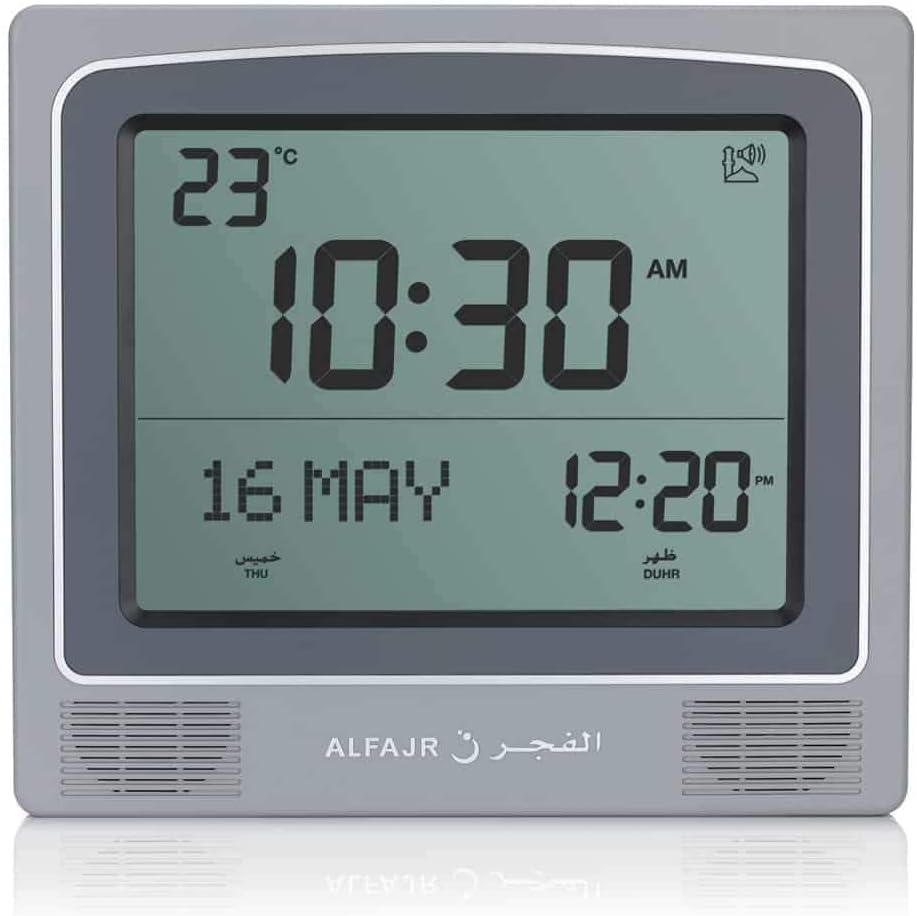
Figura 1: Față view of the ALFAJR CW-15 clock, showing the digital display with time, date, and temperature. The speaker grilles are visible at the bottom.
Figura 2: Față view of the ALFAJR CW-15 clock, similar to Figure 1, but with the ALFAJR brand logo visible at the bottom center.
3. Setarea orei și datei
Țineți apăsat butonul SET timp de aproximativ 3 secunde, până când afișajul orei începe să clipească.
Utilizați UP şi JOS Apăsați butoanele pentru a regla ora. SET pentru a confirma și a trece la minute.
Ajustați minutele folosind UP şi JOS, apoi apăsați SET.
Continuați acest proces pentru a seta anul, luna și ziua.
După setarea datei, apăsați SET to exit the time/date setting mode.
4. Setting Location (City or Coordinates)
Accurate Azan times depend on correct location settings. You can select a pre-programmed city or enter latitude/longitude.
Apăsați tasta SET button once (short press) to enter the main menu.
Utilizare UP or JOS to navigate to the "CITY" or "LOCATION" setting.
Presa SET to enter the location setting.
Option A: Select Pre-programmed City: Utilizare UP or JOS to scroll through the list of cities. Once your city is displayed, press SET pentru a confirma.
Option B: Enter Latitude/Longitude: If your city is not listed, select the option to enter coordinates. Use UP şi JOS to adjust the values for latitude, longitude, and time zone offset (GMT). Press SET după fiecare valoare.
After confirming your location, the clock will automatically calculate the Azan times.
5. Azan Calculation Method
The clock supports various Azan calculation methods. Consult local Islamic authorities for the recommended method in your region.
From the main menu (short press SET), navigate to "CALC. METHOD".
Presa SET a intra.
Utilizare UP or JOS to select the desired calculation method (e.g., Muslim World League, Umm Al-Qura, Egyptian General Authority of Survey, etc.).
Presa SET pentru a confirma.
6. Ora de vară (DST)
If your region observes Daylight Saving Time, enable this feature.
From the main menu, navigate to "DST".
Presa SET.
Utilizare UP or JOS to toggle between "ON" and "OFF".
Presa SET pentru a confirma.
7. Unitate de temperatură
You can choose to display temperature in Celsius or Fahrenheit.
From the main menu, navigate to "TEMP UNIT".
Presa SET.
Utilizare UP or JOS to select "C" (Celsius) or "F" (Fahrenheit).
Presa SET pentru a confirma.
8. Calendar Display
The clock can display either the Gregorian or Hijri calendar.
From the main menu, navigate to "CALENDAR".
Presa SET.
Utilizare UP or JOS to select "GREGORIAN" or "HIJRI".
Presa SET pentru a confirma.
Instrucțiuni de operare
1. Adjusting Azan Volume
The clock features adjustable Azan volume. The volume buttons are typically located on the side or back of the unit.
During an Azan, press the UP or JOS butoane pentru a crește sau a reduce volumul.
Alternatively, some models may have a dedicated volume switch or buttons on the back. Refer to the physical clock for exact button placement.
2. Changing Azan Reciter
You can select from five different Azan reciters.
From the main menu (short press SET), navigate to "AZAN VOICE" or "RECITER".
Presa SET a intra.
Utilizare UP or JOS to cycle through the available reciters (Makkah, Madina, Egypt, AlQuds, Riyadh).
Presa SET pentru a confirma selecția dvs.
3. Daily Alarms
The clock includes daily alarm functions in addition to the Azan. These can be set for specific times.
From the main menu, navigate to "DAILY ALARM".
Presa SET.
Utilizare UP or JOS to set the desired alarm time (hour and minute).
Presa SET to confirm and enable the alarm.
To disable, navigate back to "DAILY ALARM" and set the time to "OFF" or a similar option.
4. Moduri de afișare
The clock typically cycles through different display information or allows manual switching.
The default display shows time, date, and temperature.
Apăsând scurt pe UP or JOS buttons outside of menu mode may cycle through additional information like next prayer time or Qibla direction (if available on this model).
Opțiuni de montare
The ALFAJR CW-15 clock is designed for versatile placement, either on a wall or a flat surface.
1. Montare pe perete
To mount the clock on a wall:
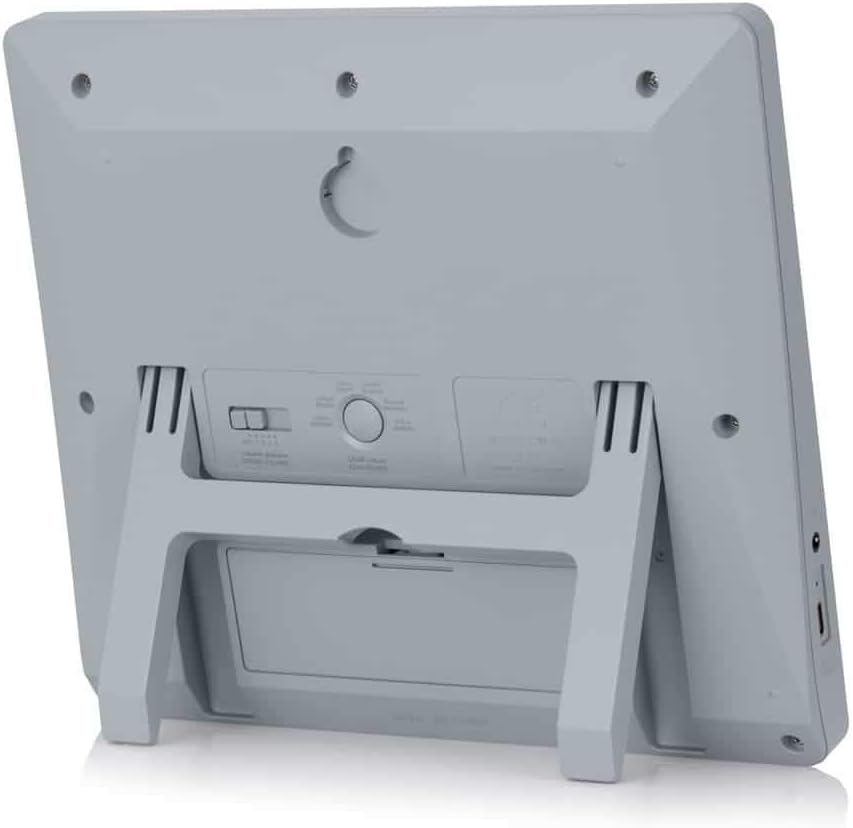
Locate the keyhole slot on the back of the clock.
Choose a suitable location on a wall.
Install a screw (not included) into the wall, leaving a small portion protruding. Ensure the screw head fits into the keyhole slot.
Carefully hang the clock onto the screw, ensuring it is securely seated.
Figura 3: Spate view of the ALFAJR CW-15 clock, highlighting the keyhole for wall mounting and the battery compartment.
2. Table Placement
For table or desk placement:
Locate the integrated stand on the back of the clock.
Pull out the stand until it locks into position.
Place the clock on a flat, stable surface.
Figura 4: lateral view of the ALFAJR CW-15 clock, showing the integrated kickstand extended for stable table placement.
Întreţinere
1. Curatenie
To maintain the appearance and functionality of your clock:
Ștergeți suprafața ceasului cu o cârpă moale și uscată.
Nu utilizați produse de curățare abrazive, solvenți sau spray-uri chimice, deoarece acestea pot deteriora afișajul sauasing.
Avoid getting moisture into the clock's openings.
2. Înlocuirea bateriei
When the display dims or the clock functions become erratic, it's time to replace the batteries.
Deschideți compartimentul bateriei din spatele ceasului.
Scoateți bateriile AA vechi.
Insert four new AA batteries, observing correct polarity.
Închideți compartimentul bateriei.
You may need to re-enter the time and location settings after battery replacement.
Depanare
Problemă
Cauza posibila
Soluţie
Ceasul nu pornește.
Batteries are dead or incorrectly inserted. No USB-C power.
Check battery polarity. Replace with new batteries. Ensure USB-C cable (if used) is connected and power source is active.
Verify city, latitude, longitude, and GMT offset. Select the correct Azan calculation method for your region. Check DST setting.
Azan sound is too low or too high.
Setarea volumului necesită ajustare.
Adjust the volume using the dedicated buttons or through the menu.
Afișajul este întunecat sau pâlpâie.
Putere scăzută a bateriei.
Înlocuiți toate cele 4 baterii AA cu unele noi.
Clock resets unexpectedly.
Intermittent power loss or very low batteries.
Ensure batteries are fresh and securely seated. If using USB-C, check the connection and power source stability.
Specificații
Model: CW-15
Marca: ALFAJR
Tip de afișare: Digital
Culoare: Gri
Material: Plastic
Dimensiuni produs: 8.5 inchi (l) x 9 inci (h)
Greutatea articolului: 3 uncii
Sursa de alimentare: 4 AA batteries (included) or USB-C (cable not included)
Tip de montare: Suport de perete/suport de masă
Caracteristici speciale: Automatic Azan, Multiple Azan Reciters, Gregorian/Hijri Calendar, Temperature Display, Daylight Saving Time
Limbi: engleză, arabă
Garanție și suport
Garanție limitată
The ALFAJR CW-15 Azan Clock comes with a limited warranty. Please refer to the warranty card included in your original packaging for specific terms, conditions, and duration. This warranty typically covers manufacturing defects under normal use.
Asistență pentru clienți
For technical assistance, troubleshooting not covered in this manual, or warranty claims, please contact ALFAJR customer support through their official website or the retailer from whom you purchased the product. Please have your model number (CW-15) and purchase date available when contacting support.
Documente conexe - CW-15
Manual de utilizare pentru răcitorul industrial S&A CW-5000/5200 Manual de utilizare pentru chillerele industriale din seria S&A CW-5000 și CW-5200 de la GUANGZHOU TEYU ELECTROMECHANICAL CO., LTD., care acoperă instalarea, operarea, specificațiile și depanarea.
Manual de utilizare pentru chillerul industrial cu refrigerare din seria CW-5202 Acest manual de utilizare oferă instrucțiuni detaliate pentru chillerul de refrigerare industrial din seria CW-5202, acoperind instalarea, funcționarea, măsurile de siguranță, depanarea și specificațiile tehnice pentru o performanță optimă.
Ghidul utilizatorului pentru Epson seria CW-C4000 Ghid complet de utilizare pentru imprimanta Epson seria CW-C4000, care acoperă configurarea, operarea, întreținerea, depanarea și specificațiile. Aflați cum să profitați la maximum de imprimanta dvs. Epson.