1. Introducere
This manual provides comprehensive instructions for the installation, operation, and maintenance of your CALEX Smart Mini Indoor IP Camera. Please read this manual thoroughly before using the product to ensure proper functionality and safety.
The CALEX Smart Mini Indoor IP Camera is a Wi-Fi surveillance camera offering 1080P Full HD resolution, night vision capabilities, two-way audio communication, and flexible storage options via MicroSD card or cloud.
2. Conținutul pachetului
Verificați dacă toate articolele sunt prezente în colet:
- 1 x CALEX Smart Mini Indoor IP Camera
- 1 x Power Adapter (AC 220-240 V, 50/60 Hz input; DC 5 V output)
- 1 x cablu USB
- 1 x Manual de utilizare (acest document)
- Mounting accessories (if applicable, not explicitly listed but common for cameras)

Figure 2.1: CALEX Smart Mini Indoor IP Camera and its retail packaging. The packaging highlights 1080P Full HD, Wi-Fi 2.4 GHz, and compatibility with the Calex Smart app.
3. Produs terminatview
Familiarize yourself with the components of your CALEX Smart Mini Indoor IP Camera.
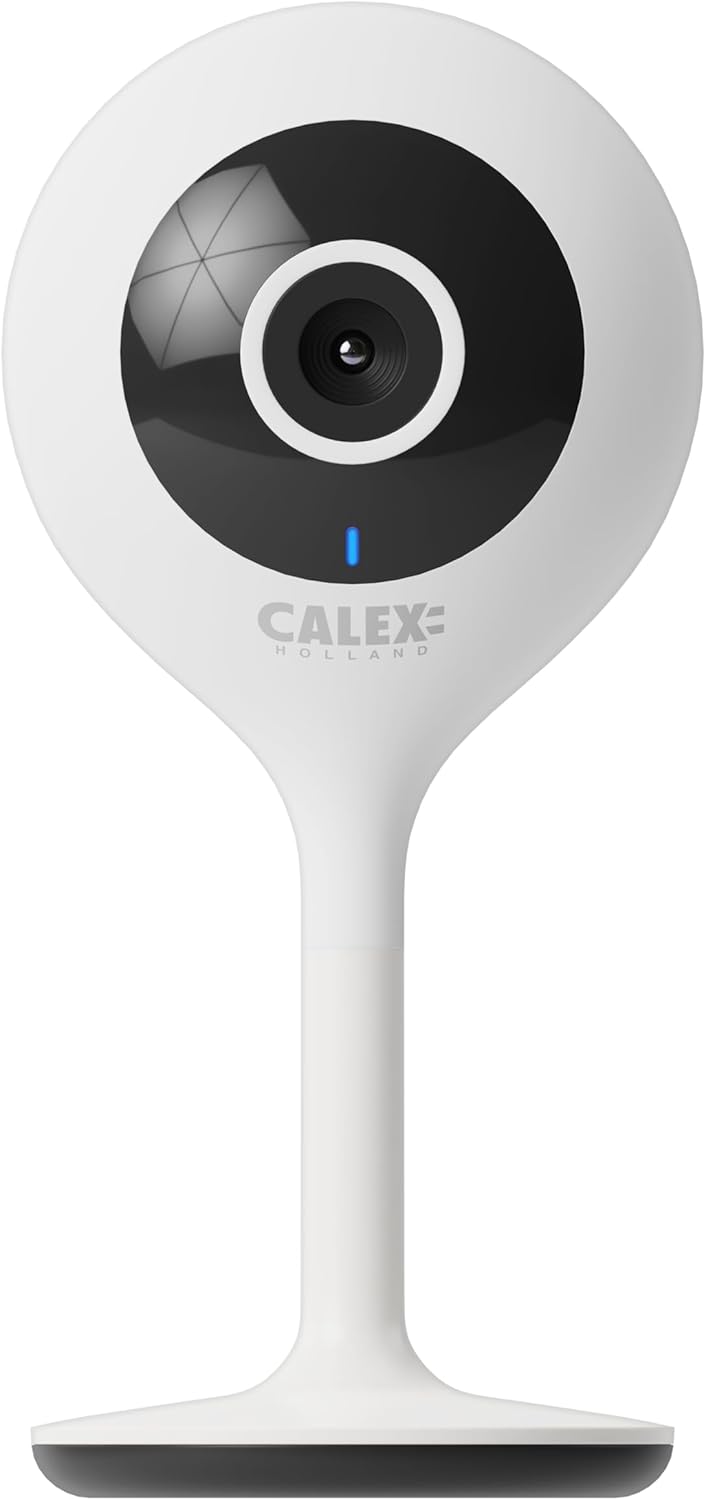
Figura 3.1: Față view of the CALEX Smart Mini Indoor IP Camera. It features a central lens, an indicator light, and the CALEX HOLLAND logo.

Figura 3.2: Spate view of the CALEX Smart Mini Indoor IP Camera. This view shows the speaker grille, a reset button, and the MicroSD card slot. The USB power input is located at the base.
Caracteristici cheie:
- Rezoluție Full HD 1080P: Oferă un videoclip clar și detaliattage.
- Vedere de noapte: Equipped with infrared LEDs for clear monitoring in low-light or dark conditions.
- Audio bidirecțional: Microfon și difuzor încorporate pentru comunicare.
- Conectivitate Wi-Fi: Connects to your home Wi-Fi network (2.4 GHz only).
- Stocare locală: Supports MicroSD card for continuous recording or event-triggered recording.
- Stocare în cloud: Serviciu opțional de stocare în cloud pentru înregistrare securizată în afara locației.
- Detectarea mișcării: Alerts and records upon detecting movement.
- Controlul aplicației mobile: Gestionați și view live feed via the Calex Smart app.
- Compatibilitate cu asistentul vocal: Works with Amazon Alexa and Google Home.
4. Configurare și instalare
4.1 Înainte de a începe
- Asigurați-vă că rețeaua Wi-Fi este de 2.4 GHz. Camera nu este compatibilă cu Wi-Fi de 5 GHz.
- Păstrați la îndemână numele rețelei Wi-Fi (SSID) și parola.
- Download the "Calex Smart" app from your mobile device's app store.
- Plasați camera în raza de acțiune a routerului Wi-Fi.

Figure 4.1: QR codes for downloading the Calex Smart app. Scan the appropriate QR code for your device (iOS or Android) to download the application.
Download the Calex Smart app here: Magazin de aplicații iOS | Magazin Google Play
4.2 Pașii inițiali de configurare
- Pornire: Conectați camera la o priză de alimentare folosind cablul USB și adaptorul de alimentare furnizate. Indicatorul luminos al camerei va începe să clipească, indicând că este gata pentru asociere.
- Open Calex Smart App: Launch the Calex Smart app on your smartphone. If you are a new user, register an account. If you already have an account, log in.
- Adăugați dispozitiv: Tap the "+" icon in the top right corner of the app to add a new device. Select "Security & Video Surveillance" and then "Smart Camera".
- Confirm Indicator Status: Follow the in-app instructions. Confirm that the indicator light on your camera is flashing rapidly.
- Introduceți detaliile Wi-Fi: Enter your 2.4 GHz Wi-Fi network name and password when prompted.
- Scanați codul QR: The app will generate a QR code. Hold your phone with the QR code approximately 15-20 cm (6-8 inches) in front of the camera lens. The camera will emit a sound when it successfully scans the QR code.
- Conexiune: Tap "I heard a prompt" in the app. The camera will then attempt to connect to your Wi-Fi network. Once connected, the indicator light will turn solid blue.
- Nume dispozitiv: Once connected, you can name your camera (e.g., "Living Room Camera", "Nursery Camera").


Figura 4.2: Examples of the Calex Smart app interface. The left image shows a live camera feed with options for screenshot, speaking, and recording. The right image shows a settings screen within the app.
5. Utilizarea camerei
5.1 În direct View
Open the Calex Smart app and select your camera from the device list to access the live video feed. You can view the feed in portrait or landscape mode.

Figura 5.1: Un utilizator viewing the live feed from the CALEX Smart Mini Indoor IP Camera on their smartphone.
5.2 Sunet bidirecțional
În timp ce în direct view, tap the microphone icon to speak through the camera's speaker. Tap the speaker icon to listen to audio from the camera's microphone.
5.3 Înregistrare și redare
- Înregistrare manuală: Tap the "Record" button in the live view interface to start or stop manual recording. Recordings are saved to your phone's gallery.
- Captură de ecran: Tap the "Screenshot" button to capture a still image from the live feed.
- Înregistrare pe card MicroSD: Insert a MicroSD card (up to 128GB, not included) into the camera's slot for continuous or event-triggered recording. Ensure the card is formatted within the app settings.
- Stocare în cloud: Subscribe to the cloud storage service via the app for secure, off-site storage of event recordings.
- Redare: Acces înregistrat footage from the "Playback" section within the camera's settings in the app.

Figure 5.2: The Calex Smart app interface displaying options for cloud storage and video playback. This allows users to review evenimente înregistrate.
5.4 Detectarea mișcării și alertele
Configure motion detection sensitivity and alert settings in the app. You will receive push notifications on your smartphone when motion is detected.
5.5 Voice Control (Alexa/Google Home)
To integrate your camera with Amazon Alexa or Google Home, follow the instructions in the respective voice assistant app to enable the "Calex Smart" skill/action. You can then use voice commands to view fluxul de imagini al camerei pe ecranele inteligente compatibile.

Figure 5.3: A couple using voice commands with an Amazon Echo device, demonstrating the camera's compatibility with smart home ecosystems like Alexa and Google Home.
6. Întreținere
- curatenie: Folosiți o cârpă moale și uscată pentru a curăța obiectivul și corpul camerei. Nu utilizați agenți de curățare lichizi sau aerosoli.
- Actualizări firmware: Periodically check the Calex Smart app for available firmware updates for your camera. Keeping the firmware updated ensures optimal performance and security.
- Resetarea camerei: If you experience connectivity issues or need to reconfigure the camera, locate the reset button on the back of the device (refer to Figure 3.2). Use a pin or a straightened paperclip to press and hold the reset button for approximately 5-10 seconds until the indicator light flashes rapidly. This will restore the camera to factory settings.
7. Depanare
| Problemă | Cauza posibila | Soluţie |
|---|---|---|
| Camera nu se conectează la Wi-Fi. | Incorrect Wi-Fi password; 5 GHz Wi-Fi network; camera too far from router; Wi-Fi signal interference. |
|
| Fără transmisie video în direct. | Camera offline; poor internet connection; app issue. |
|
| Cardul MicroSD nu este recunoscut. | Card not inserted correctly; card corrupted; unsupported card size/format. |
|
| Sunetul bidirecțional nu funcționează. | Microphone/speaker muted in app; low volume; app permissions. |
|
8. Specificații
| Caracteristică | Detaliu |
|---|---|
| Numele modelului | Securitate inteligentă |
| Numărul de model | 5501000300 |
| Rezoluţie | Full HD 1080p |
| Conectivitate | Wi-Fi (doar 2.4 GHz) |
| Intrare de putere | AC 220-240 Volts, 50/60 Hz |
| Putere de ieșire (adaptor) | DC 5 volți |
| Consumul de energie | 5 wați |
| Dimensiuni (L x l x H) | 3.2 x 5.3 x 11 cm (1.26 x 2.09 x 4.33 țoli) |
| Greutate | 167 de grame (0.37 lbs) |
| Material | Plastic |
| Culoare | Alb |
| Opțiuni de stocare | MicroSD (până la 128 GB), stocare în cloud |
| Caracteristici speciale | Night Vision, Two-Way Audio, Motion Detection, Compatible with Alexa/Google Home |
| Mediul de utilizare | De interior |
9. Garanție și asistență
CALEX products are designed and manufactured to the highest quality standards. For warranty information and technical support, please refer to the official CALEX website-ul lor sau contactați direct serviciul lor de asistență pentru clienți.
Producător: CALEX
Pentru asistență suplimentară, vizitați CALEX Official Website-ul.
10. Informații de siguranță
- Do not expose the camera to water or moisture. This product is designed for indoor use only.
- Nu încercați să dezasamblați sau să reparați singur camera. Apelați la personal calificat pentru toate lucrările de service.
- Use only the provided power adapter and cable to prevent damage or fire.
- Nu expuneți camera la lumina directă a soarelui, la surse de căldură și la câmpuri magnetice puternice.
- Ensure the camera is placed on a stable surface to prevent it from falling.


