Introducere
This manual provides detailed instructions for the installation, operation, and maintenance of your Wyze Bulb Color. This smart LED bulb offers 16 million colors, tunable white light, and smart control features, enhancing your home lighting experience.
Informații de siguranță
- Asigurați-vă că alimentarea este oprită înainte de instalare sau demontare.
- Do not use with dimmers unless specified by the manufacturer.
- Potrivit numai pentru utilizare în interior.
- Avoid exposure to water or excessive moisture.
- Nu dezasamblați becul.
Ce este inclus
- Wyze Bulb Color (2-Pack)

Image: Two Wyze Bulb Color smart bulbs, showing their colorful glow and white base with the 'WYZE COLOR' logo.
Specificații
| Caracteristică | Detaliu |
|---|---|
| Marca | WYZE |
| Tip de lumină | LED |
| Caracteristica specială | Schimbare de culoare, reglare intensă a intensității |
| Wattage | 12 wați |
| Dimensiunea formei becului | A19 |
| Baza becului | E26 |
| Echivalent incandescent | 75 wați |
| Voltage | 120 volți |
| Temperatura de culoare | Tunable White (2700K-6500K) |
| Luminozitate | 1100 lumeni |
| Indicele de redare a culorilor (CRI) | 90+ |
| Viață medie | 25000 de ore |
| Metoda de control | Voice (Alexa, Google Assistant), Wyze App |
| Conectivitate | WiFi (2.4GHz), Bluetooth |
Instrucțiuni de configurare
- Instalați becul: Screw the Wyze Bulb Color into any standard E26 light fixture. Ensure the fixture is powered on.
- Descărcați aplicația Wyze: Download the latest Wyze app from your device's app store (Google Play Store for Android or Apple App Store for iOS).
- Create/Log In to Wyze Account: Open the app and create a new account or log in to your existing one.
- Adăugați dispozitiv: In the Wyze app, tap the "+" icon in the upper left corner, then select "Add Device". Choose "Power & Lighting" and then "Wyze Bulb Color".
- Pair the Bulb: The app will guide you through the pairing process. If the bulb is not pulsing, turn the light fixture on and off three times to enter pairing mode.
- Conectați-vă la Wi-Fi: Select your 2.4GHz Wi-Fi network and enter the password. (Note: Wyze Bulbs operate on 2.4GHz Wi-Fi networks).
- Name Your Bulb: Once connected, you can name your bulb for easy identification and voice control.
Video: Demonstrates the quick and easy setup process of the Wyze Bulb Color using the Wyze app, including screwing in the bulb, connecting to Wi-Fi, and naming the device.
Instrucțiuni de operare
Using the Wyze App:
- Controlul culorii: Select your bulb in the app. Use the color wheel to choose from 16 million colors.
- Reglarea luminozității: Adjust the brightness slider to your desired level (from 30 lumens to 1100 lumens).
- White Light Temperature: Switch to the "Temperature" tab to select various shades of white light, from cool white (6500K) for focus to soft white (2700K) for relaxation.
- Scenes and Routines: Create custom scenes for different moods or activities. Set schedules and automations for the bulb to turn on/off or change color at specific times or based on other Wyze device triggers.
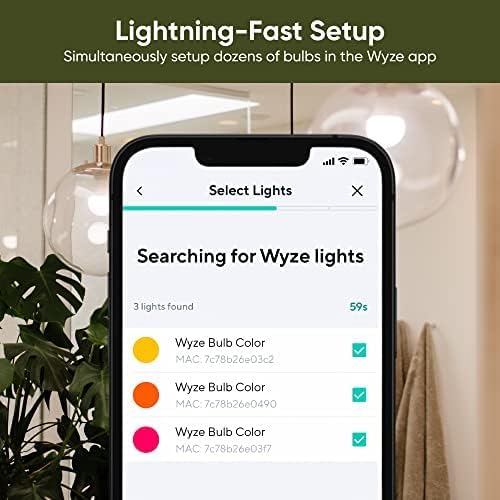
Image: The Wyze app displaying the color selection wheel, allowing users to choose from a wide spectrum of colors for their smart bulb.
Voice Control (Alexa/Google Assistant):
- Connect to Voice Assistant: Link your Wyze account to your Amazon Alexa or Google Assistant app.
- Comenzi: Use voice commands such as "Alexa, turn [bulb name] blue," "Hey Google, dim [bulb name] to 50%," or "Alexa, set [bulb name] to warm white."

Image: A person interacting with a smart speaker to control the Wyze Bulb Color, demonstrating convenient voice activation.
Caracteristici cheie
- Luminozitate reglabilă: Offers a wide range of brightness from 30 lumens (2W equivalent) to 1100 lumens (75W equivalent).
- 16 milioane de culori: Customize your lighting with a full spectrum of colors for any mood or occasion.
- Lumină albă reglabilă: Adjust white light temperature from cool to warm to suit your activity or preference.
- High CRI Rating (90+): Experience true and vibrant colors in your environment.
- Notificări inteligente: Create time-based color events or automate visual notifications using other Wyze devices.
- Configurare ușoară: Quick and straightforward setup process via the Wyze app, no hub required.

Image: A dining table illuminated with a warm red light from the Wyze Bulb Color, demonstrating its ability to set a specific mood.

Image: A home office setup brightly illuminated by the Wyze Bulb Color, highlighting its 1100 lumen output for clear visibility.
Întreţinere
- curatenie: Ensure the bulb is off and cool before cleaning. Wipe with a soft, dry cloth. Do not use liquid cleaners.
- Actualizări firmware: Regularly check the Wyze app for firmware updates to ensure optimal performance and access to new features.
- Depozitare: Dacă depozitați becul pentru o perioadă lungă de timp, păstrați-l într-un loc răcoros și uscat, ferit de lumina directă a soarelui.
Depanare
- Bulb Not Connecting: Ensure your Wi-Fi network is 2.4GHz. Try turning the light fixture off and on three times to re-enter pairing mode. Move the bulb closer to your Wi-Fi router if possible.
- Probleme de control vocal: Verify that your Wyze account is correctly linked to your Alexa or Google Assistant app. Check your internet connection.
- Performanță inconsecventă: Check for and install any available firmware updates in the Wyze app. Ensure your Wi-Fi signal is strong and stable.
- Bulb Not Turning On: Check the light fixture and ensure it is receiving power. Test the bulb in another working fixture.
Informații despre garanție
The Wyze Bulb Color comes with a 1-year manufacturer's warranty. Please refer to the official Wyze website-ul pentru termenii și condițiile complete ale garanției.
Sprijin
Pentru asistență suplimentară, vizitați site-ul oficial WYZE Store or contact Wyze customer support through their website-ul.


