Introducere
This manual provides detailed instructions for the installation, operation, and maintenance of your Lockly Secure Pro Wi-Fi Smart Door Lock. Please read this manual thoroughly before installation and use to ensure proper function and to maximize the security features of your device. Keep this manual for future reference.

Image: Lockly Secure Pro Smart Door Lock with Wi-Fi Hub and smartphone app interface.
Informații de siguranță
- Nu încercați să dezasamblați sau să modificați încuietoarea. Acest lucru poate deteriora produsul, anula garanția și compromite securitatea.
- Folosiți doar baterii specificate (alcaline AA). Nu amestecați baterii vechi cu baterii noi sau baterii de diferite tipuri.
- Ensure all components are securely fastened during installation to prevent malfunction.
- Keep physical keys in a secure location outside the property to be used as a backup.
- Protect your PIN codes and fingerprint data. Do not share them with unauthorized individuals.
Produs terminatview
Caracteristici cheie
- Metode multiple de acces: Patented PIN Genie digital keypad, 3D biometric fingerprint reader, smartphone app, voice control (Alexa/Hey Google), and physical key.
- PIN Genie Digital Keypad: Features dynamic shuffling of digits to prevent code guessing.
- 3D Biometric Fingerprint Sensor: Quick access with less than 0.3-second recognition, storing up to 99 fingerprints.
- Controlul aplicației mobile: Remote lock/unlock, real-time monitoring, and access history via the Lockly App.
- Control vocal: Compatible with Amazon Alexa and Hey Google for hands-free operation.
- Programmable Auto-Lock: Customizable auto-lock feature for enhanced security.
- Offline Access Codes: Generate access codes usable without Wi-Fi or internet connection.
- Rezistent la intemperii: Durable design suitable for various environmental conditions.
Componente
The Lockly Secure Pro package includes the smart lock assembly, a Wi-Fi hub, a door sensor, four AA batteries, and two backup physical keys.

Image: Summary of Lockly Secure Pro features.
Configurare și instalare
Compatibilitatea ușilor
Înainte de instalare, asigurați-vă că ușa dumneavoastră îndeplinește următoarele specificații:
- Door thickness: 1 3/8" - 2"
- Backset: 2 3/8" or 2 3/4"
- Cross bore diameter: 2 1/8"
- Edge bore diameter: 1"

Image: Door compatibility measurements.
Procesul de instalare
The Lockly Secure Pro is designed for easy DIY installation using common household tools. A detailed installation guide video is available to assist you through each step.

Image: Installation guide video demonstration.
Wi-Fi Hub Setup
The included Wi-Fi hub enables remote control and monitoring of your smart lock. Simply plug it into a power outlet within range of your lock and follow the instructions in the Lockly app for plug-n-play setup.

Image: Lockly Wi-Fi Hub for remote connectivity.
Instrucțiuni de operare
Unlocking and Locking Methods
Your Lockly Secure Pro offers multiple convenient ways to secure and access your property:
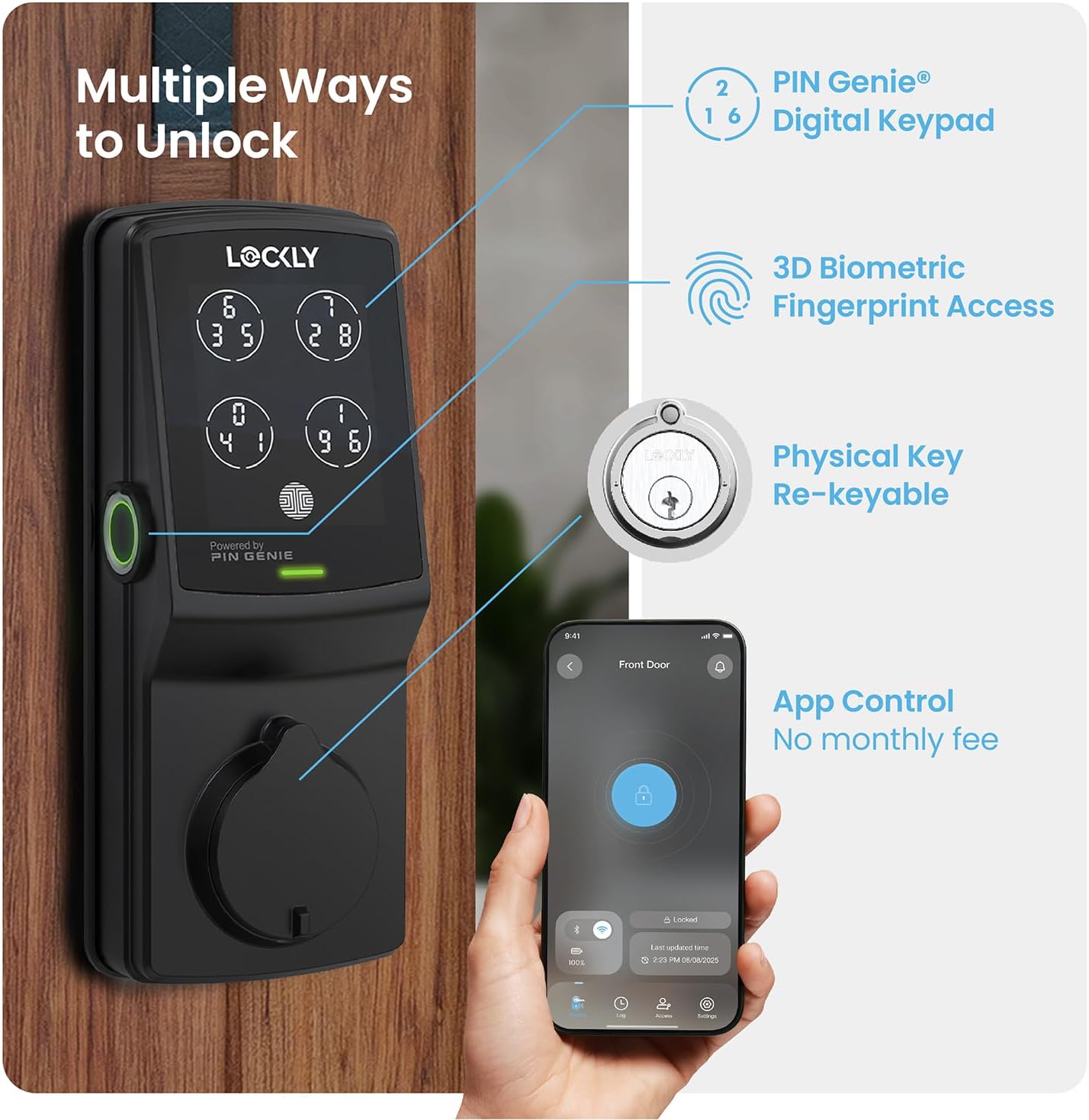
Imagine: Pesteview of multiple unlocking methods.
- PIN Genie Digital Keypad: Enter your secure PIN code on the patented keypad. The numbers on the four virtual buttons dynamically shuffle after each use, making it difficult for onlookers to guess your code.
- 3D Biometric Fingerprint Sensor: Place your registered finger on the sensor for quick access. The sensor recognizes fingerprints in less than 0.3 seconds and opens the lock in under 0.5 seconds.
- Control aplicație pentru smartphone: Use the Lockly App to remotely lock or unlock your door from anywhere. The app also provides real-time monitoring and access history.
- Control vocal: Integrate with Amazon Alexa or Hey Google to unlock, lock, or check the status of your door using voice commands.
- Cheie fizică: Two backup physical keys are included for manual access in case of power failure or other issues. The lock also features rekeying capability.

Image: PIN Genie keypad in operation.

Image: Using the 3D biometric fingerprint sensor.

Image: Lockly App interface for remote control.

Image: Voice control and physical key backup.
Caracteristici avansate
- Programmable Auto-Lock: Customize the auto-lock duration (5 to 300 seconds) to ensure your door is always secured after closing.
- eKeys & eBadges: Grant and revoke access to family, friends, or visitors directly through the Lockly app.
- Offline Access Codes: Generate temporary or permanent access codes that can be used even when the lock is not connected to Wi-Fi.

Image: Programmable auto-lock feature.
Întreţinere
Managementul bateriei
The Lockly Secure Pro operates on four AA batteries, providing up to 8 months of battery life. The Lockly app will send real-time notifications for low battery alerts. In case of complete battery depletion, an external 9V battery can be used for emergency power supply.

Image: Battery and emergency power supply details.
Curățare și durabilitate
Curățați exteriorul încuietorii cu o lavetă moale șiamp cloth. Avoid abrasive cleaners or solvents. The Lockly Secure Pro features a durable, weather-resistant design (IP54 rated) to withstand various outdoor conditions.

Image: Lockly Secure Pro demonstrating weather resistance.

Image: Durability and weather resistance specifications.
Reintroducerea cheii
The lock cylinder can be rekeyed by a professional locksmith without needing to replace the entire lock, using a standard rekey kit.

Image: Rekeyable cylinder feature.
Depanare
If you encounter issues with your Lockly Secure Pro, please refer to the following common solutions:
- Încuietoarea nu răspunde: Verificați nivelul bateriilor. Înlocuiți bateriile dacă sunt descărcate. Asigurați-vă că încuietoarea este instalată corect și că toate cablurile sunt conectate.
- Amprentă nerecunoscută: Asigurați-vă că degetul este curat și uscat. Înregistrați-vă din nou amprenta dacă problemele de recunoaștere persistă.
- Probleme cu codul PIN: Verify the correct PIN is being entered. Remember the PIN Genie keypad shuffles digits; ensure you are pressing the correct virtual button for each digit.
- Probleme de conectare la aplicație: Ensure your Wi-Fi hub is powered on and within range of the lock. Check your home Wi-Fi network status. Restart the Lockly app or your smartphone.
- Auto-Lock Not Engaging: Verify the auto-lock feature is enabled and configured with the desired delay in the Lockly app.
For further assistance, consult the Lockly app's help section or contact customer support.
Specificații
| Caracteristică | Detaliu |
|---|---|
| Marca | Lockly |
| Numele modelului | Lockly Secure Pro |
| Numărul de model al articolului | PGD728WYMB |
| Tip blocare | Smart Lock, Deadbolt |
| Material | Zinc |
| Culoare | Negru Mat |
| Tip de finisare | Periat |
| Dimensiuni articol (L x l x H) | 7.4 x 3.15 x 4.5 inci |
| Greutatea articolului | 3.8 lire sterline |
| Sursa de alimentare | 4 x baterii alcaline AA |
| Putere de urgență | 9V Battery Port |
| Protocol de conectivitate | Bluetooth, Wi-Fi (via included hub) |
| Metoda de control | Aplicație, Telecomandă, Tactil, Voce |
| Tip controler | Amazon Alexa, Asistent Google |
| Caracteristici speciale | App Control, Auto-Lock, Left Fingerprint Reader, Voice Control, Waterproof (IP54) |
| UPC | 810055600656 |
Informații despre garanție
The Lockly Secure Pro comes with a limited 5-year mechanical and finish warranty si a Garanție de 2 ani pentru electroniceVă rugăm să păstrați dovada achiziției pentru a putea face reclamații în garanție.
Asistență pentru clienți
Lockly provides lifetime technical support for all its products. For assistance with installation, operation, or troubleshooting, please contact Lockly customer support through their official website or the contact information provided in the Lockly app.


