1. Introducere
This manual provides essential information for the proper use and maintenance of your Dr Trust USA 509 Digital BMI Weight Scale. This device is designed to measure body weight and analyze various body composition metrics. Please read this manual thoroughly before first use to ensure accurate readings and safe operation.
2. Informații de siguranță
- Place the scale on a hard, flat surface. Avoid carpets or uneven floors, as this can affect accuracy.
- Do not use the scale on wet or slippery surfaces. Ensure your feet and the scale surface are dry before use.
- Nu săriți pe cântar. Urcați și coborâți ușor.
- The scale is designed for household use only. It is not intended for medical diagnosis or treatment.
- Țineți cântarul departe de câmpuri electromagnetice puternice.
- Do not immerse the scale in water or use abrasive cleaners.
- Individuals with pacemakers or other implanted medical devices should consult their physician before using this scale, as it uses Bioelectrical Impedance Analysis (BIA).
3. Conținutul pachetului
- Dr Trust USA 509 Digital BMI Weight Scale
- Cablu de încărcare USB
- Manual de utilizare
4. Produs terminatview
The Dr Trust USA 509 Digital BMI Weight Scale is an advanced body composition monitor that tracks 18 essential body metrics. It features a sleek design, high-precision sensors, and Bluetooth connectivity for seamless data synchronization with a mobile application.

Image 1: Dr Trust USA 509 Digital BMI Weight Scale, displaying a weight of 52.4 kg and a 3-year warranty badge.
Caracteristici cheie:
- 18 Body Metrics: Measures BMI, bone mass, muscle, BFR, BMR, visceral fat, subcutaneous fat, protein rate, body age, body fat, and more.
- Reîncărcabil: Equipped with a USB port for convenient charging.
- Senzori de înaltă precizie: Four sensors ensure accurate and reliable measurements.
- Conectivitate Bluetooth: Syncs data with a mobile app for Android and iPhone devices.
- Suport multi-utilizator: Allows tracking data for multiple users on the app.
- Step-on Technology: Automatically powers on when stepped on.
- Display LCD: Large, easy-to-read display for immediate weight readings.
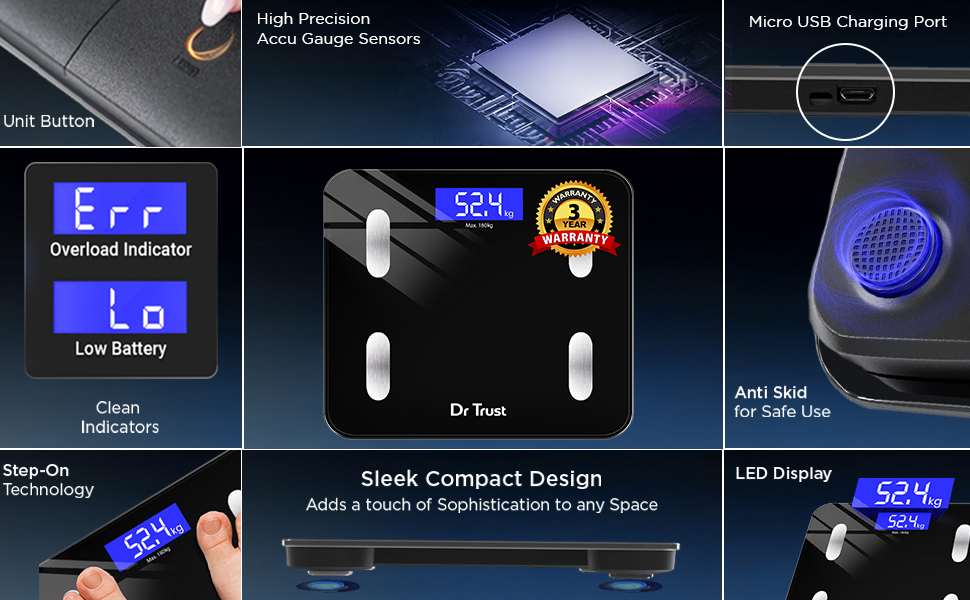
Imaginea 2: Detaliată view of the scale's components, including the Unit Button, Micro USB Charging Port, High Precision Accu Gauge Sensors, Clear Indicators (Err, Lo), Anti-Skid feet, Step-on Technology, Sleek Compact Design, and LED Display.
5. Configurare
5.1 Încărcare inițială
Before first use, ensure the scale is fully charged. Connect the provided USB charging cable to the Micro USB Charging Port on the side of the scale and to a standard USB power source. The display may show a charging indicator.

Image 3: Close-up of the Dr Trust 509 scale highlighting its rechargeable battery and USB charging port.
5.2 Instalarea aplicației și asocierea prin Bluetooth
- Descărcați Dr Trust 360 App din Apple App Store sau Google Play Store.
- Activați Bluetooth pe smartphone-ul dvs.
- Open the Dr Trust 360 App and create your user profile.
- Step onto the scale to activate it. The display will show your weight.
- Within the app, follow the instructions to connect to the scale via Bluetooth. The app will automatically detect the scale.
5.3 Plasarea la scară
Place the scale on a hard, flat, and stable surface. Avoid placing it on soft surfaces like carpets, rugs, or uneven tiles, as this can lead to inaccurate readings.
6. Instrucțiuni de utilizare
6.1 Luarea unei măsurători
- Asigurați-vă că cântarul se află pe o suprafață plană.
- Step onto the scale barefoot. Ensure your feet are positioned on the metal electrodes for body composition analysis.
- Stand still until your weight is displayed and stabilized on the LCD screen.
- If connected via Bluetooth, the data will automatically sync to the Dr Trust 360 App.
6.2 Înțelegerea citirilor afișate
The scale's LCD will primarily show your body weight. For detailed body composition metrics, refer to the Dr Trust 360 App.
6.3 Utilizarea aplicației mobile
The Dr Trust 360 App provides a comprehensive overview a datelor dumneavoastră privind sănătatea:
- Body Metrics Tracking: View all 18 body composition metrics, including Body Weight, Protein Mass, Weight without Fat, Bone Mass, Body Mass, Metabolic Age, Visceral Fat, BMR, Muscle Rate, Body Water, Obesity Level, Subcutaneous Fat, BFR, BMI.
- Urmărirea progresului: Monitor your progress over days, weeks, and months with historical data and graphs.
- Sincronizarea datelor: Syncs with Google Fit and Apple Health.
- Personalized Features: Includes Calories Tracking, Water Tracking, and a Personalized Diet Plan powered by AI (available with subscription).
- Health Data Protection: Dr Trust 360 App stores your health data on Indian servers for enhanced privacy.
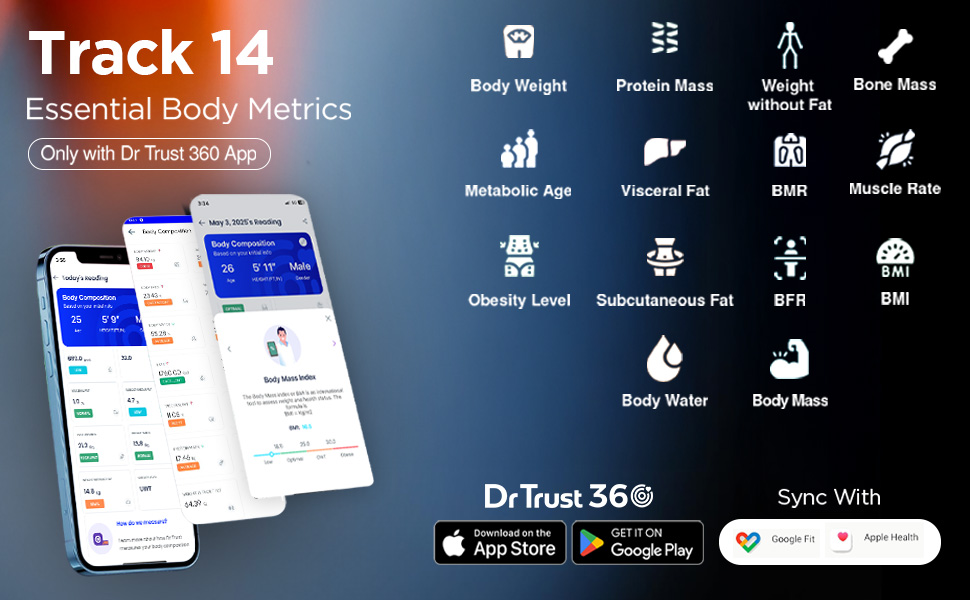
Image 4: Screenshot of the Dr Trust 360 App interface displaying various body metrics and synchronization options with Google Fit and Apple Health.
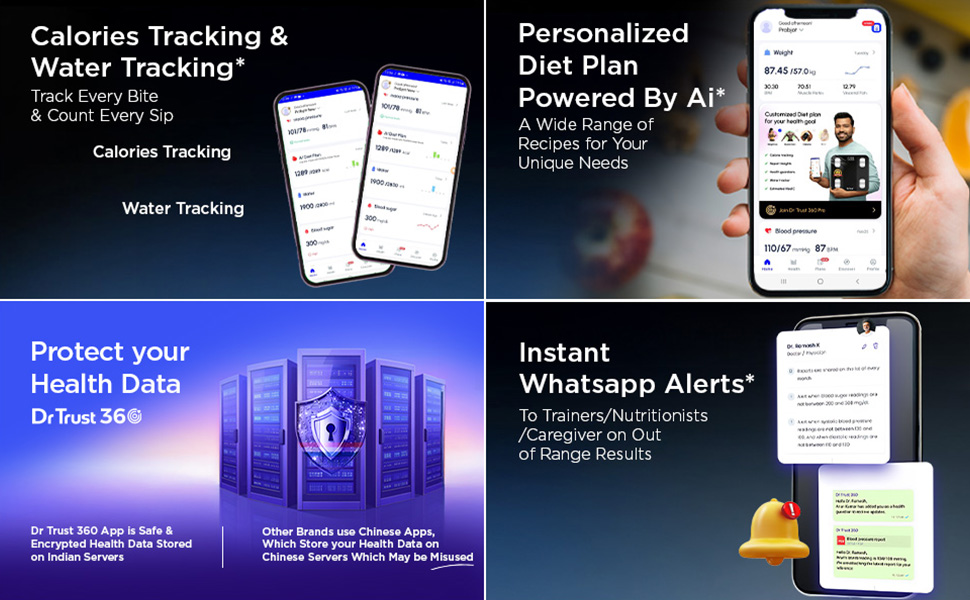
Image 5: Visual representation of the Dr Trust 360 App's capabilities, including calorie tracking, water intake tracking, and a personalized diet plan feature.
6.4 Funcționalitate multi-utilizator
The Dr Trust 360 App allows you to add multiple user profiles, making it suitable for family use. Each user's data is stored separately and can be tracked individually.
7. Întreținere
7.1 Curățare
Ștergeți suprafața cântarului cu o lavetă moale șiamp cloth. Do not use chemical cleaning agents or abrasive materials, as these can damage the scale's surface or electronic components.
7.2 Încărcare
Recharge the scale when the 'Lo' indicator appears on the display. Use the provided USB cable. A single charge provides extended use.
7.3 Depozitare
Depozitați cântarul într-un loc răcoros și uscat. Evitați temperaturile extreme și lumina directă a soarelui. Nu așezați obiecte grele pe cântar atunci când nu îl utilizați.
8. Depanare
| Problemă | Cauza posibila | Soluţie |
|---|---|---|
| 'Err' displayed | Overload (weight exceeds maximum capacity of 180 kg). | Reduceți greutatea pe cântar. |
| 'Lo' displayed | Baterie descărcată. | Recharge the scale using the USB cable. |
| Citiri inexacte | Scale on uneven surface, movement during measurement, or calibration issue. | Place scale on a hard, flat surface. Stand still. Step off and wait for display to clear, then step on again for recalibration. Ensure feet are dry and properly placed on electrodes. |
| Bluetooth nu se conectează | Bluetooth off on phone, app not open, scale not active, or interference. | Ensure phone Bluetooth is on. Open Dr Trust 360 App. Step on scale to activate. Move closer to the scale. Restart phone and app if necessary. |
| Fără afișaj | Bateria epuizată. | Încărcați cântarul. |
9. Specificații
| Caracteristică | Caietul de sarcini |
|---|---|
| Marca | Dr. Trust |
| Numărul de model | IGH00220 |
| Culoare | Negru |
| Tip de afișare | LCD |
| Material | Sticla securizata |
| Greutatea articolului | 1.56 kilograme |
| Dimensiunile produsului | 32.3 x 28 x 4.5 cm |
| Sursa de alimentare | Baterie reîncărcabilă litiu-ion (inclusă) |
| Conectivitate | Bluetooth |
| Capacitate maximă | 180 kg |
10. Informații despre garanție
The Dr Trust USA 509 Digital BMI Weight Scale comes with a 3 an garanție. Please retain your purchase receipt for warranty claims. For details on warranty terms and conditions, refer to the official Dr Trust website-ul sau contactați asistența pentru clienți.
11. Suport
For any queries, technical assistance, or support, please contact Dr Trust customer service. Contact details can typically be found on the product packaging or the official Dr Trust website-ul.


