1. Produs terminatview
The ZOOZ ZEN34 is a battery-powered Z-Wave Long Range Remote Control and Scene Controller. It functions as a wireless switch, allowing you to trigger scenes and control other Z-Wave smart home devices without the need for existing wiring. Its design allows for flexible installation, either within a standard switch box or mounted on any flat surface.

Image 1.1: The Zooz ZEN34 Remote Switch, its accompanying wall plate, and product packaging.
This device utilizes the latest 800 series Z-Wave chip for enhanced signal coverage, faster communication, S2 authenticated security, and SmartStart for simplified pairing. A compatible Z-Wave hub is required for operation.
2. Configurare și instalare
2.1 Instalarea bateriei
The ZEN34 remote requires two CR2032 batteries, which are included. Ensure correct polarity when inserting the batteries.
2.2 Z-Wave Inclusion (Pairing)
- Initiate the inclusion (pairing) mode on your Z-Wave hub. Refer to your hub's instruction manual for specific steps.
- On the ZEN34 remote, quickly click the top button six (6) times. The device will attempt to pair with your Z-Wave network.
- Confirm successful inclusion on your Z-Wave hub interface. For SmartStart compatible hubs, scan the QR code located on the back of the device or its packaging.
2.3 Opțiuni de plasare
The ZEN34 offers versatile installation options:
- Montaj de suprafață: Use the included double-sided tape to adhere the magnetic base to any clean, flat surface. The remote can then be magnetically attached to this base.
- Montare în perete: Install the magnetic base into a standard electrical switch box. The remote can then be magnetically attached, appearing as a traditional wall switch. This allows for integration into multi-gang wall plates.

Image 2.1: Demonstrating the placement of the ZEN34 remote into a wall plate.

Image 2.2: The ZEN34 remote installed directly onto a wall surface.
2.4 Compatibilitatea Hub-ului
The ZEN34 is designed for advanced Z-Wave systems that support scene control programming. Compatible hubs include:
- Z-Box Hub (recommended)
- gospodar
- hubitat
- Asistent acasă
Note: Basic Z-Wave systems may not fully recognize or support the ZEN34's functionality. Your smart speaker is not a Z-Wave hub.
3. Instrucțiuni de utilizare
3.1 Funcționalitatea telecomenzii
The ZEN34's paddles act as remote control buttons. Once paired with a compatible Z-Wave hub, you can program them to:
- Trigger specific scenes.
- Turn other smart home devices on or off.
- Control smart bulbs or switches.

Image 3.1: The ZEN34 remote being used to control a device, such as a ceiling fan.
3.2 Scene Control and Multi-Tap Actions
The ZEN34 supports various button press actions, allowing for flexible scene programming:
- Atingere simplă: Press and release a paddle once.
- Apasare dubla: Press and release a paddle twice quickly.
- Atinge de trei ori: Press and release a paddle three times quickly.
- Ține: Press and hold a paddle.
- Eliberare: Release a paddle after holding it.
These actions can be assigned to different functions within your Z-Wave hub's automation rules. Consult your hub's documentation for programming scene control and multi-tap events.
3.3 Z-Wave Long Range
Equipped with Z-Wave Long Range technology, the ZEN34 offers extended signal coverage, providing more reliable connectivity over greater distances (up to 1300 feet with a compatible Z-Wave Long Range hub).
4. Întreținere
4.1 Înlocuirea bateriei
The ZEN34 is powered by two CR2032 coin cell batteries. When the battery level is low, your Z-Wave hub may report a low battery status. To replace the batteries:
- Carefully remove the remote from its magnetic base or wall plate.
- Localizați compartimentul bateriei de pe spatele dispozitivului.
- Replace the old CR2032 batteries with new ones, ensuring correct orientation.
- Reattach the remote to its base.
Battery life can vary depending on usage frequency and environmental factors. Some users have reported a battery life of approximately two months with frequent use.
5. Depanare
5.1 Dispozitivul nu se conectează
- Asigurați-vă că hub-ul Z-Wave este în modul de includere.
- Verify the batteries are correctly installed and have sufficient charge.
- Try performing an exclusion (removal) process on your Z-Wave hub first, then attempt inclusion again. To exclude, put your hub in exclusion mode and click the top button on the ZEN34 six times.
- Bring the ZEN34 closer to your Z-Wave hub during the pairing process.
5.2 Durată scurtă de viață a bateriei
- Frequent use of the remote can deplete batteries faster.
- Ensure you are using fresh, high-quality CR2032 batteries.
- Temperaturile extreme pot afecta performanța bateriei.
5.3 Delay in Response
Some Z-Wave hubs may introduce a slight delay (e.g., 0.5 seconds) after a button press. This delay allows the system to detect potential double or triple tap actions. This behavior is often configurable within your Z-Wave hub's device settings or automation rules. Consult your hub's documentation for options to adjust or disable this delay if immediate response is preferred over multi-tap functionality.
6. Specificații
- Număr de model:
- ZEN34 800LR
- Putere:
- 2 x baterii CR2032 (incluse)
- Frecvența undelor Z:
- 908.42 MHz (SUA)
- Z-Wave Series:
- Seria 800
- Tehnologie de conectivitate:
- Z-Wave
- Culoare:
- Alb
- Greutatea articolului:
- 3.2 uncii
- Dimensiuni pachet:
- 4.76 x 2.95 x 1.73 inci
- Utilizare în interior:
- Doar pentru utilizare în locuri uscate
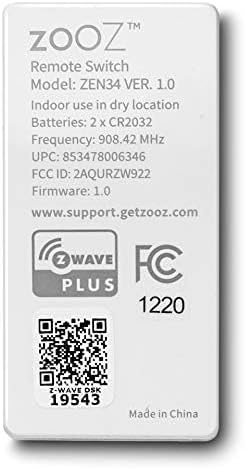
Image 6.1: The back of the ZEN34 remote, displaying model information, battery type, Z-Wave frequency, and Z-Wave Plus certification.
7. Garanție și asistență
ZOOZ products are known for their quality and customer support. While specific warranty periods may vary, ZOOZ generally provides excellent assistance for product-related issues.
For technical support, troubleshooting assistance, or warranty inquiries, please visit the official ZOOZ support website:
When contacting support, please have your product model (ZEN34) and any relevant purchase information ready.


