1. Introducere
This manual provides instructions for the installation, operation, and maintenance of the Grandstream GRP2604 IP Phone. The GRP2604 is a 3-line, 6-SIP account IP phone designed for ease of use and advanced functionality, featuring a 2.7-inch LCD display and dual-port Gigabit Ethernet.
2. Informații de siguranță
- Folosiți doar adaptorul de alimentare furnizat împreună cu telefonul.
- Nu expuneți dispozitivul la apă sau umezeală.
- Evitați amplasarea telefonului în apropierea surselor de căldură sau a luminii directe a soarelui.
- Nu încercați să deschideți sau să reparați dispozitivul singur. Apelați la personal calificat pentru toate lucrările de service.
- Asigurați o ventilație corespunzătoare în jurul telefonului.
3. Conținutul pachetului
Verificați dacă pachetul dvs. conține următoarele articole:
- GRP2604 IP Phone Unit
- Telefon cu cablu
- Suport pentru telefon
- Cablu Ethernet
- Adaptor de alimentare
- Quick Installation Guide (this manual serves as the full guide)
4. Produs terminatview
4.1. Aspect telefon

Figura 4.1: Faţă view of the Grandstream GRP2604 IP Phone. This image displays the phone's main body, handset, 2.7-inch LCD display, numeric keypad, function keys, and programmable line keys.
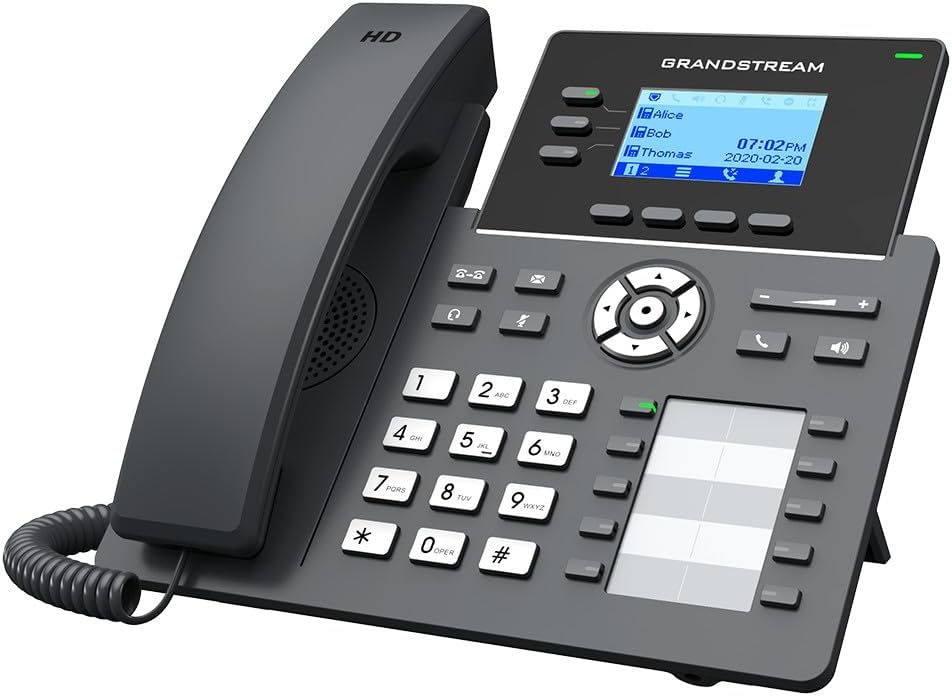
Figura 4.2: Înclinat view of the Grandstream GRP2604 IP Phone. This perspective highlights the ergonomic design of the handset and the slight tilt of the main unit, providing a clearer view of the display and keypad.

Figura 4.3: Latura view of the Grandstream GRP2604 IP Phone with its stand attached. This image illustrates how the phone is positioned for desktop use, showing the angle provided by the stand.
4.2. Panoul din spate și porturile

Figura 4.4: Spate view of the Grandstream GRP2604 IP Phone, showing the various ports and connections. From left to right, these include the handset port, headset port, two Gigabit Ethernet ports (LAN and PC), and the DC 5V power input.
The rear panel of the GRP2604 features essential connection ports:
- Port telefon: Connects the coiled handset cord.
- Port pentru căști: For connecting a wired headset.
- PC Port (LAN Out): Se conectează la un computer sau la alt dispozitiv de rețea.
- LAN Port (Network In): Connects to your network switch or router.
- Intrare de alimentare DC 5V: Conectează adaptorul de alimentare.
5. Configurare
- Atașați suportul telefonului: Align the stand with the slots on the back of the phone and slide it into place until it clicks securely.
- Conectați receptorul: Plug one end of the coiled handset cord into the handset and the other end into the handset port on the rear of the phone.
- Conectați-vă la rețea:
- Conectați un capăt al cablului Ethernet la portul LAN al telefonului.
- Conectați celălalt capăt al cablului Ethernet la un comutator de rețea sau un router.
- If connecting a computer, use another Ethernet cable to connect the PC port on the phone to your computer.
- Conectare alimentare: Plug the DC 5V power adapter into the power input port on the phone, then plug the adapter into a power outlet. The phone will automatically power on and begin the boot-up sequence.
- Configurație inițială: Once the phone boots up, it will attempt to obtain an IP address via DHCP. You may need to access the phone's web interface for further SIP account configuration, as instructed by your VoIP service provider or network administrator.
6. Instrucțiuni de utilizare
6.1. Efectuarea de apeluri
- Apelare cu receptorul scos din furcă: Ridicați receptorul sau apăsați tasta Difuzor button. Dial the number and press the Apelează soft key or wait a few seconds.
- Apelare cu receptorul în furcă: Dial the number first, then pick up the handset or press the Difuzor buton.
- Utilizarea tastelor de linie: Press an available line key, dial the number, and press the Apelează tasta soft.
6.2. Primirea apelurilor
- Answer with Handset: Ridicați receptorul.
- Answer with Speakerphone: Apăsați tasta Difuzor buton.
- Answer with Headset: Apăsați tasta Căști button (if a headset is connected).
6.3. Funcții de apel
- Ține: În timpul unui apel activ, apăsați tasta Ține Apăsați din nou butonul pentru a relua apelul.
- Transfer: În timpul unui apel activ, apăsați tasta Transfer button. Dial the transfer destination number and press the Transfer soft key again (attended transfer) or hang up (blind transfer).
- Conferinţă: În timpul unui apel activ, apăsați tasta Conferinţă button. Dial the second party's number and press the Conferinţă soft key to join all parties. The GRP2604 supports 5-way voice conferencing.
- Mesageria vocală: Apăsați tasta Mesaj button to access your voicemail.
6.4. Reglarea volumului
Utilizați Volum +/- buttons located on the phone to adjust the ringer volume when idle, or the handset/speaker/headset volume during a call.
7. Întreținere
- curatenie: Use a soft, dry cloth to clean the phone's surface. Do not use liquid cleaners or aerosol sprays.
- Depozitare: Dacă depozitați telefonul pentru o perioadă lungă de timp, deconectați-l de la priză și de la rețea și depozitați-l într-un loc răcoros și uscat.
- Actualizări firmware: Regularly check the Grandstream website pentru actualizări de firmware pentru a asigura performanță și securitate optime.
8. Depanare
| Problemă | Soluție posibilă |
|---|---|
| Telefonul nu pornește. |
|
| Fără ton de apel. |
|
| Nu pot efectua sau primi apeluri. |
|
| Afișajul este gol sau înghețat. |
|
9. Specificații
- Model: GRP2604
- linii: 3
- Conturi SIP: 6
- Afişa: 2.7-inch (132x48) LCD
- Porturi Ethernet: Ethernet Gigabit dual-port
- Voice Conferencing: 5 sensuri
- Dimensiuni (L x l x H): 3.94 x 3.94 x 3.94 inci
- Greutatea articolului: 1.1 lire sterline (500 grame)
- Material: Plastic
- Sursa de alimentare: Electric cu fir (DC 5V)
- Culoare: Negru
10. Garanție și asistență
The Grandstream GRP2604 IP Phone comes with a manufacturer's warranty. For detailed warranty information, please refer to the warranty card included with your product or visit the official Grandstream website. For technical support, product inquiries, or service, please contact Grandstream customer support through their official channels.
Grandstream Networks Inc.
www.grandstream.com


