1. Introducere
This manual provides essential information for the safe and efficient operation of your DOOGEE S97 Pro Rugged Smartphone. Please read it thoroughly before using your device.

Image 1.1: The DOOGEE S97 Pro Rugged Smartphone, showcasindesignul și afișajul său robust.
2. Dispozitiv terminatview
The DOOGEE S97 Pro is a rugged smartphone designed for durability and performance. Key features include:
- Sistem de operare: Android 11
- Procesor: Helio G95 Octa Core 2.1GHz 12nm
- Memorie: 8 GB RAM + 128 GB ROM
- Baterie: 8500mAh Super Battery with 33W Fast Charging and 10W Wireless Charging
- Afişa: 5.71-inch Corning Gorilla Glass
- Camera spate: Samsung 48MP AI Main Camera (48MP + 8MP + 2MP + 2MP)
- Camera frontală: 16MP
- Caracteristici speciale: 40m Rangefinder, IP68 Waterproof, Dustproof, Shockproof, NFC Support
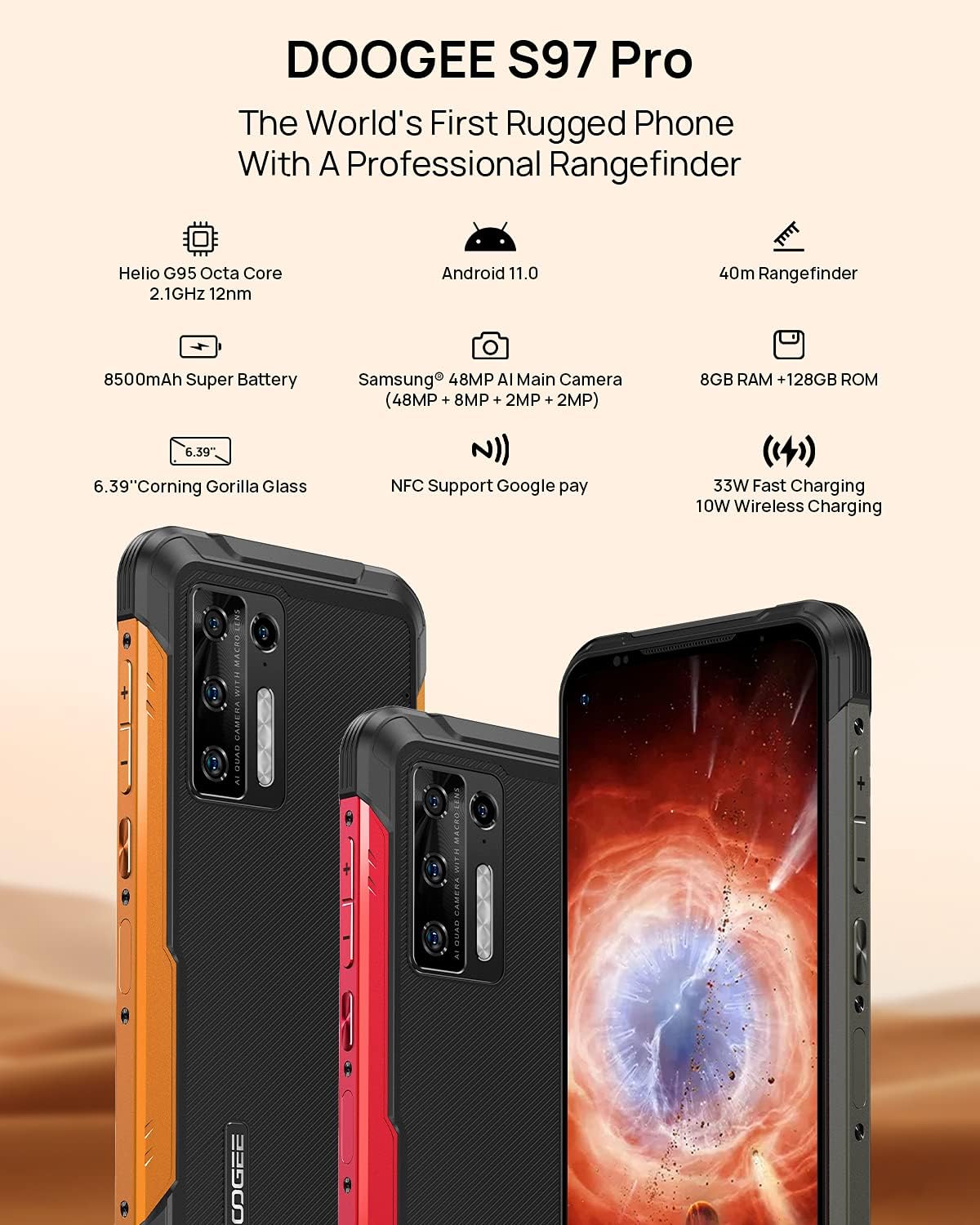
Image 2.1: Visual representation of the DOOGEE S97 Pro's main features, including processor, battery, camera, and display.
3. Configurare
3.1 Instalarea cartelei SIM
- Localizați tava cartelei SIM pe lateralul dispozitivului.
- Folosește instrumentul de ejectare a cartelei SIM furnizat pentru a deschide tava.
- Carefully place your Nano SIM card(s) into the designated slots. Ensure proper orientation.
- Gently push the SIM card tray back into the device until it is flush with the body.
Nota: This device supports specific frequency bands. Please verify compatibility with your network carrier before use. The DOOGEE S97 Pro does not support certain CDMA network carriers such as Verizon, Sprint, Xfinity, and TracFone.
3.2 Pornirea inițială
- Press and hold the Power button located on the side of the device until the DOOGEE logo appears.
- Urmați instrucțiunile de pe ecran pentru a finaliza configurarea inițială, inclusiv selectarea limbii, conexiunea Wi-Fi și configurarea contului Google.
4. Instrucțiuni de utilizare
4.1 Navigare de bază
- Funcția Înapoi: Swipe from the left or right edge of the screen towards the center.
- Ecranul principal: Glisați în sus din partea de jos a ecranului pentru a reveni la ecranul de pornire.
- Aplicații recente: Swipe up from the bottom of the screen and hold briefly to view recent applications. Swipe left or right along the very bottom of the screen to scroll through recent apps.
- Sertarul de aplicații: The device does not feature a traditional app drawer. All installed applications are displayed on the home screen. Additional home screens are automatically added to the right as more apps are installed.
4.2 Utilizarea camerei
The DOOGEE S97 Pro is equipped with a versatile camera system:
- Camera spate: 48MP main sensor, 8MP ultra-wide angle, 2MP portrait, and 2MP macro lens.
- Camera frontală: 16MP pentru selfie-uri și apeluri video.
To access the camera, tap the Camera icon on your home screen. Select desired modes (Photo, Video, Portrait, Macro, etc.) from the interface.

Imaginea 4.1: Prim-plan view of the Samsung 48MP AI Quad Rear Camera system on the DOOGEE S97 Pro.
4.3 Rangefinder Functionality
The integrated 40m laser rangefinder allows for precise distance measurements. To use:
- Locate and open the 'Rangefinder' application on your device.
- Select the desired measurement mode (Length, Area, Volume, Pythagoras).
- Follow the on-screen instructions to aim the laser and take measurements.

Image 4.2: Screenshots of the DOOGEE S97 Pro's 40m Rangefinder application interface, showing various measurement modes.
4.4 Managementul bateriei
The DOOGEE S97 Pro features an 8500mAh battery. To optimize battery life and charging:
- Încărcare prin cablu: Use the provided USB Type-C cable and a compatible 33W fast charger for optimal charging speed.
- Încărcare fără fir: The device supports 10W wireless charging. Place the phone on a compatible wireless charging pad.
- Optimizarea bateriei: Access battery settings to manage app power usage and enable power-saving modes.

Image 4.3: Illustration of the DOOGEE S97 Pro's 8500mAh Super Battery and charging capabilities.
4.5 Caracteristici de durabilitate
The S97 Pro is built to withstand harsh environments:
- Evaluare IP68: Provides protection against dust ingress and immersion in water up to 1.5 meters for 30 minutes.
- Rezistent la șocuri: Designed to resist drops and impacts.
- Corning Gorilla Glass: Enhances screen durability against scratches and minor impacts.

Image 4.4: Demonstrations of the DOOGEE S97 Pro's waterproof, dustproof, and shockproof capabilities.
Video 4.5: An official video from DOOGEE showcasing the rugged features and capabilities of the S59 Pro smartphone.
Sistem de operare Android 11 4.6
The device runs on Android 11, offering enhanced privacy controls, improved notification management, and a streamlined user experience.

Image 4.6: Visual representation of the Android 11 operating system interface on the DOOGEE S97 Pro.
5. Întreținere
5.1 Curățarea dispozitivului
Due to its waterproof design, the DOOGEE S97 Pro can be cleaned with water. Ensure all ports are securely closed before rinsing. Use a soft, damp cloth to wipe the screen and body. Avoid harsh chemicals or abrasive materials.
5.2 Actualizări de software
Verificați și instalați periodic actualizări de software pentru a asigura performanță optimă, securitate și acces la funcții noi. Navigați la Setări > Sistem > Actualizare sistem pentru a verifica dacă există actualizări disponibile.
6. Depanare
Dacă întâmpinați probleme cu dispozitivul dvs., consultați următoarele soluții comune:
- Dispozitivul nu răspunde: Apăsați și țineți apăsat butonul de pornire timp de aproximativ 10-15 secunde pentru a forța o repornire.
- Probleme de conectivitate la rețea: Verify your SIM card is correctly inserted. Check network settings (Setări > Rețea și internet > Rețea mobilăReporniți dispozitivul.
- Probleme de încărcare: Ensure the USB cable and charger are securely connected and undamaged. Try a different charger or cable. For wireless charging, ensure the phone is correctly positioned on the charging pad.
- Fingerprint Sensor Inaccuracy: Asigurați-vă că degetul este curat și uscat. Înregistrați-vă din nou amprentele digitale în Setări > Securitate > Amprentă.
- Performanță lentă: Close unused applications. Clear cache (Setări > Aplicații și notificări > Vedeți toate aplicațiile > [Nume aplicație] > Stocare și memorie cache > Ștergeți memoria cache). Consider a factory reset as a last resort (Setări > Sistem > Opțiuni de resetare > Șterge toate datele (resetarea din fabrică)).
7. Specificații
| Caracteristică | Detaliu |
|---|---|
| Dimensiunile produsului | 6.41 x 3.19 x 0.63 inci |
| Greutatea articolului | 12 uncii (340 grame) |
| Sistem de operare | Android 11.0 |
| RAM | 8 GB (Note: Product data shows 4GB RAM, but images and title indicate 8GB. This manual uses 8GB as per prominent product claims.) |
| Capacitate de stocare a memoriei | 128 GB |
| Dimensiunea ecranului | 5.71 inchi |
| Capacitatea bateriei | 8500 Miliamp Hours (Note: Product data shows 10050 mAh, but images and title indicate 8500 mAh. This manual uses 8500 mAh as per prominent product claims.) |
| Tehnologii de comunicații fără fir | Celular, Wi-Fi |
| Tehnologia celulară | LTE |
| Tip conector | USB tip C |
| Intrare interfață umană | Butoane |
| Ce este în cutie | Cablu USB |
For detailed specifications, please refer to the product packaging or the official DOOGEE website-ul.

Image 7.1: The DOOGEE S97 Pro highlighting its 8GB RAM and 128GB ROM, powered by a Helio G95 Octa Core processor.
8. Garanție și asistență
Your DOOGEE S97 Pro smartphone is covered by a manufacturer's warranty. Please refer to the warranty card included in your product packaging for specific terms and conditions, including warranty duration and coverage details.
For technical support, product inquiries, or service requests, please visit the official DOOGEE website-ul web sau contactați departamentul de asistență pentru clienți. Informațiile de contact pot fi găsite de obicei pe DOOGEE website-ul sau în ambalajul produsului.


