1. Introducere
This manual provides essential information for the safe and efficient operation of your iProda 2 in 1 Laptop, Model M1169YM. Please read this manual thoroughly before using the device and retain it for future reference. This convertible laptop features an 11.6-inch touchscreen, powered by an Intel N4100 processor, and runs on Windows 10 Pro.

Image: The iProda 2 in 1 Laptop can be used in multiple configurations, including traditional laptop, tent, stand, and tablet modes, showcasinversatilitatea sa.
2. Informații de siguranță
Respectați următoarele măsuri de siguranță pentru a preveni deteriorarea dispozitivului sau vătămarea corporală:
- Nu expuneți dispozitivul la temperaturi extreme, la lumina directă a soarelui sau la umiditate ridicată.
- Evitați să scăpați dispozitivul sau să îl supuneți la impacturi puternice.
- Use only the provided or approved power adapter for charging.
- Țineți aparatul departe de apă și alte lichide.
- Nu încercați să dezasamblați sau să reparați dispozitivul singur. Adresați-vă personalului de service calificat.
3. Conținutul pachetului
Verificați dacă toate articolele sunt prezente în colet:
- iProda 2 in 1 Laptop (Model M1169YM)
- Adaptor de alimentare
- Manual de utilizare (acest document)
4. Produs terminatview
The iProda 2 in 1 Laptop is designed for versatility, offering multiple usage modes and essential connectivity options.
4.1. Caracteristici cheie
- Ecran tactil IPS de 11.6 inci: A responsive 10-point precision touchscreen with 1920x1080 resolution for interactive use.
- Design convertibil: 360-degree hinge allows seamless transition between laptop, tablet, tent, and stand modes.
- Intel N4100 Processor: Provides efficient performance for daily tasks.
- Windows 10 Pro: Pre-installed operating system for productivity and security.
- Stocare extensibilă: Supports M.2 2242 SSD for additional storage capacity.

Image: Key features of the iProda laptop, including its touchscreen, operating system, display specifications, and camera resolution.

Image: The laptop's 360-degree hinge allows it to convert into a tablet, enabling direct interaction via its precision touchscreen.
4.2. Porturi și butoane
Familiarize yourself with the various ports and buttons on your laptop:
- Port de tip C: Used for power supply and data transfer.
- Micro HDMI: Pentru conectarea la afișaje externe.
- Micro USB: Pentru conectarea dispozitivelor USB.
- Slot pentru carduri TF: For expanding storage with a TF (MicroSD) card.
- Buton de alimentare: Pentru a porni/opri dispozitivul sau a-l pune în modul repaus.
- Butoane de volum: To adjust audio output.
- Mufă pentru căști: Pentru conectarea căștilor sau a difuzoarelor externe.

Imagine: O imagine detaliată view of the laptop's side panels, indicating the location and function of each port and button for easy identification.
5. Configurare
5.1. Încărcarea bateriei
Before first use, fully charge the laptop's battery. Connect the provided power adapter to the Type-C port on the laptop and plug it into a power outlet. The charging indicator light will illuminate.
5.2. Prima pornire și configurarea Windows
- Press and hold the Power Button until the screen turns on.
- Urmați instrucțiunile de pe ecran pentru a finaliza configurarea inițială a Windows 10 Pro, inclusiv selectarea limbii, conexiunea la rețea și crearea contului de utilizator.
6. Utilizarea laptopului
6.1. Folosind ecranul tactil
The 10-point precision touchscreen allows for intuitive interaction with Windows 10 Pro. Use gestures such as tapping, swiping, pinching, and stretching to navigate, zoom, and interact with applications.
6.2. Tastatură și touchpad
The integrated keyboard and touchpad provide traditional input methods. The touchpad supports multi-touch gestures for scrolling, zooming, and switching applications.

Image: The laptop's full-size American keyboard and responsive touchpad, designed for comfortable typing and navigation.
6.3. Moduri convertibile
The 360-degree hinge allows you to switch between various modes:
- Mod laptop: Configurație standard pentru tastare și productivitate.
- Modul tabletă: Fold the screen back completely for a tablet experience, ideal for browsing or drawing.
- Mod cort: Position the laptop like a tent for media consumption or presentations.
- Mod suport: Flip the keyboard face down to use the screen as a display, suitable for watching videos.

Image: The laptop configured in tent mode, demonstrating its flexibility for viewafișarea de conținut fără ca tastatura să stea în cale.
7. Extindere stocare
The laptop comes with 64GB eMMC storage. You can expand the storage capacity by installing an M.2 2242 SSD (128GB/256GB/512GB, not included).
7.1. Installing an M.2 2242 SSD
To install an M.2 2242 SSD:
- Power off the laptop and disconnect the power adapter.
- Carefully open the back cover of the laptop.
- Locate the M.2 slot.
- Insert the M.2 2242 SSD into the slot and secure it with the appropriate screw (if provided).
- Puneți la loc capacul din spate.
- Upon booting, you may need to initialize and format the new SSD through Windows Disk Management.
Note: If you are unsure about this procedure, it is recommended to seek professional assistance.

Image: Visual representation of the M.2 SSD slot, illustrating how additional storage can be integrated into the laptop.
8. Conectivitate
8.1. Conexiune Wi-Fi
The laptop supports dual-frequency 2.4GHz/5GHz Wi-Fi. To connect to a wireless network:
- Click the Wi-Fi icon in the system tray.
- Selectați rețeaua dorită din listă.
- Introduceți parola de rețea dacă vi se solicită și faceți clic pe „Conectare”.
8.2. External Display (Micro HDMI)
Connect an external monitor or TV using a Micro HDMI to HDMI cable. Once connected, you can configure display settings (duplicate, extend, second screen only) through Windows display settings.
8.3. Dispozitive USB
Use the Micro USB port or the Type-C port (with an appropriate adapter) to connect peripherals such as a mouse, keyboard, or external storage devices.
9. Întreținere
9.1. Curatenie
To clean the laptop, power it off and disconnect the power adapter. Use a soft, lint-free cloth slightly dampened with water or a screen cleaner for the display. Avoid harsh chemicals or abrasive materials.
9.2. Îngrijirea bateriei
Pentru a prelungi durata de viață a bateriei:
- Evitați descărcarea completă frecventă a bateriei.
- Nu expuneți laptopul la temperaturi ridicate.
- Dacă depozitați laptopul pentru o perioadă lungă de timp, asigurați-vă că bateria este încărcată la aproximativ 50-70%.
10. Depanare
Iată soluții pentru problemele comune pe care le-ați putea întâmpina:
| Problemă | Soluţie |
|---|---|
| Laptopul nu pornește. | Ensure the battery is charged. Connect the power adapter and try again. If still unresponsive, perform a hard reset by holding the power button for 10-15 seconds. |
| Ecranul este gol sau pâlpâie. | Restart the laptop. Check if an external display is connected and interfering. Update display drivers if possible. |
| Probleme cu conexiunea Wi-Fi. | Ensure Wi-Fi is enabled. Restart your router and the laptop. Check network settings in Windows. |
| Ecranul tactil nu răspunde. | Restart the laptop. Ensure the screen is clean. Check for any pending Windows updates or driver updates for the touchscreen. |
11. Specificații
Technical specifications for the iProda 2 in 1 Laptop (Model M1169YM):
| Caracteristică | Detaliu |
|---|---|
| Marca | iProda |
| Numărul de model | M1169YM |
| Sistem de operare | Windows 10 Pro |
| Dimensiunea ecranului | 11.6 inchi |
| Rezoluția ecranului | 1920 x 1080 pixeli (1080p) |
| Procesor | Intel N4100 (up to 2.4 GHz Burst Frequency) |
| RAM | 4 GB DDR4 |
| Hard Drive | 64 GB eMMC |
| Placa grafica | Integrated (UHD 600 Graphics) |
| Tip fără fir | 2.4 GHz / 5 GHz Dual-frequency Wi-Fi |
| Durata medie a bateriei | 8 Hours (3500mAh, 27Wh) |
| Greutatea articolului | 3.63 lire sterline |
| Dimensiunile produsului | 11.99 x 11.6 x 0.5 inci |
| Tehnologia de conectivitate | HDMI, USB Type-C, Micro USB |
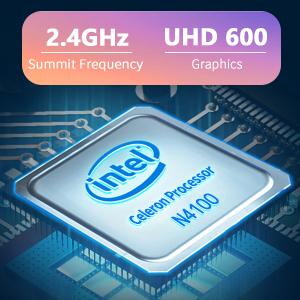
Image: The Intel Celeron N4100 processor, central to the laptop's performance, highlighting its clock speed and integrated graphics capabilities.

Image: The laptop's battery specifications, indicating its power capacity for extended use.
12. Garanție și asistență
For warranty information and technical support, please refer to the documentation included with your purchase or visit the official iProda website. Contact information for customer service can typically be found on the manufacturer's support page.


