1. Introducere
Thank you for choosing the ANYCUBIC Photon Mono X 3D Printer. This manual provides essential information for setting up, operating, and maintaining your new resin 3D printer. Please read this manual thoroughly before use to ensure proper operation and to achieve the best printing results. The Photon Mono X features an 8.9-inch 4K monochrome LCD screen and a Matrix UV LED light source, enabling fast and precise resin 3D printing.
2. Informații de siguranță
Siguranța dumneavoastră este primordială. Vă rugăm să respectați următoarele măsuri de precauție:
- Ventilare: Always operate the printer in a well-ventilated area. Resin fumes can be irritating.
- Echipament individual de protecție (EIP): Wear gloves and safety glasses when handling resin. Avoid direct skin contact and eye exposure.
- Manipularea rășinii: Keep resin away from direct sunlight and heat sources. Store in a cool, dark place. Do not ingest resin.
- Eliminare: Dispose of uncured resin and contaminated materials according to local regulations. Cured resin can be treated as regular plastic waste.
- Siguranta electrica: Ensure the power supply is correctly connected and matches your local voltage. Do not operate with damaged cables.
- Copii și animale de companie: Keep the printer and resin out of reach of children and pets.
3. Conținutul pachetului
Vă rugăm să verificați dacă toate articolele sunt prezente în coletul dumneavoastră:
- ANYCUBIC Photon Mono X 3D Printer
- Platform (Build Plate)
- Cuva de rasina
- Spatula (2 Pcs)
- Trusa de scule
- Gloves (3 pairs)
- Funnel (5 pcs)
- Masca
- Manual de utilizare (acest document)
- Unitate USB
- Power Adapter / Power Cord
- Antena WiFi

Figura 3.1: Lista pieselor incluse
4. Produs terminatview
The ANYCUBIC Photon Mono X is a high-speed resin 3D printer designed for detailed and efficient printing. Key components include:
- UV-blocking Cover: Yellow transparent cover to protect resin from ambient UV light.
- Placă de construcție: The platform where prints are formed.
- Cuvă de rășină: Contains the liquid resin during printing.
- 8.9" 4K Monochrome LCD Screen: Cures resin layer by layer with high resolution.
- Matrix UV LED Light Source: Provides uniform UV light for precise curing.
- Z-axis Linear Rail: Ensures stable and accurate vertical movement.
- Interfață cu ecran tactil: For controlling printer functions and monitoring prints.

Figure 4.1: ANYCUBIC Photon Mono X 3D Printer
5. Configurare
5.1 Despachetarea și plasarea
- Scoateți cu grijă toate componentele din ambalaj.
- Place the printer on a stable, level surface away from direct sunlight and heat sources. Ensure adequate ventilation.
- Connect the power adapter and WiFi antenna.
5.2 Nivelarea plăcii de construcție
Accurate leveling is crucial for successful prints. Follow these steps:
- Loosen the screws on the build plate.
- Place a piece of A4 paper on the LCD screen.
- Lower the build plate until it presses firmly against the paper.
- Tighten the screws on the build plate.
- Raise the build plate and remove the paper.
5.3 Adding Resin
Before adding resin, ensure the resin vat is clean and securely placed. Pour the resin into the vat, making sure not to exceed the maximum fill line.
6. Funcționare
6.1 Preparing 3D Models
Use a slicing software, such as Chitu Box, to prepare your 3D models. This software converts your 3D model into printable layers (slices) and generates the necessary support structures. Save the sliced file pe unitatea USB furnizată.
6.2 Pornirea unei imprimări
- Insert the USB drive into the printer's USB port.
- Pe ecranul tactil, navigați la meniul „Imprimare”.
- Selectați imprimarea dorită file din lista.
- Press 'Print' to begin the printing process.

Figure 6.1: Faster Printing with Photon Mono X
6.3 Monitoring Print Progress
The printer's touchscreen displays real-time print progress, including current layer, total layers, and estimated time remaining. The transparent yellow cover allows for visual monitoring of the print without exposing the resin to harmful UV light.
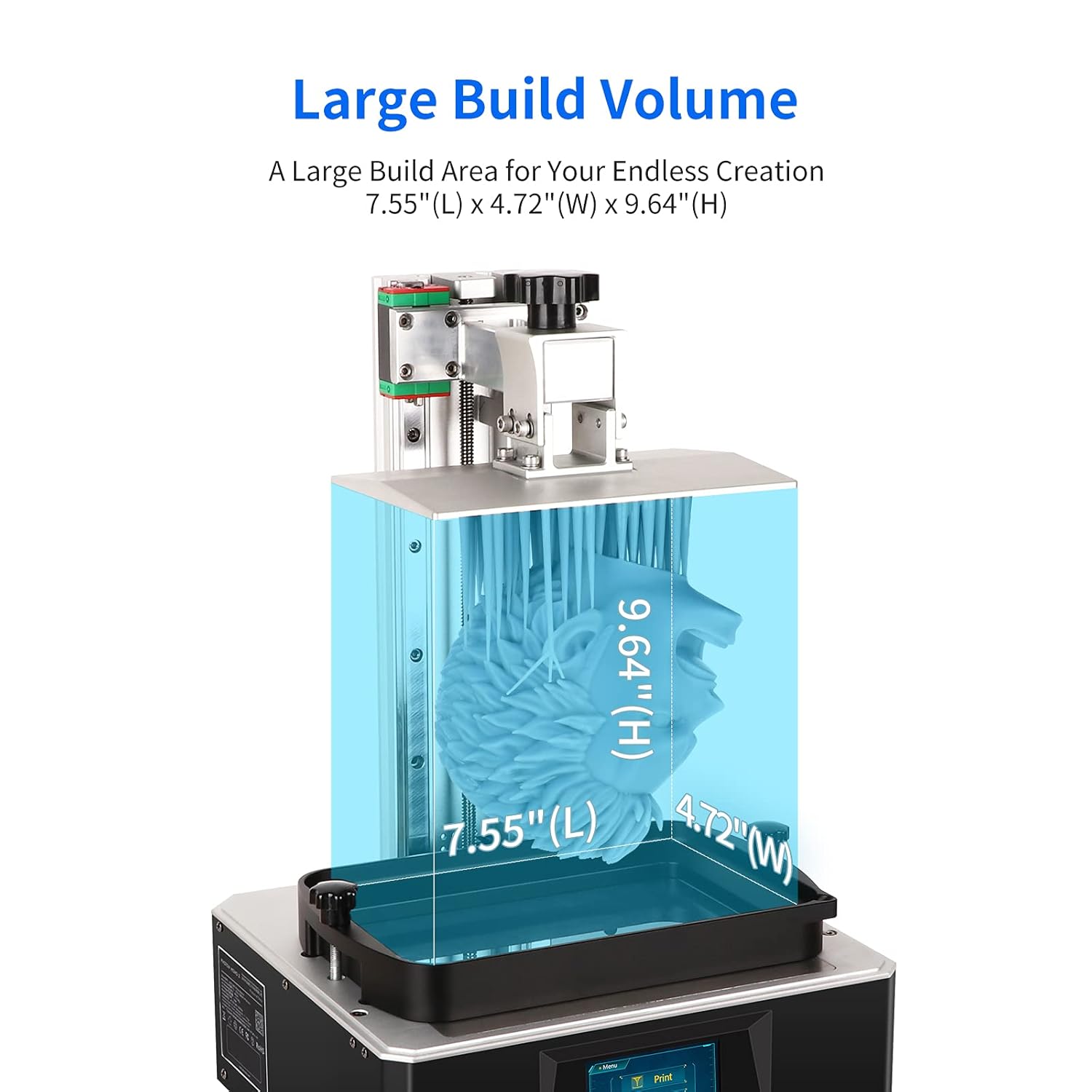
Figure 6.2: Large Build Volume for Diverse Creations

Figure 6.3: Upgraded Matrix UV Light Source for High Accuracy
7. Întreținere
Regular maintenance ensures the longevity and performance of your printer.
7.1 Curățarea cuvei de rășină și a plăcii de construcție
After each print, or if changing resin types, clean the resin vat and build plate using isopropyl alcohol (IPA). Ensure no cured resin bits remain in the vat or on the FEP film.
7.2 Îngrijirea foliei FEP
The FEP (Fluorinated Ethylene Propylene) film at the bottom of the resin vat is a consumable part. Inspect it regularly for damage or cloudiness. Replace the FEP film if it shows signs of wear to prevent print failures and damage to the LCD screen.
7.3 LCD Screen Care
Keep the LCD screen clean and free of resin spills. Use a soft, lint-free cloth and IPA to gently clean the screen. Never use abrasive materials or sharp objects on the screen.
7.4 Printer Exterior
Wipe down the exterior of the printer with a soft cloth to remove dust and resin residue. Avoid getting liquids into the internal components.
8. Depanare
Această secțiune abordează problemele frecvente pe care le-ați putea întâmpina.
- Imprimarea nu se lipește de placa de construcție: Ensure the build plate is properly leveled. Increase bottom exposure time in slicing software. Check resin temperature.
- Warped or Deformed Prints: Check for proper support placement in slicing software. Ensure resin is well-mixed. Verify ambient temperature is suitable.
- Partial Prints or Missing Layers: Inspect FEP film for damage. Check LCD screen for dead pixels. Ensure resin is not expired or contaminated.
- Imprimanta nu răspunde: Restart the printer. Check power connections. Ensure USB drive is properly inserted and file nu este corupt.
For more detailed troubleshooting, refer to the official ANYCUBIC support resources.
9. Specificații
| Caracteristică | Caietul de sarcini |
|---|---|
| Dimensiunile produsului | 30 x 25 x 25 inchi (76.2 x 63.5 x 63.5 cm) |
| Numărul de model al articolului | Photon Mono X-1 |
| Printing Volume (L x W x H) | 192 mm x 120 mm x 245 mm / 7.55" x 4.72" x 9.84" |
| Ecran LCD | 8.9" 4K Monochrome LCD (3840 x 2400 resolution) |
| Sursă de lumină | Matrix UV LED Light Source |
| Viteza maximă de imprimare | 60 mm/h |
| Material | Metal |
| Greutatea articolului | 11 kilograme (24.25 livre) |
10. Garanție și asistență
ANYCUBIC provides a one-month free return and exchange policy for this product. For any issues or inquiries not covered in this manual, please contact ANYCUBIC customer support or visit the official ANYCUBIC website pentru asistență și resurse suplimentare.
Magazinul oficial ANYCUBIC: ANYCUBIC Amazon Store


