1. Introducere
Thank you for choosing the MEDION MD19601 Robot Vacuum Cleaner. This device is designed to provide efficient and automated cleaning for your home, combining vacuuming and mopping functionalities. This manual provides essential information for the safe and effective use, setup, operation, and maintenance of your robot vacuum cleaner. Please read it thoroughly before first use and keep it for future reference.

The MEDION MD19601 Robot Vacuum Cleaner on a wooden floor, showcasing its sleek design and low profile.
2. Instrucțiuni de siguranță
- Citiți cu atenție toate instrucțiunile înainte de a utiliza aparatul.
- This appliance is for indoor household use only. Do not use outdoors or on commercial or industrial surfaces.
- Do not allow children to operate the robot vacuum cleaner. Supervise children and pets when the robot is operating.
- Ensure the power adapter and charging station are placed in a dry area, away from water or moisture.
- Do not use the robot vacuum cleaner to pick up large debris, liquids, burning or smoking objects, or sharp objects.
- Before use, clear the area of loose cables, small objects, rugs with long fringes, and anything that could entangle the brushes.
- Do not operate the robot vacuum cleaner if it is damaged or malfunctioning. Contact customer support for assistance.
- Only use the original charging station and power adapter provided with the device.
3. Conținutul pachetului
Vă rugăm să verificați conținutul pachetului la despachetare. Dacă lipsesc sau sunt deteriorate articole, contactați serviciul de asistență pentru clienți.
- MEDION MD19601 Robot Vacuum Cleaner
- Stație de încărcare
- Adaptor de alimentare
- 2 x Side Brushes (pre-installed)
- 2 x Perii laterale de rezervă
- Rezervor de apă
- 2 x Lavetă de mop
- 1 x Spare Filter
- Perie de curățare

All components included with the MEDION MD19601 Robot Vacuum Cleaner: the robot, charging station, power adapter, cleaning brush, spare side brushes, spare filter, water tank, and mop pads. Dimensions are indicated as 325mm diameter and 80mm height.
4. Produs terminatview
Caracteristici cheie:
- Curățare 2 în 1: Combines powerful vacuuming with effective mopping for comprehensive floor cleaning.
- Control inteligent: Control your robot via the dedicated MEDION Robots app (Android/iOS), or through voice commands using Amazon Alexa and Google Assistant.
- Navigație inteligentă: Equipped with sensors and bumpers for collision detection, obstacle avoidance, and stair detection, protecting both your furniture and the robot.
- Curățare eficientă: Features powerful side and main brushes for thorough dirt and dust collection.
- Durată lungă de viață a bateriei: A powerful battery allows for up to 100 minutes of continuous cleaning on a single charge, with automatic return to the charging station.
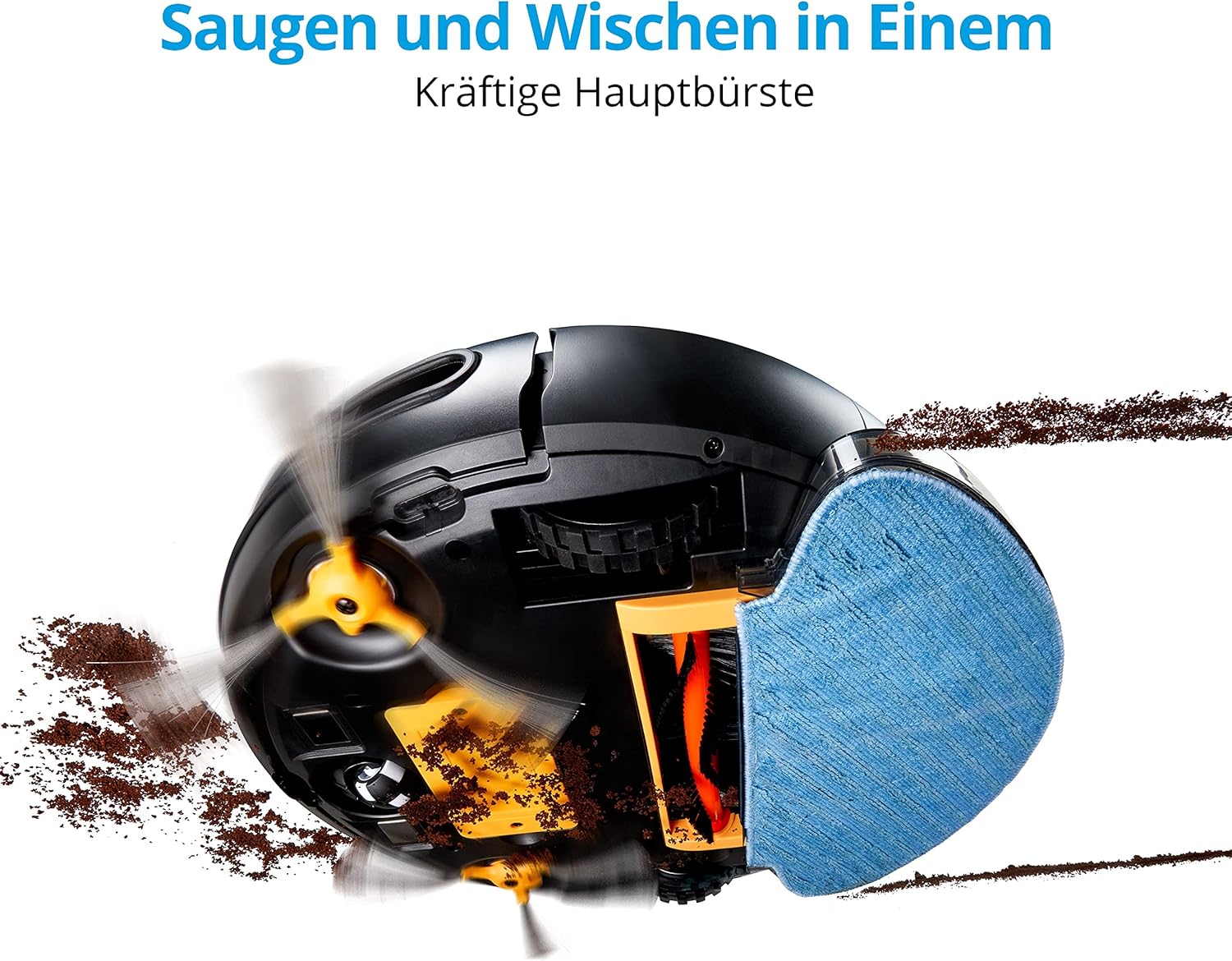
Partea inferioară view of the MEDION MD19601 Robot Vacuum Cleaner demonstrating its powerful main brush and side brushes for simultaneous vacuuming and mopping.

De sus în jos view of the MEDION MD19601 Robot Vacuum Cleaner, highlighting its clean white and black design with the power button and MEDION logo.
5. Configurare
5.1 Amplasarea stației de încărcare
- Place the charging station against a wall in an open area, ensuring at least 0.5 meters (1.6 feet) of clear space on both sides and 1.5 meters (5 feet) in front.
- Connect the power adapter to the charging station and plug it into a power outlet. Ensure the indicator light on the charging station is on.
5.2 Încărcare inițială
- Place the robot vacuum cleaner onto the charging station, aligning its charging contacts with those on the station.
- Allow the robot to charge completely before its first use. The indicator light on the robot will change to indicate a full charge (refer to the robot's LED indicator guide for details).
5.3 Instalarea și asocierea aplicației
- Download the "MEDION Robots" app from the App Store (iOS) or Google Play Store (Android).
- Deschide aplicația și creează un cont sau autentifică-te.
- Follow the in-app instructions to add your MD19601 robot vacuum cleaner. This typically involves connecting your smartphone to a 2.4GHz Wi-Fi network and then connecting the robot to the same network.
- Once paired, you can control the robot, set schedules, and monitor its status via the app.

A smartphone screen displaying the MEDION Robots app interface, showing options for manual control, scheduling, cleaning modes, push notifications, and suction power adjustment.
6. Instrucțiuni de utilizare
6.1 Pornirea/Oprirea curățării
- Pornire manuală: Apăsați butonul de pornire/oprire de pe robot o dată pentru a începe curățarea. Apăsați-l din nou pentru a întrerupe.
- Controlul aplicației: Use the "Start" or "Clean" button within the MEDION Robots app to initiate or stop a cleaning cycle.
6.2 moduri de curățare
Robotul oferă diverse moduri de curățare accesibile prin intermediul aplicației:
- Mod auto: Robotul navighează inteligent și curăță întreaga zonă accesibilă.
- Modul Edge: Robotul curăță de-a lungul pereților și marginilor mobilei.
- Spot/Circle Mode: The robot cleans a specific area in a spiral pattern for concentrated cleaning.
6.3 Programare
Use the MEDION Robots app to set cleaning schedules for specific times and days. The robot will automatically start cleaning according to your programmed schedule.
6.4 Funcția de ștergere
- Fill the water tank with clean water. You may add a small amount of neutral floor cleaner suitable for robot vacuums (avoid foaming detergents).
- Attach a clean mop pad securely to the water tank.
- Insert the filled water tank with the mop pad into the designated slot on the robot.
- Porniți un ciclu de curățare. Robotul va aspira și va șterge acum simultan.
- After mopping, remove the water tank and empty any remaining water. Clean the mop pad.
6.5 Control vocal
Integrate your MEDION MD19601 with Amazon Alexa or Google Assistant for convenient voice control. Follow the instructions in the MEDION Robots app or your smart home assistant app to link the devices. Common commands include:
- "Alexa, start MEDION Robot cleaning."
- "Hey Google, tell MEDION Robot to stop."

The MEDION MD19601 Robot Vacuum Cleaner with a speech bubble indicating voice control compatibility with Alexa and Google Assistant.

Un deasupra capului view of the MEDION MD19601 Robot Vacuum Cleaner on a wooden floor, illustrating its intelligent navigation system mapping a cleaning path around obstacles like a laptop.
7. Întreținere
Întreținerea regulată asigură performanțe optime și prelungește durata de viață a aspiratorului robot.
7.1 Curățarea recipientului de gunoi și a filtrului
- Deschideți capacul superior al robotului și scoateți coșul de gunoi.
- Goliți conținutul coșului de gunoi într-un coș de gunoi.
- Remove the filter assembly (HEPA filter and sponge filter). Tap them gently to remove dust. Do not wash the HEPA filter with water.
- Clătiți recipientul de praf cu apă, dacă este necesar, asigurându-vă că este complet uscat înainte de a-l introduce din nou.
- Reassemble the filters and dustbin, then place them back into the robot.
7.2 Brush Cleaning (Side and Main)
- Întoarceți robotul.
- Remove the side brushes by gently pulling them upwards. Remove any hair or debris wrapped around them.
- Remove the main brush cover and then the main brush. Use the provided cleaning tool to cut and remove tangled hair or fibers.
- Reinstall the main brush and cover, then reattach the side brushes.

Detaliat view of the underside of the MEDION MD19601 Robot Vacuum Cleaner, showing the main brush, side brushes, and wheels.
7.3 Curăţarea senzorului
Wipe the cliff sensors (located on the bottom of the robot) and the bumper sensors (on the front) with a clean, dry cloth to ensure proper operation.
7.4 Întreținerea rezervorului de apă și a lavetei de mop
- După fiecare sesiune de curățare a solului, goliți orice apă rămasă din rezervor.
- Rinse the water tank thoroughly and allow it to air dry.
- Remove the mop pad and wash it by hand or machine. Allow it to dry completely before reuse.
8. Depanare
| Problemă | Cauza posibila | Soluţie |
|---|---|---|
| Robotul nu pornește și nu răspunde. | Baterie descărcată; Întrerupător oprit; Robot blocat. | Încărcați robotul; Asigurați-vă că întrerupătorul de alimentare este pornit; Îndepărtați obstacolele. |
| Robotul nu se poate întoarce la stația de încărcare. | Stația de încărcare este blocată; Robotul este prea departe de stație. | Ensure clear space around charging station; Manually place robot closer. |
| Performanță slabă de curățare. | Recipientul de praf este plin; Perii încâlcite; Filtrul este înfundat. | Goliți recipientul de praf; Curățați periile; Curățați sau înlocuiți filtrul. |
| Probleme de conectare la aplicație. | Parolă Wi-Fi incorectă; Router prea departe; Rețea Wi-Fi de 5 GHz. | Verificați parola Wi-Fi; Mutați robotul mai aproape de router; Asigurați-vă că utilizați Wi-Fi de 2.4 GHz. |
| Funcția de ștergere nu funcționează. | Rezervorul de apă este gol; laveta de mop nu este atașată corect. | Fill water tank; Attach mop pad securely. |
9. Specificații
| Caracteristică | Caietul de sarcini |
|---|---|
| Marca | MEDIU |
| Numărul de model | MD19601 |
| Culoare | Alb |
| Nivel de zgomot | 44 de decibeli |
| Durata de viață a bateriei | Până la 100 de minute |
| Dimensiuni produs (L x l x H) | 32.5 x 32.5 x 8 cm |
| Greutatea articolului | 2.9 kilograme |
| Caracteristica specială | Fără fir |
| Compatibilitate | Amazon Echo (Alexa), Asistentul Google |
| Tip filtru | HEPA |
10. Garanție și asistență
MEDION offers a commitment to quality and support for its products.
- Disponibilitatea pieselor de schimb: Spare parts for the MEDION MD19601 are available for a period of 2 years from the date of purchase.
- For further assistance, troubleshooting, or to inquire about warranty services, please refer to the official MEDION website-ul lor sau contactați direct serviciul de asistență pentru clienți.


