1. Introducere
The HP Aruba CX 6200F 48G Class4 4SFP+ 370W Switch (Model JL727A) is a next-generation stackable access switch designed for enterprise branch offices, campuses, and SMB networks. This switch extends industry-leading monitoring and troubleshooting capabilities to the access layer through its cloud-centric design, fully programmable OS, and the Aruba Network Analytics Engine. It supports Aruba NetEdit and the Aruba CX Mobile App for streamlined configuration and deployment.
This manual provides essential information for the safe and efficient use of your Aruba CX 6200F switch, covering installation, operation, maintenance, and troubleshooting.
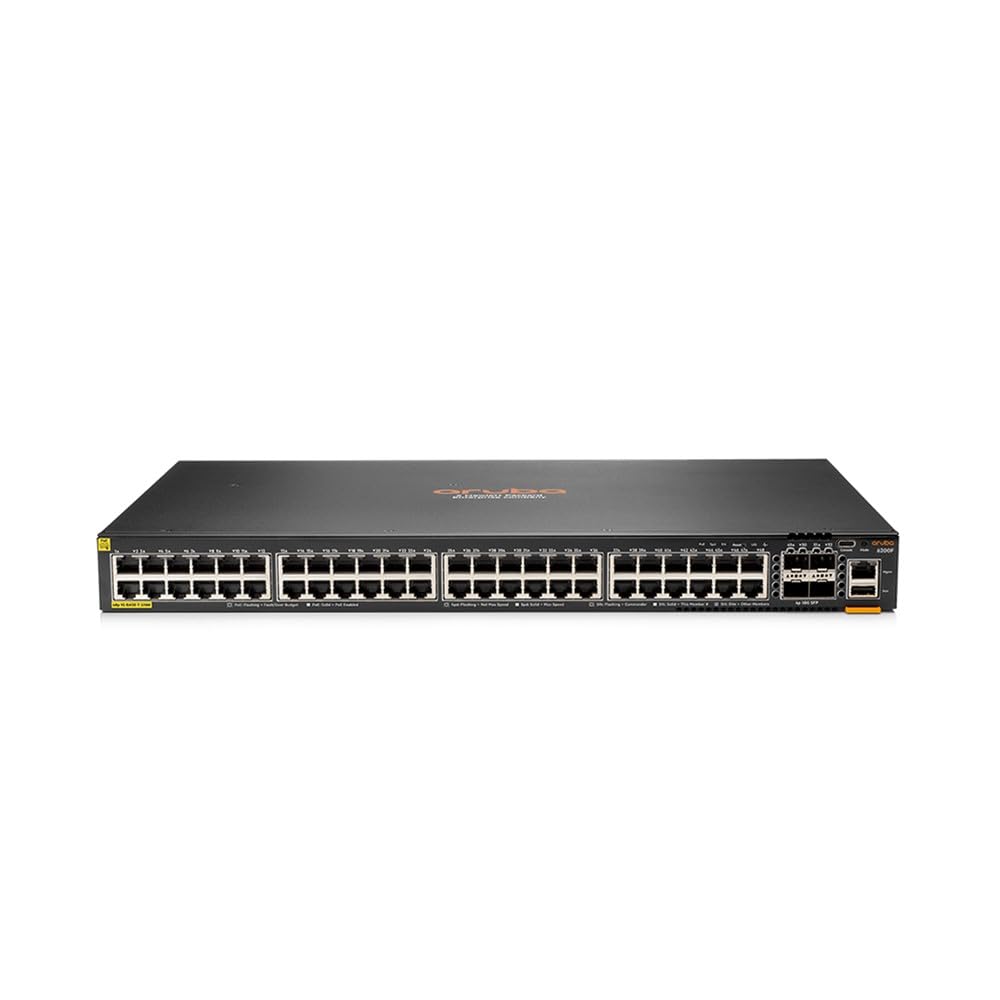
Figura 1: Față view of the HP Aruba CX 6200F 48G Class4 4SFP+ 370W Switch. This image shows the front panel of the Aruba CX 6200F switch, featuring 48 Gigabit Ethernet ports and 4 SFP+ uplink ports.
2. Informații de siguranță
Please read all safety instructions carefully before installing or operating the device. Failure to follow these instructions may result in electric shock, fire, or damage to the product.
- Asigurați-vă că sursa de alimentare voltage matches the specifications of the switch.
- Do not open the switch casing. În interior nu există piese care să poată fi reparate de utilizator.
- Install the switch in a well-ventilated area to prevent overheating.
- Keep the switch away from water, moisture, and excessive heat.
- Use only the power cord and accessories provided or approved by HP.
- Properly ground the device to prevent electrical hazards.
3. Conținutul pachetului
Verify that all items are present in the package. If any item is missing or damaged, contact your vendor immediately.
- Aruba CX 6200F 48G Class4 4SFP+ 370W Switch (Model JL727A)
- Cablu de alimentare
- Rack Mount Kit
- Ghid de pornire rapidă
4. Suprasolicitare fizicăview
The Aruba CX 6200F switch features a robust metal casing designed for durability and efficient heat dissipation. The front panel includes:
- 48 x Gigabit Ethernet Ports: For connecting network devices.
- 4 x SFP+ Uplink Ports: For high-speed fiber or copper uplinks to other switches or network segments.
- Indicatoare LED: Status LEDs for power, system health, and port activity.
The rear panel typically includes the power input and possibly additional management ports (e.g., console port).
5. Configurare
5.1. Montare pe rack
Use the included rack mount kit to secure the switch in a standard 19-inch equipment rack. Ensure adequate space for airflow around the unit.
5.2. Conexiune la alimentare
- Connect the power cord to the power input on the rear of the switch.
- Conectați celălalt capăt al cablului de alimentare la o priză cu împământare.
- Verificați dacă LED-ul de alimentare de pe panoul frontal se aprinde, indicând că comutatorul primește alimentare.
5.3. Conexiuni de rețea
- Connect your network devices (computers, servers, IP cameras, access points) to the Gigabit Ethernet ports using standard Ethernet cables.
- For high-speed connections to your core network or other switches, insert SFP+ transceivers into the SFP+ uplink ports and connect appropriate fiber or copper cables.
5.4. Configurare inițială
Refer to the included Quick Start Guide for initial network configuration steps, including accessing the management interface (CLI or Web GUI) and setting up basic network parameters.
6. Instrucțiuni de utilizare
The Aruba CX 6200F switch operates automatically once powered on and configured. Key operational aspects include:
- Network Analytics Engine: Provides advanced monitoring and troubleshooting capabilities by collecting and analyzing network data.
- Programmable OS: Allows for flexible network automation and integration with various management tools.
- PoE (Power over Ethernet): The Class4 PoE ports can deliver power to compatible devices such as IP phones, wireless access points, and surveillance cameras, simplifying deployment.
- stivuire: Multiple Aruba CX 6200F switches can be stacked to create a single logical unit, increasing port density and simplifying management. Consult the advanced configuration guide for stacking procedures.
For detailed configuration and management, use the Aruba NetEdit platform or the Aruba CX Mobile App, as described in the product documentation.
7. Întreținere
- curatenie: Curățați periodic exteriorul comutatorului cu o cârpă moale și uscată. Nu utilizați agenți de curățare lichizi sau cu aerosoli. Asigurați-vă că orificiile de ventilație sunt lipsite de praf și obstrucții.
- Actualizări firmware: Verificați periodic asistența HP website for the latest firmware updates. Keeping the firmware up-to-date ensures optimal performance, security, and access to new features. Follow the instructions provided with the firmware update package.
- Conditii de mediu: Ensure the switch operates within its specified temperature and humidity ranges to prevent hardware failure.
8. Depanare
If you encounter issues with your Aruba CX 6200F switch, refer to the following common troubleshooting steps:
- Fără putere:
- Check if the power cord is securely connected to both the switch and the power outlet.
- Verificați dacă priza este funcțională.
- Asigurați-vă că sursa de alimentare voltage corect.
- Fără conectivitate la rețea:
- Verificați cablurile Ethernet pentru conexiuni sigure și pentru a vedea dacă există deteriorări.
- Verify that the port LEDs on the switch are active.
- Confirm IP address settings and VLAN configurations.
- Dispozitivul PoE nu pornește:
- Ensure the connected device is PoE compatible.
- Check the PoE status LEDs on the switch.
- Verify that the switch's PoE budget is not exceeded.
For more advanced troubleshooting, consult the comprehensive documentation available on the HP support website sau contactați asistența tehnică.
9. Specificații
| Caracteristică | Caietul de sarcini |
|---|---|
| Numărul de model | JL727A |
| Marca | HP |
| Greutatea produsului | 7.33 kg (16.15 lire) |
| Voltage | 50.8 volți |
| Materialul carcasei | Metal |
| Putere maximă | 370 wați |
| Evaluarea temperaturii superioare | 40°C (104°F) |
| Tip de interfață | PoE |
| UPC | 190017408989 |
| Culoare | Negru |
| Baterii incluse | Nu |
| Bateriile necesare | Nu |
| Dimensiuni pachet | 58.42 x 50.8 x 17.78 cm |
| Numărul de porturi | 48 |
| Componente incluse | Power cord, rack mount kit, quick start guide |
| Dispozitive compatibile | Camera foto |
10. Garanție și asistență
Pentru informații despre garanție și asistență tehnică, consultați site-ul oficial HP website or the documentation included with your product. You can typically find support resources, FAQs, and contact information by visiting www.hp.com/support and searching for your product model (JL727A).
Păstrați la îndemână bonul fiscal și numărul de serie al produsului atunci când contactați serviciul de asistență.