1. Introducere
This instruction manual provides detailed guidance for the installation, operation, and maintenance of your Beghelli Dom-e Wi-Fi Full HD Pan/Tilt Surveillance Camera. Please read this manual thoroughly before using the product to ensure proper functionality and safety. Keep this manual for future reference.

Figure 1: Beghelli Dom-e Wi-Fi Full HD Pan/Tilt Surveillance Camera.
2. Produs terminatview
The Beghelli Dom-e Wi-Fi Camera is a versatile surveillance device designed for indoor use, offering Full HD 1080p resolution and comprehensive monitoring capabilities. It integrates seamlessly into your smart home system via the Dom-e Beghelli application.
Caracteristici cheie:
- Rezoluție Full HD 1080p: Oferă un videoclip clar și detaliattage.
- Funcționalitate Pan și Tilt: Motorized rotation of 355° horizontally and 85° vertically, controllable via the app.
- Vedere de noapte: Equipped with IR LEDs for clear visibility up to 10 meters in low-light conditions.
- Detectarea mișcării: Sends real-time push notifications to your smartphone upon detecting movement, including specific person detection.
- Urmărire automată: The "Tracking" function enables the camera to automatically follow moving subjects.
- Audio bidirecțional: Built-in microphone and speaker allow for hands-free communication.
- Opțiuni flexibile de înregistrare: Record directly to your smartphone, to a MicroSD card (up to 128GB, not included), or via optional cloud storage.
- Conectivitate Wi-Fi: Connects to your home Wi-Fi network (2.4 GHz).
- Criptarea datelor: Ensures the security of your video data.
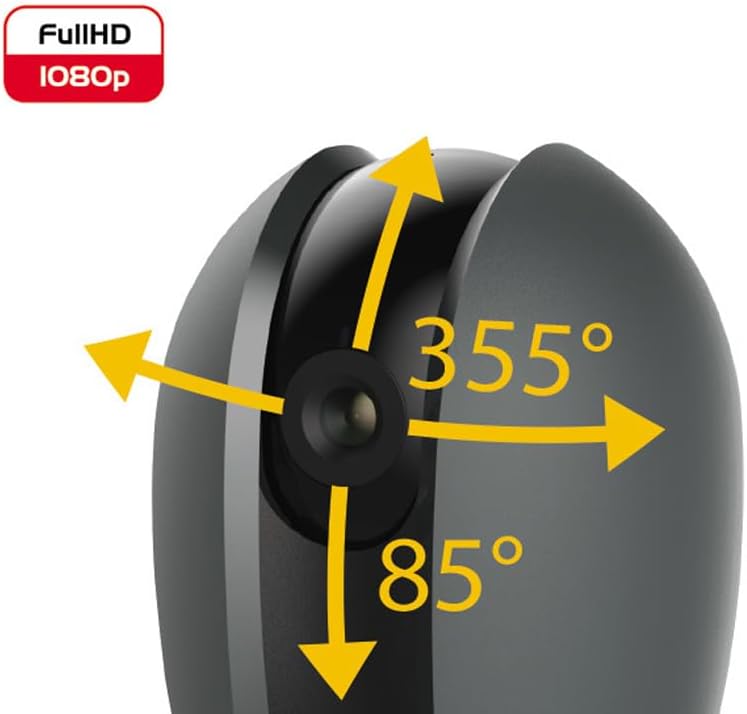
Figura 2: Capacitățile de rotire panoramică și înclinare ale camerei.
3. Conținutul pachetului
Verificați dacă toate articolele sunt prezente în colet:
- Beghelli Dom-e Wi-Fi Full HD Pan/Tilt Surveillance Camera
- USB Power Adapter (230V – DC 5V/1A)
- Mounting accessories (if included, not explicitly listed but implied by "wall or ceiling installation")
- Manual de instrucțiuni (acest document)

Figure 3: Product packaging for the Beghelli Dom-e Camera.
4. Configurare
4.1 Alimentarea camerei
- Connect the provided USB power adapter to the camera's power input.
- Plug the adapter into a standard 230V power outlet. The camera will power on and initiate its startup sequence.
4.2 Instalarea aplicației mobile
The Beghelli Dom-e camera is controlled via the dedicated "Dom-e Beghelli" mobile application.
- Download the "Dom-e Beghelli" app from the Apple App Store (for iOS 8.0 or later) or Google Play Store (for Android 4.2 or later).
- Instalați aplicația pe smartphone sau tabletă.
- Înregistrează-te pentru un cont nou sau autentifică-te dacă ai deja unul.
4.3 Connecting to Wi-Fi and Pairing
Ensure your Wi-Fi network is 2.4 GHz (IEEE802.11 b/g/n). The camera does not support 5 GHz networks.
- Open the Dom-e Beghelli app and follow the on-screen instructions to add a new device.
- Select the Beghelli Dom-e camera from the list of available devices.
- Enter your Wi-Fi network name (SSID) and password when prompted.
- The app will guide you through the pairing process, which typically involves scanning a QR code displayed on your phone with the camera, or listening for an audio prompt.
- Once successfully paired, the camera's status indicator will change, and you will see the live feed in the app.

Figure 4: Simplified setup steps via the Dom-e Beghelli app.
4.4 Montarea camerei
The camera can be installed on a wall or ceiling. Choose a location that provides the desired viewunghiul de deplasare și se află în raza de acțiune a rețelei Wi-Fi și a unei prize de alimentare.
- Mark the drilling points on the desired surface using the mounting template (if provided).
- Dați găuri și introduceți dibluri de perete, dacă este necesar.
- Secure the mounting bracket (if provided) to the surface.
- Atașați camera la suportul de montare.
- Adjust the camera's angle manually or via the app after installation.
5. Instrucțiuni de utilizare
5.1 În direct View și control panoramic/înclinat
- Open the Dom-e Beghelli app and select your camera to view fluxul live.
- Use the directional controls within the app to pan the camera horizontally (355°) and tilt it vertically (85°) to adjust the viewzona de ing.
5.2 Detectarea mișcării și notificări
- Navigați la setările camerei din aplicație pentru a activa detectarea mișcării.
- Configure sensitivity levels and detection zones as needed.
- Activează notificările push pentru a primi alerte pe smartphone atunci când este detectată mișcare.
- The camera also features person detection for more accurate alerts.
5.3 Sunet bidirecțional
- în timp ce viewing the live feed, tap the microphone icon in the app to speak through the camera's speaker.
- The camera's built-in microphone will capture audio from the monitored area, allowing you to listen in.
5.4 Înregistrare și stocare
- Înregistrare pe card MicroSD: Insert a MicroSD card (up to 128GB, not included) into the camera's slot for continuous recording or event-triggered recording.
- Smartphone Recording: You can manually record video clips directly to your smartphone while viewtransmiterea fluxului live.
- Stocare în cloud: An optional cloud storage service is available via subscription for off-site video backup. Refer to the app for details.
- Înregistrare programată: Set up specific times for the camera to record automatically through the app settings.
5.5 Vedere nocturnă
The camera automatically switches to night vision mode in low-light conditions, utilizing its IR LEDs to provide clear black-and-white footagpână la 10 de metri.
6. Mobile Application (Dom-e Beghelli App)
The Dom-e Beghelli app is the central control interface for your camera and other compatible smart home devices. It allows for:
- Remote control of camera pan and tilt.
- Access to live video feed and recorded footage.
- Configuration of motion detection, notifications, and recording schedules.
- Comunicare audio bidirecțională.
- Integration with other Dom-e smart home devices (e.g., alarms, smart plugs, lighting).
- Voice control compatibility with Google Assistant and Amazon Alexa (if associated with a compatible smartphone).

Figure 5: The Dom-e Beghelli app interface for camera control.
7. Specificații
| Caracteristică | Caietul de sarcini |
|---|---|
| Numărul de model | 60021 |
| Rezoluţie | Full HD 1080p (2 megapixeli) |
| Senzor | CMOS 1/2.9" |
| Obiectiv | 3.6 mm / f2.0 / 105° |
| Viteza obturatorului | 1/25 - 1/100,000 sec |
| Pan Rotation | 355 ° orizontal |
| Rotație de înclinare | 85 ° pe verticală |
| Gama de vedere nocturnă | Up to 10 meters (IR LEDs) |
| Audio | Two-way, hands-free (in/out) |
| Depozitare | MicroSD card up to 128GB (not included), Smartphone, Cloud (optional subscription) |
| Wi-Fi standard | IEEE802.11 b/g/n (2.4 GHz) |
| Banda de frecventa | 2.4 GHz - 2.4835 GHz |
| Intrare de putere | 230V – DC 5V/1A (USB adapter included) |
| Consum maxim de energie | 4.5 W |
| Dimensiuni (L x l x H) | 63 x 58 x 96 mm (Product description) / 7 x 7 x 11 cm (Specifications) |
| Greutate | 330 de grame |
| Material | Plastic |
| Compatibilitatea sistemelor de operare | Apple iPhone iOS 8.0 or later / Android 4.2 or later |
| Utilizare recomandată | Securitate interioară |
Note: Some dimensions may vary slightly between product description and specifications list.
8. Întreținere
8.1 Curățare
- Asigurați-vă că aparatul foto este oprit și deconectat de la priză înainte de curățare.
- Folosiți o lavetă moale și uscată pentru a șterge corpul camerei.
- Pentru lentilă, folosiți o lavetă specială pentru curățarea lentilelor pentru a evita zgârieturile.
- Nu utilizați agenți de curățare lichizi, aerosoli sau solvenți abrazivi.
8.2 Actualizări de software
Periodically check the Dom-e Beghelli app for firmware updates. Keeping your camera's firmware updated ensures optimal performance, security, and access to new features.
9. Depanare
| Problemă | Soluţie |
|---|---|
| Camera nu pornește | Ensure the USB power adapter is securely connected to the camera and a working power outlet. Verify the outlet has power. |
| Nu se poate conecta la Wi-Fi |
|
| Fără flux video live |
|
| Detectarea mișcării nu funcționează |
|
| Cannot reconnect after Wi-Fi password change | If your Wi-Fi password changes, you will likely need to reset the camera and re-pair it with the app using the new Wi-Fi credentials. Refer to the app for device reset instructions. |
10. Garanție și asistență
For warranty information and technical support, please refer to the documentation provided with your purchase or contact Beghelli customer service directly. You can typically find contact details on the Beghelli official website or within the Dom-e Beghelli application.
Manufacturer: Beghelli
Model: 60021


