1. Informații de siguranță
Please read all safety instructions carefully before operating this device. Keep this manual for future reference.
- Do not overload wall outlets or extension cords beyond their rated capacity. Overloading can cause electric shock or fire.
- Evitați expunerea unității la ploaie sau umezeală pentru a preveni pericolele de incendiu sau șoc electric.
- Nu deschide dulapul. Adresați service-ul numai personalului calificat.
- Asigurați-vă că cablul de alimentare nu este ciupit sau călcat pe el.
2. Produs terminatview
The DANFI AUDIO DF TE-2017 is a versatile 3-speed record player with built-in speakers, Bluetooth input, and USB recording capabilities. It supports 7", 10", and 12" vinyl records.

Imaginea 2.1: Față view of the DANFI AUDIO DF TE-2017 Record Player with the dust cover open, showing the platter and tone arm.
Componente incluse:
- DANFI AUDIO DF TE-2017 Record Player
- Adaptor 45 RPM
- Cablu de alimentare și adaptor
- Replacement Needle (Stylus)
- Turntable Slipmat
- Manual de utilizare (acest document)
3. Instrucțiuni de configurare
3.1 Despachetarea și plasarea
- Scoateți cu grijă pick-up-ul din ambalaj.
- Așezați unitatea pe o suprafață stabilă și plană, ferită de lumina directă a soarelui, surse de căldură și praf excesiv sau vibrații.
- Asigurați o ventilație adecvată în jurul unității.
3.2 Asamblarea inițială
- Capac de praf: The removable dust cover can be placed on top of the unit to protect the platter and tone arm when not in use.
- Slipmat: Place the provided turntable slipmat onto the platter.
- Protecție stylus: Remove the clear plastic stylus protector from the needle before first use. Be careful not to damage the stylus.
3.3 Conexiune la alimentare
- Connect the power adapter to the DC IN port on the back of the record player.
- Conectați adaptorul de alimentare la o priză de perete adecvată.
4. Instrucțiuni de utilizare

Image 4.1: Diagram illustrating the various controls and components of the record player, including the 45 RPM adapter, tone arm, tone arm lifter, auto stop control, speed switch, ON/OFF button (volume control), and cartridge.
4.1 Funcționarea de bază a pick-up-ului
- Pornire/Oprire și volum: Rotate the ON/OFF/VOLUME knob clockwise to power on the unit and adjust the volume.
- Selectați viteza: Set the speed switch (33, 45, or 78 RPM) to match the record you are playing. For 45 RPM records, place the 45 RPM adapter on the spindle.
- Înregistrare loc: Place your vinyl record on the turntable platter.
- Lift Tone Arm: Use the tone arm lifter to gently raise the tone arm.
- Position Tone Arm: Manually move the tone arm over the desired starting groove of the record.
- Lower Tone Arm: Gently lower the tone arm using the lifter. The music will begin to play.
- Auto Stop: The turntable features an auto-stop function that will stop the platter rotation automatically when the record finishes playing. Ensure the 'Auto Stop Control' switch is engaged for this feature.
- Sfârșitul redării: When the record finishes, use the tone arm lifter to raise the tone arm, return it to its rest, and secure it with the clip.
4.2 Bluetooth Input Mode
This record player can receive audio wirelessly from Bluetooth-enabled devices like smartphones or tablets.

Image 4.2: A smartphone displaying its Bluetooth settings, connected to the TE-2017 record player, demonstrating wireless music streaming.
- Selectați modul Bluetooth: Press the 'M' button on the front panel until 'BT' appears on the display. The unit will enter pairing mode.
- Activați Bluetooth pe dispozitiv: Pe smartphone sau tabletă, activați Bluetooth și căutați dispozitivele disponibile.
- Asociați dispozitivul: Select 'TE-2017' from the list of devices. Once paired, you will hear a confirmation sound.
- Redați muzică: You can now stream music from your device through the record player's built-in speakers.
Note: This unit functions as a Bluetooth receiver only and cannot connect to external Bluetooth speakers.
4.3 USB Recording (Vinyl to Digital)
Convert your vinyl records into digital audio files (WAV format) directly onto a USB flash drive.
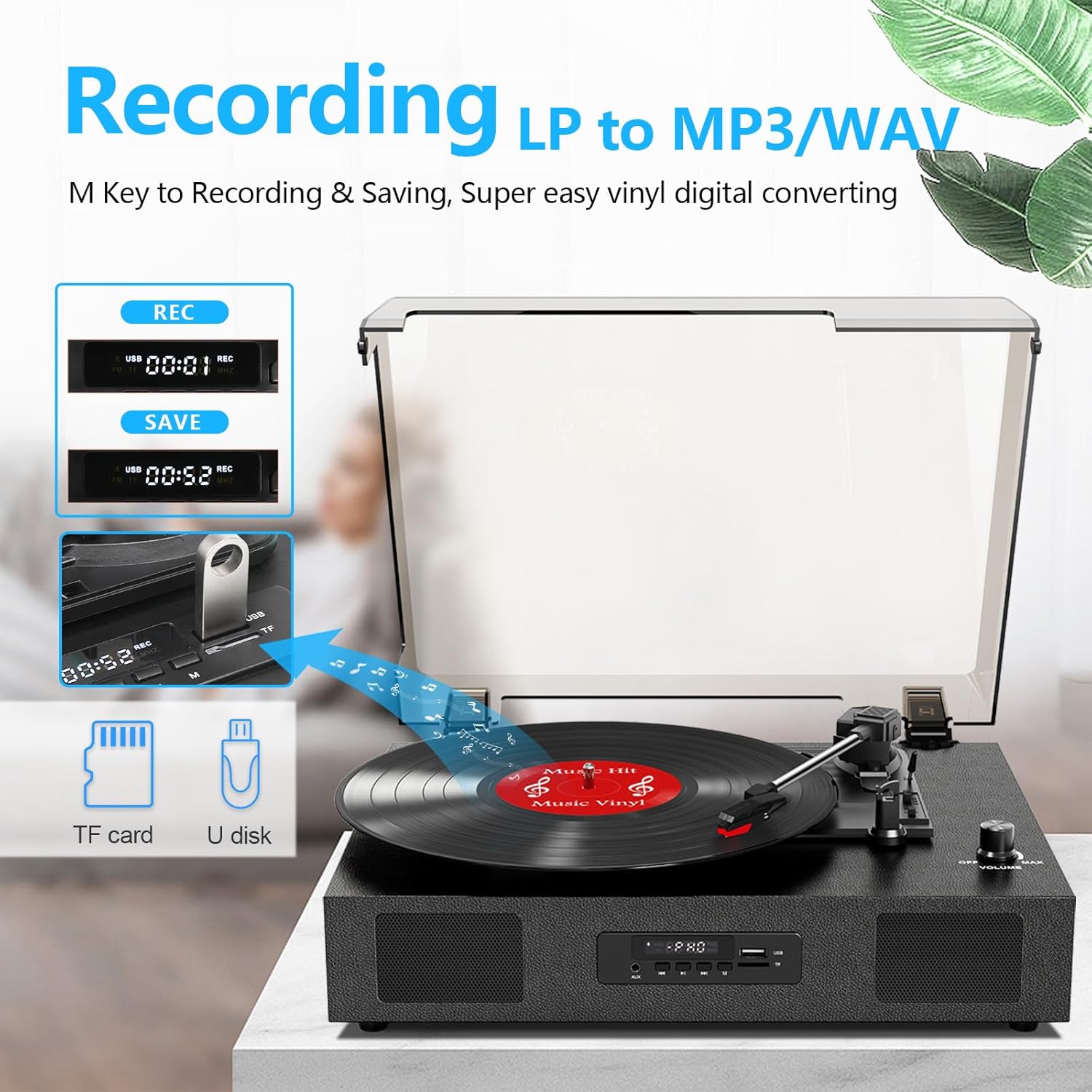
Image 4.3: The record player's display showing 'REC' and a timer, with a USB flash drive inserted, indicating the USB recording function.
- Introduceți unitatea USB: Insert a USB flash drive (formatted to FAT32) into the USB port on the front panel.
- Începeți redarea: Begin playing your vinyl record as described in section 4.1.
- Începeți înregistrarea: Press the 'REC' button on the front panel. The display will show 'REC' and a timer, indicating recording has started.
- Opriți înregistrarea: Press the 'REC' button again to stop recording. The recorded file will be saved to your USB drive.
- Acces Files: You can access the recorded WAV files on your computer. If MP3 format is desired, conversion can be done using computer software.
4.4 RCA Line-Out Connection
Connect the record player to external powered speakers or a home audio system for enhanced sound.
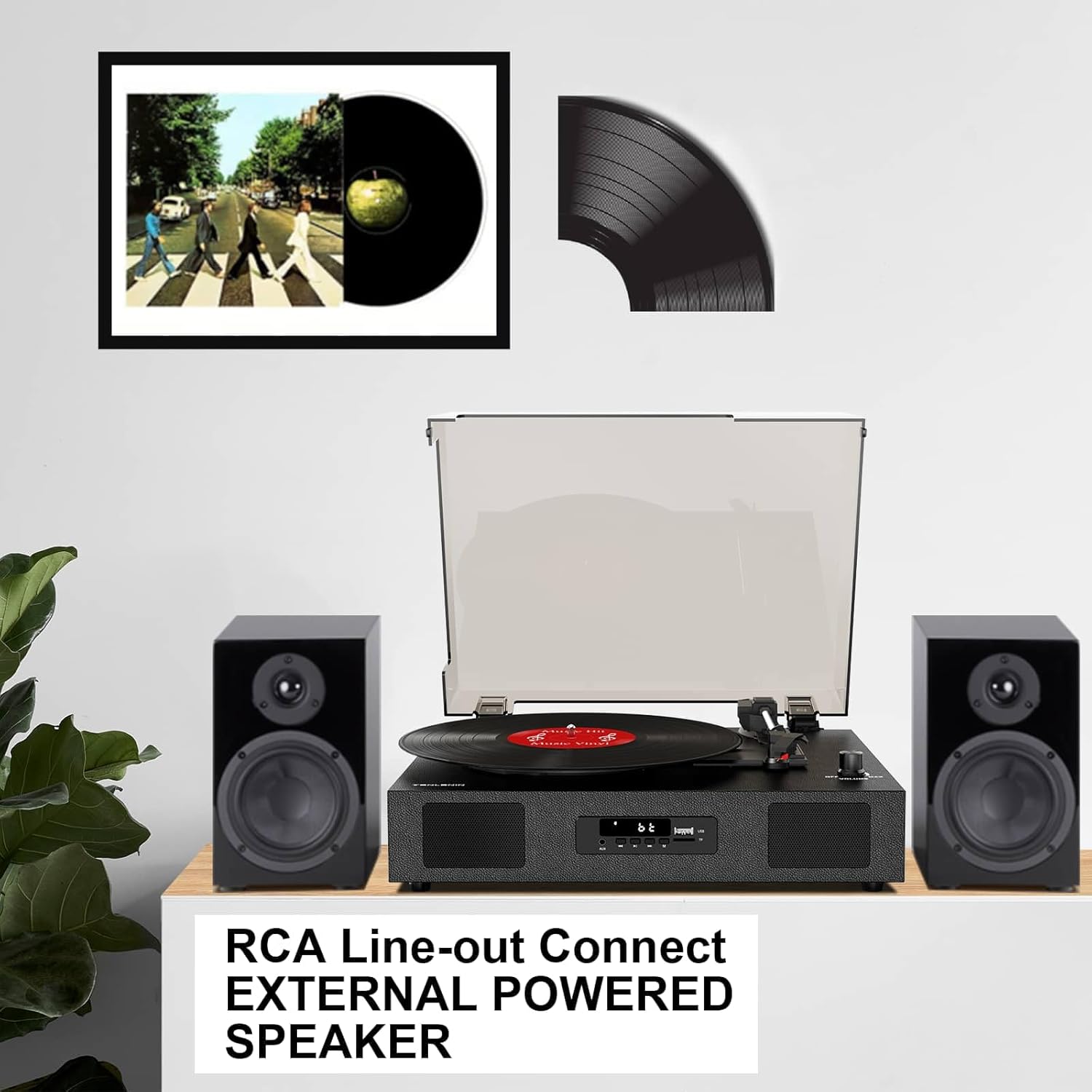
Image 4.4: The record player connected via RCA cables to a pair of external powered speakers, demonstrating the line-out functionality.
- Cabluri de conectare: Use RCA audio cables (not included) to connect the RCA L/R output jacks on the back of the record player to the corresponding input jacks on your external ampamplificator sau difuzoare amplificate.
- Reglați volumul: Control the volume primarily through your external audio system. The record player's volume knob will still affect the output level.
4.5 AUX Line-In
Connect external audio devices (e.g., MP3 players) via the AUX IN port.
- Cablu de conectare: Use a 3.5mm audio cable (not included) to connect your external device to the AUX IN port on the front panel.
- Selectați modul AUX: Press the 'M' button until 'AUX' appears on the display.
- Redare audio: Play audio from your connected device. The sound will be output through the record player's speakers.
5. Întreținere
5.1 Curăţarea unităţii
- Ștergeți exteriorul unității cu o cârpă moale și uscată. Nu utilizați substanțe de curățare abrazive sau solvenți.
- Keep the dust cover clean to prevent dust from settling on the platter and records.
5.2 Stylus Care and Replacement
- Stylusul (acul) este o componentă delicată. Manipulați-l cu grijă.
- Clean the stylus periodically with a soft brush, brushing gently from back to front.
- A worn stylus can damage records and degrade sound quality. Replace the stylus after approximately 300-500 hours of playback, or if you notice a decrease in sound quality or increased skipping.
- To replace the stylus, refer to the instructions provided with the replacement needle.
5.3 Îngrijirea înregistrărilor
- Always handle records by their edges to avoid transferring oils from your skin.
- Depozitați discurile vertical în huse, într-un loc răcoros și uscat.
- Curățați discurile în mod regulat cu o perie sau o soluție specială pentru curățarea discurilor, pentru a îndepărta praful și electricitatea statică.
6. Depanare
If you experience issues with your record player, consult the following troubleshooting guide.
- Fără putere:
- Asigurați-vă că adaptorul de alimentare este conectat corect la unitate și la o priză funcțională.
- Check if the ON/OFF/VOLUME knob is turned clockwise to power on.
- Fără sunet:
- Increase the volume using the ON/OFF/VOLUME knob.
- Ensure the correct input mode (PHONO, BT, AUX) is selected.
- If using RCA output, ensure external speakers are powered on and correctly connected, and their volume is adjusted.
- Check if the stylus protector has been removed.
- Omiterea înregistrărilor:
- Ensure the record player is on a stable, level surface.
- Clean the record to remove dust or debris.
- Check the stylus for damage or wear; replace if necessary.
- Some records, especially new or heavier pressings, may be more prone to skipping.
- USB Recording Issues (e.g., skipping, corrupted files):
- Ensure the USB drive is formatted to FAT32. Other formats like exFAT may not be compatible for recording.
- Try a different USB flash drive.
- Ensure the record is clean and playing smoothly during recording.
- Bluetooth Disconnecting/Resetting:
- If the Bluetooth player is paused for an extended period, the unit may revert to another mode. Re-select Bluetooth mode using the 'M' button.
- Ensure your Bluetooth device is within range.
7. Specificații
| Numele modelului | TE-2017 |
| Marca | DANFI AUDIO DF |
| Dimensiunile produsului | 14.1 x 11.2 x 4.9 inci |
| Greutatea articolului | 4.85 lire sterline |
| Material | Lemn stratificat, Plastic |
| Viteza maximă de rotație | 78 RPM |
| Speeds Supported | 33 1/3, 45, 78 RPM |
| Caracteristici speciale | Built-In Bluetooth Receiver, Digital Display, Digital Recorder, RCA Output |
| Dispozitive compatibile | Headphone, MP3 Player, Personal Computer, Smartphone, Tablet |
8. Garanție și asistență
DANFI AUDIO DF offers a 30-day money-back or replacement policy for this product. For any inquiries or assistance, please contact customer service. Support is available 24 hours a day.
For further support or warranty claims, please refer to your purchase documentation or contact the seller directly.


