1. Introducere
This manual provides essential information for the safe and efficient operation of your iFFALCON 40F2A 40-inch Full HD Android Smart LED TV. Please read these instructions thoroughly before using the television and retain them for future reference.
The iFFALCON 40F2A is a 40-inch Full High Definition (1920x1080) Smart LED TV powered by Android, offering a rich entertainment experience with built-in Google Assistant, HDR10 support, and integrated streaming services.

Imagine: față view of the iFFALCON 40F2A 40-inch Full HD Android Smart LED TV.
2. Configurare
2.1 Despachetarea și conținutul pachetului
Scoateți cu grijă televizorul din ambalaj. Asigurați-vă că toate componentele sunt prezente:
- 1 x iFFALCON 40F2A LED TV
- 1 x Suport de masă
- 1 x Manual de utilizare (acest document)
- 1 x card de garanție
- 1 x telecomandă
- 2 x baterii AAA
2.2 Instalarea standului
If using the table-top stand:
- Așezați ecranul televizorului cu ecranul în jos pe o suprafață moale și plană pentru a preveni deteriorarea.
- Aliniați suporturile suportului cu orificiile pentru șuruburi din partea inferioară a televizorului.
- Fixați suportul folosind șuruburile furnizate.
- Ridicați cu grijă televizorul în poziție verticală pe o suprafață stabilă și plană.
2.3 Montare pe perete (opțional)
For wall mounting, consult a professional installer and refer to the wall mount kit's instructions. Ensure the wall mount is compatible with the TV's VESA mounting pattern.
2.4 Conectarea dispozitivelor externe
Connect your external devices (e.g., set-top box, gaming console, Blu-ray player) to the TV's ports. The TV features HDMI, USB, VGA, and Headphone ports.
- HDMI: Pentru audio și video de înaltă definiție.
- USB: Pentru conectarea dispozitivelor de stocare USB.
- Ethernet: Pentru conexiune la internet prin cablu.
- Căști: For audio output to headphones.
2.5 Conectarea la rețea și configurarea inițială
- Introduceți bateriile AAA furnizate în telecomandă.
- Conectați cablul de alimentare la televizor și apoi la o priză.
- Apăsați butonul de pornire de pe telecomandă pentru a porni televizorul.
- Urmați instrucțiunile de pe ecran pentru a finaliza configurarea inițială, inclusiv selectarea limbii, conexiunea la rețea (Wi-Fi sau Ethernet) și conectarea la contul Google.
3. Operarea televizorului
3.1 Funcții de control de la distanță
The remote control provides access to all TV functions. It includes dedicated buttons for popular streaming services like Netflix, Amazon Prime Video, and Zee5, as well as a Google Assistant button for voice commands.

Image: The iFFALCON 40F2A Smart Remote Control, highlighting the Google Assistant and Netflix hotkey buttons.
3.2 Interfața Android TV
Navigate the Android TV interface using the remote's directional pad and OK button. The home screen displays recommended content, installed applications, and settings.

Image: The Android TV home screen on the iFFALCON 40F2A, showing various apps and features.
3.3 Asistent Google
Apasă butonul Asistent Google de pe telecomandă și vorbește în microfon pentru a controla televizorul, a căuta conținut, a primi răspunsuri și a gestiona dispozitivele inteligente pentru casă.
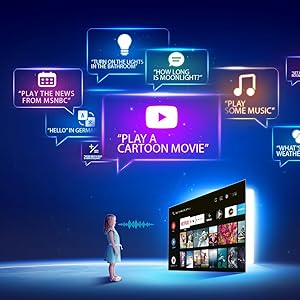
Image: Illustration of using Google Assistant voice commands with the TV.
3.4 Streaming Applications
Access a wide range of pre-installed streaming applications such as Netflix, Amazon Prime Video, YouTube, Disney+Hotstar, Zee5, and more. Additional apps can be downloaded from the Google Play Store.

Image: The iFFALCON 40F2A displaying various streaming application logos.
3.5 Chromecast încorporat
Use the built-in Chromecast feature to cast content from your compatible smartphone, tablet, or computer directly to your TV screen.

Image: A smartphone casting content to the iFFALCON 40F2A TV via Chromecast.
4. Caracteristici
4.1 Full HD Display with HDR10
Experience clear and vibrant visuals with Full HD (1920x1080) resolution. HDR10 support enhances contrast and color accuracy, providing a more dynamic picture.

Image: A side-by-side comparison of a scene without HDR10 and with HDR10, showing enhanced detail and color.
4.2 Micro-dimming
Micro Dimming analyzes video content in hundreds of separate zones to adjust brightness and darkness independently, improving contrast and picture quality.

Image: A comparison showing a city skyline without Micro Dimming and with Micro Dimming, highlighting improved contrast.
4.3 iPQ Engine
The iPQ Engine intelligently processes image quality, optimizing brightness, color range, and other visual parameters for a superior viewexperiență.

Image: Visual representation of the iPQ Engine's high brightness precision and intelligent color range control technologies.
4.4 Dolby Audio
Enjoy immersive sound with Dolby Audio. The TV features 20 Watts speakers (10W + 10W) for clear and powerful audio output.

Image: Graphic illustrating the 10W + 10W Dolby Audio speakers for enhanced sound.
Design subțire 4.5
The iFFALCON 40F2A features a sleek and slim design, allowing it to blend seamlessly into any living space.

Image: A hand demonstrating the slim profile of the iFFALCON TV.
5. Întreținere
5.1 Curățarea ecranului
Ștergeți ușor ecranul cu o lavetă moale, fără scame. Pentru petele persistente, ștergeți ușorampClătiți laveta cu apă sau cu un produs specializat de curățare a ecranelor. Evitați utilizarea substanțelor chimice dure sau a materialelor abrazive.
5.2 Curățarea corpului televizorului
Wipe the TV's frame and stand with a soft, dry cloth. Do not use liquid cleaners directly on the TV.
5.3 Îngrijire generală
- Evitați expunerea televizorului la lumina directă a soarelui sau la temperaturi extreme.
- Asigurați o ventilație adecvată în jurul televizorului pentru a preveni supraîncălzirea.
- Deconectați televizorul în timpul furtunilor cu fulgere sau când acesta nu va fi utilizat pentru perioade lungi de timp.
6. Depanare
Dacă întâmpinați probleme cu televizorul, consultați următoarele probleme și soluții frecvente:
| Problemă | Cauza posibila | Soluţie |
|---|---|---|
| Fără putere | Cablul de alimentare deconectat; Problemă la priză | Check power cord connection; Try a different outlet; Press power button on TV/remote |
| Nu există imagine, dar există sunet | Incorrect input source; Loose HDMI/AV cable | Select correct input source; Reconnect cables securely |
| Nu există sunet, dar imaginea este prezentă | Volume muted or too low; Audio cable issue | Unmute or increase volume; Check audio settings; Reconnect audio cables |
| Telecomanda nu funcționează | Dead batteries; Obstruction; Remote not paired | Replace batteries; Remove obstructions; Re-pair remote if necessary |
| Nu se poate conecta la Wi-Fi | Parolă incorectă; Problemă cu routerul; Televizorul este prea departe de router | Verify password; Restart router; Move TV closer or use Ethernet |
| Aplicațiile sunt lente sau se blochează | Insufficient memory; Network issue; App malfunction | Close unused apps; Check internet connection; Clear app cache/data or reinstall app |
Dacă problema persistă după ce încercați aceste soluții, vă rugăm să contactați serviciul de asistență pentru clienți.
7. Specificații
Detailed technical specifications for the iFFALCON 40F2A Smart LED TV:

Image: Diagram showing the dimensions of the iFFALCON 40F2A TV.
| Caracteristică | Caietul de sarcini |
|---|---|
| Marca | iFFALCON |
| Model | 40F2A |
| Dimensiunea ecranului | 40 inch (102 cm) |
| Tehnologia de afișare | LED, panou de calitate A+ |
| Rezoluţie | Full HD (1920 x 1080 pixeli) |
| Rata de reîmprospătare | 60 Hz |
| Timp de răspuns | 8.5 de milisecunde |
| Viewunghiul ing | 178 de grade |
| Raportul de aspect al imaginii | 16:09 |
| Raportul de contrast al imaginii | 5000:1 |
| Sistem de operare | Android |
| Dimensiunea memoriei RAM instalate | 1 GB |
| Capacitate de stocare digitală | 8 GB |
| Coprocesor grafic | Mali470x2 |
| Ieșire audio | 20 Watts (Dolby Audio) |
| Tehnologia de conectivitate | Ethernet, HDMI, USB, Wi-Fi, Bluetooth |
| Interfață hardware | HDMI, Headphone, USB, VGA |
| Total porturi USB | 1 |
| Sursa de alimentare | AC |
| Wattage | 75 Watts (On-mode power consumption) |
| Dimensiunile produsului (Lxlxh) | 90.5 x 18.5 x 57.7 cm (cu suport) |
| Greutatea articolului | 6.1 kg |
| baterii | 2 baterii AAA (incluse pentru telecomandă) |
8. Garanție și asistență
8.1 Informații despre garanție
Your iFFALCON 40F2A TV comes with a 1 ani garanție from the date of purchase. Please refer to the included Warranty Card for detailed terms and conditions. Retain your purchase receipt as proof of purchase for warranty claims.
8.2 Asistență pentru clienți
For technical assistance, service requests, or any inquiries regarding your iFFALCON TV, please contact the manufacturer's customer support. Contact details can typically be found on the warranty card or the official iFFALCON website-ul.


