1. Introducere
This manual provides essential information for the safe and efficient use of your MEDION P14371 (MD 30044) Full HD 43 inch Android Smart TV. Please read these instructions carefully before operating the device and retain them for future reference.
The MEDION P14371 is a 43-inch Full HD (1920x1080) Smart TV featuring Android TV, HDR support, PVR readiness, and integrated Google Chromecast and Assistant. It offers access to popular streaming services like Netflix and Amazon Prime Video, along with a triple HD tuner for DVB-T2 HD, cable, and satellite reception.
2. Informații de siguranță
Respectați întotdeauna următoarele măsuri de siguranță pentru a preveni electrocutarea, incendiul sau vătămarea corporală:
- Nu expuneți televizorul la ploaie sau umezeală.
- Asigurați o ventilație corespunzătoare; nu blocați orificiile de ventilație.
- Folosiți doar cablul de alimentare furnizat împreună cu televizorul.
- Nu deschideți televizorul.asing; consultați personalul calificat pentru toate lucrările de service.
- A nu se lăsa la îndemâna copiilor și a se elimina în mod corespunzător.
3. Conținutul pachetului
Verificați dacă toate articolele sunt prezente în ambalaj:
- MEDION LIFE Smart TV P14371 (MD 30044)
- Feet with screws for stand assembly
- Telecomanda cu baterii AAA
- Manual de utilizare
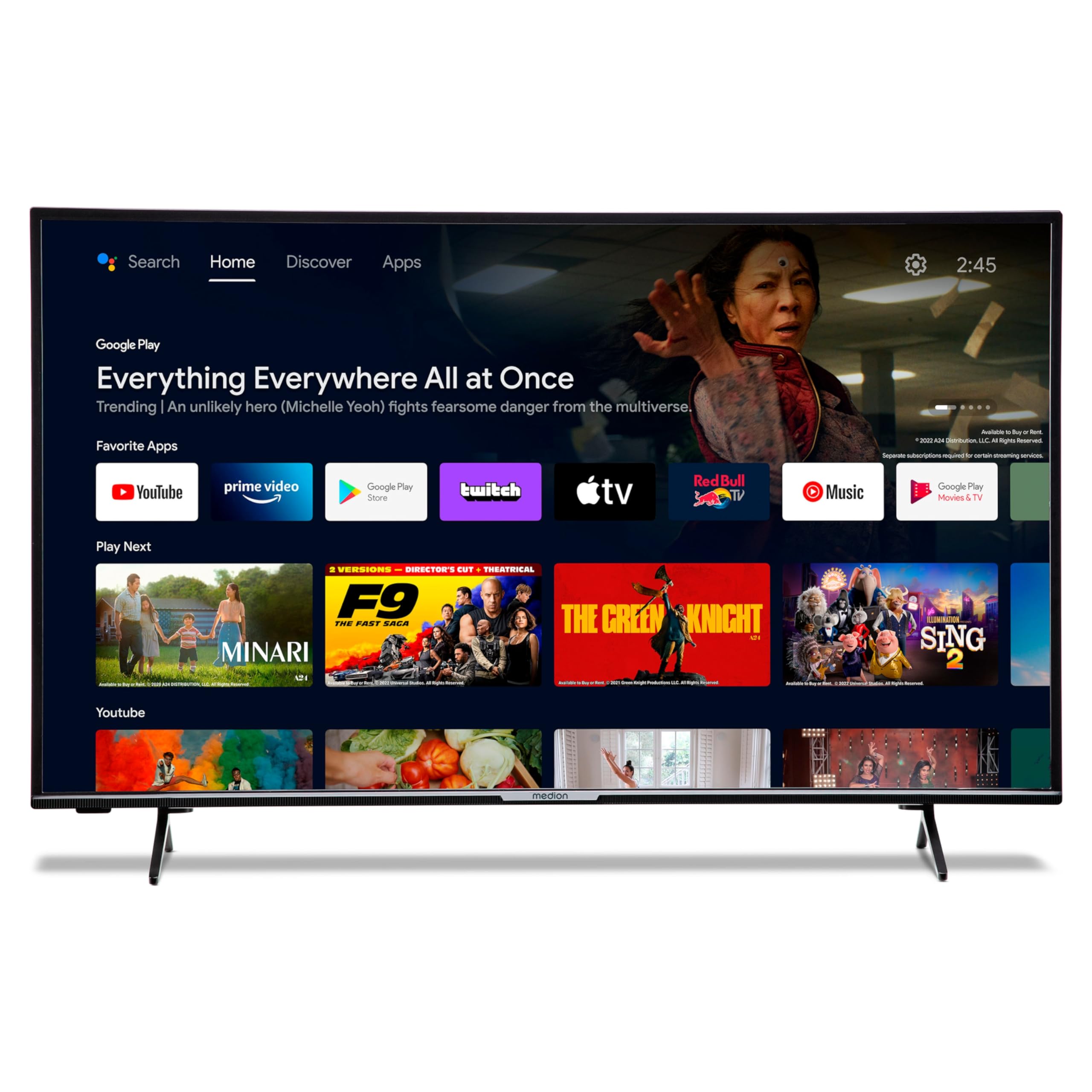
Image: The MEDION P14371 Smart TV with its remote control, illustrating the main components included in the package.
4. Configurare
4.1. Instalare fizică
Atașarea suportului:
- Așezați cu grijă ecranul televizorului cu fundul în jos pe o suprafață moale și plană pentru a preveni deteriorarea.
- Align the TV feet with the corresponding screw holes on the bottom of the TV.
- Fixați picioarele folosind șuruburile furnizate.

Image: The MEDION P14371 television securely placed on its stand, ready for use.
Montare pe perete: If wall mounting, ensure you use a VESA compatible bracket (100 x 100 mm) and follow the bracket manufacturer's instructions. Remove the stand feet before mounting.
4.2. Conexiuni
Conectați dispozitivele externe la porturile televizorului. Consultați imaginea de mai jos pentru locațiile porturilor:
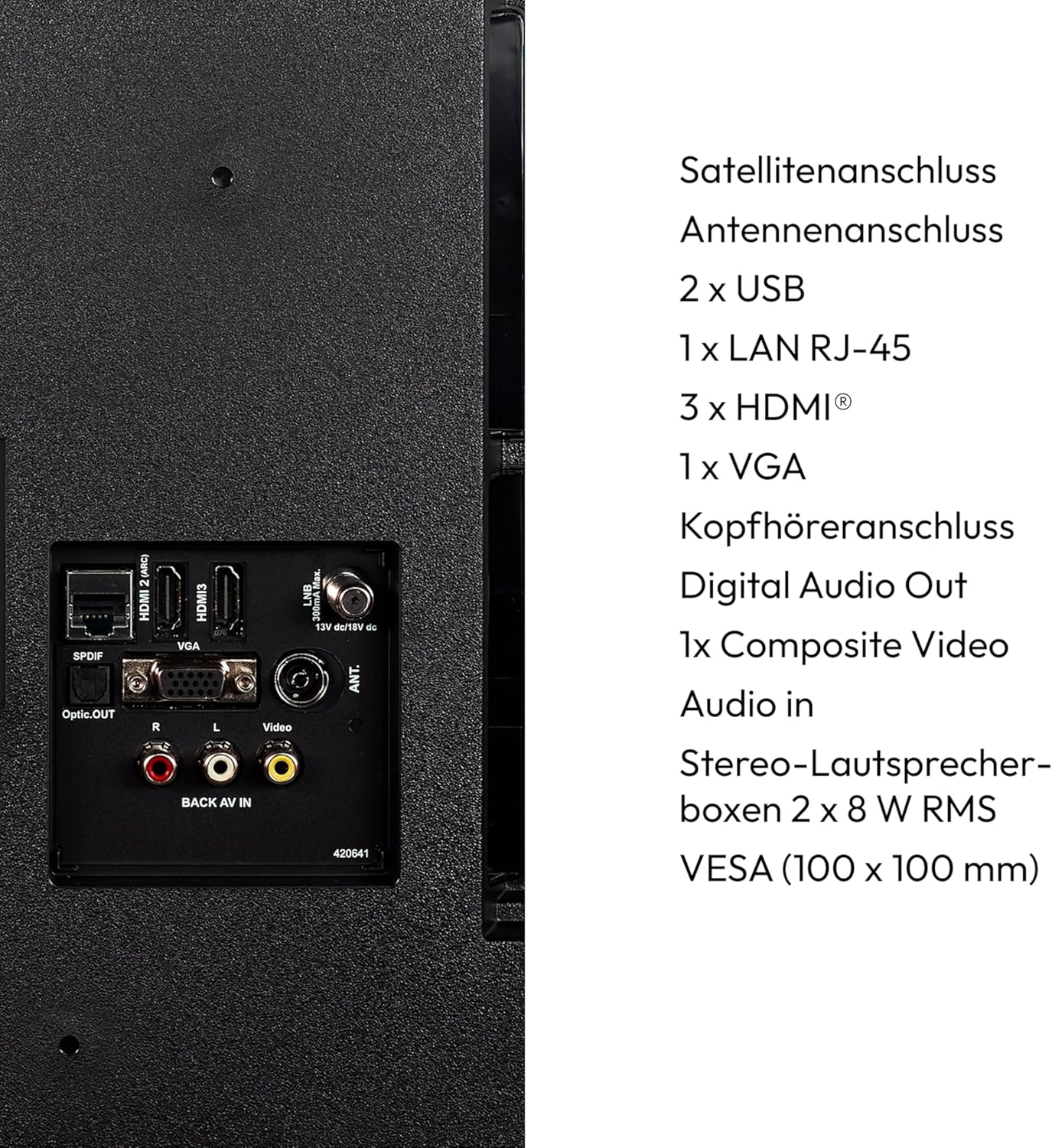
Imagine: O imagine detaliată view of the rear panel of the MEDION P14371 TV, showing various input and output ports including Satellite, Antenna, USB, LAN, HDMI, VGA, Headphone, Digital Audio Out, Composite Video, and Audio In.
- Conexiune prin satelit: Connect your satellite dish cable.
- Conexiune antenă: Connect your terrestrial antenna cable.
- 2 x USB: Pentru conectarea dispozitivelor de stocare USB pentru redarea media sau funcționalitatea PVR.
- 1 x LAN RJ-45: Pentru o conexiune la internet prin cablu.
- 3 x HDMI®: Pentru conectarea dispozitivelor de înaltă definiție, cum ar fi playere Blu-ray, console de jocuri sau set-top box-uri.
- 1 x VGA: Pentru conectarea unui computer.
- Jack pentru căști: Pentru conectarea căștilor.
- Ieșire audio digitală (optică): Pentru conectarea la un sistem audio extern.
- 1 x Composite Video (AV In): Pentru conectarea dispozitivelor mai vechi.
4.3. Pornirea inițială
- After all connections are made, plug the power cord into a wall outlet.
- Apăsați butonul de pornire de pe telecomandă sau de pe televizor.
- Urmați instrucțiunile de pe ecran pentru configurarea inițială, inclusiv selectarea limbii, conexiunea la rețea și scanarea canalelor.
5. Operarea televizorului
5.1. Telecomanda
Telecomanda inclusă oferă acces la toate funcțiile televizorului. Introduceți cele două baterii AAA așa cum este indicat în compartimentul pentru baterii.
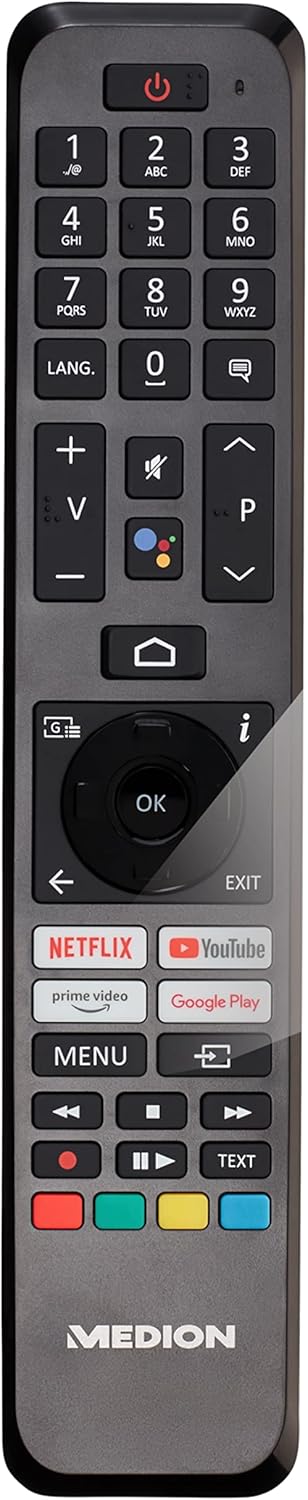
Image: The remote control for the MEDION P14371 TV, showing buttons for power, volume, channel, navigation, Netflix, Prime Video, Google Play, and Google Assistant.
- Buton de alimentare: Pornește/oprește televizorul sau îl pune în standby.
- Butoane numerice (0-9): Pentru selectarea directă a canalului.
- Volumul (+/-): Reglează nivelul volumului.
- Channel (P+/P-): Schimbă canale.
- Butoane de navigare (Sus/Jos/Stânga/Dreapta/OK): Pentru navigarea și selecția meniurilor.
- Buton Acasă: Accesează ecranul principal Android TV.
- Butonul Înapoi: Revine la ecranul anterior.
- Butonul Asistent Google: Activates voice control (Hey Google).
- Netflix, Amazon Prime Video, Google Play Buttons: Acces direct la aceste servicii de streaming.
5.2. Funcții Smart TV (Android TV)
Your TV runs on Android TV, providing access to a wide range of apps and services.

Image: The MEDION P14371 TV displaying the Google Play interface with various apps and games, highlighting its Smart TV capabilities.
- Magazin Google Play: Descarcă și instalează aplicațiile, jocurile și serviciile de streaming preferate.
- Chromecast încorporat: Transmiteți conținut de pe smartphone, tabletă sau computer direct pe televizor.
- Asistent Google: Folosește comenzi vocale prin intermediul telecomenzii pentru a căuta conținut, a controla dispozitivele inteligente pentru casă și a obține informații.
- HDR (gamă dinamică ridicată): Enjoy enhanced contrast and color detail with compatible content.
5.3. Triple HD Tuner
The integrated triple tuner allows reception of digital television signals without an external receiver:
- DVB-T2 HD: Terrestrial digital television.
- DVB-C: Televiziune digitală prin cablu.
- DVB-S2: Televiziune digitală prin satelit.
Perform a channel scan during initial setup or via the TV menu to find available channels.
5.4. PVR (Personal Video Recorder)
Connect a USB storage device to record TV programs. Access the PVR function through the TV menu to schedule recordings or record live TV.
5.5. Conectivitate wireless
- Wifi: Conectați-vă la rețeaua wireless de acasă pentru acces la internet și funcții Smart TV.
- Bluetooth: Conectați căști wireless, soundbar-uri sau alte dispozitive compatibile Bluetooth.
6. Întreținere
6.1. Curatenie
- Deconectați întotdeauna televizorul înainte de curățare.
- Folosiți o lavetă moale și uscată pentru a șterge ecranul și carcasa.
- Pentru pete persistente, folosiți o pastă ușor damp cloth with a mild, non-abrasive cleaner. Do not spray cleaner directly onto the screen.
6.2. Actualizări software
The TV may receive software updates to improve performance and add new features. Ensure your TV is connected to the internet to receive these updates. You can check for updates manually in the TV's settings menu.
7. Depanare
Dacă întâmpinați probleme cu televizorul, consultați următoarele soluții comune:
| Problemă | Soluție posibilă |
|---|---|
| Fără putere | Verificați dacă cablul de alimentare este conectat corect la televizor și la priză. Încercați o altă priză. |
| Nu există imagine, dar există sunet | Verificați sursa de intrare. Asigurați-vă că toate cablurile video sunt conectate corect. |
| Nu există sunet, dar imaginea este prezentă | Check the volume level and mute settings. Ensure audio cables are connected correctly. |
| Telecomanda nu funcționează | Înlocuiți bateriile. Asigurați-vă că nu există obstacole între telecomandă și senzorul IR al televizorului. |
| Funcțiile Smart TV sunt lente sau nu răspund | Check your internet connection. Restart the TV by unplugging it for a few minutes and plugging it back in. Clear app caches in settings. |
| Nu se poate conecta la Wi-Fi | Ensure your router is on and working. Re-enter the Wi-Fi password. Try restarting your router and the TV. |
8. Specificații
Detailed technical specifications for the MEDION P14371 (MD 30044) TV:
| Caracteristică | Caietul de sarcini |
|---|---|
| Marca | MEDIU |
| Numărul de model | P14371 (MD 30044) |
| Dimensiunea ecranului | 43 inchi (108 cm) |
| Tehnologia de afișare | LCD LED |
| Rezoluţie | 1080p Full HD (1920 x 1080 pixeli) |
| Raportul de aspect | 1.77:1 (16:9) |
| Rata de reîmprospătare | 60 Hz |
| Sistem de operare | Android TV |
| Tehnologia de conectivitate | Bluetooth, HDMI, USB, WLAN (Wi-Fi) |
| Total porturi USB | 2 |
| Caracteristici speciale | Bluetooth, USB Recording (PVR), HDR, Smart/Internet TV, Wi-Fi, Google Chromecast, Google Assistant |
| Servicii de Internet acceptate | Netflix, Amazon Prime Video |
| Clasa de eficienta energetica (SDR) | E |
| Consum de energie (SDR) | 42.0 W / 1000 h |
| Clasa de eficienta energetica (HDR) | G |
| Consum de energie (HDR) | 62.0 W / 1000 h |
| Producător | MEDIU |
| Componente incluse | Smart TV (MD30044) |
Pentru informații mai detaliate despre energie, vă rugăm să consultați baza de date EPREL a UE: https://eprel.ec.europa.eu/qr/1587496

Image: Diagram showing the physical dimensions of the MEDION P14371 TV, including width (973 mm), height (570 mm without stand, 627 mm with stand), and depth (92 mm without stand, 250 mm with stand).
9. Garanție și asistență
MEDION is committed to providing excellent customer service and product support.
- Garanție generală: A minimum general warranty of 2 years is offered by the supplier.
- Suport produs: Guaranteed product support for up to 10 years.
- Disponibilitatea pieselor de schimb: Guaranteed availability of spare parts for up to 7 years from the date of market withdrawal.
- Actualizări de software: Guaranteed software and firmware updates for up to 8 years from the date of market withdrawal.
Our competent customer service team is available 365 days a year. Our customer relationship does not end with the purchase. If an issue cannot be resolved through direct communication, our repair service will handle it quickly and efficiently.
For support, please visit the official MEDION website-ul lor sau contactați direct serviciul lor de asistență pentru clienți.