Introducere
The UMAX Air Mouse M1 is a versatile wireless controller designed to enhance your interaction with various devices. Featuring a built-in gyroscope for precise air mouse functionality, a full QWERTY keyboard for easy text input, and voice control capabilities, it offers a comprehensive solution for navigation and command. Its ergonomic design ensures comfortable handling, and the integrated Li-Ion battery provides extended usage time. This manual will guide you through the setup, operation, and maintenance of your Air Mouse M1.

Figura 1: Față view of the UMAX Air Mouse M1, showing the directional pad, OK button, volume controls, and voice button.
Conținutul pachetului
Vă rugăm să vă asigurați că toate articolele sunt prezente în colet:
- UMAX Air Mouse M1
- Receptor USB
- Cablu de încărcare
- Manual de utilizare (acest document)
Înființat
1. Încărcarea dispozitivului
The UMAX Air Mouse M1 comes with a built-in Li-Ion battery. Before first use, it is recommended to fully charge the device. Connect the charging cable to the charging port on the Air Mouse and the other end to a standard USB power source (e.g., computer USB port, USB wall adapter).
2. Conectarea receptorului USB
The Air Mouse M1 connects wirelessly via a USB receiver. Locate the USB receiver, typically stored within the battery compartment or a dedicated slot on the device itself. Insert the USB receiver into an available USB port on your target device (e.g., Smart TV, PC, Android TV Box).
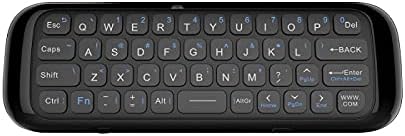
Figura 2: Spate view of the UMAX Air Mouse M1, showing the full QWERTY keyboard.
3. Initial Pairing (Automatic)
Once the USB receiver is plugged in, the Air Mouse M1 should automatically pair with your device. No manual pairing steps are typically required. The device should be ready for use within a few seconds.
Instrucțiuni de operare
1. Air Mouse Function
The Air Mouse M1 utilizes a gyroscope for cursor control. Hold the remote in your hand and move your wrist to control the on-screen cursor. The cursor will follow your hand movements. Press the OK button to click.
2. Keyboard Input
Flip the Air Mouse M1 over to access the full QWERTY keyboard. Use the keys to type text as you would on a standard keyboard.
3. Control vocal
Apăsați și mențineți apăsat butonul dedicat Voce button (often indicated by a microphone icon) to activate voice input. Speak clearly into the microphone located on the device. Release the button when you have finished speaking. This feature requires compatible software or operating system support on your connected device.
4. Funcții butoane
- Buton de alimentare: Turns the device on/off or puts it into sleep mode.
- Buton OK: Confirms selection, acts as left-click.
- Pad direcțional: Navighează prin meniuri și selecții.
- Volume Buttons (V+/V-): Reglează volumul audio.
- Buton Acasă: Returns to the home screen of the connected device.
- Butonul Înapoi: Navigates back in menus or applications.
- Buton de meniu: Deschide meniuri contextuale.
Întreţinere
1. Îngrijirea bateriei
The UMAX Air Mouse M1 is equipped with a rechargeable Li-Ion battery. To prolong battery life:
- Evitați descărcarea completă frecventă a bateriei.
- Charge the device when the low battery indicator appears.
- Depozitați dispozitivul într-un loc răcoros și uscat dacă nu îl utilizați pentru perioade lungi de timp.
2. Curatenie
Pentru curățarea dispozitivului, folosiți o lavetă moale și uscată. Pentru murdăria persistentă, folosiți o lavetă ușor uscată.amp cloth can be used, but ensure no moisture enters the device's ports or openings. Do not use harsh chemicals or abrasive cleaners.
Depanare
| Problemă | Cauza posibila | Soluţie |
|---|---|---|
| Dispozitivul nu răspunde | Low battery; USB receiver not connected; Device not paired. | Charge the device; Ensure USB receiver is securely plugged in; Re-insert USB receiver to re-establish connection. |
| Cursorul este neregulat sau nu se mișcă lin | Interferență; Baterie descărcată. | Move closer to the USB receiver; Ensure no strong electromagnetic interference; Charge the device. |
| Keyboard not typing | Device in air mouse mode; Low battery. | Ensure the device is flipped to the keyboard side; Charge the device. |
| Controlul vocal nu funcționează | Microphone blocked; No internet connection on host device; Host device does not support voice input. | Ensure microphone is clear; Check host device's internet connection; Verify host device's compatibility with voice input. |
Specificații
- Model: UMAX Air Mouse M1 (laishutin)
- Tehnologia de detectare a mișcării: Stabilizare giroscopică
- Conectivitate: Wireless (receptor USB)
- Baterie: 1 baterie litiu-ion (inclusă)
- Culoare: Portocale (Note: Product images show a black device, but specifications list 'Orange'.)
- Greutatea articolului: 7 uncii (0.2 kilograme)
- Dimensiuni pachet: 7.09 x 3.94 x 0.79 inci
- Sisteme de operare compatibile: Android, Windows, Linux
Asistență și garanție
For technical support or inquiries regarding your UMAX Air Mouse M1, please refer to the official UMAX website or contact their customer service. Specific warranty details may vary by region and retailer. Please retain your proof of purchase for warranty claims.
Pentru mai multe informații, vizitați: UMAX Official Website-ul


