1. Introducere
The BlackVue DR900X-2CH is a high-performance 4K UHD cloud dashcam system designed to provide comprehensive vehicle surveillance. It features a front 4K UHD camera and a Full HD rear camera, built-in Wi-Fi, GPS, and advanced parking mode capabilities. This manual provides detailed instructions for installation, operation, and maintenance, ensuring you get the most out of your BlackVue dashcam.
2. Conținutul pachetului
Înainte de a începe instalarea, verificați dacă toate componentele sunt prezente în pachet:
- BlackVue DR900X-2CH Front Camera Unit
- BlackVue Rear Camera
- Rear Camera Connection Cable (Coaxial)
- Power Cord (Cigarette Lighter Plug)
- Hardwiring Power Cable
- MicroSD Card (32GB included)
- Cititor de carduri MicroSD
- Cable Clips (8ea)
- Pry Tool
- Spare Mounting Tape
- Ghid de pornire rapidă

3. Produs terminatview
Familiarizați-vă cu componentele principale și funcțiile acestora.
3.1 Front Camera Unit

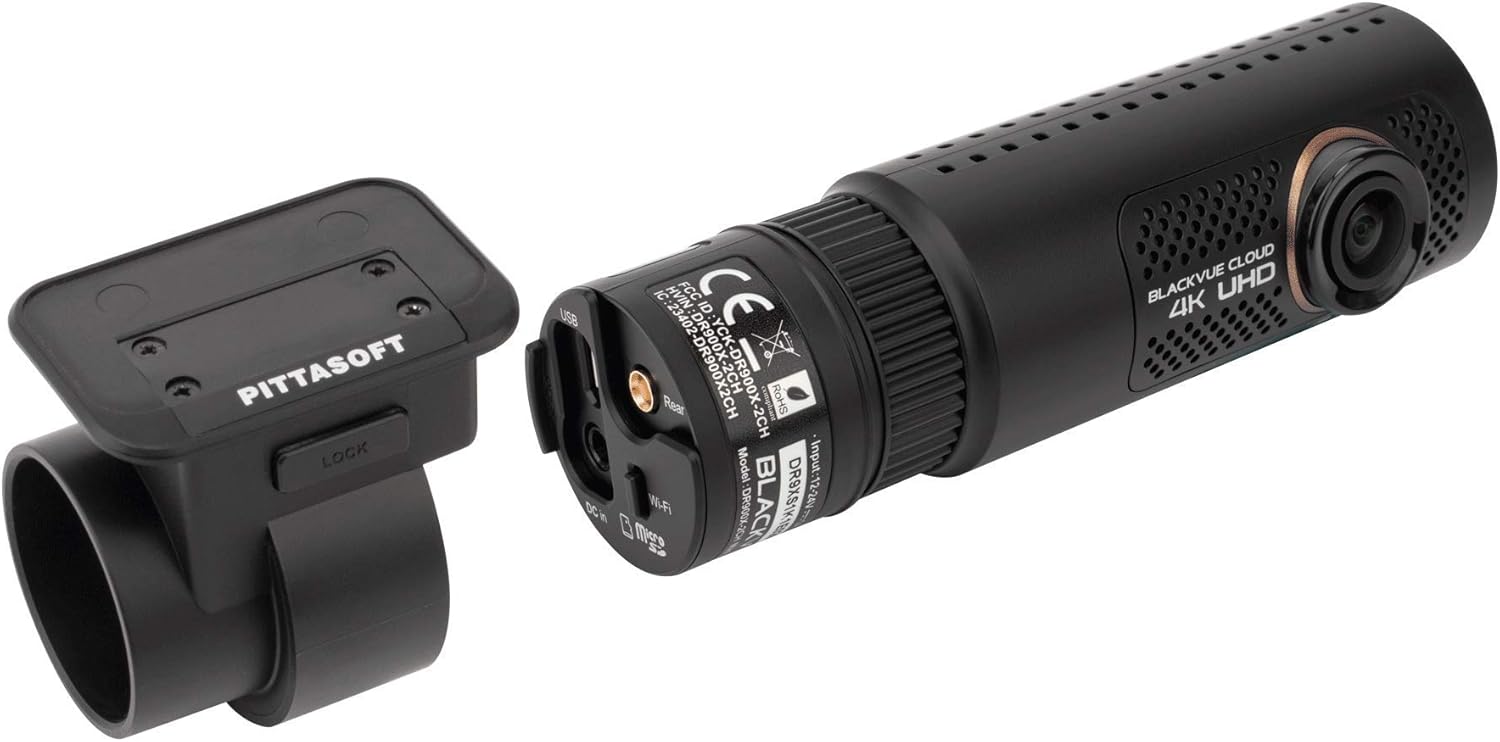
The front camera unit houses the main processor, 4K UHD lens, Wi-Fi module, GPS, and various ports for power, the rear camera, and the optional LTE module.

- Lentilă frontală: Captures 4K UHD video.
- Buton Wi-Fi: Activates/deactivates Wi-Fi.
- Slot pentru card MicroSD: Pentru introducerea cardului de memorie.
- DC In: Port de intrare pentru alimentare.
- Port cameră spate: Connects the rear camera via coaxial cable.
- Port USB: For connecting the optional CM100 LTE module.
- Vorbitor: For voice prompts.
- Indicatoare LED: Indicate recording status, GPS, Wi-Fi, and LTE connectivity.
3.2 Rear Camera Unit
The rear camera unit captures Full HD video and connects to the front unit via the provided coaxial cable.
4. Configurare și instalare
Proper installation is crucial for optimal performance and video quality.
4.1 MicroSD Card Insertion
- Asigurați-vă că camera de bord este oprită.
- Open the microSD card cover on the side of the front camera unit.
- Insert the microSD card into the slot with the gold contacts facing away from the lens until it clicks into place.
- Închideți bine capacul.
4.2 Montarea camerei de bord
- Clean the windshield area where you intend to mount the dashcam. Ensure it is free of dust and grease.
- Attach the front camera unit to its mounting bracket.
- Peel off the protective film from the mounting tape on the bracket.
- Mount the front camera on the center of your windshield, ideally behind the rearview oglindă, asigurându-vă că nu vă obstrucționează vederea view. Press firmly for 30 seconds.
- Mount the rear camera on the rear windshield, ensuring the lens has a clear view.

4.3 Wiring the Dashcam
There are two primary wiring options:
- Cablu de alimentare brichetă: For basic operation, plug the power cable into your vehicle's cigarette lighter socket. The dashcam will power on/off with the vehicle's ignition.
- Cablu de alimentare cu cablare fixă: For advanced parking mode functionality, connect the hardwiring cable to your vehicle's fuse box. This allows the dashcam to continue recording when the vehicle is parked. Refer to your vehicle's manual for fuse box location and proper connection points (ACC, BATT+, GND). It is recommended to have this installed by a professional if you are unsure.
- Connect the power cable to the DC In port on the front camera unit.
- Route the power cable along the edge of the windshield and down to the power source, using the provided cable clips and pry tool to tuck the cable neatly.
- Connect the rear camera cable to the Rear Camera port on the front unit.
- Route the rear camera cable to the rear of the vehicle, ensuring it does not interfere with airbags or other vehicle components.
4.4 Initial Setup with BlackVue App
- Download the BlackVue App from your smartphone's app store (iOS/Android).
- Porniți camera de bord.
- On your smartphone, go to Wi-Fi settings and connect to the BlackVue dashcam's Wi-Fi network (SSID: DR900X-2CH-XXXXXX, Password: blackvue).
- Open the BlackVue App. The app will automatically connect to the dashcam.
- Follow the on-screen prompts to set up basic settings like time zone, recording quality, and parking mode options.
5. Operating the Dashcam
Understand the various recording modes and features of your BlackVue dashcam.
5.1 Moduri de înregistrare
- Înregistrare normală: Înregistrare continuă în timpul conducerii. Files are saved in segments and overwritten oldest first when the microSD card is full.
- Înregistrare eveniment: Triggered by impacts detected by the G-sensor or manual events (e.g., pressing the touch sensor on the dashcam). These filesunt protejate împotriva suprascrierii.
- Înregistrare în modul parcare: Activated when the vehicle's ignition is turned off (requires hardwiring). Records only when motion or impact is detected, conserving power and storage.
5.2 LED Indicators and Voice Prompts
The dashcam provides visual and audible cues for its status:
- REC LED: Indicates recording status (e.g., solid for normal, blinking for event).
- LED GPS: Solid when GPS signal is acquired.
- LED Wi-Fi: Solid when Wi-Fi is active, blinking during connection.
- LTE LED: (If CM100 LTE module is connected) Indicates LTE connectivity.
- Indemnizații vocale: The dashcam will announce status changes, such as
Documente conexe - DR900X-2CH

Ghid de activare a cartelei SIM BlackVue pentru conectivitate în cloud
Un ghid complet pentru activarea cartelei SIM și conectarea camerei de bord BlackVue la serviciul BlackVue Cloud. Acest ghid acoperă găsirea detaliilor de conectivitate, crearea unui cont, înregistrarea camerei de bord și procesul de activare a cartelei SIM pentru funcții îmbunătățite.
Ghid de instalare și utilizare pentru BlackVue DR970X Box-2CH Plus Series
Un ghid complet pentru instalarea și utilizarea camerei video de bord BlackVue DR970X Box-2CH Plus Series, inclusiv configurarea camerei spate, instalarea modulului GNSS, instalarea modulului de conectivitate, opțiunile cablului de alimentare și utilizarea aplicației.
Ghid de pornire rapidă pentru BlackVue DR900X Plus
Ghid complet de pornire rapidă pentru camera de bord BlackVue DR900X Plus, care acoperă instalarea, configurarea, redarea, conectivitatea la cloud, specificațiile produsului și informații despre garanție.
Ghid de utilizare BlackVue DR650S-2CH IR: Cameră interioară cu infraroșu
Ghid de utilizare pentru camera de bord BlackVue DR650S-2CH IR, care detaliază caracteristicile, specificațiile și instrucțiunile de instalare pentru camera interioară cu infraroșu.
Cameră auto BlackVue DR770X-2CH IR LTE: Component Overview
Detaliat pesteview a componentelor și caracteristicilor camerei de bord cu două canale BlackVue DR770X-2CH IR LTE, inclusiv componentele camerei frontale, spate și interne, LED-urile, porturile și instrucțiunile de montare.
Manual de utilizare BlackVue Wi-Fi 2CH DR550GW-2CH
Manual de utilizare pentru camera auto BlackVue Wi-Fi 2CH DR550GW-2CH de la PittaSoft Co., Ltd., care detaliază instalarea, funcționarea, caracteristicile și depanarea pentru o siguranță sporită la volan.