1. Introducere
The ELECDER D19 True Wireless Earbuds are designed to provide a superior audio experience with advanced features such as Bluetooth 5.0 connectivity, noise cancellation, and IPX7 waterproofing. This manual provides comprehensive instructions for setting up, operating, and maintaining your earbuds to ensure optimal performance and longevity.
Caracteristici cheie:
- Bluetooth 5.0: Fast and stable wireless transmission with CVC8.0 noise cancellation for clear calls.
- Premium Hi-Fi Stereo Audio: APTX audio for lossless transmission, delivering immersive sound with crystal clarity and deep bass.
- IPX7 Impermeabil: Resistant to sweat, water, and rain, ideal for workouts and outdoor activities.
- Design ergonomic: Lightweight (5g per earbud) with flexible silicone ear-fins and S/M/L ear caps for a secure and comfortable fit.
- Quick Pairing Technology: Automatic power-on and pairing upon removal from the charging case.
- USB Quick Charge & Wireless Charging: Up to 4.5 hours of music on a single charge, with an additional 18 hours from the charging case, supporting both USB and wireless charging.
2. Produs terminatview

Figure 2.1: ELECDER D19 True Wireless Earbuds in their charging case. The earbuds are black, sleek, and designed for in-ear use, while the compact charging case is also black with a smooth finish.
Ce este în cutie:
- ELECDER D19 True Wireless Earbuds (Left and Right)
- Carcasă de încărcare
- Cablu de încărcare USB
- Dopuri pentru urechi (mărimi S/M/L)
- Manual de utilizare (acest document)
3. Ghid de instalare
3.1 Încărcarea căștilor și a carcasei
Before first use, fully charge the earbuds and the charging case. The charging case supports both USB cable charging and wireless charging.
- Încărcare USB: Connect the provided USB cable to the charging port on the case and plug the other end into a USB power source (e.g., computer, wall adapter). The indicator light on the case will show charging status.
- Încărcare fără fir: Place the charging case on a compatible wireless charging pad. The indicator light will flash to confirm charging.

Figure 3.1: The ELECDER D19 charging case being charged wirelessly on a charging pad, also showing the Micro USB port for wired charging. This image highlights the dual charging capabilities of the case.
A full charge for the earbuds provides approximately 4.5 hours of music playback, and the charging case provides an additional 18 hours of battery life.
3.2 Împerecherea cu dispozitivul dvs.
The ELECDER D19 earbuds feature quick pairing technology for seamless connection.
- Pasul 1: Open the charging case and take out both earbuds. They will automatically power on and pair with each other.
- Pasul 2: Pe smartphone-ul sau dispozitivul compatibil Bluetooth, accesați setările Bluetooth.
- Pasul 3: Caută available devices and select "Elecder D19" from the list to connect.
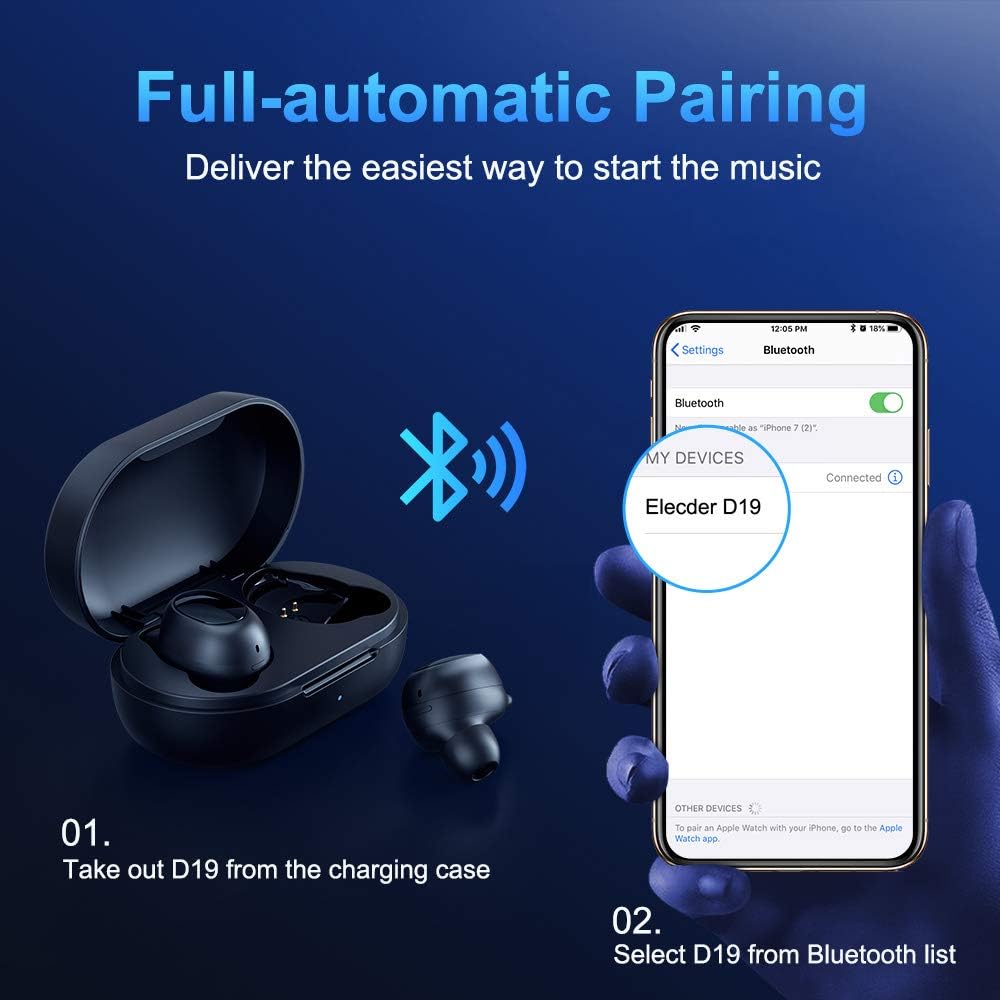
Figure 3.2: A visual guide demonstrating the automatic pairing process. The image shows the earbuds being taken out of the case and then the "Elecder D19" option appearing in a smartphone's Bluetooth settings for connection.
After the initial pairing, the earbuds will automatically connect to the last paired device when taken out of the charging case.

Figure 3.3: An illustration showing the stable Bluetooth connection between the ELECDER D19 earbuds and various smart devices, including smartphones and tablets.
4. Instrucțiuni de utilizare
4.1 Purtarea căștilor
For optimal sound quality and comfort, choose the ear tips that best fit your ears. The earbuds come with S, M, and L sizes. Insert the earbuds into your ears and gently rotate them to find a secure and comfortable fit. The ergonomic ear-fin design helps ensure stability during movement.
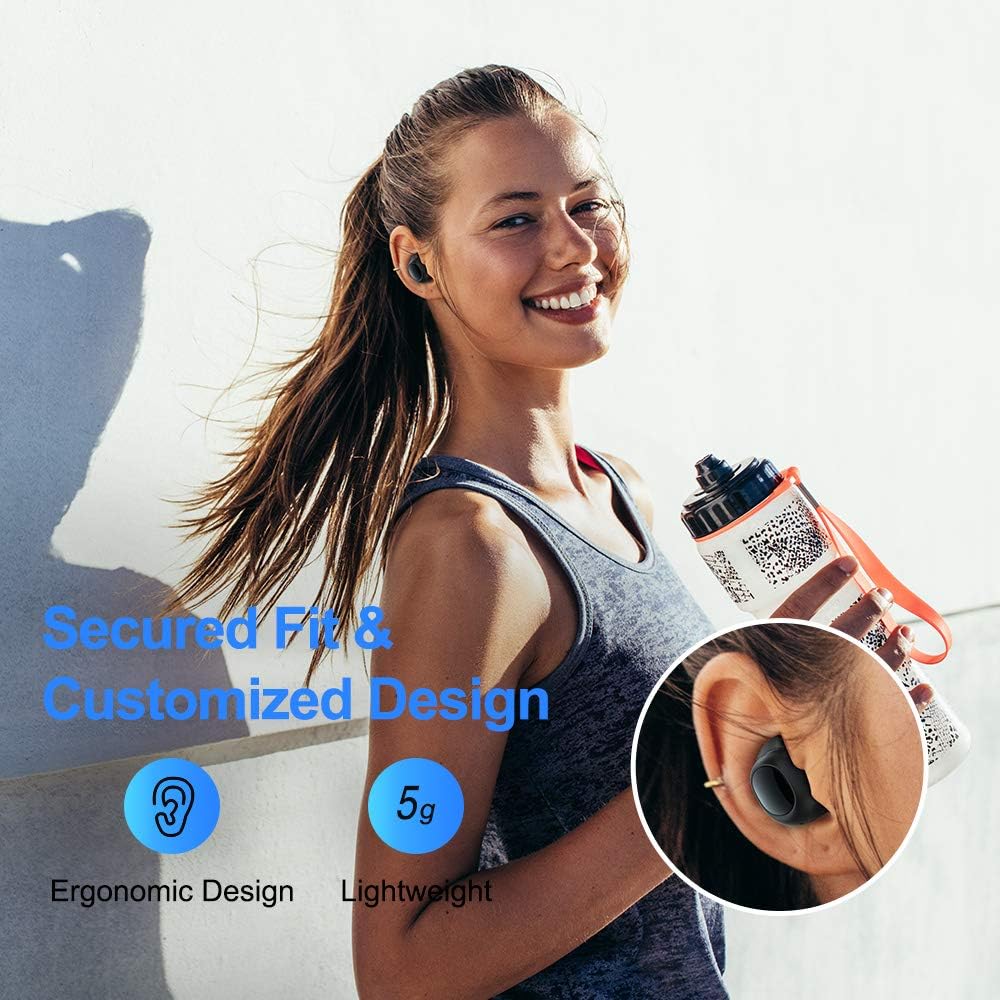
Figure 4.1: A person wearing the ELECDER D19 earbuds during a workout, demonstrating the secure and comfortable fit provided by the ergonomic design and customizable ear tips.
4.2 Controlul media
The ELECDER D19 earbuds feature physical buttons for media control. Specific button functions may vary slightly based on the device and operating system, but common controls include:
- Redare/Pauză: Apăsare unică pe oricare dintre căști.
- Următoarea piesă: Apăsați de două ori pe casca intraauriculară dreaptă.
- Pista anterioară: Apăsați de două ori pe casca intraauriculară stângă.
- Creșterea volumului: Triple press on the right earbud.
- Volum scăzut: Triple press on the left earbud.
4.3 Gestionarea apelurilor
Manage your calls directly from the earbuds:
- Răspundeți/Terminați apelul: Apăsare unică pe oricare dintre căști.
- Respinge apelul: Apăsați și țineți apăsat fiecare cască timp de 2 secunde.
- Activați Asistentul vocal: Apăsați și țineți apăsat oricare dintre căști timp de 3 secunde (de exemplu, Siri, Asistentul Google).
5. Întreținere și îngrijire
Proper maintenance ensures the longevity and optimal performance of your ELECDER D19 earbuds.
5.1 Curățare
- Curățați regulat căștile și carcasa de încărcare cu o lavetă moale, uscată și fără scame.
- Scoateți dopurile de urechi și curățați-le cu apă și săpun delicat, apoi uscați-le bine înainte de a le fixa la loc.
- Use a cotton swab or small brush to gently clean the charging contacts on both the earbuds and the case.
- Evitați utilizarea materialelor abrazive, a alcoolului sau a produselor chimice de curățare.
5.2 Rezistență la apă (IPX7)
The ELECDER D19 earbuds are IPX7 waterproof, meaning they can withstand submersion in up to 1 meter of water for 30 minutes. This makes them suitable for protection against sweat, rain, and accidental splashes.

Figure 5.1: The ELECDER D19 earbuds shown with water droplets, illustrating their IPX7 waterproof rating, which protects them from sweat, rain, and splashes.
Nota: The charging case is not waterproof. Ensure earbuds are dry before placing them back into the charging case.
5.3 Depozitare
Când nu le utilizați, depozitați căștile în carcasa lor de încărcare pentru a le proteja și a le menține încărcate. Depozitați carcasa într-un loc răcoros și uscat, ferit de temperaturi extreme și de lumina directă a soarelui.
6. Depanare
If you encounter issues with your ELECDER D19 earbuds, refer to the following common solutions:
| Problemă | Cauza posibila | Soluţie |
|---|---|---|
| Căștile nu se conectează cu dispozitivul. | Bluetooth este dezactivat pe dispozitiv; căștile nu sunt în modul de asociere; dispozitivul asociat anterior interferează. | Ensure Bluetooth is enabled. Place earbuds back in case, then take them out to re-enter pairing mode. Forget "Elecder D19" from your device's Bluetooth list and re-pair. |
| Doar o singură cască funcționează. | Earbuds not paired with each other; low battery on one earbud. | Place both earbuds back into the charging case, close the lid, wait a few seconds, then open and take them out again. Ensure both earbuds are charged. |
| Niciun sunet sau volum redus. | Device volume too low; ear tips not properly sealed; debris in earbud nozzle. | Increase volume on your device. Adjust earbud position or try different sized ear tips for a better seal. Clean earbud nozzles. |
| Carcasa de încărcare nu se încarcă. | Faulty cable/charger; improper placement on wireless charger. | Try a different USB cable and power adapter. Ensure the case is correctly aligned on the wireless charging pad. |
| Conexiune Bluetooth instabilă. | Interference; distance from device; low earbud battery. | Reduce distance between earbuds and device. Avoid environments with strong Wi-Fi or other Bluetooth signals. Ensure earbuds are fully charged. |
7. Specificații
Detailed technical specifications for the ELECDER D19 True Wireless Earbuds:
| Caracteristică | Detaliu |
|---|---|
| Numele modelului | ELECDER D19 |
| Tehnologia de conectivitate | Fără fir (Bluetooth 5.0) |
| Gama Bluetooth | 33 picioare |
| Plasarea urechii | În ureche |
| Factor de formă | În ureche |
| Controlul zgomotului | Active Noise Cancellation (CVC8.0) |
| Microfon | Inclus |
| Nivel de rezistență la apă | IPX7 Impermeabil |
| Durata de viață a bateriei (căști) | Up to 4.5 hours (music) / 4 hours (calling) |
| Charging Case Additional Playtime | 18 de ore |
| Timp de încărcare | Aproximativ 2 de ore |
| Interfață de încărcare | Micro USB, Wireless Charging |
| Greutatea articolului | 1.92 ounces (total) / 5g (each earbud) |
| Dimensiunile produsului | 3.89 x 3.89 x 1.65 inci |
| Dispozitive compatibile | iOS and Android Smartphones |
| Material | Silicon (terminale pentru urechi) |
| Culoare | Negru |

Figure 7.1: An infographic detailing the battery life of the ELECDER D19 earbuds and charging case, showing 4 hours for calls, 4.5 hours for music, and a total of 18 hours with the 500mAh charging case.
8. Garanție și asistență
ELECDER products are manufactured to high quality standards. For information regarding warranty coverage, technical support, or service inquiries, please refer to the contact information provided with your product packaging or visit the official ELECDER website-ul.
Pentru asistență suplimentară, puteți contacta și comerciantul de unde ați achiziționat produsul.


