1. Produs terminatview
The AWOW TH213 is a smart WiFi thermostat designed for controlling gas and water boiler heating systems. It features a large LCD display with white backlight for clear visibility and offers both manual and smart control options via a smartphone application. This thermostat is compatible with popular smart home platforms like Amazon Alexa and Google Assistant, providing convenient voice control.
Caracteristici cheie:
- Compatibility with gas and water boiler systems.
- Ecran LCD mare cu iluminare de fundal.
- Voltage: 100-240V, 50/60Hz; Max Switching Power: 3A.
- Remote control via Smart Life app (requires 2.4 GHz Wi-Fi).
- Voice control compatible with Amazon Alexa and Google Assistant.
- Programmable modes: 24-hour, 5+2 day, or 7-day options.
- Temperature accuracy: 1°C, adjustable range from 5°C to 35°C.

Image 1.1: The AWOW TH213 Smart WiFi Thermostat displaying current and set temperatures, alongside a smartphone showing the thermostat's control interface in the Smart Life app.
2. Ghid de instalare
Proper installation is crucial for the safe and efficient operation of your thermostat. It is recommended that installation be performed by a qualified electrician.
2.1 Măsuri de siguranță
- Always turn off the power supply at the main circuit breaker before beginning any electrical work.
- Ensure the thermostat is compatible with your heating system (gas or water boiler).
- Do not install in locations with extreme temperatures, direct sunlight, or high humidity.
2.2 Schema electrică
The thermostat requires a 100-240V AC power supply and connections to your boiler. It typically uses four wires: two for power (Live and Neutral) and two for the boiler control (dry contact switch). The thermostat is designed to fit standard European 60mm round boxes or Italian 503 boxes.
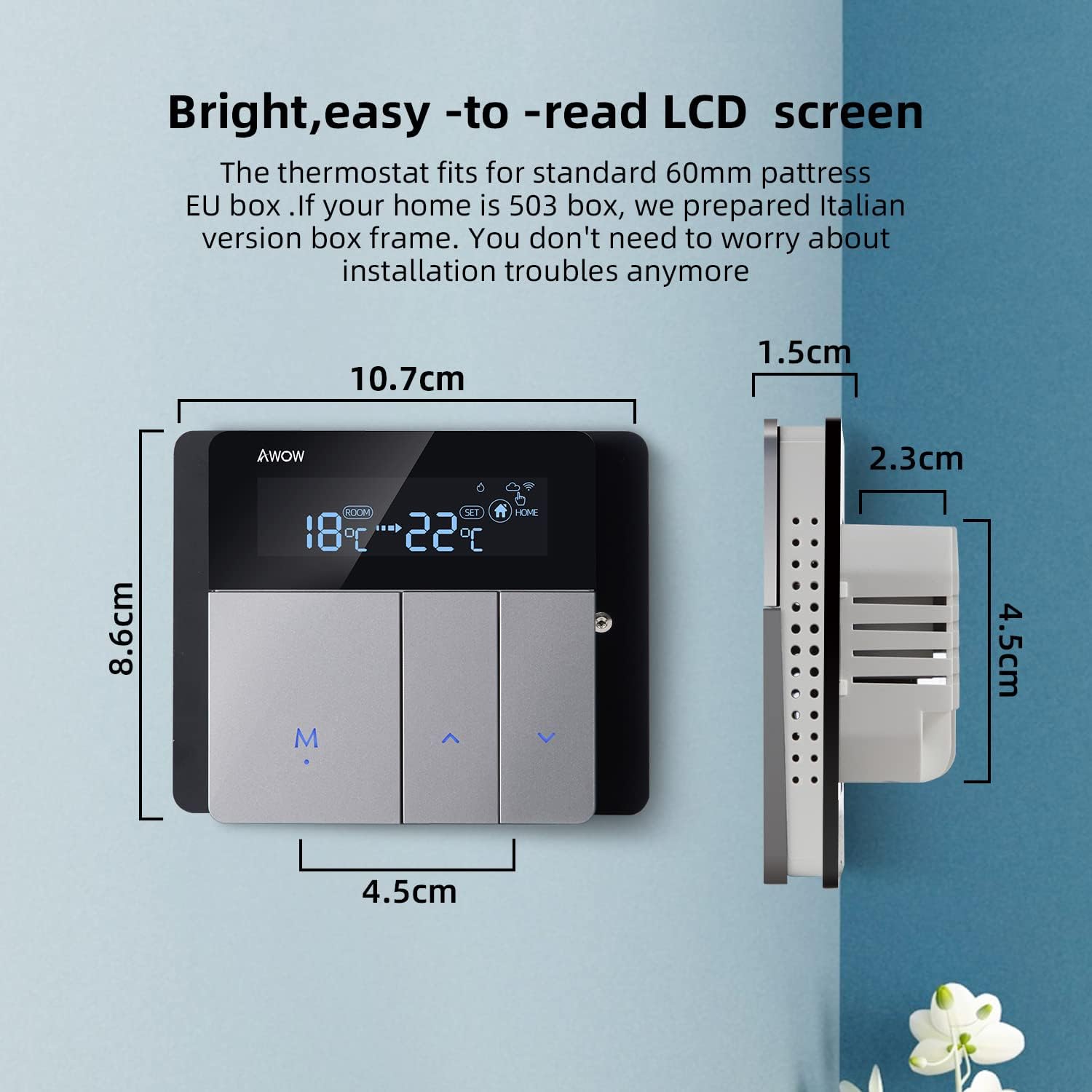
Image 2.1: Detailed wiring diagram showing connections for power supply (L, N) and boiler control (1, 2) on the back of the AWOW TH213 thermostat. The diagram also illustrates the thermostat's dimensions.
Pași de cablare:
- Opriți alimentarea principală cu energie a sistemului dumneavoastră de încălzire.
- Mount the thermostat base plate to the wall box (European 60mm or Italian 503).
- Connect the Live (L) and Neutral (N) wires from your 100-240V AC power supply to the corresponding terminals on the thermostat.
- Connect the two boiler control wires (often referred to as dry contacts) to terminals 1 and 2. These wires typically come from your boiler's thermostat input.
- Carefully attach the front panel of the thermostat to the base plate.
- Restabiliți alimentarea cu energie electrică a sistemului de încălzire.
- After power-up, press and hold the 'M' button to initiate the thermostat.

Image 2.2: Illustrative diagram demonstrating how the AWOW TH213 thermostat connects to a boiler, which then supplies heat to an underfloor heating system, ensuring a comfortable room temperature of 22°C.
2.3 Conexiune Wi-Fi
To enable smart features, connect your thermostat to your home Wi-Fi network using the Smart Life app.
- Descărcați aplicația „Smart Life” din App Store (iOS) sau Google Play Store (Android).
- Înregistrează-te sau conectează-te la contul tău Smart Life.
- Ensure your smartphone is connected to a 2.4 GHz Wi-Fi network. The thermostat does not support 5 GHz networks.
- Follow the in-app instructions to add a new device. The thermostat should enter pairing mode automatically or by following specific button presses (refer to the app for exact steps).
- Once connected, you can control and program your thermostat remotely.
3. Instrucțiuni de utilizare
3.1 Control manual
You can adjust the temperature directly on the thermostat unit:
- Utilizați Up şi Jos butoanele săgeată pentru a crește sau a reduce temperatura dorită.
- Apăsați tasta M button to cycle through different modes (e.g., Manual, Auto).
Image 3.1: The AWOW TH213 thermostat's LCD screen showing room temperature and set temperature, along with the 'M' (Mode) and arrow buttons for manual adjustments.
3.2 Controlul aplicației Smart Life
The Smart Life app provides comprehensive control and programming capabilities from your smartphone, allowing you to manage your heating from anywhere.

Image 3.2: A user interacting with the Smart Life mobile application on a smartphone to control their thermostat remotely, illustrating the convenience of managing home heating from any location.
3.3 Moduri programabile
The thermostat offers three programming options to optimize energy savings and comfort:
- 24-Hour Program: Set a consistent schedule for each day of the week.
- 5+2 Day Program: Separate schedules for weekdays (Monday-Friday) and weekends (Saturday-Sunday).
- Program de 7 zile: Customize the schedule for each individual day of the week.
These programs can be configured within the Smart Life app under the "Smart" mode setting. Common preset modes include "Wake," "Away," "Home," and "Sleep," allowing for quick adjustments based on your daily routine.

Image 3.3: A smartphone displaying the Smart Life app interface, highlighting the three programming options (24H, 5+2, 7 days) for the AWOW TH213 thermostat, along with examples of temperature settings for different scenarios like "Get up," "Away," "Go home," and "Sleep."
3.4 Control vocal (Alexa și Asistentul Google)
Integrate your AWOW TH213 thermostat with Amazon Alexa or Google Assistant for hands-free control.
- Ensure your thermostat is connected to the Smart Life app and your Alexa/Google Home device is set up.
- Enable the "Smart Life" skill/action in your Alexa or Google Home app.
- Discover devices. Your thermostat should appear.
- Acum puteți utiliza comenzi vocale precum:
- "Alexa, set the living room to 22 degrees."
- „Hei Google, care este temperatura în dormitor?”
- „Alexa, pornește încălzirea.”

Image 3.4: The AWOW TH213 thermostat mounted on a wall, with an Amazon Echo Dot nearby, illustrating its compatibility with Amazon Alexa and Google Assistant for voice-controlled temperature adjustments.
4. Întreținere
The AWOW TH213 thermostat requires minimal maintenance to ensure optimal performance.
- curatenie: Ștergeți ușor ecranul șiasinȘtergeți cu o cârpă moale și uscată. Evitați utilizarea de produse de curățare abrazive, solvenți sau spray-uri chimice, deoarece acestea pot deteriora afișajul sau componentele interne.
- Actualizări de software: Ensure the Smart Life app is updated to the latest version to benefit from new features and performance improvements. Firmware updates for the thermostat may also be available through the app.
- Ciclu de alimentare: If the thermostat becomes unresponsive, try turning off the main power supply to the heating system for a few minutes, then restore power.
5. Depanare
If you encounter issues with your AWOW TH213 thermostat, refer to the following common problems and solutions:
| Problemă | Cauza posibila | Soluţie |
|---|---|---|
| Termostatul nu pornește. | Fără alimentare cu energie electrică; cablare incorectă. | Check main circuit breaker. Verify L and N wiring connections. Ensure 'M' button is pressed after power-up. |
| Nu se poate conecta la Wi-Fi. | Bandă Wi-Fi incorectă; semnal slab; parolă incorectă. | Ensure your router is broadcasting a 2.4 GHz Wi-Fi signal. Move thermostat closer to router. Double-check Wi-Fi password. Restart router and thermostat. |
| Încălzirea nu se pornește/oprește conform programării. | Incorrect programming; manual override; wiring issue to boiler. | Review programming schedules in the Smart Life app. Check if the thermostat is in manual mode. Verify boiler control wiring (terminals 1 and 2). |
| Inaccurate temperature readings or heating behavior. | Sensor calibration needed; thermostat placed in an unsuitable location; hysteresis. | The thermostat has an NTC temperature sensor with 1°C accuracy. If readings seem off, check for drafts or direct heat sources near the thermostat. The Smart Life app may offer a temperature calibration option. Note that thermostats often have a built-in hysteresis (temperature differential) to prevent rapid cycling of the heating system. |
| Display shows "F" or is blank/faulty. | Internal error; display damage. | Perform a power cycle (turn off/on main power). If the issue persists, contact customer support. |
| Comanda vocală nu funcționează. | Smart Life skill/action not enabled; device not discovered; incorrect commands. | Ensure the Smart Life skill/action is enabled in your Alexa/Google Home app. Redo device discovery. Use correct voice commands as specified in the app. |
6. Specificații
| Caracteristică | Detaliu |
|---|---|
| Marca | AWOW |
| Numărul de model | TH213 |
| Culoare | Gri, Negru |
| Dimensiuni | 11 x 11 x 6 cm |
| Greutate | 240 g |
| Putere | 1.5 wați |
| Voltage | 100-240V AC, 50/60Hz |
| Max Switching Power | 3A |
| Tehnologia de conectivitate | Wi-Fi (doar 2.4 GHz) |
| Tip controler | Amazon Alexa, Asistent Google |
| Tip de afișare | LCD cu iluminare de fundal |
| Metoda de control | App, Voice, Manual |
| Senzor de temperatură | NTC |
| Precizia temperaturii | ±1°C |
| Interval de temperatură reglabil | 5°C până la 35°C |


