1. Introducere
Thank you for choosing the HANMATEK S1 DM20 Digital Multimeter. This intelligent multimeter is designed for safe and accurate measurements of various electrical parameters. Please read this manual thoroughly before use to ensure proper operation and to prevent potential hazards.
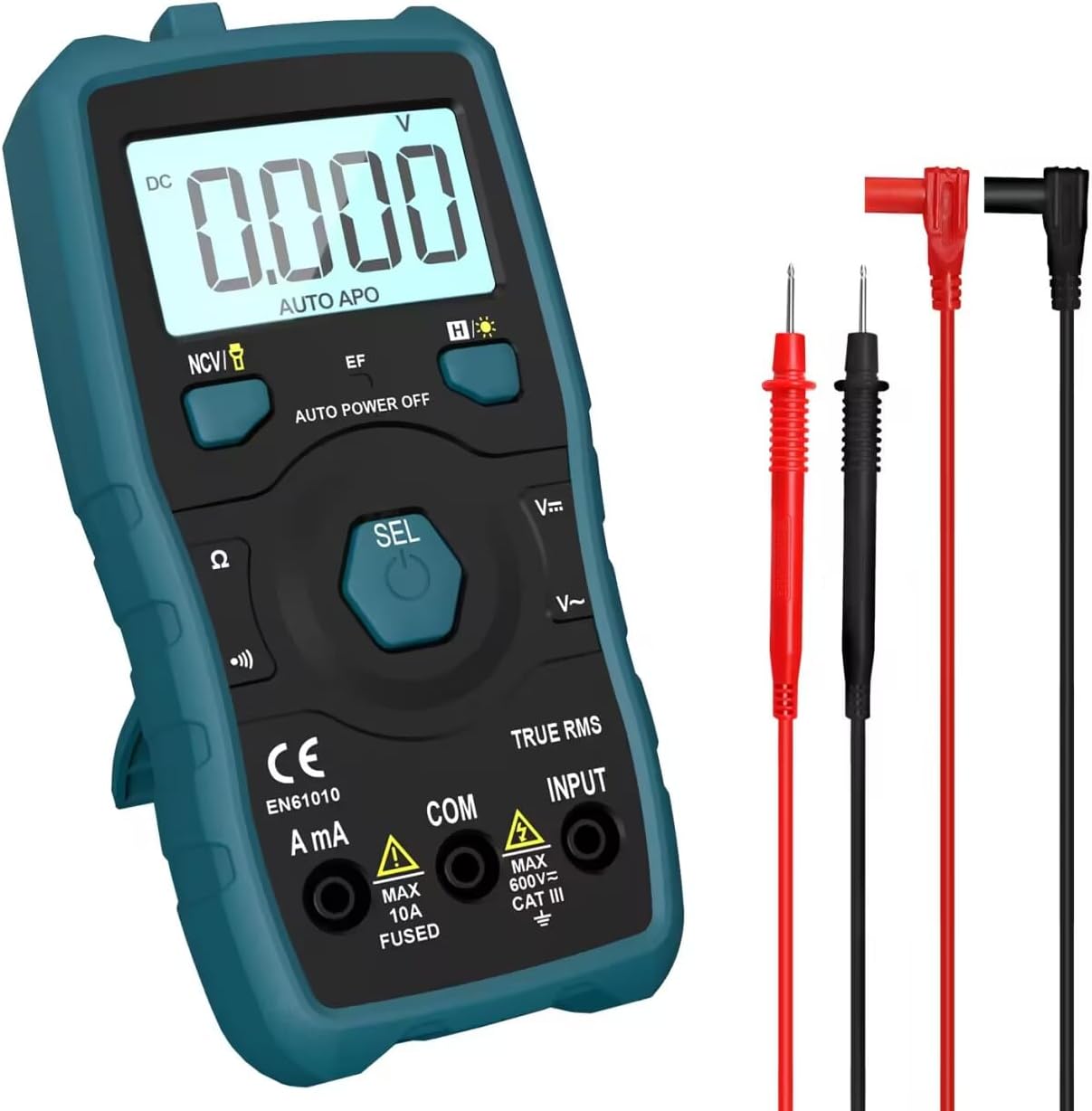
Image 1.1: HANMATEK S1 DM20 Digital Multimeter with included test leads.
2. Informații de siguranță
AVERTISMENT: Nerespectarea acestor instrucțiuni de siguranță poate duce la electrocutare, incendiu sau vătămări corporale.
- To prevent erroneous readings and avoid electric shock or personal injury, replace the battery as soon as the low battery voltagApare simbolul e.
- To prevent electric shock or personal injury, turn off the device and ensure test leads are disconnected from the circuit under test before opening the battery cover to replace the battery.
- Do not measure any AC or DC voltage exceeding 600V to prevent electric shock or damage to the instrument.
- Verificați întotdeauna multimetrul și cablurile de testare pentru a depista eventualele deteriorări înainte de utilizare. Nu utilizați multimetrul dacă este deteriorat.
- Ensure your hands are dry when operating the multimeter.
- Nu utilizați multimetrul în medii cu gaze explozive, vapori sau praf.
3. Caracteristicile și componentele produsului
The HANMATEK S1 DM20 Digital Multimeter is equipped with several features for versatile measurements. Familiarize yourself with the components shown below.
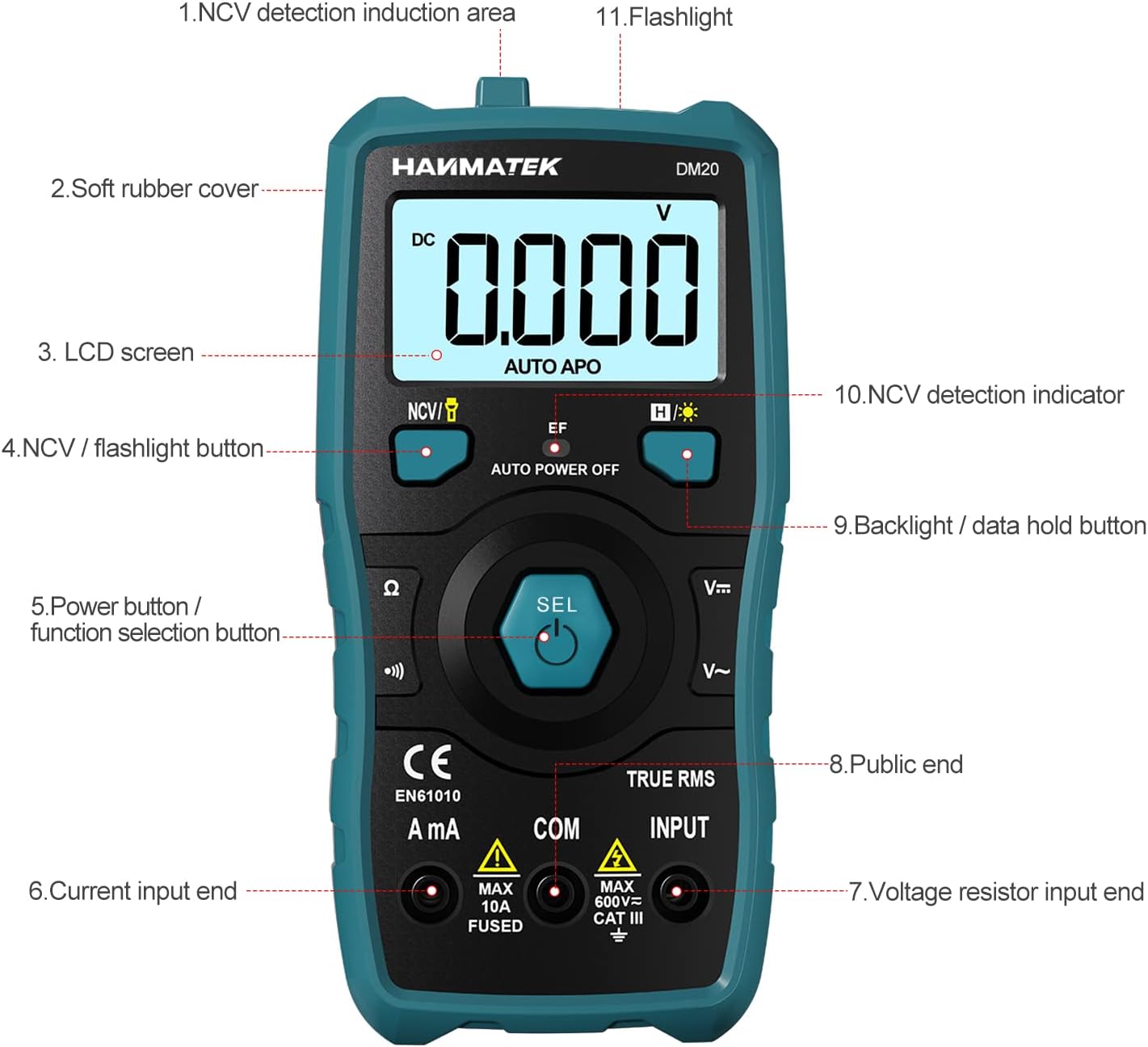
Imaginea 3.1: Față view of the multimeter with labeled components.
- NCV Detection Induction Area
- Soft Rubber Cover
- Ecran LCD
- NCV / Flashlight Button
- Power Button / Function Selection Button (SEL)
- Current Input End (A mA)
- Voltage Resistor Input End (INPUT)
- Public End (COM)
- Backlight / Data Hold Button
- NCV Detection Indicator
- Lanternă

Imaginea 3.2: Pesteview of multimeter functions including AC/DC Voltage, AC/DC Current, Resistance, Continuity, Backlight, Data Hold, NCV, Flashlight, and 6000 Count display.
4. Configurare
4.1 Conținutul pachetului
Înainte de a începe, asigurați-vă că toate articolele sunt prezente în pachet:
- HANMATEK S1 DM20 Digital Multimeter
- 3 baterii AAA de 1.5 V
- Cabluri de testare (roșu și negru)
- Manual de utilizare

Image 4.1: Package contents including the multimeter, batteries, test leads, and manual.
4.2 Instalarea bateriei
The multimeter requires 3 x 1.5V AAA batteries. Follow these steps to install them:
- Asigurați-vă că multimetrul este oprit și că sondele de testare sunt deconectate.
- Localizați compartimentul bateriei pe spatele multimetrului.
- Folosiți o șurubelniță pentru a deschide capacul bateriei.
- Insert the 3 AAA batteries, observing the correct polarity (+/-).
- Puneți la loc capacul bateriei și fixați-l cu șurubul.

Imaginea 4.2: Detaliată view of the multimeter's rear, showing the battery bay and stable holder.
5. Instrucțiuni de utilizare
The HANMATEK S1 DM20 features auto-ranging for most measurements, simplifying operation.
5.1 Pornire/Oprire
- Apăsați tasta SEL button to power on the multimeter.
- Multimetrul se va opri automat după o perioadă de inactivitate pentru a conserva bateria.
- Pentru a opri manual alimentarea, apăsați și mențineți apăsat butonul SEL buton.
5.2 Selectarea funcției
The multimeter automatically detects the measurement type (voltage, resistance, continuity) when test leads are connected. For specific functions or to switch between AC/DC, press the SEL butonul pentru scurt timp.
5.3 Măsurători de bază
Conectați cablul de testare roșu la INTRARE terminalul și testul negru conduc la COM terminal for most measurements.
- Voltage (AC/DC): Connect test leads in parallel to the circuit or component. The multimeter will automatically detect AC or DC voltage.
- Current (AC/DC): Connect test leads in series with the circuit. Use the A mA terminal for current measurements. Ensure the circuit is de-energized before connecting.
- Rezistenţă: Connect test leads across the component. Ensure the component is isolated from power.
- Continuitate: Connect test leads across the circuit. A buzzer will sound if continuity is detected.
- Dioda: Connect test leads across the diode.
- Frecvenţă: Connect test leads to the signal source.

Image 5.1: Demonstrations of NCV testing, resistance test, current measuring, voltage measuring, and on-off test.
5.4 fără contact voltage (NCV) Detectie
Funcția NCV permite detectarea volumului de curent alternativtage fără contact direct.
- Apăsați tasta NCV / Flashlight pentru a activa modul NCV.
- Place the NCV detection area (top of the multimeter) near the conductor.
- Dacă AC voltage is detected, the NCV LED will flash, and the buzzer will sound. The LCD screen will display segments ('-' to '----') indicating signal strength.

Image 5.2: NCV function detecting voltage in a live line versus a null line.
5.5 Backlight and Data Hold
- Iluminare de fundal: Apăsați tasta Backlight / Data Hold button briefly to turn the LCD backlight on/off.
- Reținere de date: Țineți apăsat butonul Backlight / Data Hold Apăsați butonul pentru a îngheța citirea curentă pe afișaj. Apăsați din nou pentru a o elibera.
5.6 Lanterna
- Țineți apăsat butonul NCV / Flashlight button to turn the built-in flashlight on/off.
6. Întreținere
- Curatenie: Wipe the multimeter with a damp cârpă și detergent blând. Nu folosiți abrazivi sau solvenți.
- Depozitare: Store the multimeter in a dry, cool place away from direct sunlight. If storing for extended periods, remove the batteries to prevent leakage.
- Înlocuirea bateriei: Replace batteries promptly when the low battery indicator appears to ensure accurate readings. Refer to Section 4.2 for instructions.
7. Depanare
- Fără afișaj/PornitVerificați instalarea bateriilor și asigurați-vă că bateriile nu sunt descărcate. Înlocuiți-le dacă este necesar.
- Lecturi inexacte: Ensure test leads are properly connected and not damaged. Verify the correct measurement function is selected (though auto-ranging handles most). Check battery level.
- No NCV Detection: Ensure NCV mode is activated. The detection area must be close to the AC voltage sursa.
- Auto Power Off Too Soon: This is a power-saving feature. The device will power off after a period of inactivity.
8. Specificații
| Caracteristică | Caietul de sarcini |
|---|---|
| Numărul de model | DM20 |
| Afișează numărătorii | 4000 |
| Evaluare de siguranță | 600V CAT II, Pollution Degree 2, IEC61010 |
| Sursa de alimentare | 3 baterii AAA de 1.5 V |
| Dimensiuni | 147 mm x 71 mm x 45 mm (7.1 x 4.5 x 14.7 cm) |
| Greutate | 220 g |
| Caracteristici speciale | NCV, Auto-Ranging, Data Hold, Auto Power-Off, Backlight, Flashlight |
9. Garanție și asistență
The HANMATEK S1 DM20 Digital Multimeter comes with a 24 luni garantie de la data achiziției. Această garanție acoperă defectele de fabricație în condiții normale de utilizare.
For technical support, warranty claims, or any inquiries, please contact HANMATEK customer service through their official channels or the retailer where the product was purchased. You can find more information on the HANMATEK Brand Store.


