1. Introducere
This manual provides comprehensive instructions for the installation, operation, and maintenance of your Orbit B-Hyve Smart Hose Faucet Irrigation Controller and Wi-Fi Hub. This system allows for smart control of your hose faucet watering from a smart device, optimizing water usage and plant health.
2. Produs terminatview
The Orbit B-Hyve system consists of two primary components:
- B-Hyve Smart Hose Faucet Timer: This device attaches to your outdoor hose faucet and controls water flow. It features a manual on/off button.
- Wi-Fi Hub: This indoor device connects to your home Wi-Fi network and communicates wirelessly with the hose faucet timer, enabling remote control and smart features via the B-Hyve app.

Figure 2.1: The Orbit B-Hyve Smart Hose Faucet Irrigation Controller, its accompanying Wi-Fi Hub, and a smartphone displaying the B-Hyve application interface.
3. Instrucțiuni de configurare
3.1. Download the B-Hyve App
The B-Hyve app is essential for controlling and programming your irrigation system. It is available for both Android and iOS devices.
- Caută "B-Hyve" in your device's app store (Google Play Store for Android, Apple App Store for iOS).
- Download and install the free B-Hyve app.
- Follow the on-screen prompts to create an account or log in if you already have one.
3.2. Install the Wi-Fi Hub
The Wi-Fi Hub connects your timer to your home network.
- Plug the Wi-Fi Hub into an indoor electrical outlet within range of your home Wi-Fi router.
- Ensure the hub is placed in a location where it can maintain a stable connection to both your Wi-Fi network and the hose faucet timer.
- The hub's indicator light will show its connection status. Refer to the app for specific pairing instructions.

Figure 3.2: The Orbit B-Hyve Wi-Fi Hub plugged into a standard indoor electrical outlet, ready for network connection.
3.3. Attach the Hose Faucet Timer
Proper attachment ensures secure operation and prevents leaks.
- Thread the hose faucet timer onto your outdoor hose faucet. Hand-tighten only to prevent damage.
- Ensure a snug fit to prevent leaks. Do not overtighten.
- Connect your garden hose to the bottom outlet of the timer.
- Install the required batteries into the timer unit as per the instructions in the B-Hyve app or the timer's battery compartment.
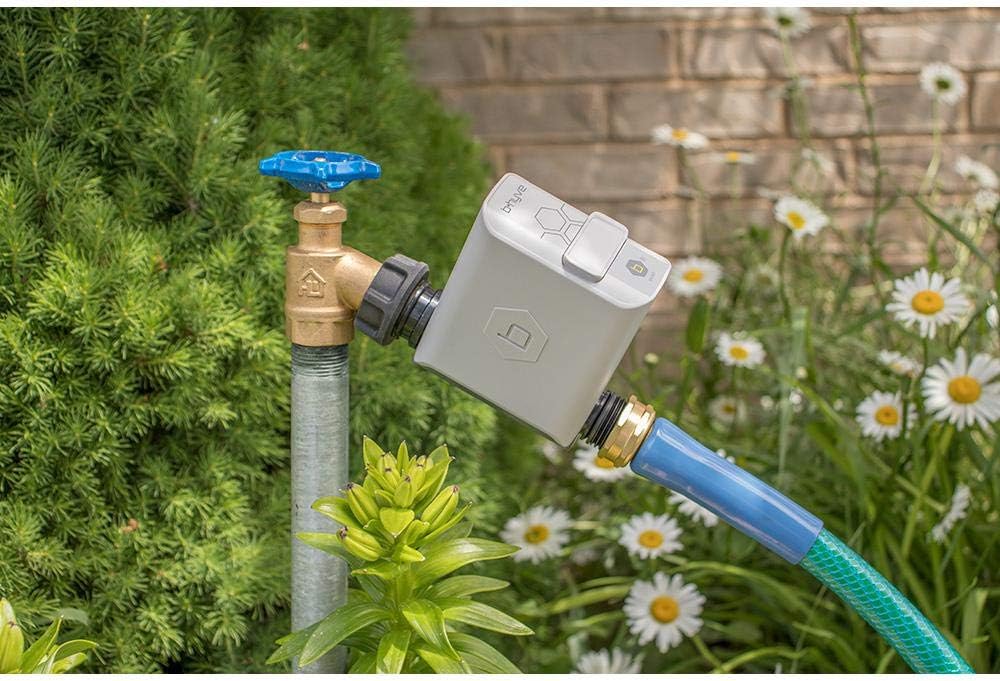
Figure 3.3: The Orbit B-Hyve Smart Hose Faucet Irrigation Controller securely attached to an outdoor water faucet, with a garden hose connected to its output.
3.4. Pair Timer with App
Follow the in-app instructions to pair your hose faucet timer with the Wi-Fi Hub and the B-Hyve app. This typically involves selecting "Add Device" in the app and following the guided steps.
4. Instrucțiuni de utilizare
4.1. Programming Schedules via B-Hyve App
The B-Hyve app provides comprehensive control over your watering schedules.
- Open the B-Hyve app on your smart device.
- Select your hose faucet timer from the device list.
- Navigate to the "Programs" or "Schedules" section to create, edit, or delete watering programs.
- Set start times, durations, and days of the week for each watering zone.
4.2. Smart Watering Features
The B-Hyve system can optimize watering based on local weather conditions.
- Enable "Smart Watering" in the app settings for your timer.
- The system will receive instant weather updates and adjust watering schedules to avoid overwatering during rain or to provide additional water during dry periods.
- This feature aims to conserve water and reduce your water bill.
4.3. Udare manuală
You can initiate watering manually directly from the timer or through the app.
- On the Timer: Press the "on/off" button on the hose faucet timer to manually start or stop watering. The duration for manual watering can often be preset in the app.
- Prin aplicație: In the B-Hyve app, select your timer and choose the "Manual Watering" option to specify duration and start watering immediately.
4.4. Extinderea sistemului
Additional B-Hyve smart valves can be added to create multiple watering zones.
- Each additional smart valve will connect to the existing Wi-Fi Hub.
- These timers network together to boost signal strength, eliminating the need for additional repeaters.
5. Întreținere
- Înlocuire baterie: The hose faucet timer requires batteries for operation. Replace them when the app indicates low battery or if the timer stops responding. Use the recommended battery type as specified in the app or on the device.
- winterization: Before freezing temperatures occur, disconnect the hose faucet timer from the faucet and store it indoors in a dry, protected area. Remove batteries to prevent corrosion.
- curatenie: Periodically inspect the timer for debris or mineral buildup, especially around the inlet screen. Clean as needed to ensure proper water flow.
- Integritatea conexiunii: Ensure all connections (faucet to timer, timer to hose) are secure to prevent leaks. Avoid overtightening.
6. Depanare
- Timer Not Connecting to Wi-Fi / App:
- Ensure the Wi-Fi Hub is plugged in and its indicator light shows a stable connection.
- Verify the hub is within range of your home Wi-Fi router and the hose faucet timer.
- Check the timer's batteries; replace if low.
- Try power cycling the Wi-Fi Hub (unplug and plug back in).
- Restart the B-Hyve app on your smart device.
- Cronometrul nu udă:
- Check if the faucet is turned on.
- Verify battery level in the timer.
- Ensure there are no active "rain delays" or "smart watering" adjustments preventing scheduled watering.
- Inspect the timer for any physical obstructions or damage.
- Scurgeri la conexiuni:
- Asigurați-vă că toate conexiunile sunt strânse manual în siguranță.
- Verificați dacă șaibele sau inelele O sunt deteriorate și înlocuiți-le dacă este necesar.
- Avoid overtightening, which can strip threads or crack plastic.
- App is Difficult to Use / Buggy:
- Ensure your B-Hyve app is updated to the latest version.
- Check your smart device's operating system for available updates.
- Dacă problemele persistă, încercați să reinstalați aplicația.
7. Specificații
| Marca | Orbită |
| Model | B-Hyve Smart Hose Faucet Irrigation Controller/Wi-Fi Hub |
| ASIN | B087JSZC72 |
| UPC | 046878218307 |
| Greutatea articolului | 12.7 uncii |
| Dimensiuni pachet | 11.3 x 7.64 x 2.52 inci |
| Tip de afișare | Digital |
| Culoare | Verde, Alb |
| Prima disponibilă | 4 august 2020 |
8. Garanție și asistență
Information regarding product warranty and customer support is not available in the provided data. Please refer to the official Orbit website or the product packaging for detailed warranty terms and contact information for technical support.
Pentru asistență suplimentară, puteți vizita Magazinul Orbit pe Amazon.


