1. Introducere
This manual provides comprehensive instructions for the setup, operation, and maintenance of your Behringer Q802USB Premium 8-Input 2-Bus Mixer. The Q802USB is a versatile and feature-packed analog mixer designed for various audio applications, including small project recording, rehearsals, and podcasting. It features 8 inputs, including 2 mono channels with XENYX mic preamps and 2 stereo channels, along with a built-in USB/audio interface.
Vă rugăm să citiți cu atenție acest manual înainte de a utiliza dispozitivul pentru a asigura utilizarea corectă și pentru a maximiza performanța și longevitatea acestuia.
2. Caracteristici cheie
- Premium ultra-low noise, high headroom analog mixer.
- Two state-of-the-art XENYX mic preamps, comparable to stand-alone boutique preamps.
- Studio-grade compressors with super-easy "one-knob" functionality and control LED for professional vocal and instrumental sound.
- Built-in stereo USB/Audio Interface for direct connection to your computer.
- 8 total input channels.
- Design compact și durabil.
3. Ce se află în cutie
La despachetare, vă rugăm să verificați dacă toate componentele enumerate mai jos sunt prezente și în stare bună:
- Behringer Q802USB 8-Input 2-Bus Mixer
- Adaptor de alimentare
- Cablu USB
- Manual de utilizare (acest document)
If any items are missing or damaged, please contact your retailer or Behringer customer support immediately.
4. Produs terminatview

Figura 4.1: Faţă view of the Behringer Q802USB mixer, showing all input channels, controls, and the main section.
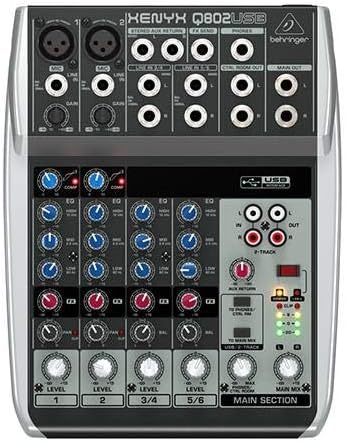
Figura 4.2: De sus în jos view of the Behringer Q802USB mixer, highlighting the layout of knobs, faders, and input/output jacks.

Figura 4.3: Spate view of the Behringer Q802USB mixer, showing the power input, USB port, and serial number label.
5. Configurare
5.1 Conexiune la alimentare
- Asigurați-vă că întrerupătorul de alimentare al mixerului este în poziția OPRIT.
- Connect the included power adapter to the "AC POWER IN" port on the rear of the mixer.
- Conectați adaptorul de alimentare la o priză electrică adecvată.
5.2 Conexiuni audio
The Q802USB offers various input and output options:
- Intrări de microfon (Canalele 1-2): Use XLR cables to connect microphones to the MIC inputs. Ensure phantom power (+48V) is only enabled if your microphones require it (e.g., condenser microphones).
- Intrări de linie (Canalele 1-2): Folosiți cabluri TRS sau TS de 1/4" pentru instrumente sau dispozitive de nivel de linie.
- Intrări stereo de linie (canalele 3/4, 5/6): Use 1/4" TS cables for stereo instruments or playback devices.
- Ieșiri principale: Conectați difuzoarele principale sau ampamplificator la mufele MAIN OUT (TRS de 1/4").
- Ieșiri din camera de control: Connect studio monitors to the CTRL ROOM OUT (1/4" TS) jacks.
- Ieșire căști: Connect headphones to the PHONES (1/4" TRS) jack.
5.3 Conexiune USB
To use the Q802USB as an audio interface with your computer:
- Connect one end of the USB cable to the USB port on the rear of the mixer.
- Conectați celălalt capăt al cablului USB la un port USB disponibil de pe computer.
- The mixer should be recognized automatically by most modern operating systems. For advanced features or specific drivers, visit Behringer's official website-ul.
6. Instrucțiuni de utilizare
6.1 Operare de bază
- Pornire: After all connections are made, switch the mixer's power to ON.
- Gain control: Adjust the GAIN knob for each input channel to set the input level. Aim for the signal to peak around 0 dB on the level meters during the loudest parts of your audio.
- Compresor (Canalele 1-2): Use the COMP knob to apply compression to microphone inputs. Turn clockwise to increase compression.
- Egalizare (EQ): Use the HIGH, MID, and LOW knobs on each channel to adjust the tonal balance.
- Level Faders/Knobs: Adjust the LEVEL faders (or rotary knobs for stereo channels) to control the volume of each channel in the main mix.
- Mix principal: Use the MAIN MIX fader to control the overall output volume of the mixer.
- Headphone/Control Room Level: Adjust the PHONES/CTRL ROOM knob to set the monitoring volume.
6.2 USB Audio Interface Usage
When connected to a computer via USB, the Q802USB acts as a 2-in/2-out audio interface:
- Înregistrare: The main mix output of the mixer is sent to your computer via USB. You can record this stereo signal in your digital audio workstation (DAW) software.
- Redare: Audio from your computer can be routed back to the mixer via USB. Use the 2-TRACK/USB TO MAIN MIX button to send this audio to the main mix, or 2-TRACK/USB TO PHONES/CTRL ROOM to send it only to your headphones/control room monitors.
7. Întreținere
Proper maintenance ensures the longevity and optimal performance of your Behringer Q802USB mixer.
- curatenie:
- Deconectați întotdeauna curentul înainte de curățare.
- Use a soft, dry, lint-free cloth to wipe down the exterior.
- Pentru murdăria persistentă, o ușoară damp Se poate folosi o lavetă cu săpun blând, urmată de o lavetă uscată.
- Avoid abrasive cleaners, solvents, or waxes, as they can damage the finish.
- Depozitare:
- Depozitați mixerul într-un loc răcoros și uscat, ferit de lumina directă a soarelui și de temperaturi extreme.
- Protect it from dust and moisture when not in use, ideally with a dust cover.
- Ventilare: Asigurați o circulație adecvată a aerului în jurul unității. Nu blocați orificiile de ventilație.
- Organizare de cabluri: Avoid tightly bending or crimping cables, especially near connectors, to prevent damage.
8. Depanare
If you encounter issues with your Q802USB mixer, refer to the following common problems and solutions:
| Problemă | Cauza posibila | Soluţie |
|---|---|---|
| Fără putere | Power cable not connected; power outlet faulty; mixer power switch off. | Verificați conexiunea cablului de alimentare; încercați o altă priză; asigurați-vă că întrerupătorul este pornit. |
| Fără ieșire de sunet | Main Mix fader down; channel level knobs down; output cables disconnected; incorrect input selection. | Increase Main Mix fader; increase channel level knobs; check all audio cable connections; ensure correct input is selected. |
| Sunet distorsionat | Câștig de intrare prea mare; nivel de ieșire prea mare; cablu defect. | Reduce input GAIN; reduce Main Mix fader; try different cables. |
| Sunetul USB nu funcționează | USB cable disconnected; incorrect audio settings on computer; driver issue. | Check USB cable connection; verify audio input/output settings in your computer's sound preferences and DAW; install/update Behringer drivers if necessary. |
If the problem persists after trying these solutions, please contact Behringer customer support.
9. Specificații
| Caracteristică | Detaliu |
|---|---|
| Dimensiunile produsului | 14 x 12.2 x 4.3 inci |
| Greutatea articolului | 2.2 lire sterline (aproximativ 1 kilogram) |
| Numărul de canale | 8 (2 mono, 2 stereo) |
| Mic Preamps | 2 x XENYX |
| Compresoare | Studio-grade "one-knob" on mono channels |
| Interfață USB | Built-in stereo USB/Audio Interface |
| Tehnologia de conectivitate | USB |
| Sursa de alimentare | Electric cu fir |
| Numărul de model | Q802USB |
10. Garanție și asistență
For detailed warranty information, please refer to the warranty card included with your product or visit the official Behringer website. Behringer provides comprehensive support for its products.
- Suport online: Vizita Asistență Behringer pentru întrebări frecvente, descărcări de drivere și înregistrarea produsului.
- Inregistrarea produsului: Register your product online to receive the latest updates and warranty information.
- Contact: For technical assistance or service, please contact Behringer customer service through their website-ul.
You can also visit the official Behringer store on Amazon for more information and related products: Magazin Behringer.


