Introducere
Thank you for choosing the Tracer Roadster 4 in 1 Steering Wheel. This manual provides detailed instructions for setting up, operating, maintaining, and troubleshooting your new racing wheel. Please read this manual thoroughly before use to ensure optimal performance and longevity of your device.
The Tracer Roadster 4 in 1 Steering Wheel is designed for an immersive gaming experience, compatible with various platforms including PlayStation 4 and Windows PC. It features a responsive steering wheel, integrated shifter, and a pedal set for realistic control.
Conținutul pachetului
- Tracer Roadster 4 in 1 Steering Wheel
- Set pedale
- Manual de utilizare (acest document)
Ghid de instalare
Conectarea la PlayStation 4 (PS4)
- Connect the steering wheel's USB cable to an available USB port on your PS4 console.
- Power on your PS4 console. The red LED on the steering wheel will illuminate, indicating power.
- Connect the steering wheel to your PS4 controller using a microUSB cable (not included). This step is crucial for authentication.
- Apăsați tasta ACASĂ button on the steering wheel. The green LED will illuminate, indicating successful connection and readiness for use.
Conectarea la PC (Windows)
- Connect the steering wheel's USB cable to an available USB port on your Windows PC.
- The system should automatically detect and install the necessary drivers. If not, please refer to the manufacturer's website pentru descărcări de drivere.
- Once drivers are installed, the steering wheel will be ready for use with compatible PC racing games.

Figure 1: The Tracer Roadster 4 in 1 Steering Wheel, including the main wheel unit, integrated shifter, and separate pedal set. This image shows the complete setup ready for connection.
Instrucțiuni de operare
Comenzi ale volanului
The steering wheel features a full range of motion for precise control in racing games. It includes various buttons and a D-pad for in-game navigation and actions, mimicking a standard game controller layout.
- Pad direcțional (D-Pad): For menu navigation and specific in-game controls.
- Action Buttons (X, Circle, Square, Triangle / A, B, X, Y): Butoane de acțiune standard pentru jocuri.
- L1/R1, L2/R2 Buttons: Shoulder buttons, often used for shifting gears or other actions.
- Butonul HOME: PS4 system menu access.
- Butonul PROG: For programming specific functions (refer to game-specific instructions).
- Touchpad: Integrated touchpad for additional control options, especially on PS4.
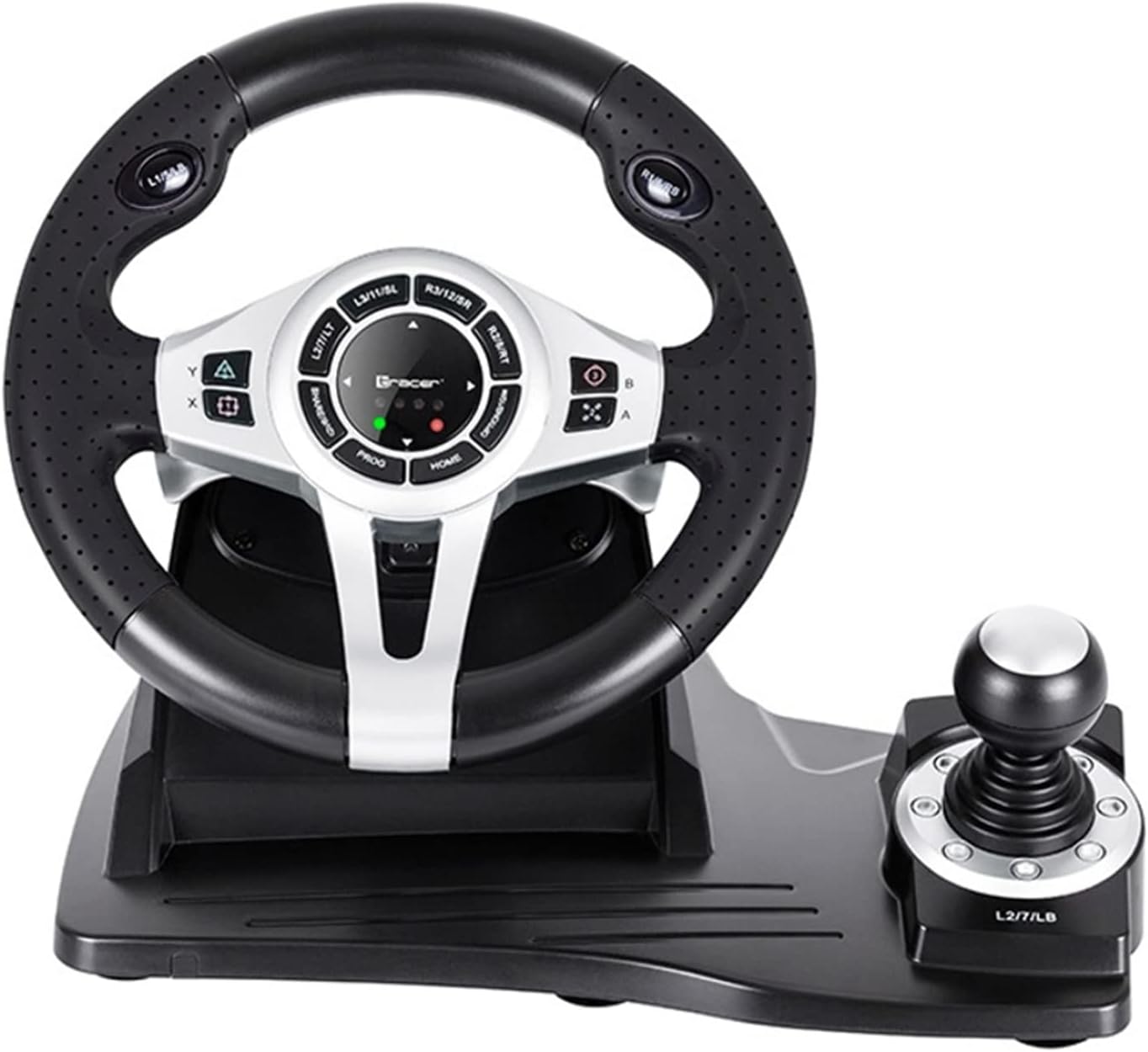
Figura 2: O descriere detaliată view of the central control panel on the steering wheel, showing the various buttons, D-pad, and indicator lights. The integrated shifter is visible to the right.
Set pedale
The separate pedal set includes an accelerator and brake pedal for realistic driving simulation. Ensure the pedal set is placed on a stable surface to prevent slipping during intense gameplay.

Figure 3: The standalone pedal unit, featuring both accelerator and brake pedals. The textured base provides grip to prevent movement during use.
Întreținere și îngrijire
- curatenie: Use a soft, dry cloth to clean the surface of the steering wheel and pedals. For stubborn dirt, a slightly damp Se poate folosi o cârpă, dar asigurați-vă că nu pătrunde umezeală în componentele interne.
- Depozitare: Când nu îl utilizați, depozitați dispozitivul într-un loc răcoros și uscat, ferit de lumina directă a soarelui și de temperaturi extreme.
- Evitați lichidele: Nu expuneți dispozitivul la apă sau alte lichide.
- Manipulați cu grijă: Evitați scăderea sau supunerea dispozitivului la impacturi puternice.
Depanare
| Problemă | Cauza posibila | Soluţie |
|---|---|---|
| Steering wheel not recognized by PS4. | Incorrect connection or authentication issue. | Ensure the steering wheel's USB cable is securely connected to the PS4. Verify the microUSB cable connection between the steering wheel and the PS4 controller. Press the ACASĂ butonul de pe volan. |
| No response from steering wheel on PC. | Drivers not installed or USB port issue. | Try a different USB port. Check Device Manager for driver status. Reinstall drivers if necessary from the manufacturer's website-ul. |
| LED indicators not lighting up. | No power or connection issue. | Ensure the USB cable is firmly connected to the console/PC. Check if the console/PC is powered on. |
| Pedals not responding. | Loose connection to the steering wheel. | Verify that the pedal unit's cable is securely plugged into the steering wheel base. |
Specificații
| Caracteristică | Detaliu |
|---|---|
| Marca | Trasor |
| Numele modelului | Roadster 4 in 1 |
| Numărul de model | TRAJOY46524 |
| Tehnologia de conectivitate | USB |
| Dispozitive compatibile | PlayStation 4, Windows PC |
| Tip controler | Volan |
| Culoare | Negru |
| Caracteristica specială | Touchpad |
| Numărul de butoane | 8 (excluding D-pad and shifter controls) |
| Greutatea articolului | 2 kilograme |
| Dimensiuni produs (L x l x H) | 2.8 x 24.6 x 16.5 cm |
Garanție și suport
For warranty information and technical support, please refer to the official Tracer website-ul web sau contactați distribuitorul. Păstrați dovada achiziției pentru orice reclamații în garanție.
Pentru asistență suplimentară, puteți vizita pagina produsului pe Amazon.com.be.


