1. Introducere
Thank you for choosing the AstroAI Digital Tire Pressure Gauge, Model GL-0801B. This device is designed to provide quick and accurate tire pressure readings for a variety of vehicles. Proper tire pressure is crucial for safe driving, reduced tire wear, and extended tire life.
This manual provides detailed instructions for the setup, operation, maintenance, and troubleshooting of your new tire pressure gauge. Please read it thoroughly before use and retain it for future reference.

Image: The AstroAI Digital Tire Pressure Gauge in black, shown with two AAA batteries and a brass Presta valve adapter.
2. Configurare
2.1 Instalarea bateriei
Your AstroAI Digital Tire Pressure Gauge requires 2 AAA batteries for operation. These batteries are included with your purchase. To install or replace batteries:
- Locate the battery compartment on the back of the gauge.
- Glisați deschideți capacul bateriei.
- Introduceți 2 baterii AAA, asigurându-vă că polaritatea este corectă (+/-).
- Închideți bine capacul bateriei.
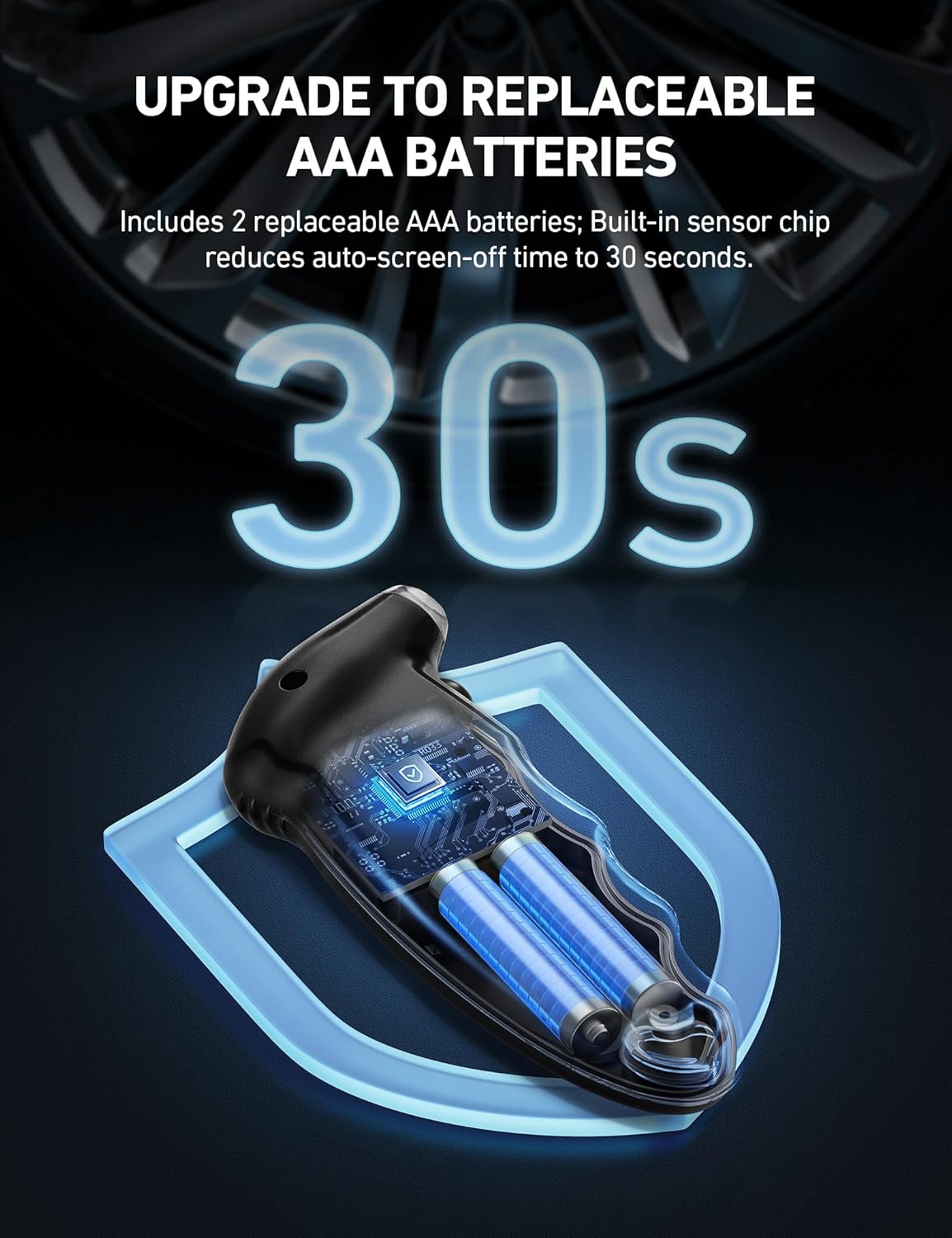
Imagine: O imagine internă view of the AstroAI Digital Tire Pressure Gauge illustrating the placement of two AAA batteries.
2.2 Presta-to-Schrader Adapter
The gauge comes with a Presta-to-Schrader adapter, allowing compatibility with both Presta and Schrader valves. This adapter is typically used for bicycles with Presta valves.

Image: The digital tire pressure gauge demonstrating its use on both a bicycle tire (with Presta adapter) and a car tire (Schrader valve).
3. Instrucțiuni de utilizare
3.1 Power On/Off and Unit Selection
- Press the "ON/UNIT/OFF" button to turn on the gauge. The LCD screen will display "0.0" and the selected unit.
- To change measurement units (PSI, BAR, Kgf/cm², KPA), press the "ON/UNIT/OFF" button repeatedly until your desired unit is displayed.
- The gauge will automatically shut off after 20 seconds of inactivity to conserve battery life. To manually turn off the gauge, press and hold the "ON/UNIT/OFF" button for approximately 3 seconds.
3.2 Measuring Tire Pressure
- Ensure the gauge is powered on and the correct unit is selected.
- Press the gauge's nozzle firmly onto the tire valve stem. You will hear a slight hiss as air escapes; this is normal. Maintain a tight seal to prevent air leakage.
- The reading will be displayed on the backlit LCD screen. The illuminated nozzle assists in low-light conditions.
- Remove the gauge from the valve stem to easily read the measurement. The reading will hold on the screen for a few seconds.

Image: A visual guide demonstrating the simple 1-button operation for powering on, calibrating, measuring, and reading tire pressure.

Image: The gauge's illuminated nozzle and backlit LCD display ensure clear readings even in low-light environments.
3.3 Compatibilitatea vehiculului
The AstroAI Digital Tire Pressure Gauge is versatile and compatible with most vehicles, including cars, trucks, motorcycles, and bicycles (with the included Presta-to-Schrader adapter).

Image: Recommended tire pressure ranges for different vehicle types, highlighting the gauge's broad applicability.
4. Întreținere
4.1 Înlocuirea bateriei
When the battery indicator on the LCD screen shows low power, replace the 2 AAA batteries as described in Section 2.1. Always use fresh batteries for optimal performance.
4.2 Curățarea și depozitarea
- Clean the gauge with a soft, dry cloth. Do not use abrasive cleaners or immerse the device in water.
- Store the gauge in a cool, dry place, away from direct sunlight and extreme temperatures.
- Scoateți bateriile dacă le depozitați pentru perioade lungi de timp pentru a preveni scurgerile.
5. Depanare
5.1 Gauge Not Turning On or Flashing Screen
- Check the batteries. Ensure they are correctly installed with the right polarity.
- Înlocuiți bateriile cu unele noi dacă sunt descărcate.
5.2 Citiri inexacte
- Ensure a tight seal between the gauge nozzle and the tire valve stem during measurement. Air leakage can cause inaccurate readings.
- Verify that the correct measurement unit is selected.
- If issues persist, contact AstroAI Customer Service.
6. Specificații
| Caracteristică | Detaliu |
|---|---|
| Model | GL-0801B |
| Interval de măsurare | 0-150 PSI / 0-10 bar / 0-10 Kgf/cm² / 0-1000 KPA |
| Afişa | LCD cu iluminare din spate |
| Sursa de alimentare | 2 x baterii AAA (incluse) |
| Oprire automată | 20 secunde |
| Material | Acrilonitril Butadien Stiren (ABS) |
| Dimensiuni | 5.51 x 2.36 x 1.18 inci |
| Greutate | 3.07 uncii (87 grame) |
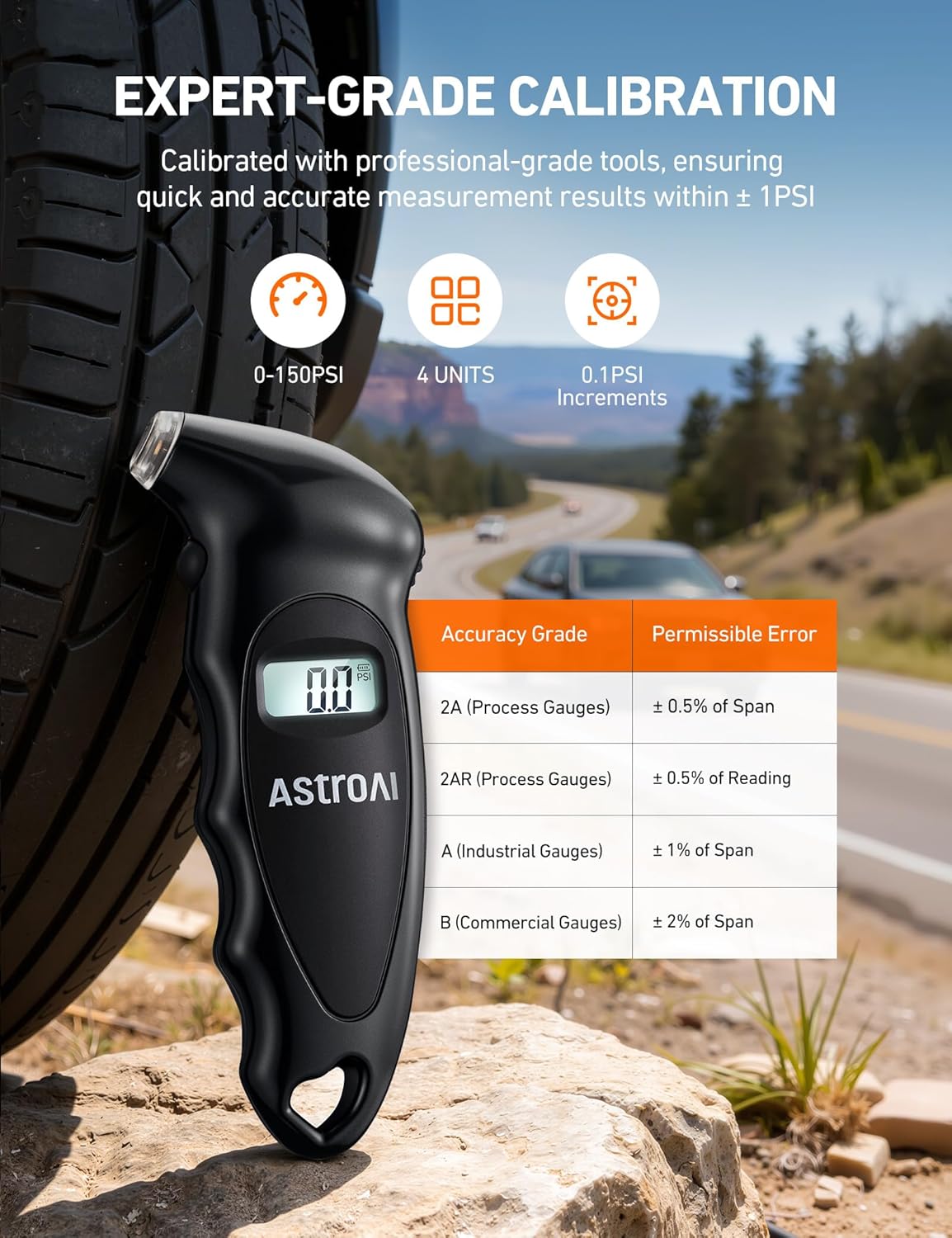
Image: Details on the gauge's accuracy and measurement capabilities.
7. Garanție și asistență
AstroAI provides a 1-year warranty for this product. For any questions, concerns, or support needs, please contact AstroAI Customer Service directly. You can find contact information on the official AstroAI website sau prin intermediul platformei dvs. de achiziții.
Pentru resurse suplimentare și informații despre produse, vizitați AstroAI Store.
Videoclip oficial al produsului
Video: An official product video from AstroAI Direct demonstrating the features and usage of the AAA Tire Pressure Gauge.


