1. Introducere
This manual provides detailed instructions for the installation, operation, and maintenance of your DEATTI 8-Channel 2K Wireless Security Camera System. Please read this manual thoroughly before using the product to ensure proper setup and functionality.

Imaginea 1.1: Pesteview of the DEATTI 8-Channel 2K Wireless Security Camera System, showing the NVR unit, eight cameras, and a 1TB hard drive.
The DEATTI 2K wireless surveillance system features an integrated router and Wi-Fi antenna for stable and long-range wireless connectivity. It supports motion detection, P2P remote access, and offers a true plug-and-play setup experience.
2. Conținutul pachetului
Verificați dacă toate articolele enumerate mai jos sunt prezente în colet. Dacă lipsesc sau sunt deteriorate articole, vă rugăm să contactați serviciul de asistență pentru clienți.

Image 2.1: Visual representation of the complete package contents, including the NVR, cameras, and accessories.
- 1 x Înregistrator video de rețea (NVR) cu 8 canale
- 8 x 3MP Wireless IP Cameras
- 1 x 1TB Hard Disk Drive (Pre-installed)
- 1 x mouse USB
- 8 x Adaptoare de alimentare pentru cameră
- 1 x Adaptor de alimentare NVR
- 8 x Huse cu șuruburi (pentru montarea camerei)
- 1 x Antenna (for NVR, if not pre-attached)
- 1 x Ghid de pornire rapidă
3. Configurare sistem
3.1 Conectarea inițială
Follow these steps for the initial setup of your security system:
- Conectați NVR-ul la un monitor folosind un cablu HDMI sau VGA.
- Conectați mouse-ul USB la portul USB al NVR-ului.
- Connect the NVR to a power source using the provided NVR power adapter.
- Connect each camera to its respective power adapter and plug them into an electrical outlet. The cameras will automatically pair with the NVR.
- For internet access and remote viewing, connect the NVR to your router using an Ethernet cable.

Image 3.1: NVR system connection ports for monitor, internet, mouse, and power.
3.2 Wireless Connection and Range
The system utilizes a wireless connection between the cameras and the NVR. Each camera can also function as a Wi-Fi repeater to extend the wireless range.
- Open Space Range: Up to 1000 feet (approximately 300 meters).
- With Obstacles: Up to 200 feet (approximately 60 meters), depending on the type and number of obstacles (e.g., walls).

Image 3.2: Illustration of the auto-pairing feature between a camera and the NVR.

Image 3.3: Wireless signal range comparison: up to 1000ft in open space and up to 200ft with obstacles.
4. Remote Access Setup
The system supports P2P (Peer-to-Peer) remote access, allowing you to view trăi footage and recordings from your mobile device or computer without complex network configurations.
4.1 Configurarea aplicației mobile
To access your system remotely via a smartphone or tablet:
- Download the recommended mobile application (e.g., 'IP Pro' or 'EseeCloud') from your device's app store.
- Înregistrați un cont și conectați-vă.
- Add your NVR device by scanning the QR code displayed on your NVR's monitor or by manually entering the device ID.
- Odată adăugat, puteți view live feeds and manage settings from your mobile device.
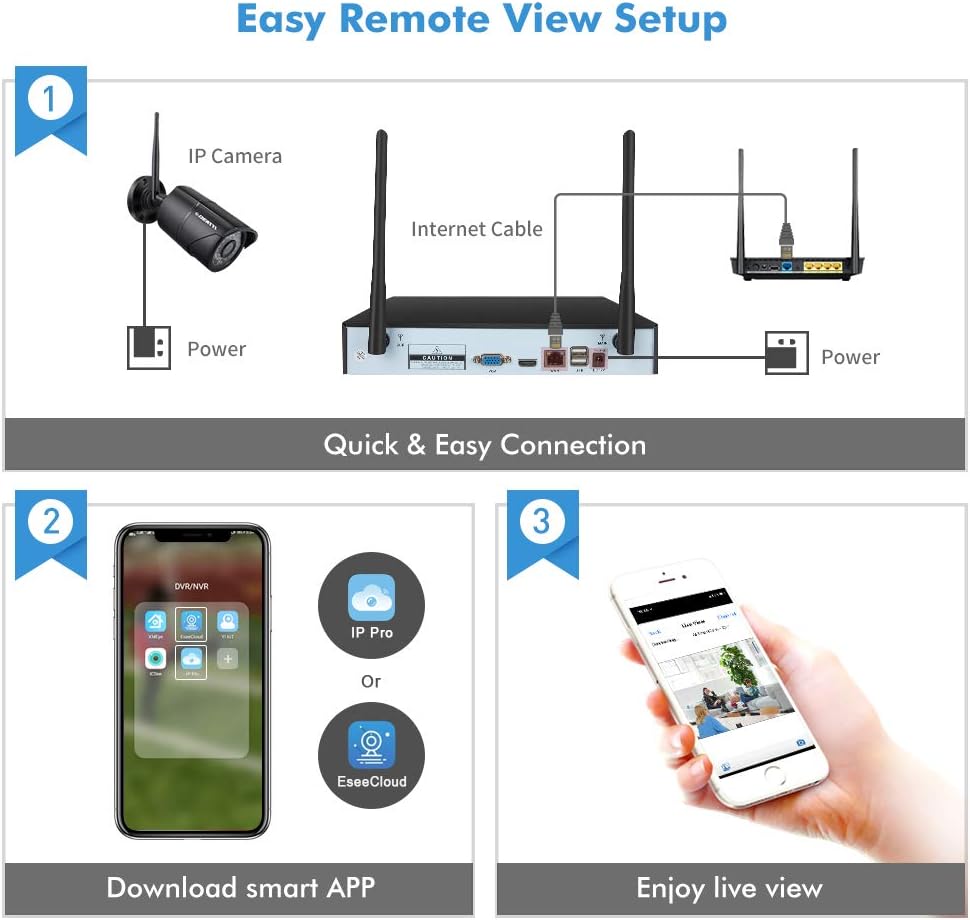
Image 4.1: Guide for setting up remote viewing, including NVR-router connection, app download, and live monitoring.
5. Instrucțiuni de utilizare
5.1 În direct View și Înregistrare
After successful setup, the NVR will display live feeds from all connected cameras. The pre-installed 1TB HDD will automatically begin recording based on default settings (typically continuous recording or motion-triggered recording).
- Viewing: Use the connected monitor and USB mouse to navigate the NVR interface. You can switch between single-camera view și o grilă cu mai multe camere view.
- Redare: Acces înregistrat footage through the NVR's playback menu. You can search by date, time, and event type.
5.2 Detectarea mișcării și alertele
The system features integrated motion detection. When motion is detected in a camera's field of view, it can trigger recording and send alerts.
- Configurare: Access the NVR's menu to configure motion detection zones, sensitivity, and recording schedules for each camera.
- Alerte: Enable email notifications or push notifications to your mobile app to receive instant alerts when motion is detected.

Imaginea 5.1: Example of an instant email alert received on a smartphone after motion detection.
5.3 Vedere de zi și de noapte
The cameras are equipped with infrared (IR) LEDs for night vision, providing clear surveillance in low-light or no-light conditions. The system automatically switches between day (color) and night (black and white IR) modes.

Image 5.2: Visual comparison of camera performance in daylight and nighttime conditions.
6. Întreținere
6.1 Îngrijirea camerei
- curatenie: Curățați regulat lentilele camerei cu o lavetă moale,amp o lavetă pentru a asigura o calitate clară a imaginii. Evitați substanțele de curățare abrazive.
- Protecție împotriva intemperiilor: The cameras are IP66 weatherproof, designed to withstand various outdoor conditions. However, extreme weather may affect performance.

Image 6.1: An outdoor camera operating in snowy conditions, highlighting its weatherproof construction.
6.2 NVR Maintenance
- Ventilare: Asigurați-vă că NVR-ul este amplasat într-o zonă bine ventilată pentru a preveni supraîncălzirea.
- Actualizări firmware: Periodically check for and install firmware updates to ensure optimal performance and security.
- Gestionarea hard disk-ului: The 1TB hard drive will overwrite older footage once full. Back up important recordings regularly.
7. Depanare
- Nicio imagine pe monitor:
- Check power connections for both NVR and monitor.
- Verify HDMI/VGA cable connection.
- Ensure the correct input source is selected on your monitor. - Camerele nu se conectează:
- Ensure cameras are powered on.
- Check the distance between cameras and NVR; reduce obstacles if possible.
- Re-pair cameras with the NVR if necessary (refer to the Quick Start Guide for pairing instructions). - Fără acces de la distanță:
- Ensure the NVR is connected to your router via Ethernet cable.
- Verify your internet connection.
- Check app settings and device ID for accuracy. - Vedere nocturnă slabă:
- Curățați obiectivul camerei.
- Ensure there are no obstructions blocking the IR LEDs.
- Adjust camera angle to avoid reflective surfaces.
8. Specificații
| Marca | DEATTI |
| Numărul de model | DE-DET-8Na2M8WCa2M1TB |
| Tehnologia de conectivitate | Cu fir, fără fir |
| Rezoluție de înregistrare video | 1440p (2K) |
| Caracteristica specială | Detectarea mișcării |
| Numărul de canale | 8 |
| Culoare | Negru |
| Sursa de alimentare | Power Adapter Operated |
| Dimensiuni (L x l x H) | 33.3 x 29.9 x 29 cm |
| Utilizări recomandate | Motion Detection, Surveillance |
| Dispozitive compatibile | Smartphones, Tablets, Laptops, Personal Computers |
9. Garanție și asistență
Your DEATTI 8-Channel 2K Wireless Security Camera System comes with the following:
- Garanție de rambursare a banilor în 30 de zile: Dacă nu sunteți mulțumit de achiziție, o puteți returna în termen de 30 de zile pentru o rambursare completă.
- 1 an garanție de producător: This product is covered by a 1-year manufacturer warranty against defects in materials and workmanship.
For technical assistance or warranty claims, please contact DEATTI customer support via email. Support is available in English and German.


