1. Introducere
This manual provides comprehensive instructions for the safe and efficient operation of your HPRT HT-300 Barcode Label Printer. Please read this manual thoroughly before using the printer and retain it for future reference.
Caracteristici cheie:
- Efficient and portable thermal printing technology.
- Versatile connectivity via USB, suitable for various environments including retail, healthcare, and logistics.
- Simple operation, quick paper loading, and straightforward maintenance.
- Delivers high-quality, low-noise, and high-speed printing at 203 DPI.
- User-friendly setup and operation for seamless integration with your devices.
2. Informații de siguranță
To ensure safe operation and prevent damage to the printer or injury to yourself, please observe the following safety precautions:
- Nu expuneți imprimanta la apă sau umiditate excesivă.
- Folosiți doar adaptorul de alimentare furnizat împreună cu imprimanta.
- Evitați amplasarea imprimantei în lumina directă a soarelui sau în apropierea surselor de căldură.
- Țineți imprimanta departe de praf și resturi.
- Do not attempt to disassemble or repair the printer yourself. Contact qualified service personnel.
- Asigurați o ventilație corespunzătoare în jurul imprimantei în timpul funcționării.
3. Conținutul pachetului
Verificați dacă toate articolele sunt prezente în colet:
- HPRT HT-300 Barcode Label Printer
- Adaptor de alimentare
- Cablu USB
- Starter Label Roll
- Manual de utilizare (acest document)
4. Imprimantă depășităview
Familiarize yourself with the components of your HPRT HT-300 printer.
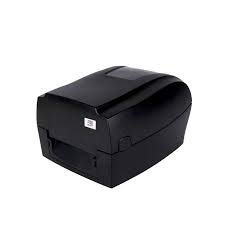
Figura 4.1: Fata-dreapta view of the HPRT HT-300 Barcode Label Printer. This image shows the compact design of the printer, with the label output slot visible at the front.
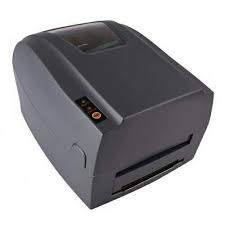
Figura 4.2: Dreapta sus view of the HPRT HT-300 printer, highlighting the control panel with buttons for operation and status indicators.
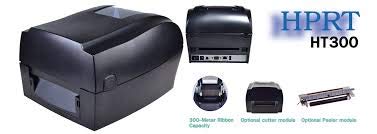
Figura 4.3: A explodat view illustrating the internal components and optional modules for the HPRT HT-300, such as the ribbon capacity, optional cutter, and peeler modules.
5. Configurare
5.1 Despachetarea
- Scoateți cu grijă imprimanta și toate accesoriile din ambalaj.
- Păstrați ambalajul pentru transport sau depozitare ulterioară.
5.2 Conectarea puterii
- Connect the power adapter to the printer's power input port.
- Conectați cablul de alimentare la o priză electrică adecvată.
- Ensure the power indicator light illuminates (if applicable).
5.3 Conectarea la computer
The HPRT HT-300 connects to your computer via USB.
- Conectați un capăt al cablului USB la portul USB al imprimantei.
- Conectați celălalt capăt al cablului USB la un port USB disponibil de pe computer.
5.4 Încărcarea etichetelor
Follow these steps to load label rolls into the printer:
- Deschideți capacul imprimantei.
- Place the label roll onto the media holder, ensuring the labels feed from the bottom.
- Guide the leading edge of the labels through the print mechanism until it extends slightly past the print head.
- Adjust the media guides to fit the width of your labels snugly.
- Închideți bine capacul imprimantei.
5.5 Instalarea driverelor și a software-ului
To enable your computer to communicate with the printer, you must install the appropriate drivers and software.

Figura 5.1: Example of HPRT Kit Software and BarTender label design software interface. This image illustrates the software tools available for driver installation, printer settings, and label design.
- Insert the provided driver CD (if included) into your computer's optical drive, or download the latest drivers from the official HPRT website-ul.
- Run the installer and follow the on-screen prompts to complete the driver installation.
- Install any bundled label design software, such as BarTender, if desired. This software provides tools for creating and printing various label formats.
- Utilize the HPRT label printer-specific settings tool to view printer status, perform test prints, and configure advanced settings.
6. Funcționare
6.1 Pași de bază pentru imprimare
- Asigurați-vă că imprimanta este pornită și conectată la computer.
- Open your label design software (e.g., BarTender) or the application from which you wish to print.
- Create or open the label design you intend to print.
- Access the print settings and select the HPRT HT-300 as your printer.
- Verify the label size and orientation settings match your loaded labels.
- Inițiați lucrarea de imprimare.
6.2 Printer Status Indicators
Refer to the printer's control panel for status lights that indicate power, errors, or paper out conditions. Consult the driver software for more detailed status information.
7. Întreținere
Regular maintenance ensures optimal performance and extends the lifespan of your printer.
7.1 Curățarea capului de imprimare
The print head should be cleaned periodically to prevent print quality issues.
- Opriți imprimanta și deconectați cablul de alimentare.
- Deschideți capacul imprimantei.
- Ștergeți ușor suprafața capului de imprimare cu o lavetă fără scame umezită cu alcool izopropilic.
- Lăsați capul de imprimare să se usuce complet înainte de a închide capacul și a reconecta alimentarea.
7.2 Curățarea rolei de imprimare
Clean the platen roller to ensure smooth label feeding.
- Opriți imprimanta și deconectați cablul de alimentare.
- Deschideți capacul imprimantei.
- Rotate the platen roller manually and wipe its surface with a lint-free cloth moistened with isopropyl alcohol.
- Allow it to dry before closing the cover and reconnecting power.
8. Depanare
This section addresses common issues you might encounter with your HPRT HT-300 printer.
| Problemă | Cauza posibila | Soluţie |
|---|---|---|
| Imprimanta nu răspunde |
|
|
| Calitate slabă a imprimării (linii estompate) |
|
|
| Blocaj de hârtie |
|
|
9. Specificații
Technical specifications for the HPRT HT-300 Barcode Label Printer:
- Model: HT-300
- Tehnologia de imprimare: Termic
- Rezoluție de imprimare: 203 DPI
- Viteza de imprimare: 5 Inches per Second (IPS)
- Ieșire imprimantă: Monocrom
- Conectivitate: USB
- Dispozitive compatibile: Laptops, Computers
- Dimensiune maximă a suportului media: 5 inci
- Media tipărită: Etichete
- Imprimare față-verso: Nu
- Culoare: Negru
- Greutatea articolului: 3 kg 670 g
- Producător: HPRT
- Numărul piesei producătorului: SDH03
10. Garanție și asistență
10.1 Informații despre garanție
The HPRT HT-300 Barcode Label Printer comes with a 12 luni garantie from the date of purchase. This warranty covers manufacturing defects under normal use. It does not cover damage caused by misuse, accidents, unauthorized modifications, or improper maintenance. Please retain your proof of purchase for warranty claims.
10.2 Asistență pentru clienți
For technical assistance, troubleshooting, or warranty inquiries, please contact HPRT customer support.
- Website: Vizitați site-ul oficial HPRT website pentru resurse de asistență, întrebări frecvente și descărcări de drivere.
- E-mail/Telefon: Refer to the HPRT website-ul sau ambalajul produsului pentru date de contact specifice.


