1. Introducere
The eKids Frozen 2 Bluetooth Karaoke Machine with Light Show is designed to provide an interactive music experience. This portable device allows users to stream audio wirelessly via Bluetooth, sing along with the included wired microphone, and expand content through a USB port. It features a multi-colored LED light show and built-in memory for storing music.
2. Ce se află în cutie
- Bluetooth MP3 Karaoke Machine
- Microfon cu fir
- Cablu de încărcare USB
3. Caracteristicile produsului
- Conectivitate Bluetooth: Connect to any compatible Bluetooth device to stream audio wirelessly.
- Microfon cu fir: Includes one real working wired microphone for singing along. An additional mic jack is available for a second microphone (sold separately).
- Player audio USB: Features a USB port to play MP3 files from a USB flash drive (not included).
- Funcția de înregistrare: Record performances while singing along to streaming music. Requires a USB flash drive (not included).
- Multi-colored LED Light Show: Integrated light show to enhance the performance experience.
- Memorie Încorporată: Store hours of music directly on the device.
- Baterie reîncărcabilă: Portable design with a built-in rechargeable battery for on-the-go use.

Figura 1: Pesteview of the Karaoke Machine's Controls and Features.

Figure 2: Bluetooth Compatibility with various devices.
4. Configurare
4.1 Alimentarea unității
The karaoke machine operates on a built-in rechargeable battery. Ensure the unit is fully charged before first use for optimal performance.
- Connect the supplied USB charging cable to the USB charging port on the back of the unit.
- Conectați celălalt capăt al cablului USB la un adaptor de alimentare USB standard (nu este inclus) sau la un port USB alimentat.
- The charging indicator will illuminate. Allow sufficient time for a full charge.
4.2 Conectarea microfonului
The wired microphone connects to the microphone jack on the unit.
- Locate the microphone jack on the side or back of the karaoke machine.
- Introduceți ferm mufa microfonului în mufă.

Figure 3: Karaoke Machine with Microphone Connected.
5. Instrucțiuni de utilizare
5.1 Pornire/Oprire
Țineți apăsat butonul Putere button located on the control panel to turn the unit on or off.
5.2 Asociere Bluetooth
- Turn on the karaoke machine. The Bluetooth indicator on the display will flash, indicating it is in pairing mode.
- Pe dispozitivul cu Bluetooth (smartphone, tabletă etc.), accesați setările Bluetooth și activați Bluetooth.
- Select "eKids Frozen 2 Karaoke" (or similar name) from the list of available devices.
- După conectare, indicatorul Bluetooth va înceta să clipească și va rămâne aprins constant. Acum puteți transmite audio de pe dispozitiv.
5.3 Playing Music via USB
- Introduceți o unitate flash USB care conține MP3 files în portul USB de pe unitate.
- The unit should automatically switch to USB mode and begin playing music. If not, press the Modul butonul pentru a selecta modul USB.
- Utilizați Redare/Pauză, Următoarea piesă, și Piesa anterioară butoane pentru a controla redarea.
5.4 Utilizarea microfonului
- Ensure the microphone is securely plugged into the mic jack.
- Apăsați tasta Microfon ON / OFF button to activate the microphone.
- Adjust the microphone volume using the dedicated volume controls if available, or the main volume controls.
5.5 Spectacol de lumini
Apăsați tasta Lumină ON/OFF button to activate or deactivate the multi-colored LED light show.
5.6 Înregistrarea performanțelor
To record your singing, a USB flash drive (not included) must be inserted into the USB port.
- Ensure a USB flash drive is inserted.
- Start playing your desired music (via Bluetooth or USB).
- Apăsați tasta REC butonul pentru a începe înregistrarea.
- Sing into the microphone.
- Apăsați tasta REC button again to stop recording. Your performance will be saved to the USB flash drive.
6. Întreținere
- Curățați unitatea cu o lavetă moale și uscată. Nu utilizați substanțe de curățare abrazive sau solvenți.
- Păstrați unitatea departe de lumina directă a soarelui, surse de căldură și umiditate.
- Store the microphone in its designated compartment on the back of the unit when not in use to prevent loss or damage.
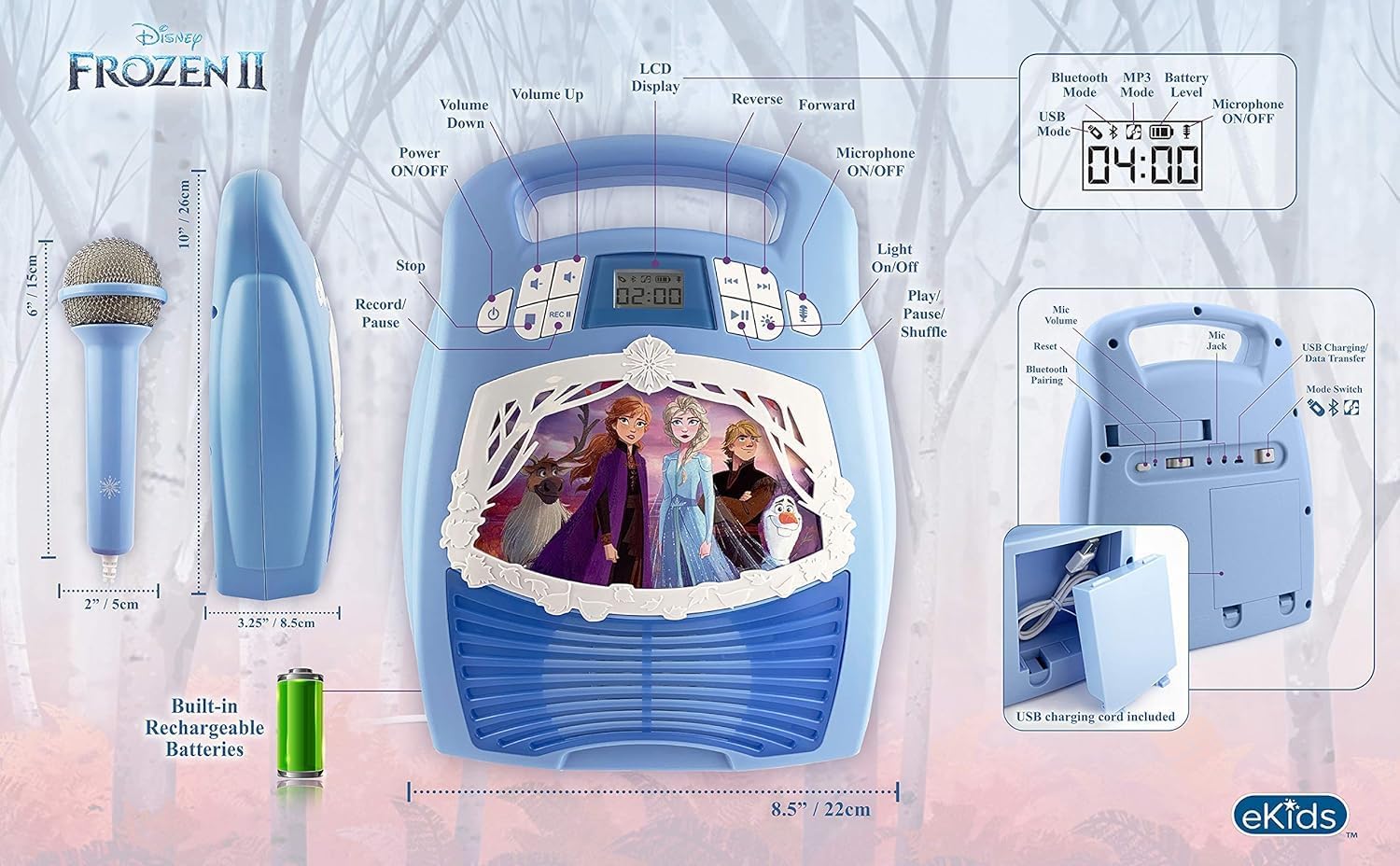
Figura 4: Spate view with microphone storage compartment.
7. Depanare
- Fără putere: Ensure the unit is charged. Connect the USB charging cable and allow it to charge.
- Fără sunet: Check the volume levels on both the karaoke machine and your connected Bluetooth device. Ensure the microphone is turned on if using it.
- Bluetooth nu se conectează: Make sure Bluetooth is enabled on your device and the karaoke machine is in pairing mode. Try restarting both devices. Ensure no other devices are currently connected to the karaoke machine.
- Microfonul nu funcționează: Verify the microphone is securely plugged into the correct jack and the microphone ON/OFF button is activated.
- Probleme de înregistrare: Ensure a compatible USB flash drive is inserted and has sufficient free space.
8. Specificații
| Caracteristică | Detaliu |
|---|---|
| Dimensiunile produsului | 8 x 3 x 10 inci |
| Greutatea articolului | 2.64 lire sterline |
| Numărul de model | FR-553v9M |
| Varsta Recomandata | 3 - 35 luni |
| baterii | 3 AA batteries required (included) - Note: Product description also mentions built-in rechargeable battery. Please refer to packaging for exact battery type. |
| Caracteristica specială | Portabil, reîncărcabil |
| Culoare | Older Version |
| Producător | KIDdesigns |
9. Informații de siguranță
Please read and follow all safety instructions provided with the product packaging. This product is intended for use by children aged 3 and up, under adult supervision.
10. Garanție și asistență
Acest produs vine cu un Garanție limitată de un an. For warranty claims or technical support, please refer to the contact information provided in your product packaging or visit the eKids official website-ul.
11. Videoclip de produs
Video 1: An official product video from KIDdesigns, Inc. showcasing the eKids Frozen 2 Bluetooth Karaoke Machine with Light Show, highlighting its features and design.


