1. Introducere
Thank you for choosing the ÍPEGA KP-CA144 Wi-Fi IP Camera. This manual provides detailed instructions for the installation, operation, and maintenance of your security camera. Please read this manual thoroughly before use to ensure proper functionality and safety.
2. Produs terminatview
The ÍPEGA KP-CA144 is a wireless IP camera designed for surveillance, featuring Wi-Fi connectivity, 720p video resolution, and advanced night vision capabilities, including full-color night vision. It is suitable for wall mounting and offers a night vision range of up to 30 meters.

Figura 2.1: Faţă view of the ÍPEGA KP-CA144 Wi-Fi IP Camera, showing the lens and LED array.
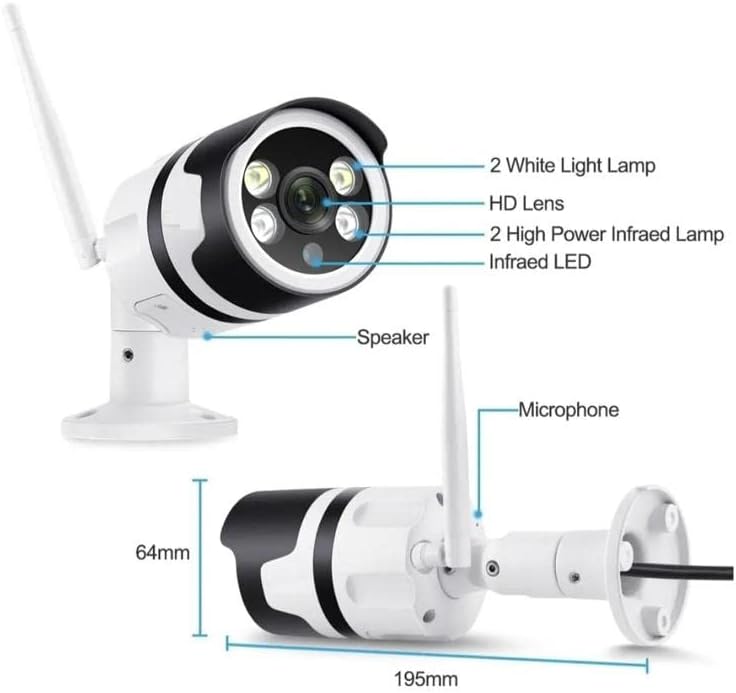
Figura 2.2: Detailed diagram of the camera components. This image highlights the 2 White Light Lamps, HD Lens, 2 High Power Infrared Lamps, Infrared LED, Speaker, and Microphone. Dimensions are also indicated: 195mm length and 64mm height.
Componentele cheie includ:
- Obiectiv HD: Captures video at 720p resolution.
- Lumină albă Lamps (x2): Provide illumination for full-color night vision.
- High Power Infrared Lamps (x2): Enhance infrared night vision.
- LED infraroșu: Additional infrared illumination.
- Vorbitor: Pentru comunicare audio bidirecțională.
- Microfon: Pentru intrare audio în timpul comunicării bidirecționale.
- Antena Wi-Fi: Pentru conectivitate la rețeaua wireless.
3. Ghid de instalare
3.1 Unboxing
Scoateți cu grijă toate componentele din ambalaj. Verificați dacă toate articolele sunt prezente:
- ÍPEGA KP-CA144 Wi-Fi IP Camera
- Adaptor de alimentare
- Șuruburi și ancore de montare
- Manual de utilizare (acest document)
3.2 Montarea camerei
Camera este concepută pentru montare pe perete. Alegeți o locație potrivită care să ofere imaginea dorită viewunghiul de deplasare și se află în raza de acțiune a rețelei Wi-Fi și a unei prize de alimentare.
- Marcați punctele de găurire pe perete folosind baza camerei ca șablon.
- Drill holes at the marked points. Insert the wall anchors if necessary.
- Fixați baza camerei pe perete folosind șuruburile furnizate.
- Reglați unghiul camerei după cum este necesar.
3.3 Pornire
Connect the power adapter to the camera's power input port and then plug the adapter into a standard electrical outlet. The camera will initiate its startup sequence, which may include an indicator light flashing.
3.4 Conexiune la rețea (Wi-Fi)
To connect the camera to your Wi-Fi network, you will need to download the dedicated mobile application. Refer to the packaging or a quick start guide for the app name and QR code.
- Download and install the camera's companion app on your smartphone.
- Creați un cont și conectați-vă.
- Follow the in-app instructions to add a new device. This typically involves scanning a QR code on the camera or using an audio pairing method.
- Selectați rețeaua Wi-Fi de 2.4 GHz și introduceți parola când vi se solicită.
- Wait for the camera to connect to the network. A confirmation message or indicator light change will signify a successful connection.
4. Instrucțiuni de utilizare
4.1 În direct View
Once connected, open the mobile app and select your camera from the device list to access the live video feed. You can view mâncarea în timp realtage de la camera ta.
4.2 Înregistrare
The camera supports continuous recording or motion-activated recording. Recording settings can be configured within the mobile application. Ensure a compatible microSD card (not included) is inserted for local storage, or subscribe to cloud storage services if available.
4.3 Redare
Foo înregistrattage can be accessed and played back through the mobile app. Navigate to the playback section, select the desired date and time, and review inregistrarile.
4.4 Vedere nocturnă
The ÍPEGA KP-CA144 features advanced night vision with a range of up to 30 meters. It supports both infrared (black and white) and full-color night vision, utilizing its white light lamps for illumination in low-light conditions.

Figura 4.1: Comparison illustrating the difference between Full-Color Mode and Infrared Mode night vision. Full-Color Mode provides vivid, colored images in low light, while Infrared Mode offers clear black and white images.
The night vision mode can typically be set to automatic, infrared, or full-color within the camera's app settings.
4.5 Sunet bidirecțional
Utilize the built-in speaker and microphone for two-way audio communication. Through the mobile app, you can speak through the camera and hear audio from the camera's vicinity.
5. Întreținere
Întreținerea regulată asigură performanța optimă și durata de viață a camerei dumneavoastră.
- curatenie: Ștergeți ușor obiectivul și corpul camerei cu o cârpă moale și uscată. Evitați utilizarea substanțelor chimice dure sau a materialelor abrazive.
- Actualizări firmware: Periodically check the mobile app for available firmware updates. Keeping the firmware updated ensures the latest features and security patches.
- Stabilitatea rețelei: Ensure your Wi-Fi network is stable and provides sufficient signal strength to the camera for uninterrupted operation.
6. Depanare
If you encounter issues with your ÍPEGA KP-CA144 camera, refer to the following common problems and solutions:
| Problemă | Cauza posibila | Soluţie |
|---|---|---|
| Aparat foto offline | Fără alimentare; semnal Wi-Fi slab sau deconectat; parolă Wi-Fi incorectă. | Verificați conexiunea la alimentare; mutați camera mai aproape de router sau utilizați un extender Wi-Fi; introduceți din nou parola Wi-Fi în aplicație. |
| Fără flux video | Camera offline; app issue; network congestion. | Ensure camera is online; restart the app; check internet connection. |
| Calitate slabă a imaginii | Dirty lens; low light conditions; network bandwidth. | Clean the lens; ensure adequate lighting or enable night vision; check network speed. |
| Vederea de noapte nu funcționează | Night vision mode disabled; IR/white lights obstructed. | Enable automatic or specific night vision mode in app; ensure no obstructions in front of lights. |
Dacă problema persistă, vă rugăm să contactați serviciul de asistență pentru clienți.
7. Specificații
| Caracteristică | Caietul de sarcini |
|---|---|
| Model | KP-CA144 |
| Marca | ÍPEGA |
| Rezoluție captură video | 720p |
| Tehnologia comunicațiilor fără fir | Wi-Fi (2.4 GHz) |
| Factor de formă | Glonţ |
| Gama de vedere nocturnă | 30 metri |
| Lamp Tip | Infrared, LED (White Light) |
| Caracteristici speciale | Night Vision (Full-Color & Infrared), Two-Way Audio |
| Tip de montare | Montare pe perete |
| Dimensiuni (aprox.) | 195mm (Length) x 64mm (Height) |
| EAN | 7898652412134 |
8. Garanție și asistență
For warranty information and technical support, please refer to the documentation provided with your purchase or visit the official ÍPEGA webPăstrați dovada achiziției pentru reclamații în garanție.


