1. Introducere
The Alpine X308U Mech-Less Navigation Receiver is designed to provide advanced smartphone integration and a reliable built-in navigation system for your vehicle. This manual provides essential information for the proper installation, operation, and maintenance of your device.
Caracteristici cheie:
- 8-inch WVGA High-Resolution Capacitive Touch Display
- Compatibility with Apple CarPlay and Android Auto
- Embedded Navigation with 3D & 2D mapping and Pinch-to-Zoom interface
- Bluetooth hands-free calling and audio streaming
- Built-In HD Radio Tuner and SiriusXM Satellite Radio readiness
- Multiple connectivity options including HDMI input/output and USB
- Advanced audio tuning features: 9-band parametric EQ and 6-channel time correction
- Support for FLAC, AAC, MP3, WMA, HE-AC Playback
- Accessory Control Ready (KAC-001 Required) and iDatalink Maestro Module compatibility
2. Produs terminatview

Figura 2.1: Față View with Navigation Display. This image shows the Alpine X308U unit with its 8-inch high-resolution capacitive touch display active, presenting a detailed 3D navigation map. The screen displays street names, distances, and navigation icons, demonstrating the unit's integrated GPS capabilities. Control buttons are visible along the bottom edge of the screen.

Figura 2.2: Față View with Media Interface. This image illustrates the Alpine X308U's user interface for media playback and radio tuning. The display shows current FM radio frequency (105.8 MHz), preset stations, and options for HDMI, Music, Pandora, and Bluetooth Audio. Album art and song information are also visible, highlighting the unit's multimedia capabilities.

Figure 2.3: Audio Settings Interface. This image displays the "BASS ENGINE SQ" audio adjustment screen on the Alpine X308U. Users can select from various sound presets like Standard, Punch, Rich, Mid Bass, and Low Bass, and adjust levels for Bass Engine, Navi Audio, and Back Audio. This interface demonstrates the unit's comprehensive audio customization options.

Figura 2.4: Conexiuni panou spate. Această imagine oferă o imagine detaliată view of the rear panel of the Alpine X308U, highlighting its various input and output ports. Visible connections include GPS antenna input, USB ports, HDMI In, HDMI Out, and the main wiring harness connector. A cooling fan is also visible on the left side, indicating thermal management features.
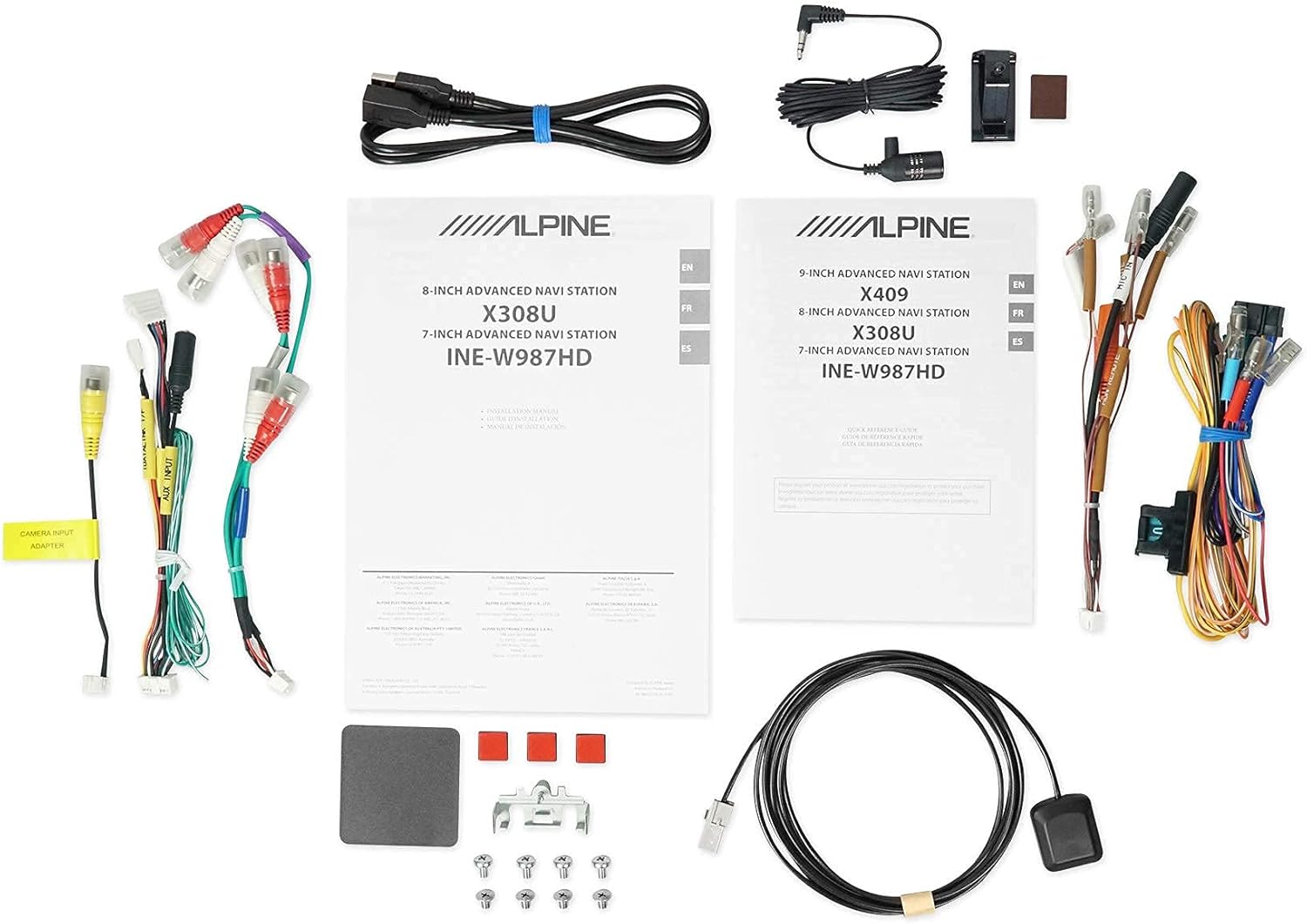
Figura 2.5: Componente incluse. This image displays a selection of cables and accessories that come with the Alpine X308U unit. These include various wiring harnesses, RCA cables for audio/video connections, a USB extension cable, and a GPS antenna. These components are essential for the proper installation and functionality of the receiver.
3. Configurare și instalare
Proper installation is crucial for the optimal performance of your Alpine X308U. It is highly recommended that installation be performed by a qualified professional car audio installer.
3.1. Listă de verificare înainte de instalare:
- Asigurați-vă că sunt prezente toate componentele enumerate în secțiunea „Ce se află în cutie”.
- Deconectați borna negativă a bateriei vehiculului înainte de a începe orice lucrare electrică.
- Review your vehicle's specific wiring diagrams and dash disassembly instructions.
3.2. Conexiuni de cablare:
Connect the main wiring harness to the vehicle's power, ground, and speaker wires. Utilize the provided connectors for a secure fit. Refer to the wiring diagram included with your unit for specific color codes and pin assignments.
- Conexiuni de alimentare: Connect the yellow wire (constant 12V), red wire (switched 12V), and black wire (ground).
- Ieșiri difuzoare: Connect the speaker wires to the corresponding vehicle speakers. Ensure correct polarity.
- Intrare/ieșire HDMI: Use the HDMI ports for connecting external video sources or outputting video to a rear entertainment system. Note that HDMI output functionality may be limited to specific Alpine accessories.
- Intrare USB: Connect USB devices for media playback or smartphone integration (CarPlay/Android Auto).
- Intrare cameră: Conectați un spate-view camera to the dedicated input for enhanced safety. The unit supports up to 3 cameras with the optional KCX-C250MC Multi-camera selector.
- pre-amp Ieșiri: Utilize the 6-channel pre-amp ieșiri pentru conectarea externă ampliificatori.
- Antena GPS: Montați antena GPS într-un loc cu lumină naturală view of the sky for optimal navigation performance.
3.3. Montarea unității:
Securely mount the X308U in your vehicle's dashboard using the provided mounting hardware. Ensure adequate ventilation around the unit to prevent overheating.
4. Instrucțiuni de utilizare
4.1. Operațiune de bază:
- Pornire/Oprire: Apăsați și mențineți apăsat butonul de alimentare (de obicei situat pe panoul frontal) pentru a porni sau opri unitatea.
- Controlul volumului: Adjust volume using the dedicated volume buttons or on-screen controls.
- Interfață cu ecran tactil: Navigate through menus and select functions by tapping icons on the capacitive touch display. The unit supports 4-Way Swipe Action Control.
- Buton de meniu: Access the main menu to switch between different sources and settings.
4.2. Sistem de navigație:
- Accesarea navigației: Tap the "Navigation" icon on the main menu.
- Entering Destinations: Use the on-screen keyboard to input addresses, points of interest, or select from recent destinations.
- Hartă View: Comutare între harta 2D și 3D views. Use pinch-to-zoom gestures to adjust the map scale.
- Ghidare vocală: Follow spoken turn-by-turn directions for guidance.
4.3. Smartphone Integration (CarPlay & Android Auto):
- Connecting Your Smartphone: Connect your compatible iPhone or Android phone to the unit's USB port using a certified USB cable.
- Activating CarPlay/Android Auto: Once connected, the respective interface will automatically launch or prompt you to activate it on the screen.
- Utilizarea aplicațiilor: Access supported navigation, music, messaging, and communication apps directly from the unit's display.
4.4. Funcții Bluetooth:
- Împerecherea unui dispozitiv: Go to the Bluetooth settings menu, enable pairing mode on the X308U, and search for the unit on your smartphone. Select "Alpine X308U" and confirm the pairing code.
- Apeluri fără mâini: Make and receive calls directly through the unit's microphone and vehicle speakers.
- Streaming audio: Redați muzică în flux wireless de pe smartphone-ul asociat.
4.5. Setări audio:
- Egalizator: Access the 9-band parametric EQ to fine-tune audio frequencies.
- Corectarea timpului: Adjust the sound stage for optimal listening position using the 6-channel time correction feature.
- TuneIt App: For advanced audio tuning and sharing settings, download and use the Alpine TuneIt App on your smartphone.
5. Întreținere
Regular maintenance ensures the longevity and optimal performance of your Alpine X308U.
- Curățarea ecranului: Use a soft, lint-free cloth specifically designed for electronic screens to gently wipe the display. Do not use abrasive cleaners or solvents.
- Curatenie generala: Păstrați unitatea curată de praf și resturi. Folosiți o cârpă moale și uscată pentru a șterge exteriorul.
- Actualizări de software: Verificați periodic sistemul Alpine website for firmware updates to ensure your unit has the latest features and bug fixes. Follow the instructions provided with the update carefully.
- Conditii de mediu: Evitați expunerea unității la temperaturi extreme, la lumina directă a soarelui pentru perioade lungi de timp sau la umiditate excesivă.
6. Depanare
If you encounter issues with your Alpine X308U, refer to the following common troubleshooting steps before contacting support.
| Problemă | Cauza posibila | Soluţie |
|---|---|---|
| Fără alimentare/Unitatea nu pornește. | Conexiune de alimentare slăbită, siguranță arsă, problemă cu bateria vehiculului. | Check all power wiring connections. Inspect and replace any blown fuses. Ensure vehicle battery is charged. |
| Niciun sunet de la difuzoare. | Speaker wires disconnected, incorrect audio settings, unit in mute mode. | Verify speaker wire connections. Check audio settings (e.g., fader/balance, EQ). Ensure unit is not muted. |
| Navigation not working or inaccurate. | GPS antenna not properly connected or obstructed, outdated map data. | Asigurați-vă că antena GPS este conectată corect și are o vizibilitate clară. view of the sky. Check for available map updates. |
| Dispozitivul Bluetooth nu se conectează. | Device not in pairing mode, incorrect pairing procedure, interference. | Asigurați-vă că ambele dispozitive sunt în modul de asociere. Ștergeți asocierile anterioare și încercați din nou. Apropiați-vă de unitate. |
| Ecranul tactil nu răspunde. | Temporary software glitch, screen calibration needed. | Perform a soft reset (refer to manual for specific method). If issue persists, contact support. |
7. Specificații
| Caracteristică | Detaliu |
|---|---|
| Numărul de model | X308U |
| Dimensiunea ecranului | 8 inci (21 cm diagonală) |
| Tip de afișare | WVGA High-Resolution Capacitive Touch Display |
| Putere maximă de ieșire | 50 wați x 4 canale |
| CTA-2006 Power Rating | 18 wați x 4 canale |
| pre-amp Ieșiri | 3 (4-Volt) |
| Tehnologia de conectivitate | Bluetooth, USB, HDMI |
| Tip hartă | Satellite, North America (Built-in 3D & 2D Navigation) |
| Dimensiunile produsului | 12 x 12 x 12 inci |
| Greutatea articolului | 6.4 lire sterline |
| Componente incluse | HDMI input, USB input, composite A/V input, rear-view camera input, HDMI output, 6-channel preamp outputs, USB source |
8. Garanție și asistență
This product is covered by a manufacturer's warranty. Please refer to the warranty card included with your purchase for specific terms and conditions, including warranty period and coverage details.
Asistență clienți:
For technical assistance, troubleshooting beyond this manual, or warranty claims, please contact Alpine customer support. Visit the official Alpine website pentru cele mai actualizate informații de contact și resurse de asistență.
Notă: Păstrați dovada achiziției pentru validarea garanției.


