1. Introducere
This manual provides detailed instructions for the safe and efficient operation of your DLYFULL UT4 USB Multi-Charger. Please read this manual thoroughly before use and retain it for future reference.
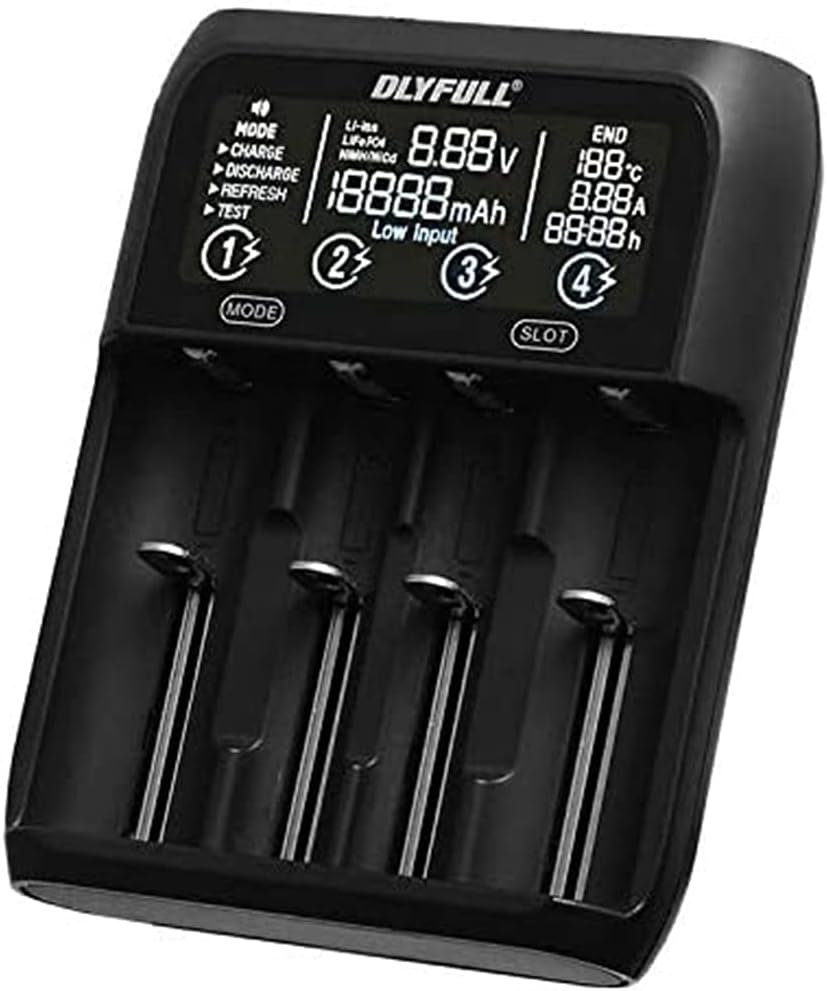
Figura 1: Față view of the DLYFULL UT4 USB Multi-Charger, displaying battery status and charging modes.
2. Informații de siguranță
To prevent injury or damage to the charger and batteries, always observe the following safety precautions:
- Use only compatible batteries as listed in the specifications.
- Nu încercați să încărcați bateriile nereîncărcabile.
- Nu expuneți încărcătorul la apă, umiditate ridicată sau temperaturi extreme.
- A nu se lăsa la îndemâna copiilor.
- Nu dezasamblați sau modificați încărcătorul.
- Asigurați o ventilație adecvată în timpul încărcării.
3. Conținutul pachetului
Verificați dacă toate articolele sunt prezente în colet:
- DLYFULL UT4 USB Multi-Charger
- USB Type-C Cable (may vary by region)
- Manual de utilizare (acest document)
4. Configurare
4.1 Conectarea sursei de alimentare
- Connect the provided USB Type-C cable to the input port on the back of the DLYFULL UT4 charger.
- Connect the other end of the USB Type-C cable to a compatible USB power adapter (DC 5V / 2A recommended, not included).
- The charger display will illuminate, indicating it is ready for use.

Figura 2: Spate view of the DLYFULL UT4 charger, highlighting the USB Type-C input and USB-A output ports.
5. Instrucțiuni de utilizare
5.1 Introducerea bateriilor
The DLYFULL UT4 features four independent charging slots. Insert compatible rechargeable batteries into the slots, ensuring correct polarity (+ and -). The charger will automatically detect the battery type and display its current voltage.
5.2 Selectarea modurilor de funcționare
The charger supports various operating modes. Use the "MODE" button to cycle through available options for the selected slot. Use the "SLOT" button to select which battery slot to configure.
- ÎNCĂRCA: Mod de încărcare standard.
- DESCĂRCARE: Discharges the battery to a safe level before recharging (useful for Ni-MH batteries to reduce memory effect).
- REÎMPROSPĂTA: Charges, discharges, and then recharges the battery to optimize capacity and extend battery life.
- TEST: Measures the actual capacity of the battery.
5.3 Funcția de ieșire USB
The charger can also function as a power bank to charge external devices. To use this feature:
- Ensure a charged battery is inserted into Slot 1.
- Connect your external device (e.g., smartphone) to the USB-A output port on the back of the charger.
- The charger will provide up to 5V / 2A output.

Figure 3: The DLYFULL UT4 charger in use, demonstrating battery insertion and showing included battery sleeves.
6. Întreținere
- Clean the charger with a dry, soft cloth. Do not use abrasive cleaners or solvents.
- Keep the charging slots free from dust and debris.
- Depozitați încărcătorul într-un loc răcoros și uscat atunci când nu îl utilizați.
7. Depanare
- Încărcătorul nu pornește:
Ensure the USB Type-C cable is securely connected to both the charger and a working power source. Verify the power source provides DC 5V / 2A.
- Bateria nu se încarcă:
Check that the battery is inserted with correct polarity. Ensure the battery is compatible with the charger. Try cleaning the battery contacts and charger terminals.
- "Low Input" message on display:
This indicates the input power supply is insufficient. Use a power adapter that provides at least DC 5V / 2A.
8. Specificații

Figure 4: Original specifications table for the DLYFULL UT4 charger.
| Caracteristică | Detaliu |
|---|---|
| Model | UT4 (Multi-Charger) |
| Intrare | DC 5V / 2A (USB Type-C) |
| Ieșire USB | 5V / 2A Max (from Slot 1) |
| Curent de încărcare Ni-MH | 1A (for 1.48V batteries) |
| Ni-MH Discharge Current | 350mAh |
| Temperatura de operare | 0℃ până la 40℃ |
| Li-ion Max Protection Voltage | 4.20V ± 0.05V |
| Ni-MH Max Protection Voltage | 1.53V ± 0.05V |
| Baterii compatibile |
|
| Certificari | CE, RoHS |
| Culoare | Negru |
Note: Up to two Ni-MH batteries of size AA can be set simultaneously.
9. Informații despre garanție
Specific warranty details for the DLYFULL UT4 USB Multi-Charger are not provided in this document. Please refer to the product packaging, the official DLYFULL website, or contact your retailer for warranty terms and conditions.
10. Asistență pentru clienți
For technical assistance, troubleshooting, or general inquiries regarding your DLYFULL UT4 USB Multi-Charger, please visit the official DLYFULL website or contact their customer support channels. Contact information may also be available on the product packaging.


