Introducere
The KAIWEETS HT118A Digital Multimeter is a versatile electrical testing instrument designed for accurately measuring various electrical parameters. It features True RMS (TRMS) for precise readings of non-sinusoidal waveforms and offers a 6000-count display for high resolution. This multimeter is capable of measuring AC/DC voltage, AC/DC current, resistance, capacitance, frequency, duty-cycle, temperature, and includes functions for diode testing, continuity checking, non-contact voltage (NCV) detection, and Live wire detection. Its auto-ranging capability simplifies operation, making it suitable for both professional and automotive applications.
Ce este în cutie
The KAIWEETS HT118A package includes the following components:
- KAIWEETS HT118A Digital Multimeter
- Cabluri de testare (roșu și negru)
- Thermocouple (for temperature measurement)
- Baterii AA (2 incluse)
- Manual de utilizare (acest document)
Produs terminatview
Familiarize yourself with the main components of your KAIWEETS HT118A Digital Multimeter.
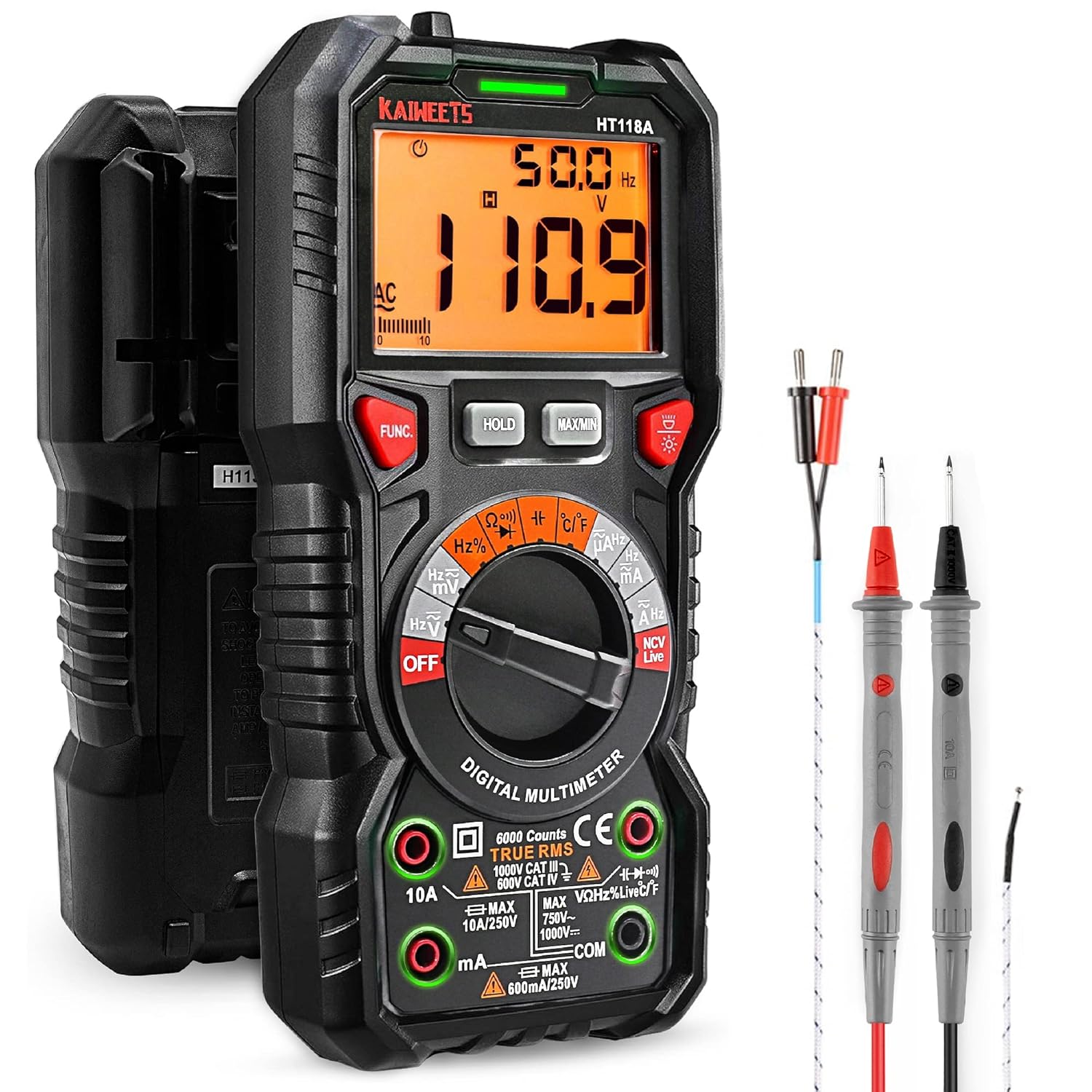
Figure 1: KAIWEETS HT118A Digital Multimeter with included accessories. This image shows the front view of the multimeter along with the red and black test leads and the temperature probe.

Figura 2: Prim-plan view of the multimeter highlighting the LED lightning jacks. These jacks illuminate to guide the user on correct probe placement for different measurement functions.

Figure 3: Display of the KAIWEETS HT118A Multimeter, showing its 2.9-inch HTN backlit screen. The screen provides dual readings and an orange backlight, which activates when voltage exceeds 80V or current exceeds 10A.
Înființat
Instalarea bateriei
The KAIWEETS HT118A Multimeter requires two AA batteries for operation. The batteries are included with the product.
- Localizați compartimentul bateriei pe spatele multimetrului.
- Folosiți o șurubelniță mică pentru a deschide capacul compartimentului bateriei.
- Introduceți cele două baterii AA, asigurându-vă că polaritatea este corectă (+ și -).
- Puneți la loc capacul compartimentului bateriei și fixați-l cu șurubul.
Conectarea cablurilor de testare
Always ensure the test leads are properly connected to the multimeter before taking measurements. The multimeter features LED lightning jacks that will illuminate to indicate the correct ports for your selected function.
- Conectați cablul de testare negru la COM Mufă de intrare (comună).
- Connect the red test lead to the appropriate input jack based on the measurement you intend to perform. The LED lights will guide you. For most voltage, resistance, continuity, diode, capacitance, and frequency measurements, use the VΩHz jack. For current measurements, use the 10A or mA/µA jack.
Instrucțiuni de operare
The KAIWEETS HT118A features auto-ranging, simplifying most measurements. Rotate the central dial to select the desired measurement function.
Măsurarea Voltage (AC/DC)
- Turn the rotary switch to the "V~" (AC Voltage) sau „V-” (Volum DCtage) poziţia.
- Connect the test leads to the circuit or component to be measured in parallel.
- The multimeter will automatically select the appropriate range and display the voltagcitirea.

Figure 4: The KAIWEETS HT118A Multimeter in use, measuring voltage within an electrical panel. This demonstrates the practical application of the device in a real-world scenario.
Measuring Current (AC/DC)
- Turn the rotary switch to the "A~" (AC Current) or "A-" (DC Current) position.
- Connect the multimeter in series with the circuit. Ensure the red test lead is in the 10A or mA/µA jack as appropriate.
- Valoarea curentă va fi afișată.
Măsurarea rezistenței
- Turn the rotary switch to the "Ω" (Resistance) position.
- Connect the test leads across the component whose resistance you wish to measure. Ensure the component is de-energized.
- The resistance reading will be displayed.
Măsurarea capacității
- Turn the rotary switch to the "Capacitance" position.
- Connect the test leads across the capacitor. Ensure the capacitor is discharged before testing.
- The capacitance reading will be displayed.
Video: How to Use KAIWEETS HT118A to Measure Capacitance. This video demonstrates the steps for accurately measuring capacitance using the multimeter.
Măsurarea temperaturii
- Turn the rotary switch to the "°C/°F" (Temperature) position.
- Connect the included thermocouple to the appropriate input jacks (usually marked with temperature symbols).
- Place the tip of the thermocouple on or in the object whose temperature you want to measure.
- The temperature reading will be displayed in Celsius or Fahrenheit.

Figure 5: The KAIWEETS HT118A Multimeter measuring the temperature of a liquid using the included K-type thermocouple. This illustrates the temperature measurement capability.
Test de continuitate
- Turn the rotary switch to the "Continuity" position (often shared with diode test).
- Conectați sondele de testare la circuit sau la componentă.
- A continuous beep indicates a complete circuit (continuity).
Testul diodei
- Turn the rotary switch to the "Diode" position (often shared with continuity test).
- Conectați sonda roșie la anod și sonda neagră la catodul diodei.
- Volumul înaintetage drop will be displayed. Reverse the leads; an open circuit reading indicates a good diode.
Vol. Fără contacttagDetectarea e (NCV) și a cablurilor sub tensiune
Funcția NCV permite detectarea volumului de curent alternativtage without direct contact. The Live function helps identify live wires.
- Turn the rotary switch to the "NCV Live" position.
- For NCV, bring the top of the multimeter close to the wire or outlet. An audible alarm and LED indicator will signal the presence of AC voltage.
- For Live wire detection, insert the red test lead into the "Live" input jack (if available, or use the NCV function as described).
Funcții suplimentare
- ȚINEȚI: Apăsați butonul HOLD pentru a îngheța valoarea curentă de pe afișaj. Apăsați din nou pentru a o elibera.
- MAX / MIN: Press the MAX/MIN button to record the maximum or minimum reading during a measurement session.
- Iluminare de fundal: Apăsați butonul de iluminare de fundal (adesea indicat de pictograma unui bec) pentru a activa sau dezactiva iluminarea de fundal a afișajului.
- Oprire automată: Multimetrul se va opri automat după o perioadă de inactivitate pentru a conserva bateria.
Video: How to Use KAIWEETS HT118A to Measure DC Voltage. This video provides a demonstration of measuring DC voltage cu multimetrul.
Întreţinere
Proper maintenance ensures the longevity and accuracy of your KAIWEETS HT118A Multimeter.
- curatenie: Ștergeți multimetrul cu reclameamp cârpă și detergent blând. Nu folosiți abrazivi sau solvenți.
- Înlocuire baterie: Replace batteries when the low battery indicator appears on the display. Always use new AA batteries.
- Depozitare: Depozitați multimetrul într-un loc răcoros și uscat, ferit de lumina directă a soarelui și de temperaturi extreme. Dacă îl depozitați pentru perioade lungi de timp, scoateți bateriile pentru a preveni scurgerile.
- Cablii de testare: Inspect test leads regularly for any signs of damage, such as cracked insulation or exposed wires. Replace damaged leads immediately to ensure safety and accurate measurements.
Depanare
| Problemă | Cauza posibila | Soluţie |
|---|---|---|
| Fără afișaj sau afișaj slab iluminat | Low batteries or no batteries installed. | Înlocuiți bateriile AA. |
| Citiri incorecte | Incorrect function selected, test leads improperly connected, or damaged test leads. | Ensure the correct function is selected on the dial. Verify test leads are securely connected to the correct input jacks. Inspect test leads for damage and replace if necessary. |
| Se afișează „OL” (Suprasarcină) | The measured value exceeds the selected range or the maximum input limit of the multimeter. | For manual ranging, select a higher range. If auto-ranging, the value is beyond the meter's maximum capacity for that function. Ensure you are not attempting to measure values exceeding the multimeter's specifications. |
| Fără bip de continuitate | Open circuit or faulty component. | Check the circuit for breaks. Ensure the component is not faulty. |
Specificații
- Model: HT118A
- Afişa: 6000 Counts, 2.9" HTN Backlit LCD
- DC Voltage: Până la 1000V
- AC Voltage: Până la 750V
- Curent continuu: Până la 10A
- Curent alternativ: Până la 10A
- Rezistenţă: Până la 60 MOhmi
- Capacitate: Da
- Frecvenţă: Da
- Duty-Cycle: Da
- Temperatură: Yes (with included thermocouple)
- Test de diodă: Da
- Continuitate: Da
- NCV (Vol. Fără contact)tage): Da
- Detectarea cablurilor sub tensiune: Da
- Evaluare de siguranță: IEC Rated CAT III 1000V, CAT IV 600V, CE, RoHS certified
- Sursa de alimentare: 2 baterii AA (incluse)
- Dimensiuni: 8.03 x 5.12 x 2.44 inci
- Greutate: 9.59 uncii (272 grame)
Garanție și suport
KAIWEETS provides a 36-Month after-sale service and lifetime technical support for the HT118A Digital Multimeter. If you encounter any concerns or require assistance, please do not hesitate to contact KAIWEETS customer support. For further information or to access the official PDF user manual, please refer to the link provided with your product documentation or visit the KAIWEETS official website-ul.
Note: Please take off the cap before using the test leads.


