1. Introducere
This manual provides instructions for the MERCUSYS MS105G 5-Port Gigabit Desktop Switch. The MS105G is designed to expand your wired network capacity, offering five 10/100/1000 Mbps auto-negotiation RJ45 ports. It is a plug-and-play device, requiring no configuration, making it ideal for home and small office network expansion.
2. Conținutul pachetului
Verificați dacă următoarele articole sunt incluse în pachetul dumneavoastră:
- MERCUSYS MS105G 5-Port Gigabit Desktop Switch
- Adaptor de alimentare
- Ghid de instalare rapidă

Image: The MERCUSYS MS105G switch, power adapter, and quick installation guide as found in the product packaging.
3. Produs terminatview
3.1 Panoul frontal
The front panel of the MS105G features five RJ45 ports and LED indicators for status monitoring.

Imagine: față view of the MERCUSYS MS105G switch, showing the five RJ45 ports and the power input.
- Porturi RJ45 (1-5): These ports support 10/100/1000 Mbps Ethernet connections. They automatically detect the speed of the connected device and adjust accordingly.
- Indicatoare LED: Each port has an associated LED. A solid green light indicates a stable link at 1000 Mbps. A solid orange light indicates a stable link at 10/100 Mbps. A blinking light indicates data activity.
3.2 Panoul din spate
The rear panel typically contains the power input port.
- Port de alimentare: Conectați adaptorul de alimentare furnizat aici.
4. Configurare
The MS105G switch is designed for simple plug-and-play installation. Follow these steps to set up your device:
- Opriți dispozitivele: Disconnect the power from your router, modem, and any devices you plan to connect to the switch.
- Conectați comutatorul:
- Connect your modem or router to any of the RJ45 ports on the MS105G using an Ethernet cable.
- Connect your network devices (e.g., computers, smart TVs, game consoles, network printers) to the remaining RJ45 ports on the MS105G using Ethernet cables.
- Conectare alimentare: Connect the provided power adapter to the power port on the MS105G, then plug the adapter into a standard electrical outlet.
- Pornirea dispozitivelor: Power on your modem, then your router, and finally your connected network devices.
The switch will automatically detect and configure the connections. The corresponding LED indicators for active ports will illuminate.
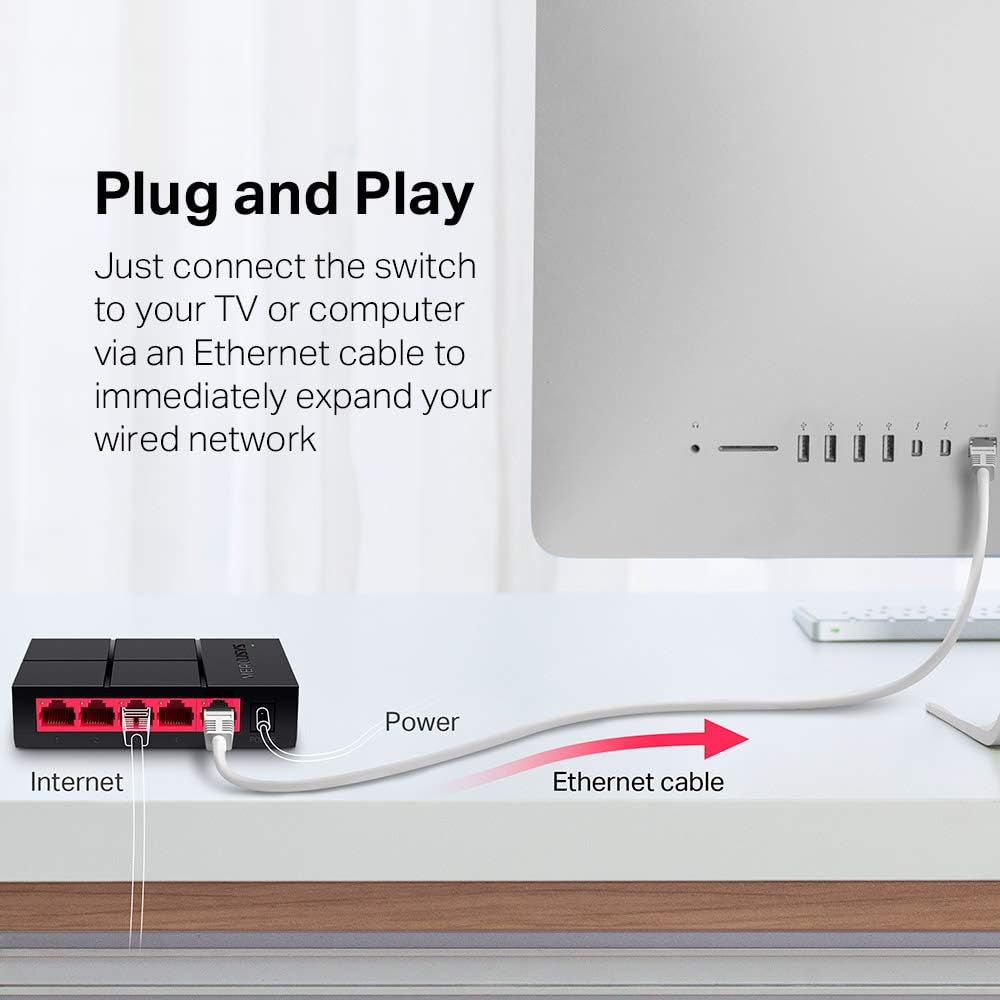
Image: Diagram illustrating the plug-and-play setup of the MERCUSYS MS105G switch, connecting it to an internet source and a computer.
5. Instrucțiuni de utilizare
The MERCUSYS MS105G is a non-managed switch, meaning it operates automatically without requiring any user configuration. Once connected as described in the Setup section, it will begin forwarding data between connected devices.
- Negociere automată: Each port automatically detects the speed (10/100/1000 Mbps) and duplex mode (Half/Full Duplex) of the connected device.
- MDI/MDIX automat: The switch automatically detects if a straight-through or crossover cable is needed, eliminating the need for specific cable types.
- Indicatoare LED: Observe the LED indicators on the front panel to confirm link status and activity for each port.
6. Întreținere
To ensure optimal performance and longevity of your MS105G switch, consider the following maintenance guidelines:
- Plasare: Așezați comutatorul într-un loc răcoros și uscat, ferit de lumina directă a soarelui, surse de căldură și umiditate excesivă. Asigurați o ventilație adecvată în jurul dispozitivului.
- curatenie: Folosiți o lavetă moale și uscată pentru a curăța exteriorul comutatorului. Nu utilizați agenți de curățare lichizi sau cu aerosoli.
- Organizare de cabluri: Keep Ethernet cables neatly organized to prevent tangles and accidental disconnections.
- Alimentare electrică: Utilizați numai adaptorul de alimentare furnizat împreună cu dispozitivul.
7. Depanare
If you encounter issues with your MS105G switch, refer to the following common troubleshooting steps:
- Fără putere:
- Asigurați-vă că adaptorul de alimentare este conectat corect la întrerupător și la o priză electrică funcțională.
- Verificați dacă priza funcționează conectând un alt dispozitiv.
- Nicio legătură/activitate pe un port:
- Check that the Ethernet cable is securely connected to both the switch port and the connected device.
- Încercați un alt cablu Ethernet pentru a exclude un cablu defect.
- Asigurați-vă că dispozitivul conectat este pornit și că adaptorul său de rețea funcționează corect.
- Încercați să conectați dispozitivul la un alt port de pe comutator.
- Viteză redusă a rețelei:
- Ensure all connected devices and cables support Gigabit Ethernet (Cat5e or Cat6 cables are recommended for Gigabit speeds).
- Check the LED indicator for the port; a green light indicates a Gigabit connection, while an orange light indicates 10/100 Mbps.
- Restart your modem, router, and the switch.
If problems persist, consult the MERCUSYS support website pentru asistență suplimentară.
8. Specificații
| Caracteristică | Descriere |
|---|---|
| Model | MS105G |
| Porturi | 5 x 10/100/1000 Mbps RJ45 Ports (Auto-Negotiation, Auto MDI/MDIX) |
| Rata de transfer de date | 1000 de megabiți pe secundă (Gigabit Ethernet) |
| Dimensiuni (L x A x H) | 10.5 x 7 x 2.5 cm (4.1 x 2.8 x 1.0 țoli) |
| Greutate | 0.08 kilograme (80 g) |
| Consumul de energie | Max 5W |
| Adaptor de alimentare | Input: 100-240VAC, 50/60Hz; Output: 5VDC/0.6A (typical) |
| Material | Plastic Casing |
| Montare | Desktop (Plug-In Mount) |

Image: Dimensions of the MERCUSYS MS105G switch, showing its compact size of 10.5 cm by 7 cm by 2.5 cm.
9. Garanție și asistență
MERCUSYS products typically come with a manufacturer's warranty. For specific warranty terms and conditions, please refer to the warranty card included with your product or visit the official MERCUSYS website. Technical support and additional resources can also be found on the MERCUSYS support page.
For the latest drivers, manuals, and support information, please visit: www.mercusys.com/support


