1. Introducere
This manual provides detailed instructions for the Soundcore Liberty True Wireless Earbuds, Model A3912. These earbuds feature Graphene-enhanced sound, extended battery life, a secure GripFit design, and Bluetooth 5.0 connectivity for a seamless audio experience.
2. Ce se află în cutie
- Soundcore Liberty Total-Wireless Earphones
- Liberty Charging Case
- 4 × GripFit Jackets (various sizes)
- 3 × EarTips (various sizes)
- Cablu micro-USB

Image: Soundcore Liberty True Wireless Earbuds with their open charging case.
3. Configurare
3.1 Încărcarea căștilor și a carcasei
Before first use, fully charge the earbuds and the charging case. The charging case provides additional power for extended listening.
- Așezați ambele căști în carcasa de încărcare.
- Connect the Micro-USB cable to the charging case and a power source.
- Indicatorii LED de pe carcasă vor afișa starea de încărcare.

Image: Graphic illustrating 100-hour playtime with the charging case.

Image: A person's hands placing an earbud into the charging case, with text indicating 15 minutes of charge provides 2 hours of listening.
3.2 Selectarea potrivirii potrivite
For optimal sound quality and comfort, choose the ear tips and GripFit jackets that best suit your ears. Experiment with different sizes to find the most secure and comfortable fit.
- Attach the desired ear tips and GripFit jackets to the earbuds.
- Insert the earbuds into your ears and gently twist to lock them in place.
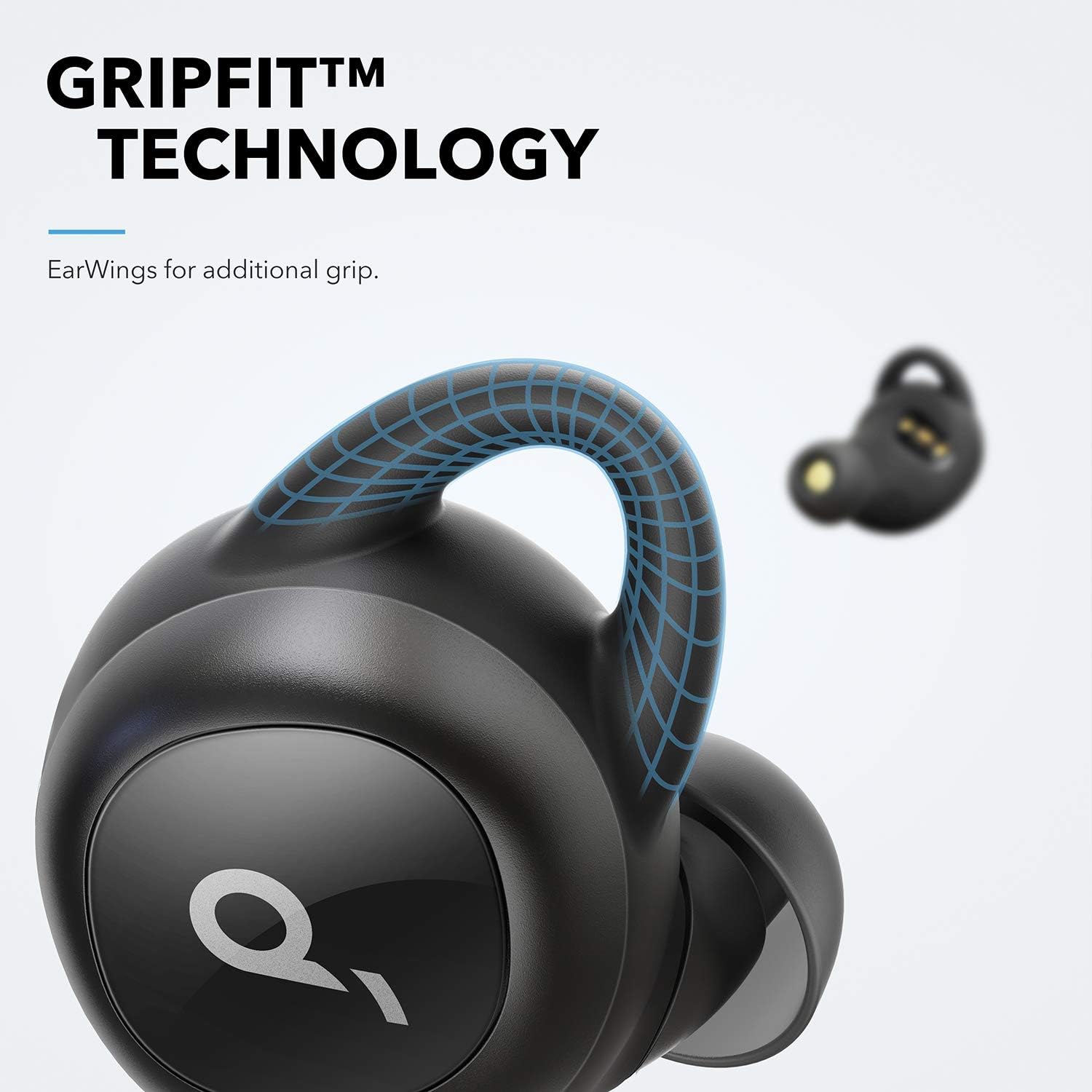
Image: Close-up of an earbud highlighting the GripFit technology for a secure fit.
3.3 Bluetooth Pairing (Push and Go)
The Soundcore Liberty earbuds feature 'Push and Go' technology for effortless pairing.
- Scoateți ambele căști din carcasa de încărcare. Vor intra automat în modul de asociere.
- Pe dispozitivul dvs. (smartphone, tabletă etc.), deschideți setările Bluetooth.
- Select "Soundcore Liberty" from the list of available devices to connect.
- After the initial setup, the earbuds will automatically connect to your device when removed from the case and disconnect when returned.
4. Instrucțiuni de utilizare
4.1 Pornire/Oprire
- Pornire: Scoateți căștile din carcasa de încărcare.
- Oprire: Puneți căștile înapoi în carcasa de încărcare.
4.2 Redare audio și apeluri
The earbuds provide high-quality audio and stereo calls. Use the touch controls for various functions.
- Redare/Pauză: Atingeți o singură dată oricare dintre căști.
- Următoarea piesă: Atingeți de două ori casca dreaptă.
- Pista anterioară: Atingeți de două ori căștile din stânga.
- Răspundeți/Terminați apelul: Atingeți o singură dată oricare dintre căști.
- Respinge apelul: Apăsați și țineți apăsat fiecare cască timp de 2 secunde.
- Activați Asistentul vocal: Apăsați și țineți apăsat oricare dintre căști timp de 1 secundă.

Image: Soundcore Liberty Earbuds shown next to a smartphone with a call interface, indicating stereo call functionality.
4.3 Graphene Enhanced Sound
The earbuds utilize Graphene-coated drivers for precision oscillation, delivering superior sound across the entire frequency range with crystal clarity and a delicately tuned sound signature.

Image: A cutaway diagram illustrating the Graphene-enhanced sound driver technology.
5. Întreținere
5.1 Curățare
Curățați regulat căștile și carcasa de încărcare pentru a asigura performanțe și igienă optime.
- Folosește o lavetă moale, uscată și fără scame pentru a șterge căștile și carcasa de încărcare.
- Scoateți dopurile de urechi și curățați-le cu apă și săpun delicat, apoi uscați-le bine înainte de a le fixa la loc.
- Asigurați-vă că contactele de încărcare de pe ambele căști și de pe carcasă sunt curate și uscate.
5.2 Sweat Resistance
The Soundcore Liberty earbuds are IPX5 rated, offering protection against sweat and light splashes, making them suitable for workouts and outdoor activities. However, they are not designed for submersion in water.
Image: A woman exercising outdoors in light rain, wearing the Soundcore Liberty Earbuds, emphasizing their sweat-resistant design (IPX5 rating).
6. Depanare
6.1 Earbuds Not Pairing or Only One Earbud Working
If your earbuds are not pairing correctly or only one earbud is producing sound, a reset may resolve the issue. Follow these steps carefully:
- Place both earbuds into the charging case. Ensure the case has sufficient charge. Keep them in the case for at least 10 seconds.
- Remove both earbuds and hold one in each hand. Locate the button on each earbud.
- Press the button on each unit simultaneously for 5 seconds. The LEDs will briefly flash red once. Release the buttons immediately after the red flash.
- Press the button on each unit again simultaneously for 8 seconds. The LEDs will briefly flash pink once. Release the buttons immediately after the pink flash.
- Place the earbuds back into the case for at least 10 seconds.
- On your connected Bluetooth device (phone, etc.), delete or 'forget' the "Soundcore Liberty" device from your Bluetooth menu.
- Take both earbuds out of the case at the same time.
- Wait approximately 15 seconds, then open your device's Bluetooth settings and scan for new devices.
- Select "Soundcore Liberty" to re-pair. This process resets the earbuds, reconnects them to each other, and then pairs them to your Bluetooth device.
6.2 Other Connectivity Issues
- Asigurați-vă că Bluetooth-ul dispozitivului este activat.
- Asigurați-vă că căștile sunt încărcate.
- Keep your device within the effective range of the earbuds (typically 10 meters or 33 feet).
- Evitați obstrucțiile fizice dintre căști și dispozitiv.
7. Specificații
| Caracteristică | Detaliu |
|---|---|
| Numele modelului | Soundcore Liberty |
| Numărul de model al articolului | A3912 |
| Tehnologia de conectivitate | Bluetooth 5.0 |
| Plasarea urechii | În ureche |
| Factor de formă | În ureche |
| Controlul zgomotului | Izolarea sunetului |
| Metoda de control | Atingere |
| Nivel de rezistență la apă | Rezistent la apă (IPX5) |
| Greutatea articolului | 3.52 uncii |
| Dimensiunile produsului | 4.76 x 6.81 x 2.44 inci |
| baterii | 1 baterii cu litiu polimer necesari |
| Producător | Anker |
8. Videoclip oficial al produsului
Video: O prezentare video oficială a produsuluiasing the Soundcore Liberty True Wireless Earbuds, highlighting their features and design.
9. Garanție și asistență
Pentru informații despre garanție, asistență tehnică sau asistență suplimentară, vă rugăm să vizitați site-ul oficial Soundcore. website-ul lor web sau contactați serviciul lor de asistență pentru clienți. Păstrați dovada achiziției pentru solicitările de garanție.
Producator: Anker


