1. Introducere
This manual provides detailed instructions for the installation, operation, and maintenance of your HOMELY LC-5 5-Band EQ Guitar Preamp with Tuner and Microphone. Please read this manual thoroughly before using the product to ensure proper function and longevity.
2. Caracteristicile produsului
- Egalizator cu 5 benzi: Adjust Bass, Midd1, Midd2, Treble, and Presence for precise tone shaping.
- Integrated Digital Tuner: Convenient LCD display tuner for accurate guitar tuning.
- Captarea microfonului: Enhances sound capture, especially for acoustic nuances.
- Controlul volumului: Master volume adjustment.
- Indicator baterie descărcată: Alertează când este necesară înlocuirea bateriei.
- Blend Control: Mixes the signal from the piezo pickup and the microphone.

Figure 2.1: The HOMELY LC-5 preamp unit highlighting the LCD display and 5-band equalizer controls.
3. Configurare și instalare
Proper installation is crucial for optimal performance. If you are unfamiliar with guitar electronics, professional installation is recommended.
3.1 Componente de mai susview
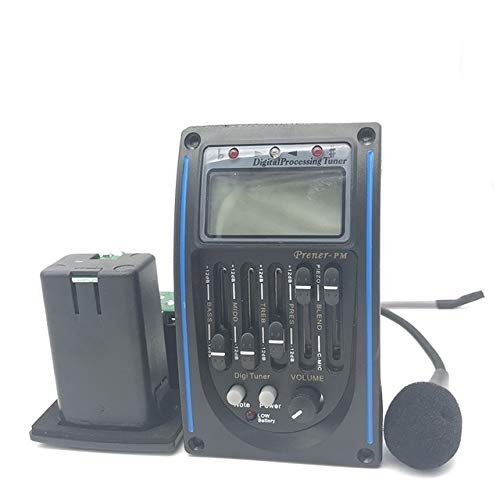
Figura 3.1: Pesteview of the LC-5 preamp unit, including the main control panel, separate battery compartment, and attached microphone.
3.2 Etapele de instalare
- Prepare the Guitar: Carefully cut the necessary openings in your guitar body for the preamp unit and the endpin jack. Ensure precise measurements to avoid damage.
- Install the Preamp Unitate: Secure the main preamp control panel into its designated opening.
- Install the Endpin Jack: Mount the endpin jack assembly, which includes the output jack and battery compartment, at the bottom of the guitar.
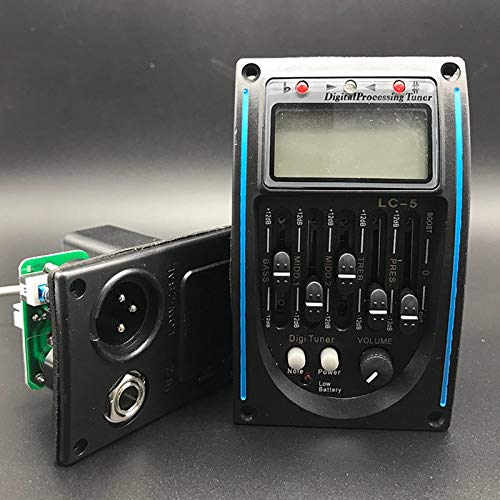
Figura 3.2: lateral view of the LC-5 preamp unit, illustrating the output jacks (XLR and 1/4-inch) and the integrated battery compartment.
- Connect the Piezo Pickup: Route the piezo pickup wire from the bridge saddle to the preamp unit and connect it to the designated input.
- Conectați microfonul: Ensure the attached microphone is positioned correctly inside the guitar body for optimal sound capture.
- Instalați bateria: Open the battery compartment (usually located within the endpin jack assembly) and insert a 9V battery, observing correct polarity.
- Testare conexiuni: Before fully securing, connect the guitar to an amplifier and test all functions to ensure proper wiring and operation.
4. Instrucțiuni de utilizare
Familiarize yourself with the controls for effective sound management.
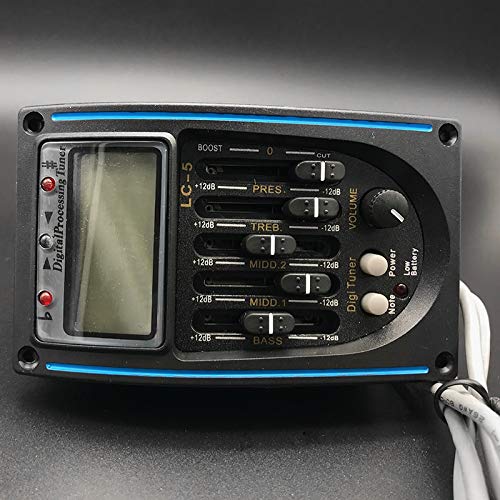
Figura 4.1: Detaliat view of the LC-5 preamp's control panel, showing the 5-band EQ sliders, volume knob, digital tuner display, and control buttons.
4.1 Pornire/Oprire
Preamp typically powers on automatically when a guitar cable is plugged into the endpin jack. Disconnect the cable to power off and conserve battery life.
4.2 Controlul volumului
- Butonul VOLUM: Rotate to adjust the overall output level of your guitar. Start with a low setting and gradually increase to avoid sudden loud sounds.
4.3 Egalizator pe 5 benzi
Use the five slider controls to shape your guitar's tone:
- BAS: Adjusts low-frequency response (0-80 Hz). Boost for a fuller, warmer sound; cut for clarity.
- MIDD 1 & MIDD 2: Adjusts mid-range frequencies (250 Hz - 2 kHz). These are crucial for the guitar's presence and projection. Experiment to find your desired tone.
- TREB: Adjusts high-frequency response (2 kHz - 20 kHz). Boost for brightness and sparkle; cut to reduce harshness.
- PRES (Presence): Adjusts upper mid-range frequencies (around 3-5 kHz) for added clarity and attack.
4.4 Tuner digital
- DIGI TUNER Button: Press this button to activate the built-in digital tuner. The LCD display will show the note being played.
- Reglare: Pluck each string individually. The display will indicate if the note is flat, sharp, or in tune. Adjust your guitar's tuning pegs until the display shows the correct note and indicates it is in tune.
- Note Button: Some models may have a 'Note' button to cycle through different tuning modes (e.g., chromatic, guitar). Refer to the display for current mode.
- Power Button (Tuner): This button typically controls the tuner's power, separate from the main preamp putere.
4.5 Blend Control (if applicable)
The "BLEND" slider allows you to mix the signal from the piezo pickup and the internal microphone. Slide towards "PIEZO" for a direct, punchy sound, or towards "MIC" for a more natural, ambient acoustic tone. Adjust to find the desired balance.
4.6 Indicator baterie descărcată
A "LOW BATTERY" LED or indicator on the LCD will illuminate when the 9V battery needs replacement. Replace the battery promptly to ensure consistent performance.
5. Întreținere
5.1 Înlocuirea bateriei
When the low battery indicator activates, replace the 9V battery. Open the battery compartment, remove the old battery, and insert a new one, ensuring correct polarity. Always use a fresh alkaline 9V battery.
5.2 Curățare
Wipe the preamp's control panel with a soft, dry cloth. Avoid using abrasive cleaners or solvents, as they may damage the finish or electronic components.
5.3 Depozitare
When not in use for extended periods, disconnect the guitar cable from the output jack to prevent battery drain. Store the guitar in a stable environment, away from extreme temperatures and humidity.
6. Depanare
- Fără ieșire de sunet:
- Check if the guitar cable is fully inserted into both the guitar's output jack and the ampmai în viață.
- Asigurați amplifier is powered on and its volume is up.
- Verify the preamp's volume knob is not set to minimum.
- Check the battery. Replace if the low battery indicator is on or if the battery is old.
- Inspect all internal wiring connections (professional inspection recommended).
- Poor Sound Quality / Buzzing / Hum:
- Check for loose connections inside the guitar.
- Ensure the piezo pickup is correctly seated under the bridge saddle.
- Adjust EQ settings; extreme boosts can introduce unwanted noise.
- Test with a different guitar cable and amplifier to rule out external issues.
- Ensure the microphone is not touching any vibrating parts of the guitar body that could cause feedback.
- Tuner Not Working:
- Ensure the tuner is activated by pressing the "DIGI TUNER" button.
- Verificați nivelul bateriei.
- Pluck strings firmly and clearly.
- Low Battery Indicator Always On:
- Înlocuiți bateria de 9V cu una nouă.
- If the issue persists with a new battery, there might be an internal circuit issue requiring professional service.
7. Specificații
| Model | LC-5 |
| Marca | HOMELY |
| Benzi de egalizare | 5-Band (Bass, Midd1, Midd2, Treble, Presence) |
| Afişa | LCD Digital Tuner |
| Alimentare electrică | Baterie de 9V (nu este inclusă) |
| Tip de ridicare | Piezo and Microphone |
8. Garanție și asistență
For warranty information or technical support, please contact HOMELY customer service through their official channels. Keep your purchase receipt as proof of purchase.
Manufacturer: Homely
Date First Available: 26 March 2019


