1. Produs terminatview
The EPEVER TRIRON 4210N is a 40A Maximum Power Point Tracking (MPPT) solar charge controller designed for 12V/24V DC systems. It efficiently manages power from solar panels to charge various battery types, including lead-acid (Sealed, Gel, Flooded, User) and lithium (LiFePO4, Li-NiCoMn, Lithium User). This set includes the TRIRON 4210N controller and the MT50 Remote Meter for enhanced monitoring and control.
Caracteristici cheie:
- Advanced MPPT technology for high tracking efficiency.
- Modular design for flexible configuration with different display and interface modules.
- Supports multiple battery types: Sealed (AGM), Gel, Flooded, Lead-acid User, LiFePO4 Lithium, Li(NiCoMn)O2 Lithium, Lithium User (9~34V).
- Negative ground design for broad application compatibility.
- Dual 5V DC USB output interface (Max 2.2A) for charging electronic devices.
- Patru-stage charging (bulk, absorption, float, equalization) to prolong battery life.
- Comprehensive electronic protection features.
- Funcția de statistici energetice în timp real.
Continutul pachetului:
Pachetul include de obicei:
- EPEVER TRIRON 4210N MPPT Solar Charge Controller
- Contor de la distanță EPEVER MT50
- Remote Temperature Sensor (RT-S)
- USB to RS485 Communication Cable
- Manual de utilizare

Image: Contents of the EPEVER TRIRON 4210N and MT50 Remote Meter package, including the controller, remote meter, temperature sensor, and cables.
2. Informații de siguranță
Vă rugăm să citiți cu atenție toate instrucțiunile și avertismentele înainte de instalare și utilizare. Nerespectarea acestor instrucțiuni poate duce la electrocutare, incendiu sau vătămări corporale grave.
- Ensure all wiring is correctly polarized and securely connected. Loose connections can cause overheating and fire.
- Conectați întotdeauna mai întâi bateria la regulatorul de încărcare, apoi la panoul solar și în final la sarcină. Deconectați în ordine inversă.
- Do not attempt to repair or modify the controller. Refer servicing to qualified personnel.
- Instalați controlerul într-o zonă bine ventilată, departe de materiale inflamabile și gaze corozive.
- Wear appropriate personal protective equipment (PPE), including eye protection and insulated gloves, when working with batteries and solar panels.
- Asigurați-vă că sistemul voltage is compatible with the controller's specifications (12V/24V auto work).
- Use appropriate circuit breakers or fuses for all connections to prevent overcurrent.
3. Instalare
3.1 Montarea controlerului
Mount the controller vertically on a flat, non-flammable surface in a dry, well-ventilated indoor area. Ensure there is sufficient clearance around the controller for heat dissipation. The recommended clearances are 150mm (5.9 inches) above and below the unit.

Image: Controller dimensions and recommended mounting clearances for proper ventilation.
3.2 Conexiuni de cablare
Follow the wiring sequence carefully to prevent damage to the controller or other components. Always ensure all power sources are disconnected before making or breaking connections.
- Conectați bateria: Connect the battery cables to the controller's battery terminals (marked with '+' and '-'). Ensure correct polarity. Always connect the battery first.
- Conectați panoul solar: Connect the solar panel cables to the controller's PV terminals (marked with solar panel icon and '+' and '-'). Ensure correct polarity.
- Conectați sarcina de curent continuu: Connect the DC load cables to the controller's load terminals (marked with light bulb icon and '+' and '-'). Ensure correct polarity.
- Connect Remote Temperature Sensor: Plug the remote temperature sensor into the designated port on the controller. Secure the sensor to the battery case for accurate temperature compensation.
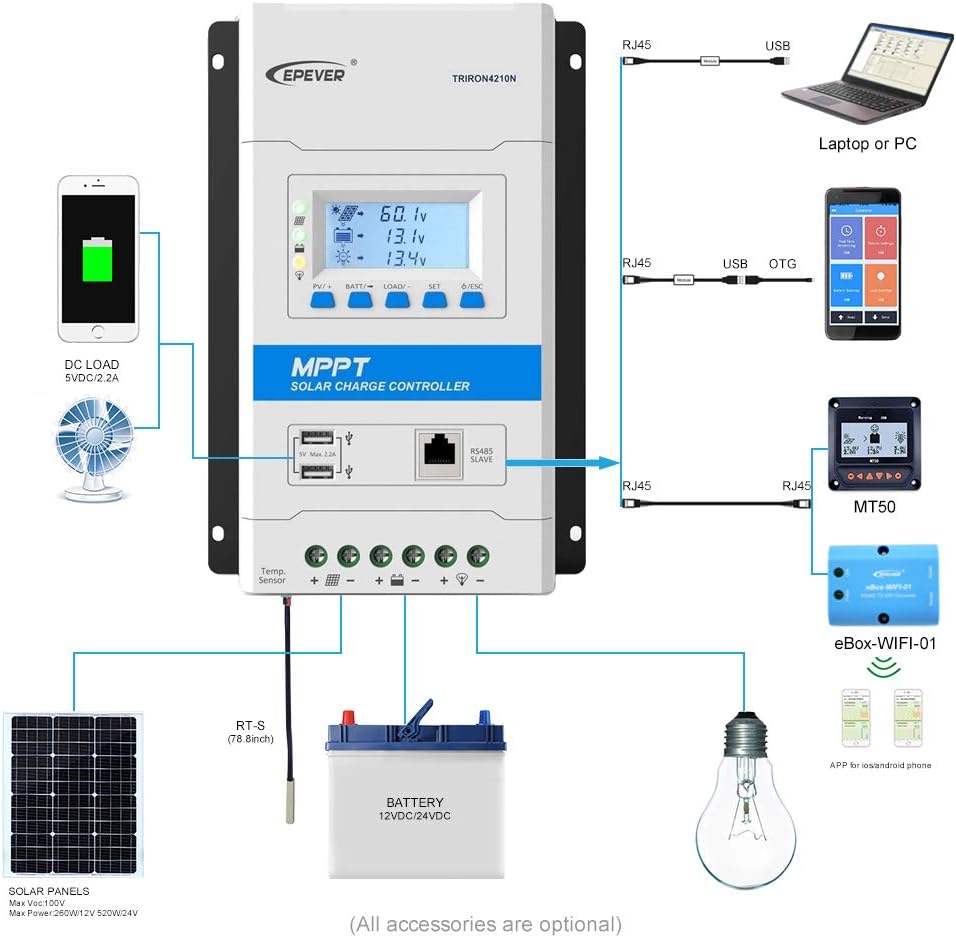
Image: Detailed wiring diagram showing connections for solar panels, battery, and DC load to the TRIRON 4210N controller.
Video: This video demonstrates the unboxing, component identification, and step-by-step installation process for the EPEVER TRIRON 4210N solar charge controller, including wiring the battery, solar panel, and remote temperature sensor.
3.3 Connecting the MT50 Remote Meter
The MT50 Remote Meter connects to the controller via an RJ45 communication cable. This allows for remote monitoring of system status and parameter settings.
- Connect one end of the RJ45 cable to the RS485 port on the TRIRON 4210N controller.
- Connect the other end of the RJ45 cable to the corresponding port on the MT50 Remote Meter.
3.4 Interfețe de comunicare
The TRIRON 4210N features an RS485 communication port, allowing connection to various accessories for extended functionality:
- Software pentru PC: Connect via an RS485 to USB adapter cable for monitoring and parameter configuration using PC software.
- Aplicație mobilă: Connect via an eBox-WIFI-01 or eBox-BLE-01 module for wireless monitoring and control through a mobile application.
4. Funcționare
4.1 Afișaj LCD și butoane
The controller features an LCD display and five buttons for viewing system parameters and making adjustments.

Image: Various screens displayed on the TRIRON 4210N LCD, showing PV voltage, current, battery status, and load information.
- Buton PV/+: Used to navigate forward through display screens or increase parameter values.
- BATT/→ Button: Used to navigate right through display screens or move cursor during parameter setting.
- Buton ÎNCĂRCARE/-: Used to navigate backward through display screens or decrease parameter values.
- Buton SET: Used to enter parameter setting mode or confirm a setting.
- Butonul ESC: Used to exit parameter setting mode or return to the previous screen.
4.2 Setări parametri
To adjust parameters such as battery type, capacity, and temperature unit, use the navigation buttons to access the setting menus. Press the SET button to enter edit mode, use PV/+ and LOAD/- to change values, and SET again to confirm. Refer to the detailed instructions in the included user manual for specific parameter adjustments.
4.3 Ieșire USB
The controller is equipped with dual 5V DC USB ports (Max 2.2A) for charging compatible electronic devices. These ports are active when the controller is powered by the battery.
5. Întreținere
Întreținerea regulată asigură performanța optimă și longevitatea regulatorului de încărcare solară.
- Verificați conexiunile: Periodically inspect all wiring connections for tightness and corrosion. Tighten any loose connections.
- Curățați controlerul: Keep the controller clean and free from dust and debris. Ensure the heat sink fins are not obstructed to allow for proper cooling.
- Inspectați cablurile: Check all cables for signs of wear, damage, or insulation degradation. Replace damaged cables immediately.
- Verificarea bateriei: For lead-acid batteries, check electrolyte levels and terminal condition as per battery manufacturer guidelines.
- Actualizări de software: Verifică-l pe cel al producătorului website for any available firmware updates for your controller.
6. Depanare
This section provides basic troubleshooting steps for common issues. For more complex problems, consult the full user manual or contact EPEVER technical support.
Probleme comune și soluții:
- Fără afișaj/Fără alimentare:
- Verificați conexiunile bateriei și asigurați-vă că sunt fixate și polarizate corect.
- Verificați volumul baterieitage se află în raza de operare a regulatorului.
- Fără încărcare de la panoul solar:
- Verificați conexiunile și polaritatea panourilor solare.
- Asigurați-vă că panourile solare ajung suficientă lumină solară.
- Verify solar panel open circuit voltage (Voc) is within the controller's input range.
- Încărcarea nu funcționează:
- Verificați conexiunile sarcinii și polaritatea.
- Ensure the load is not exceeding the controller's rated load current.
- Verificați volumul baterieitage; the load may be disconnected if the battery voltage este prea scăzut.
- Incorrect Battery Readings:
- Verify the remote temperature sensor is correctly connected and placed near the battery.
- Ensure the correct battery type and capacity are set in the controller's parameters.
7. Specificații
| Parametru | Valoare |
|---|---|
| Model | TRIRON4210N-mppt |
| Sistem Voltage | 12/24VDC Auto Work |
| Curent nominal de încărcare | 40A |
| Vol. intrare baterietage Gama | 8-32V |
| Max. Circuit deschis PV Voltage | 100V (Min operating environment temp); 92V (25℃ environment temp) |
| MPP Voltage Gama | (Vbat+2V) ~ 72V |
| Max. PV Array Power Support | 520W (12V battery); 1040W (24V battery) |
| Temperatura mediului de lucru | -25℃ ~ +55℃ (with LCD) / -30℃ ~ +55℃ (without LCD) |
| Lithium Battery Types Supported | LiFePO4 (4 series; 8 series) / Li-NiCoMn (3 series; 6 series) / User (Lithium battery setting requires RS485 or WIFI BOX) |
| Lead-acid Battery Types Supported | Sealed (AGM), Gel, Flooded, Lead-acid User |
| Autoconsum | ≤14mA (12V); ≤15mA (24V) |
| Compensarea temperaturii | -3mV/℃/2V |
| Împământare | Negativ comun |
| Terminals/Wire Size | 6AWG (16 mm²) |
| Ieșire USB | Dual 5V DC, Max 2.2A |
| Greutatea articolului | 6.69 lire sterline |
| Dimensiuni pachet | 17.56 x 8.43 x 4.88 inci |
| UPC | 655160074776 |
8. Garanție și asistență
For warranty information and technical support, please refer to the documentation included with your product or visit the official EPEVER webPăstrați bonul fiscal ca dovadă a achiziției pentru reclamații în garanție.


