1. Introducere
Thank you for choosing the MIATONE BOOMBOX Bluetooth Speaker. This portable and waterproof wireless speaker is designed to deliver high-quality audio for various environments, from indoor relaxation to outdoor adventures. Please read this manual carefully before using the product to ensure proper operation and to maximize its lifespan.

Audio de înaltă rezoluție: Experience crisp highs, rich mids, and deep bass with advanced DSP-enhanced sound technology.
2. Informații de siguranță
- Do not expose the speaker to extreme temperatures (heat or cold) or high humidity.
- Evitați scăderea sau supunerea difuzorului la impacturi puternice.
- Nu dezasamblați, reparați și modificați singur difuzorul. Adresați-vă personalului de service calificat.
- Țineți difuzorul departe de dispozitivele medicale, deoarece câmpul său magnetic poate interfera cu funcționarea acestora.
- Asigurați-vă că capacul portului de încărcare este închis etanș atunci când utilizați difuzorul în apropierea apei pentru a-i menține rezistența la apă.
- Folosiți doar cablul de încărcare furnizat sau un echivalent certificat.
- Do not listen at excessively high volumes for prolonged periods to prevent hearing damage.
3. Conținutul pachetului
Vă rugăm să verificați pachetul pentru următoarele articole:
- MIATONE BOOMBOX Bluetooth Speaker
- Cablu de încărcare micro USB
- Cablu de intrare auxiliar
- Ghidul utilizatorului
4. Produs terminatview
Familiarize yourself with the various parts and controls of your MIATONE BOOMBOX speaker.
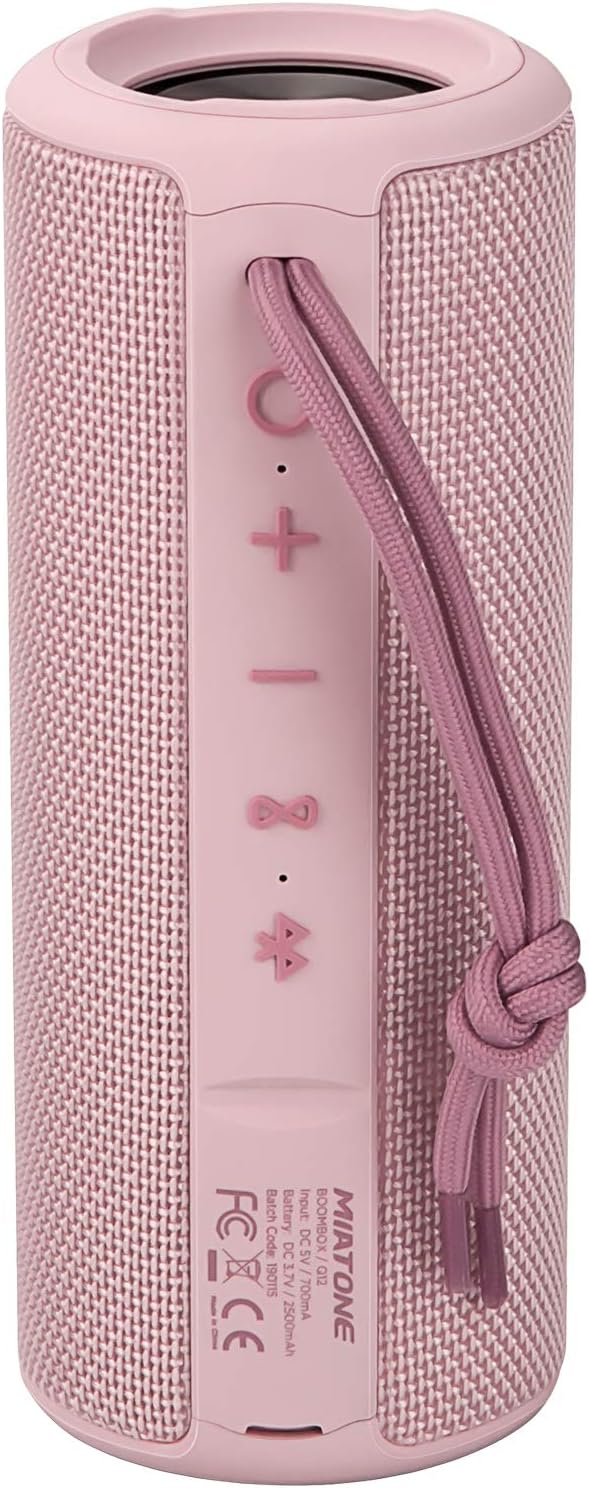
Faţă View: Shows the speaker grille and the MIATONE logo.

Spate View: Displays the control buttons (+, -, Play/Pause, Bluetooth, TWS) and the charging/AUX ports under a protective flap.

Reinforced Silicone End Caps: The speaker features durable silicone bumpers on both ends to absorb impact and prevent slipping.
Funcții butoane:
| Buton | Funcţie |
|---|---|
| + | Short press: Volume Up; Long press: Next Track |
| - | Short press: Volume Down; Long press: Previous Track |
| Redare/Pauză | Short press: Play/Pause; Short press (incoming call): Answer/End Call; Long press (incoming call): Reject Call |
| Pictograma Bluetooth | Long press: Disconnect current Bluetooth device and enter pairing mode |
| Pictogramă TWS | Short press: Initiate TWS pairing (True Wireless Stereo) |
| Buton de alimentare | Apăsare lungă: Pornire/Oprire |
5. Configurare
5.1 Încărcarea difuzorului
- Open the protective flap on the back of the speaker to reveal the charging port.
- Connect the Micro USB charging cable to the speaker's charging port and the other end to a USB power adapter (not included) or a computer's USB port.
- Indicatorul LED va afișa starea de încărcare (de exemplu, roșu pentru încărcare, stins când este complet încărcat).
- A full charge takes approximately 12 hours. Ensure the protective flap is sealed after charging.
5.2 Pornire/Oprire
- Pornire: Long press the Power button until you hear a power-on prompt.
- Oprire: Long press the Power button until you hear a power-off prompt.
5.3 Asociere Bluetooth
- Ensure the speaker is powered on and in Bluetooth pairing mode (indicated by a flashing blue LED). If not, long press the Bluetooth icon button.
- Activați Bluetooth pe dispozitivul dvs. (smartphone, tabletă, computer).
- Caută "BOOMBOX" in your device's Bluetooth list.
- Select "BOOMBOX" to connect. You will hear a confirmation sound once paired.
- Difuzorul se va reconecta automat la ultimul dispozitiv asociat atunci când este pornit, dacă se află în raza de acțiune.

Bluetooth 5.3 îmbunătățit: Provides faster and more stable wireless connections.
Împerechere 5.4 TWS (stereo True Wireless)
TWS allows you to pair two MIATONE BOOMBOX speakers together for a true stereo sound experience.
- Ensure both BOOMBOX speakers are powered on and not connected to any Bluetooth device.
- On one speaker (this will be the primary speaker), short press the TWS icon button. It will enter TWS pairing mode.
- Cele două difuzoare se vor conecta automat între ele. Veți auzi un sunet de confirmare după ce asocierea TWS a avut succes.
- După ce TWS a fost asociat, conectați dispozitivul la difuzorul principal prin Bluetooth, așa cum este descris în secțiunea 5.3.
- To disconnect TWS, short press the TWS icon button on either speaker.
6. Instrucțiuni de utilizare
6.1 Redarea muzicii
- Redare/Pauză: Apăsați scurt butonul Redare/Pauză.
- Creșterea volumului: Apăsați scurt pe + buton.
- Volum scăzut: Apăsați scurt pe - buton.
- Următoarea piesă: Apăsați lung pe + buton.
- Pista anterioară: Apăsați lung pe - buton.
6.2 Apeluri hands-free
- Răspunde la apel: Apăsați scurt butonul Redare/Pauză când sună un apel primit.
- Terminare apel: Apăsați scurt butonul Redare/Pauză în timpul unui apel.
- Respinge apelul: Apăsați lung butonul Redare/Pauză atunci când sună un apel primit.
6.3 Auxiliary Input (AUX Mode)
You can connect non-Bluetooth devices to the speaker using the provided 3.5mm auxiliary cable.
- Deschideți clapeta de protecție de pe spatele difuzorului.
- Connect one end of the 3.5mm AUX cable to the speaker's AUX port and the other end to your audio device's headphone jack.
- Difuzorul va comuta automat în modul AUX.
- Controlează redarea și volumul de pe dispozitivul conectat.
- Ensure the protective flap is sealed after use to maintain water resistance.
7. Întreținere
7.1 Curățare
- Ștergeți difuzorul cu un soft moale, damp pânză.
- Nu utilizați agenți de curățare abrazivi, alcool sau solvenți chimici.
- Asigurați-vă că difuzorul este complet uscat înainte de încărcare sau depozitare.
7.2 Depozitare
- Depozitați difuzorul într-un loc răcoros și uscat, ferit de lumina directă a soarelui și de temperaturi extreme.
- If storing for a long period, charge the battery to about 50% every few months to preserve battery life.
7.3 Protecție împotriva apei (IPX6)
The MIATONE BOOMBOX is IPX6 waterproof, meaning it can withstand powerful water jets. It is not designed for submersion.
- Always ensure the charging port and AUX port protective flap is securely closed before exposing the speaker to water.
- If the speaker gets wet, wipe it dry with a clean cloth before opening the port flap or charging.
- Nu încărcați difuzorul dacă porturile sunt ude.

IPX6 Waterproof Speaker: Designed to float and withstand water splashes, making it ideal for poolside or beach use.
8. Depanare
| Problemă | Cauza posibila | Soluţie |
|---|---|---|
| Difuzorul nu se pornește. | Bateria este descărcată sau descărcată. | Încărcați complet difuzorul. |
| Nu se poate asocia cu dispozitivul Bluetooth. | Speaker is not in pairing mode; device's Bluetooth is off; speaker is already connected to another device; device list needs refresh. | Ensure speaker is in pairing mode (flashing blue LED). Turn device's Bluetooth off and on. Disconnect from other devices. Forget "BOOMBOX" on your device and re-scan. |
| Niciun sunet sau volum redus. | Volum prea scăzut pe difuzor sau pe dispozitiv; mod de intrare incorect; difuzor neconectat. | Increase volume on both speaker and device. Ensure correct input mode (Bluetooth/AUX). Re-establish Bluetooth connection. |
| Distorsiunea sunetului. | Volum prea mare; baterie descărcată; interferențe. | Reduce volume. Charge the speaker. Move speaker closer to the device or away from other electronic devices. |
| Împerecherea TWS a eșuat. | Difuzoarele sunt prea depărtate unul de celălalt; un difuzor este deja conectat la un dispozitiv. | Asigurați-vă că ambele boxe sunt aproape una de cealaltă și nu sunt conectate la niciun dispozitiv Bluetooth înainte de a iniția asocierea TWS. |
9. Specificații
| Caracteristică | Detaliu |
|---|---|
| Numele modelului | BOOMBOX (Q12) |
| Tehnologia de conectivitate | Bluetooth 5.3, USB, AUX |
| Tip difuzor | Portable Speaker, Bluetooth Speaker |
| Putere maximă de ieșire | 20 wați |
| Raspuns in frecventa | 20 KHz |
| Durata de viață a bateriei | Până la 17 ore (la 50% volum) |
| Timp de încărcare | 12 de ore |
| Evaluare rezistentă la apă | IPX6 |
| Gama Bluetooth | Până la 100 de picioare (30.5 metri) |
| Dimensiuni (L x l x H) | 7.11 x 7.11 x 18.54 cm (2.8 x 2.8 x 7.3 țoli) |
| Greutate | 421.84 grame (0.93 lbs) |
| Material | Aluminiu |
| Dispozitive compatibile | Calculator personal, Laptop, Tabletă, Smartphone |

Timp de joacă de lungă durată: Enjoy up to 17 hours of playback at 50% volume.
10. Garanție și asistență
MIATONE products are designed and manufactured to the highest quality standards. For information regarding warranty coverage, technical support, or service inquiries, please refer to the contact information provided on the product packaging or visit the official MIATONE website-ul.
Vă rugăm să păstrați dovada achiziției pentru cererile de garanție.


