1. Introducere
Mulțumesc pentru achizițieasing the lightmaXX Nano PAR FX 3x 4 W LED RGBW. This compact and powerful LED PAR spot is designed for various lighting applications, offering vibrant RGBW color mixing and dynamic strobe effects. This manual provides essential information for safe operation, setup, and maintenance of your device. Please read it thoroughly before use.
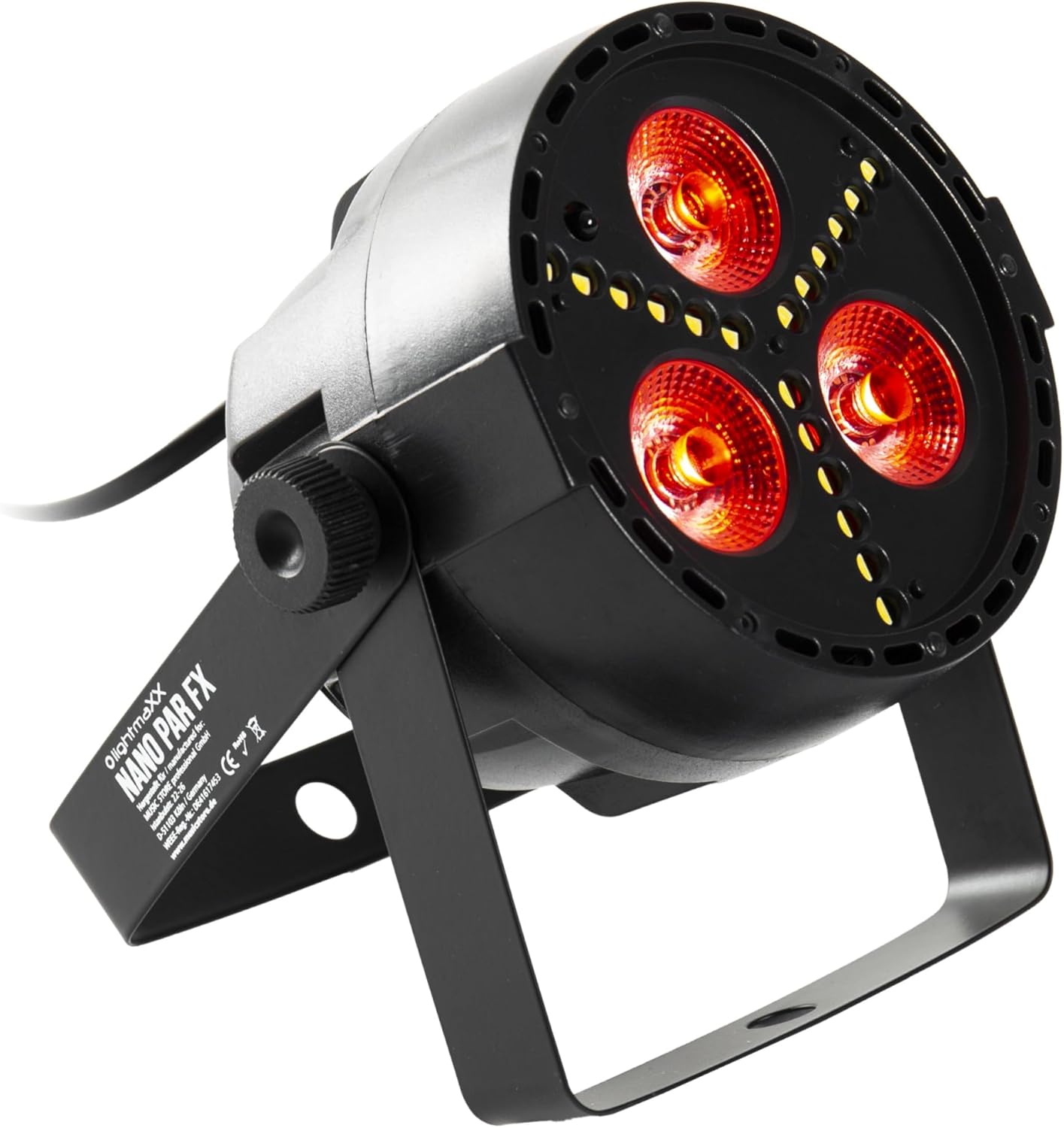
Figure 1: lightmaXX Nano PAR FX LED PAR Spot
2. Instrucțiuni de siguranță
To ensure safe operation, please observe the following safety instructions:
- Alimentare electrică: Connect the device only to a grounded power outlet with the correct voltage (230V AC).
- Ventilare: Asigurați o ventilație adecvată în jurul unității. Nu blocați orificiile de ventilație.
- Umiditate: Do not expose the device to rain or moisture. Do not use it in damp medii.
- Temperatură: Folosiți dispozitivul în intervalul de temperatură specificat. Evitați temperaturile extreme.
- Manipulare: Manevrați dispozitivul cu grijă. Evitați să îl scăpați sau să îl supuneți la impacturi puternice.
- Întreţinere: Apelați la personal de service calificat pentru toate lucrările de service. Nu încercați să reparați unitatea singur.
- Ieșire luminoasă: Avoid looking directly into the light source, as it can cause eye damage.
3. Configurare
3.1 Plasarea fizică
The lightmaXX Nano PAR FX is designed as a floor spot but can also be mounted using its adjustable bracket. Ensure the mounting surface or location is stable and can support the weight of the fixture. Allow sufficient space around the unit for proper ventilation.
3.2 Conexiuni
Connect the power cable to a suitable power outlet. For DMX control, connect a DMX cable from your DMX controller to the DMX IN port of the fixture. If linking multiple units, connect a DMX cable from the DMX OUT port of the first fixture to the DMX IN port of the next, and so on.

Figure 2: Rear panel with DMX ports and control display
4. Instrucțiuni de utilizare
4.1 Panoul de control
The rear panel features a digital display and four control buttons: MENU, UP, DOWN, and ENTER. These buttons allow you to navigate through the settings and select various operating modes.
- MENIUL: Apăsați pentru a parcurge opțiunile meniului principal.
- SUS: Increases values or moves up in menu options.
- JOS: Decreases values or moves down in menu options.
- INTRODUCE: Confirmă o selecție sau intră într-un submeniu.
4.2 Telecomandă
The lightmaXX Nano PAR FX comes with an infrared (IR) remote control for convenient operation. Ensure there is a clear line of sight between the remote and the fixture's IR receiver.

Figure 3: Product with Remote Control
4.3 Moduri de operare
The fixture offers several built-in operating modes, accessible via the control panel or remote:
- Mod auto: Cycles through pre-programmed light shows automatically.
- Mod sunet: Reacts to music or sound via a built-in microphone.
- Mod salt: Schimbă brusc culorile.
- Modul Fade: Tranziții line între culori.
- Modul stroboscopic: Produces a flashing light effect.
4.4 Color Mixing
The Nano PAR FX features RGBW LEDs, allowing for a wide spectrum of colors. You can select individual colors or mix them to create custom hues using the remote control or DMX.

Figura 4: Examples of color outputs

Red Light Output

Green Light Output
4.5 Operare DMX
For professional control, the Nano PAR FX can be operated via DMX512. Set the DMX address using the control panel. Consult the DMX channel chart (typically found in a separate DMX manual or product sheet) for specific channel assignments for color, dimming, strobe, and mode control.
5. Întreținere
5.1 Curățare
Regular cleaning helps maintain optimal performance and extends the lifespan of your fixture.
- Deconectați alimentarea înainte de curățare.
- Folosiți o lavetă moale, fără scame, pentru a șterge exteriorul.
- For lenses, use a specialized lens cleaner and a soft cloth to avoid scratches.
- Nu utilizați agenți de curățare abrazivi sau solvenți.
5.2 Depozitare
Când nu este utilizat, depozitați dispozitivul într-un mediu uscat și fără praf, de preferință în ambalajul original sau într-o husă de protecție.
6. Depanare
| Problemă | Cauza posibila | Soluţie |
|---|---|---|
| Fără putere | Power cable disconnected; no power from outlet; faulty fuse. | Check power cable connection; test outlet; replace fuse if necessary. |
| Fara iesire de lumina | Fixture in standby; incorrect mode selected; DMX signal issue. | Check power and mode settings; verify DMX connection and address. |
| Telecomanda nu funcționează | Battery low/dead; IR receiver blocked; too far from fixture. | Replace battery; ensure clear line of sight; move closer to fixture. |
| Probleme cu controlul DMX | Incorrect DMX address; faulty DMX cable; DMX controller issue. | Verify DMX address; test DMX cable; check DMX controller. |
7. Specificații
| Caracteristică | Caietul de sarcini |
|---|---|
| Marca | lightmaXX |
| Producător | lightmaXX |
| Numărul de model | LIG0015652-000 |
| Dimensiuni produs (L x l x H) | 12.9 x 12.9 x 12.8 cm |
| Greutatea articolului | 620 de grame |
| Stil | Modern |
| Culoare | Black (fixture), RGBW (light output) |
| Wați maxim | 20 wați |
| Voltage | 230 volți (AC) |
| Tip bec | Diodă emițătoare de lumină (LED) |
| Tip sursă de lumină | Diode électroluminescente (LED) |
8. Garanție și asistență
This product is subject to the standard return policy of 30 days from the date of purchase. For technical support, service, or warranty inquiries, please contact your retailer or the lightmaXX customer service department. Please have your model number (LIG0015652-000) and proof of purchase ready when contacting support.


