1. Introducere
Mulțumesc pentru achizițieasing the Alpha EK-60 61-Key Electronic Piano Keyboard. This manual provides detailed instructions for the proper setup, operation, and maintenance of your new instrument. The EK-60 is designed to offer a rich musical experience with its versatile features, including a wide range of tones and rhythms, intelligent teaching functions, and various connectivity options. Please read this manual thoroughly before using the product to ensure optimal performance and longevity.
2. Informații de siguranță
To prevent electric shock, fire, or damage to the unit, please observe the following precautions:
- Nu expuneți tastatura la ploaie sau umezeală.
- Nu așezați obiecte umplute cu lichide, cum ar fi vaze, pe tastatură.
- Nu blocați orificiile de ventilație.
- Folosiți doar adaptorul de alimentare specificat.
- Nu dezasamblați și nu modificați unitatea. Apelați la personal calificat pentru orice service.
- A nu se lăsa la îndemâna copiilor mici.
3. Conținutul pachetului
Vă rugăm să verificați dacă toate următoarele articole sunt incluse în pachetul dumneavoastră:
- 1 x Alpha 61-Key Standard Keyboard EK-60
- 1 x Adjustable Stand
- 1 x suport pentru partitură muzicală
- 1 x adaptor de alimentare
- 1 x Manual de utilizare (acest document)
4. Produs terminatview
Familiarize yourself with the components of your Alpha EK-60 keyboard.
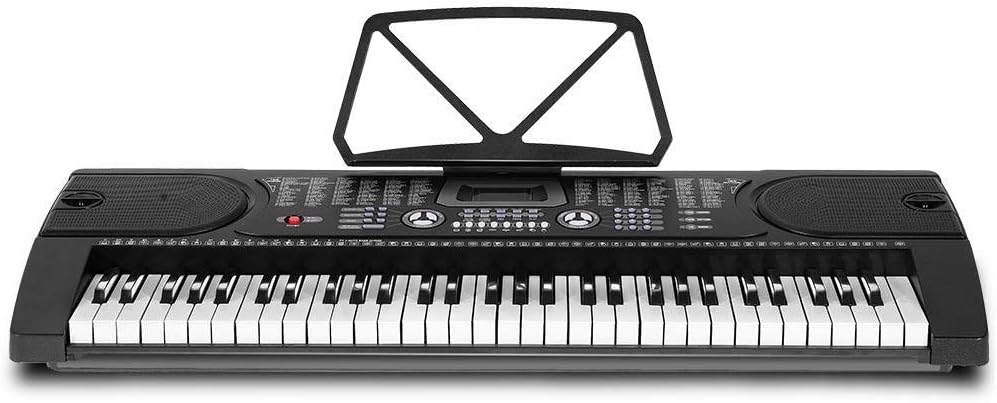
Figura 4.1: De sus în jos view of the Alpha EK-60 keyboard, highlighting the control panel, integrated speakers, and the 61 standard piano keys.

Figure 4.2: Detail of the LED display for convenient settings adjustment and the battery compartment for portable use.

Figura 4.3: View of the multiple jacks including Audio Input, Microphone Input, and Headphone Output for versatile connectivity.
Caracteristici cheie:
- 61-Key Standard Piano Keyboard
- LED display for easy navigation
- 24 melodii demo
- 255 timbres (instrument sounds)
- 255 rhythms (accompaniment styles)
- 61 kinds of keyboard percussions
- 8 Panel Percussions
- Master volume, accompaniment volume, and tempo control
- Intelligent teaching function: one-key, follow and ensemble function
- Funcția de programare a ritmului
- Auto chord and chord timbre option
- Funcționalitate de înregistrare și redare
- Sustain and vibrato effects
- Microphone input and speaker output
- Headphone jack for silent practice
- Battery powered option (6 x AA-size batteries, not included)
5. Configurare
5.1 Asamblarea standului
- Unpack all components of the adjustable stand.
- Connect the horizontal support bars to the vertical legs, ensuring they are securely fastened.
- Adjust the height of the stand to your preferred playing position using the adjustment knobs. The stand is adjustable from 59cm to 79cm in height.
- Place the keyboard securely on top of the assembled stand.
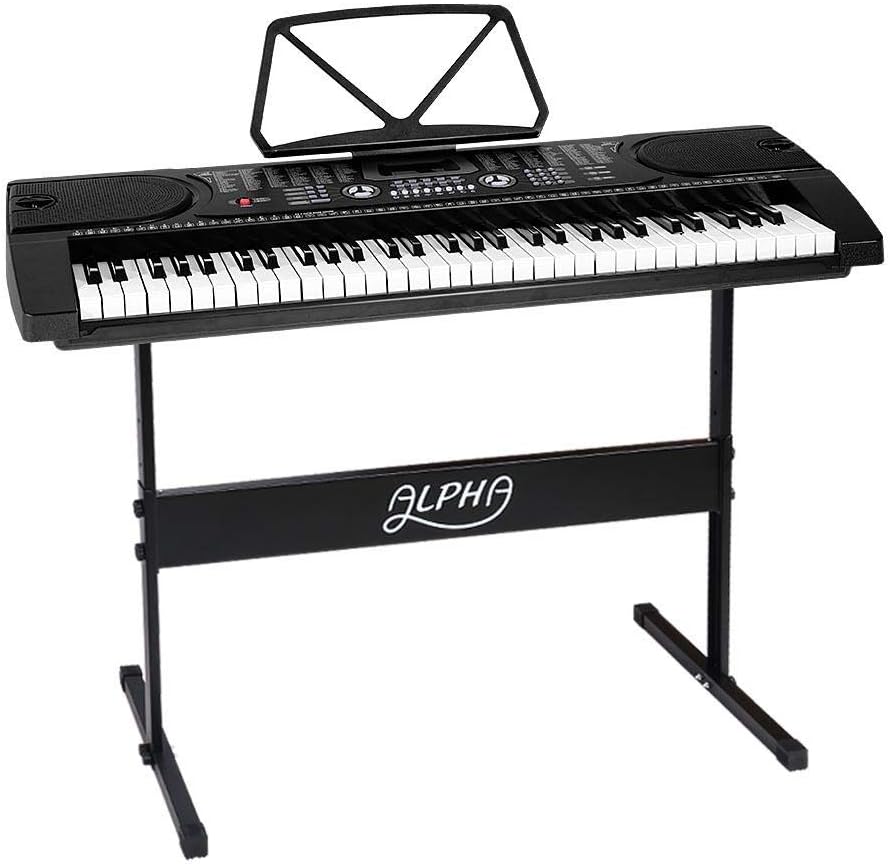
Figure 5.1: The Alpha EK-60 keyboard fully assembled on its adjustable stand, ready for use.
5.2 Alimentarea tastaturii
The Alpha EK-60 can be powered by the included AC adaptor or by batteries.
Utilizarea adaptorului de curent alternativ:
- Connect the DC plug of the power adaptor to the DC 9V input jack on the rear of the keyboard.
- Conectați adaptorul de curent alternativ la o priză standard de perete.
Utilizarea bateriilor:
- Localizați compartimentul bateriei pe partea inferioară a tastaturii.
- Deschideți capacul compartimentului bateriei.
- Insert 6 x AA-size batteries (not included), ensuring correct polarity (+/-).
- Închideți bine capacul compartimentului bateriei.
Note: When using batteries, disconnect the AC adaptor. The keyboard will automatically switch to battery power if the adaptor is removed.
6. Instrucțiuni de utilizare
6.1 Operare de bază
- Pornire/Oprire: Apăsați tasta PUTERE buton pentru a porni sau opri tastatura.
- Controlul volumului: Utilizați VOLUMUL PRINCIPAL knob to adjust the overall sound level.
- Controlul temporului: Utilizați TEMPO buttons to adjust the speed of rhythms and demo songs.
6.2 Selecting Tones and Rhythms
- Tones (Timbre): Apăsați tasta TIMBRU button, then use the number pad or +/- buttons to select from 255 different instrument sounds. The selected timbre number will appear on the LED display.
- Ritmuri: Apăsați tasta RITM button, then use the number pad or +/- buttons to select from 255 accompaniment rhythms. Press START/STOP a începe sau a termina ritmul.
6.3 Intelligent Teaching Function
The EK-60 features a 3-step intelligent teaching system to help you learn to play.
- O cheie: Plays the melody of a demo song by pressing any key.
- Urmăriți: Waits for you to play the correct note before proceeding with the melody.
- Împreună: Plays the accompaniment while you play the melody.
To use, select a demo song, then press the desired teaching mode button (O CHEIE, URMAREAZA, sau ANSAMBLU).
6.4 Înregistrare și redare
The keyboard allows you to record your performances.
- Apăsați tasta REC button to start recording. The LED display will indicate recording mode.
- Redă melodia dorită.
- Apăsați tasta JUCA button to stop recording and play back your recorded performance.
6.5 Conectivitate
- Jack pentru căști: Conectați căștile la Căști jack for silent practice.
- Intrare microfon: Conectați un microfon la INTRARE MIC jack to sing along while playing.
- Intrare/ieșire audio: Utilizați INTRARE AUDIO to connect external audio devices (e.g., MP3 player) and the IESIRE AUDIO to connect to external speakers or an ampmai în viață.
7. Întreținere
Proper care will ensure the longevity of your Alpha EK-60 keyboard.
- curatenie: Ștergeți tastatura cu o cârpă moale și uscată. Pentru murdăria persistentă, folosiți o cârpă ușor uscată.amp cloth and then wipe dry immediately. Do not use abrasive cleaners, waxes, or solvents.
- Depozitare: When not in use for extended periods, store the keyboard in a cool, dry place away from direct sunlight and extreme temperatures. If using batteries, remove them before long-term storage to prevent leakage.
- Manipulare: Evitați să scăpați tastatura sau să o supuneți la impacturi puternice.
8. Depanare
If you encounter any issues with your keyboard, refer to the following table for common problems and solutions.
| Problemă | Cauza posibila | Soluţie |
|---|---|---|
| Nici un sunet | Volume is too low; Power is off; Headphones connected; Faulty power connection. | Increase master volume; Turn on power; Disconnect headphones; Check power adaptor or replace batteries. |
| Cheile nu răspund | Keyboard is in a teaching mode; Internal malfunction. | Exit teaching mode; Power cycle the keyboard. If issue persists, contact support. |
| Rhythm/Demo song not playing | Rhythm/Demo song not selected; START/STOP button not pressed. | Select a rhythm/demo song; Press START/STOP. |
| Sunet distorsionat | Volume too high; External device connected incorrectly. | Reduce volume; Check connections of external devices. |
Dacă problema persistă după ce încercați aceste soluții, vă rugăm să contactați serviciul de asistență pentru clienți.
9. Specificații
| Caracteristică | Descriere |
|---|---|
| Model | EK-60 |
| Chei | 61 de clape standard de pian |
| Key Width | 1.9 cm |
| Tones (Timbres) | 255 |
| Ritmuri | 255 |
| Melodii demo | 24 |
| Polifonie maximă | 8 |
| Conectivitate | Audio Input, Audio Output, Headphone Jack (3.5mm), Microphone Input (3.5mm) |
| Alimentare electrică | AC Adaptor (DC 9V) or 6 x AA-size batteries (not included) |
| Dimensiuni (tastatură) | 86 cm (L) x 32.5 cm (L) |
| Dimensions (Overall with Stand) | 86 cm (L) x 32.5 cm (l) x 59-79 cm (Î) |
| Greutate | 6.2 kilograme |
| Culoare | Negru |

Figure 9.1: Detailed dimensions of the Alpha EK-60 keyboard and its adjustable stand.
10. Garanție și asistență
10.1 Informații despre garanție
The Alpha EK-60 keyboard comes with a 1 an garanție from the date of purchase. This warranty covers manufacturing defects and ensures the product is free from defects in material and workmanship under normal use. It does not cover damage caused by misuse, accident, unauthorized modification, or normal wear and tear.
10.2 Asistență pentru clienți
For any queries, technical assistance, or warranty claims, please contact the seller or manufacturer directly. Please have your purchase receipt and product model number (EK-60) ready when contacting support.


