1. Introducere
The Echo Glow is a multicolor smart lamp designed to enhance your smart home experience. It pairs with any compatible Alexa device, allowing you to control its color and brightness using voice commands. This device is ideal for creating colorful routines, setting visual timers, and adding dynamic lighting for various activities like gaming, watching videos, or listening to music. Its simple setup ensures a hassle-free experience.

Figure 1.1: The Echo Glow smart lamp într-un cadru acasă.
2. Informații de siguranță
Please read and follow all safety instructions carefully to prevent injury or damage to your device.
- Nu expuneți dispozitivul la apă sau umezeală.
- Utilizați numai adaptorul de alimentare furnizat împreună cu dispozitivul.
- Nu încercați să dezasamblați, să reparați sau să modificați dispozitivul.
- Țineți aparatul departe de lumina directă a soarelui și surse de căldură.
- Asigurați o ventilație adecvată în jurul dispozitivului.
3. Ce se află în cutie
Verificați dacă toate articolele sunt prezente în ambalaj:
- Echo Glow device
- Adaptor de alimentare (5W)
- Ghid de pornire rapidă
4. Configurare
Setting up your Echo Glow is designed to be quick and straightforward.
4.1. Pornire
- Plug the provided power adapter into the Echo Glow.
- Plug the other end of the power adapter into a wall outlet. The Echo Glow will power on automatically.
4.2. Connecting to Wi-Fi and Alexa
The Echo Glow connects to your Wi-Fi network and is controlled via an Alexa-enabled device or the Alexa app.
- Download and open the Amazon Alexa app on your Fire OS, Android, or iOS device.
- Ensure your Alexa-enabled device (e.g., Echo Dot, Echo Plus) is set up and connected to the same Wi-Fi network.
- In the Alexa app, navigate to the 'Devices' section.
- Atingeți pictograma „+” pentru a adăuga un dispozitiv nou.
- Select 'Light' and then 'Amazon Echo Glow'.
- Follow the on-screen instructions to complete the setup. The Echo Glow supports 2.4 GHz Wi-Fi only (802.11 b/g/n).
Amazon Wi-Fi simple setup can also be used to connect the device to your Wi-Fi network with minimal steps.
5. Instrucțiuni de utilizare
The Echo Glow offers various functionalities controlled primarily through Alexa voice commands or the Alexa app.
5.1. Control vocal
Once paired with an Alexa-enabled device, you can control the Echo Glow using your voice. Ensure your Echo Glow has a recognizable name in the Alexa app (e.g., 'Glow Lamp', 'Charlie's Lamp').
- Schimbați culoarea: "Alexa, set [Glow Lamp name] to blue."
- Reglați luminozitatea: "Alexa, dim [Glow Lamp name] to 50%." or "Alexa, brighten [Glow Lamp name]."
- Pornire/Oprire: "Alexa, turn on [Glow Lamp name]." / "Alexa, turn off [Glow Lamp name]."

Figure 5.1: The Echo Glow can display a wide spectrum of colors.
5.2. Routines and Timers
Integrate the Echo Glow into your daily routines or use it for visual timers.
- Color-Changing Timer: Use the Echo Glow as a visual reminder for activities. For example, "Alexa, set a Rainbow Timer for 30 minutes on Charlie's Lamp." The colors will change as time progresses.
- Wake-up Light Alarm: Create routines in the Alexa app to have the Echo Glow gradually brighten or change color to help with waking up. For example, "Alexa, set a wakeup light alarm for 7 AM on My Light."
- Bedtime Routines: Set the Echo Glow to dim or change to a calming color as part of a bedtime routine.
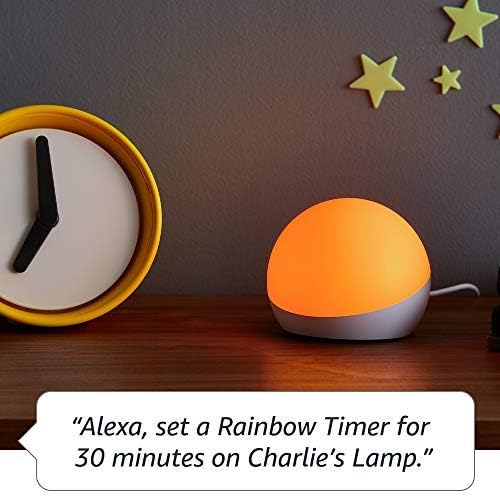
Figure 5.2: Using Echo Glow for a Rainbow Timer.
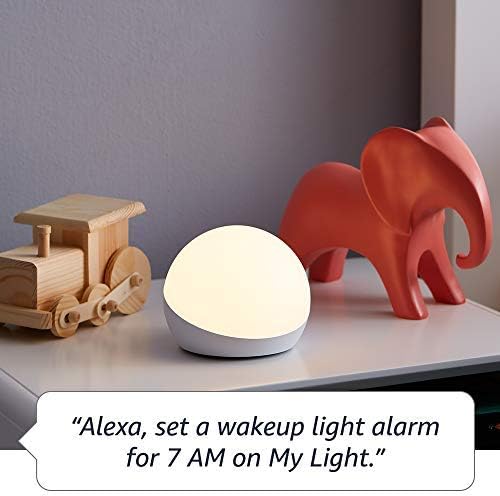
Figure 5.3: Echo Glow as a wake-up light alarm.
5.3. Creating and Choosing Lighting
The Echo Glow can add ambiance to various activities:
- Jocuri: Set dynamic colors to match your gaming environment.
- Vizionand videoclipuri: Create a cozy or immersive viewexperiență.
- Ascultând muzică: Sync the lighting to the mood of your music (requires specific Alexa routines or skills).

Figure 5.4: Echo Glow adding color to a child's play space.
6. Întreținere
The Echo Glow requires minimal maintenance.
- curatenie: Unplug the device before cleaning. Use a soft, dry, lint-free cloth to wipe the exterior. Do not use abrasive cleaners or sprays.
- Depozitare: Dacă depozitați dispozitivul pentru o perioadă lungă de timp, deconectați-l de la priză și păstrați-l într-un loc răcoros și uscat.
7. Depanare
If you encounter issues with your Echo Glow, try the following steps:
- Dispozitivul nu răspunde:
- Ensure the power adapter is securely plugged into both the Echo Glow and the wall outlet.
- Unplug the Echo Glow, wait 30 seconds, and plug it back in.
- Verify that your Alexa-enabled device is online and functioning correctly.
- Nu se poate conecta la Wi-Fi:
- Confirm your Wi-Fi network is 2.4 GHz. The Echo Glow does not support 5GHz networks.
- Ensure your Wi-Fi password is entered correctly in the Alexa app.
- Move the Echo Glow closer to your Wi-Fi router.
- Reporniți routerul Wi-Fi.
- Comenzile vocale nu funcționează:
- Ensure your Alexa-enabled device can hear you clearly.
- Verify the Echo Glow is correctly named in the Alexa app and use that name in your commands.
- Check the Alexa app for any pending updates for your Echo Glow or Alexa-enabled device.
8. Specificații
| Caracteristică | Detaliu |
|---|---|
| Dimensiuni | 100 x 100 x 81 mm (3.9” x 3.9” x 3.2”) |
| Greutate | 245 g (8.6 oz) |
| Conectivitate Wi-Fi | 2.4 GHz only, 802.11 b/g/n. Does not support 5GHz networks or ad-hoc networks. |
| Tip de lumină | 100 de lumeni alb cald (2600K) și LED-uri color RGB |
| Compatibilitate | Works exclusively with Alexa-enabled devices (Echo Dot, Echo Plus, Alexa app). Compatible with Fire OS, Android, and iOS devices. Does not contain microphones or speakers. |
| Interval de vârstă | Vârste de la 3 ani în sus |
9. Garanție și asistență
Your Echo Glow is covered by a limited warranty.
- Perioada de garantie: 90-day limited warranty and service.
- Termeni de utilizare: Use of Echo Glow is subject to the terms found on the official Amazon website-ul.
- Asistență clienți: For further assistance, troubleshooting, or warranty claims, please visit the Amazon customer support website-ul sau contactați direct echipa lor de asistență.


