1. Introducere
Thank you for choosing the Cecotec Ready Warm 6670 Cristal Electric Radiator. This modern and elegant crystal convector is designed to provide efficient and rapid heating for your living spaces. Featuring an adjustable thermostat, timer function, and Wi-Fi connectivity, it offers convenient control and optimized energy consumption. This manual provides essential information for safe operation, installation, maintenance, and troubleshooting.
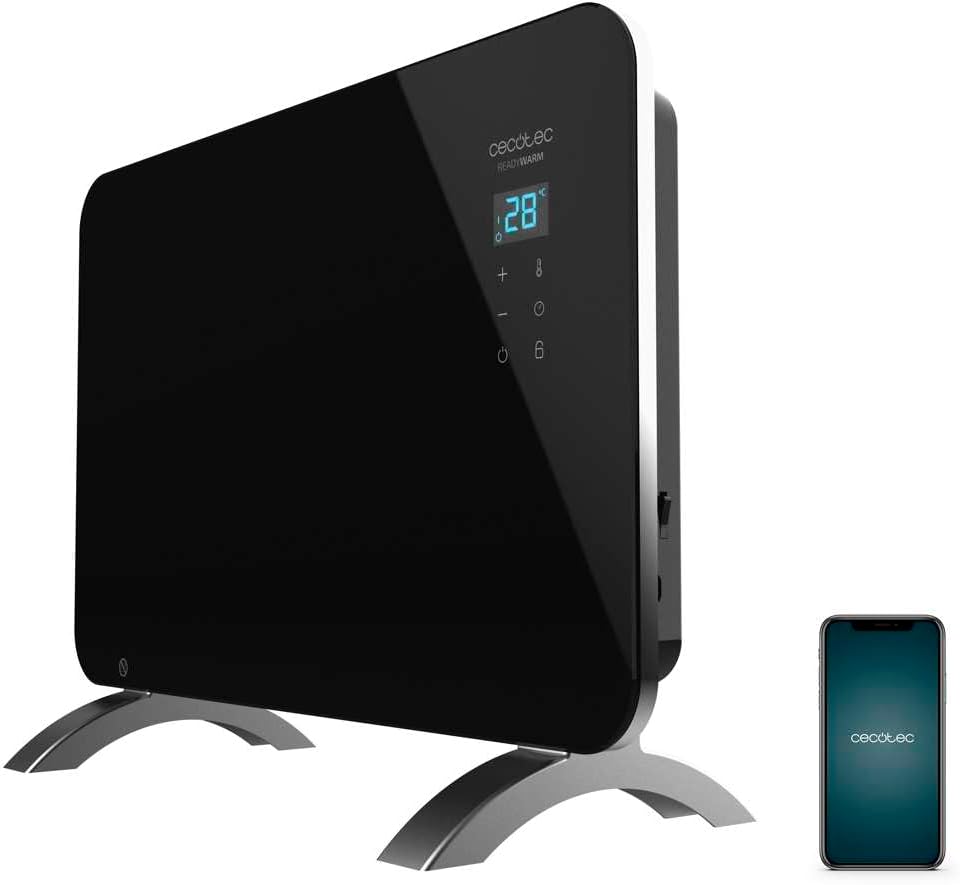
Figure 1: The Cecotec Ready Warm 6670 Cristal Electric Radiator, showcasing its sleek black design and digital display, alongside a smartphone indicating its Wi-Fi control capability.
2. Instrucțiuni importante de siguranță
Vă rugăm să citiți cu atenție toate instrucțiunile înainte de a utiliza aparatul și să le păstrați pentru referințe ulterioare. Nerespectarea acestor instrucțiuni poate duce la electrocutare, incendiu sau vătămări corporale grave.
- Asigurați-vă că voltagVolumul indicat pe eticheta cu valori nominale corespunde cu cel al rețelei de alimentare.tage înainte de a conecta aparatul.
- Nu utilizați acest aparat în apropierea apei sau înamp environments, such as bathrooms, due to its IP24 splash protection rating.
- Always place the radiator on a stable, flat surface. Ensure adequate clearance from walls and furniture for proper ventilation.
- Do not cover the radiator, as this can lead to overheating and fire hazards.
- Keep children and pets away from the appliance during operation, as surfaces can become very hot.
- Unplug the appliance from the power outlet when not in use, before cleaning, or before moving it.
- Do not operate the appliance with a damaged cord or plug, or if it has malfunctioned or been dropped.
- Repairs should only be performed by qualified personnel. Improper repairs can be dangerous.
- Acest aparat este proiectat numai pentru uz interior.
3. Componentele produsului
Familiarize yourself with the main parts of your Cecotec Ready Warm 6670 Cristal Electric Radiator:
- Main Heating Unit (Glass Panel)
- Panou de afișare digitală
- Control Buttons (+, -, Power, Mode, Timer)
- Cablu de alimentare și ștecher
- Detachable Pedestal Feet (for freestanding use)
- Wall Mounting Brackets (optional, not included in this model description but common for panel heaters)

Figura 2: O descriere detaliată view of the radiator's digital display and control buttons, showing temperature, mode, and timer indicators.
4. Configurare și instalare
Your radiator can be used as a freestanding unit with the included pedestal feet.
4.1. Attaching the Pedestal Feet
- Carefully unpack the radiator and all components.
- Place the radiator on a soft, flat surface to prevent scratching the glass panel.
- Align the pedestal feet with the mounting holes at the bottom of the radiator.
- Secure the feet using the provided screws. Ensure they are firmly attached.
- Once the feet are attached, carefully place the radiator upright in your desired location. Ensure it is on a stable, level surface and away from flammable materials.

Figure 3: The radiator positioned in a room, demonstrating its freestanding setup with the pedestal feet.
5. Instrucțiuni de utilizare
5.1. Operare de bază
- Plug the radiator into a suitable power outlet.
- Apăsați tasta Putere butonul (simbol: cerc cu linie verticală) on the control panel to turn the unit on. The digital display will illuminate.
- Utilizați + şi - pentru a regla temperatura dorită. Afișajul va afișa temperatura setată.
- Apăsați tasta Modul butonul (symbol: thermometer) to cycle through heating modes (e.g., Eco, Max).
- To turn off the radiator, press the Putere butonul din nou.
5.2. Conectivitate Wi-Fi și control prin aplicație
The Cecotec Ready Warm 6670 Cristal can be controlled via your smartphone using the Tuya Smart APP.
- Descărcați aplicația „Tuya Smart” din magazinul de aplicații al smartphone-ului dvs. (disponibilă pentru iOS și Android).
- Înregistrează-te sau conectează-te la contul tău Tuya Smart.
- Asigurați-vă că smartphone-ul dvs. este conectat la o rețea Wi-Fi de 2.4 GHz.
- On the radiator, press and hold the Wifi button (if available, or a combination of buttons as per app instructions) to enter pairing mode. The Wi-Fi indicator on the display will blink.
- In the Tuya Smart app, tap "+" to add a device. Select "Heater" or "Radiator" from the device list.
- Follow the on-screen instructions in the app to connect the radiator to your Wi-Fi network. This typically involves confirming the Wi-Fi indicator is blinking and entering your Wi-Fi password.
- Once connected, you can control the radiator's power, temperature, mode, and timer settings directly from the app.

Figure 4: A user interacting with a smartphone, illustrating the convenience of controlling the radiator remotely via the Tuya Smart application.
5.3. Funcția Timer
The timer allows you to set a specific duration for the radiator to operate.
- Apăsați tasta Cronometru butonul (simbol: ceas) on the control panel or in the app.
- Utilizați + şi - buttons to set the desired operating time in hours.
- The radiator will automatically turn off after the set time has elapsed.
6. Întreținere și curățare
Curățarea regulată asigură o performanță optimă și prelungește durata de viață a radiatorului.
- Deconectați întotdeauna radiatorul de la priză și lăsați-l să se răcească complet înainte de curățare.
- Ștergeți suprafețele exterioare cu un material moale, damp Nu utilizați produse de curățare abrazive, solvenți sau substanțe chimice dure, deoarece acestea pot deteriora finisajul.
- Nu scufundați radiatorul în apă sau în alte lichide.
- Asigurați-vă că nu pătrunde apă în panoul de control sau în componentele electrice.
- For storage, clean the unit and store it in a cool, dry place, preferably in its original packaging.
7. Depanare
Dacă întâmpinați probleme cu radiatorul, consultați următoarele probleme comune și soluții:
| Problemă | Cauza posibila | Soluţie |
|---|---|---|
| Radiatorul nu pornește. | Not plugged in; power outlet faulty; power button not pressed; overheat protection activated. | Check power connection; try a different outlet; press power button; unplug and let cool for 30 minutes before restarting. |
| Fara iesire de caldura. | Temperature setting too low; mode not set correctly. | Increase desired temperature; ensure correct heating mode (e.g., Max) is selected. |
| Conexiunea Wi-Fi eșuează. | Incorrect Wi-Fi password; router too far; 5 GHz network used; pairing mode not active. | Verify password; move radiator closer to router; ensure 2.4 GHz network is used; re-enter pairing mode on radiator. |
| Radiator turns off unexpectedly. | Timer function active; overheat protection activated. | Check timer settings; ensure radiator is not covered and has adequate ventilation. |
8. Specificatii tehnice
| Caracteristică | Detaliu |
|---|---|
| Marca | Cecotec |
| Numărul de model | big-V1704474 (05350) |
| Culoare | Negru |
| Putere | 1000 W |
| Voltage | 220 volți |
| Material | Aluminum (Heating element), Glass (Panel) |
| Metoda de încălzire | Convecție |
| Caracteristica specială | Adjustable Thermostat, Wi-Fi Connectivity, Timer, Overheat Protection, IP24 Splash Protection |
| Dimensiuni (L x l x H) | 47 x 13 x 64 cm (Product); 60 x 24 x 46 cm (Product, alternative) |
| Greutatea articolului | 5.1 kilograme |
| Nivel de zgomot | 44 dB |
| Utilizare recomandată | Indoor (Home) |
9. Garanție și asistență
Cecotec products are manufactured to high-quality standards. This product comes with a standard manufacturer's warranty covering defects in materials and workmanship from the date of purchase. Please refer to the warranty card included with your product for specific terms and conditions.
Pentru asistență tehnică, asistență pentru depanare sau reclamații în garanție, vă rugăm să contactați serviciul clienți Cecotec prin intermediul serviciului oficial website or the contact information provided in your product packaging. When contacting support, please have your model number (big-V1704474) and purchase date ready.
Disponibilitate piese de schimb: 10 ani.


