1. Introducere
The Denver MRD-51 is a versatile multi-function music system designed to play various audio formats. It integrates a record player, DAB+ and FM/AM radio tuner, CD player, and cassette deck into a single unit. Additionally, it features a USB port for digitizing audio from CDs, records, or cassettes, and an AUX input for connecting external devices. The system includes two integrated stereo speakers for a complete audio experience.
2. Instrucțiuni de siguranță
- Citiți cu atenție toate instrucțiunile înainte de a utiliza dispozitivul.
- Păstrați acest manual pentru referințe viitoare.
- Nu expuneți unitatea la ploaie sau umezeală pentru a preveni incendiul sau electrocutarea.
- Asigurați o ventilație corespunzătoare; nu blocați nicio deschidere de ventilație.
- Așezați unitatea pe o suprafață stabilă, plană.
- Disconnect the power plug from the wall outlet if the unit is not in use for a long period.
- Nu încercați să reparați unitatea singur. Apelați la personal de service calificat pentru toate lucrările de service.
3. Conținutul pachetului
Verificați dacă toate articolele sunt prezente la despachetare:
- Denver MRD-51 Multi-Function Music System
- Cablu de alimentare
- Telecomanda
- Manual de utilizare
4. Produs terminatview

Figura 4.1: Denver MRD-51 Multi-Function Music System with turntable open. This image displays the Denver MRD-51 music system from a front-top perspective, with the turntable lid open and a vinyl record placed on the platter. The control panel, including the LCD display, knobs, and buttons, is visible below the turntable.

Figura 4.2: Denver MRD-51 Multi-Function Music System, front view. A front view of the Denver MRD-51 music system with the turntable lid closed. This image highlights the integrated stereo speakers on the sides and the central control panel, emphasizing its classic design.
4.1 Controale panoului frontal
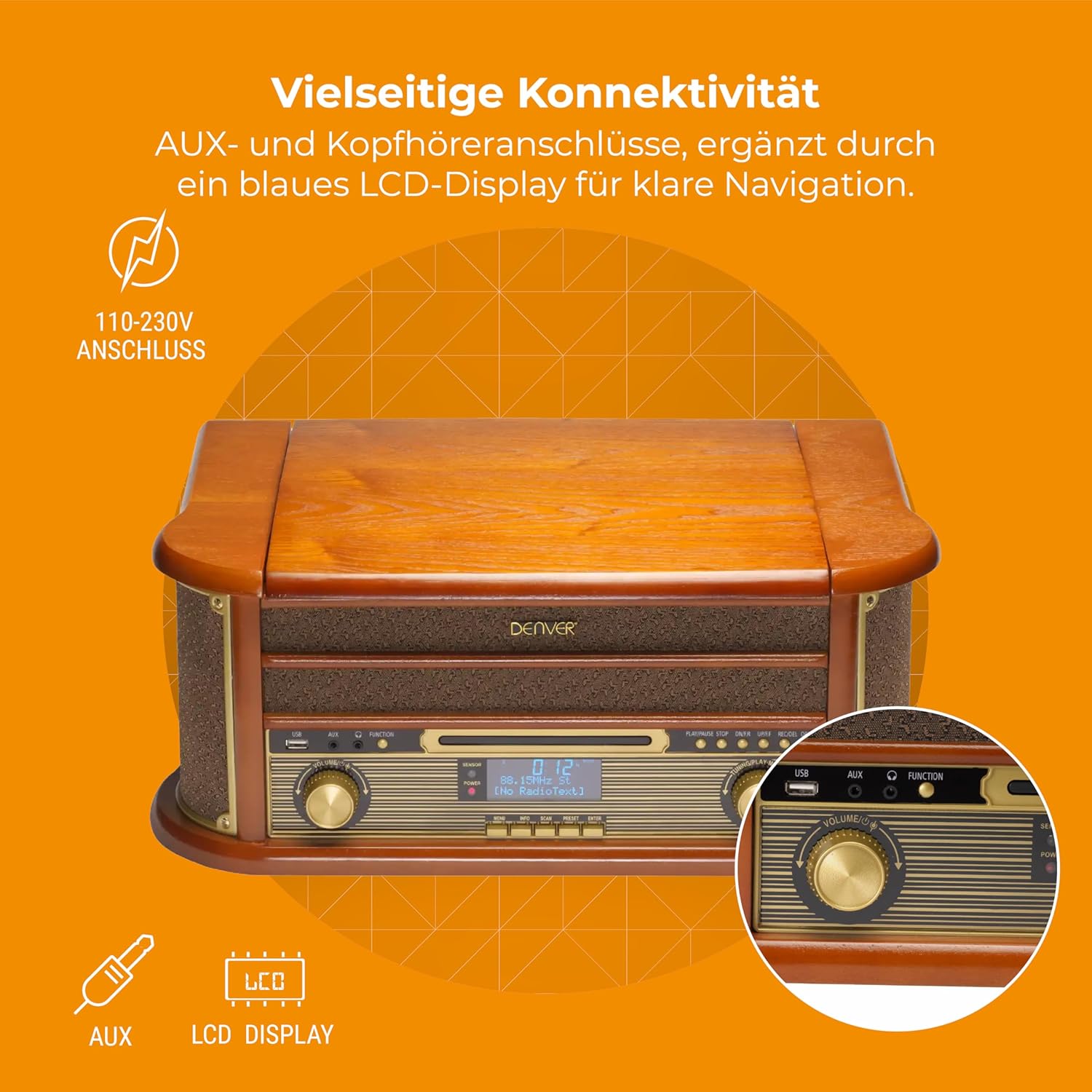
Figura 4.3: Denver MRD-51 front panel with USB, AUX, and LCD display. A close-up of the Denver MRD-51's front control panel, showcasing the USB port, AUX input, and the blue LCD display for clear navigation. This view details the various connectivity options available.
- Butonul de pornire: Pornește sau oprește unitatea.
- Buton FUNCȚIE: Selects between Turntable, CD, Cassette, DAB+, FM, AM, AUX, and USB modes.
- Port USB: For connecting USB storage devices for playback or recording.
- Intrare AUX: Mufă de 3.5 mm pentru conectarea surselor audio externe.
- Display LCD: Shows current mode, track information, radio frequency, and other system status.
- Buton PLAY/PAUSE: Starts or pauses playback for CD, Cassette, or USB.
- Butonul STOP: Oprește redarea.
- SKIP Buttons (◀◀ / ▶▶): Skips tracks or fast forwards/rewinds.
- Butonul ÎNREGISTRARE: Inițiază înregistrarea pe USB.
- Butonul VOLUM: Ajustează volumul general de ieșire.
- TUNING Knob: Adjusts radio frequency in FM/AM mode or navigates menus in DAB+ mode.
4.2 Turntable and Cassette Deck

Figura 4.4: Denver MRD-51 showing open turntable and cassette deck. This image illustrates the versatility of the Denver MRD-51, featuring the open turntable with a record and an arrow pointing to the cassette deck slot on the side, indicating its multi-format playback capabilities.
- Platou de platan: For playing vinyl records.
- Tone Arm with Stylus: Reads the grooves of vinyl records.
- Selector de viteză: Allows selection of 33, 45, or 78 RPM.
- Cassette Deck Slot: For inserting audio cassettes.
4.3 CD Player

Figura 4.5: Denver MRD-51 with CD tray open and remote control. This image shows the Denver MRD-51 with its CD tray open, ready for disc insertion. A remote control is also pictured, indicating convenient operation of the system's functions.
- Tava CD: For inserting compact discs.
- Buton DESCHIDERE/ÎNCHIDERE: Deschide și închide tava pentru CD-uri.
5. Configurare
5.1 Despachetarea și plasarea
- Scoateți cu grijă unitatea din ambalaj.
- Place the unit on a flat, stable surface away from direct sunlight, heat sources, and excessive dust or moisture.
- Asigurați-vă că există suficient spațiu în jurul unității pentru ventilație.
5.2 Conexiune la alimentare
- Conectați cablul de alimentare la mufa AC IN din spatele unității.
- Plug the other end of the power cable into a standard wall outlet (110-230V).
5.3 Conectarea antenei
For optimal radio reception, extend the telescopic antenna fully for FM/DAB+ or adjust its position for AM.
6. Instrucțiuni de utilizare
6.1 Funcționare generală
- Apăsați tasta PUTERE butonul pentru a porni unitatea.
- Apăsați tasta FUNCŢIE button repeatedly to cycle through available modes: Turntable, CD, Cassette, DAB+, FM, AM, AUX, USB.
- Reglați VOLUM butonul la nivelul de ascultare dorit.
6.2 Funcționarea platanului rotativ
- Select the 'Turntable' function.
- Open the turntable lid.
- Pune un disc de vinil pe platou.
- Set the speed selector to match the record's speed (33, 45, or 78 RPM). For 45 RPM records, use the included adapter if necessary.
- Gently lift the tone arm and position the stylus over the desired track on the record.
- Lower the tone arm slowly onto the record. Playback will begin.
- At the end of the record, the tone arm may automatically return to its rest, or you may need to manually lift and return it.
6.3 Funcționarea CD Player-ului
- Select the 'CD' function.
- Apăsați tasta DESCHIS/ÎNCHIS butonul pentru a deschide tava CD.
- Place a CD (CD/CD-R/CD-RW compatible) with the label side facing up into the tray.
- Apăsați tasta DESCHIS/ÎNCHIS Apăsați din nou butonul pentru a închide sertarul. Aparatul va citi discul.
- Presa REDARE/PAUZĂ pentru a începe redarea.
- Utilizați SARE butoanele (◀◀ / ▶▶) pentru a naviga între piese.
- Presa STOP pentru a termina redarea.
6.4 Funcționarea casetofonului
- Select the 'Cassette' function.
- Insert an audio cassette into the cassette deck slot until it clicks into place.
- Apăsați tasta JUCA button (often integrated with the cassette mechanism) to start playback.
- Utilizați STOP button to end playback. Fast forward and rewind functions are typically available via dedicated buttons on the cassette deck.
6.5 Funcționarea radioului (DAB+/FM/AM)
- Select the desired radio function (DAB+, FM, or AM).
- For DAB+ Radio: The unit will typically perform an automatic scan for available stations upon first use. Use the TUNING buton sau SARE buttons to navigate through the list of stations.
- For FM/AM Radio: Utilizați TUNING knob to manually tune to a station. The frequency will be displayed on the LCD.
6.6 Înregistrare USB
The MRD-51 allows you to digitize audio from your records, CDs, or cassettes directly to a USB storage device.
- Introduceți o unitate flash USB în Port USB.
- Select the source function you wish to record from (Turntable, CD, or Cassette).
- Start playback of the audio source (e.g., play a record, CD, or cassette).
- Apăsați tasta ÎNREGISTRA button. The recording indicator on the display will illuminate, and recording will begin.
- Apăsați tasta ÎNREGISTRA din nou butonul sau STOP button to end the recording. The recorded file va fi salvat pe unitatea USB.
6.7 Intrare AUX
- Conectați un dispozitiv audio extern (de exemplu, un smartphone, un player MP3) la Intrare AUX using a 3.5mm audio cable.
- Select the 'AUX' function.
- Start playback on your external device. The audio will be played through the MRD-51's speakers.
7. Întreținere
7.1 Curăţarea unităţii
- Deconectați întotdeauna unitatea de la priză înainte de curățare.
- Folosiți o lavetă moale și uscată pentru a șterge suprafețele exterioare.
- Nu utilizați agenți de curățare abrazivi, ceară sau solvenți.
7.2 Îngrijirea stiloului pick-up-ului
- Curățați ușor stylus-ul în mod regulat cu o perie moale, periind din spate în față.
- Evitați să atingeți stylus-ul cu degetele.
- Replace the stylus when sound quality deteriorates or if it is visibly damaged.
7.3 Îngrijirea playerului CD/casetofon
- Handle CDs and cassettes by their edges to avoid fingerprints and scratches.
- Keep the CD tray and cassette deck free of dust and debris.
8. Depanare
| Problemă | Cauza posibila | Soluţie |
|---|---|---|
| Fără putere | Cablul de alimentare nu este conectat; Priza de perete nu este activă | Asigurați-vă că cablul de alimentare este conectat corect; Încercați o altă priză |
| Nici un sunet | Volume too low; Incorrect function selected; External device not playing | Increase volume; Select correct function; Ensure external device is playing and connected properly |
| Turntable not spinning or poor sound | Speed setting incorrect; Stylus dirty or damaged; Record dirty | Adjust speed selector; Clean or replace stylus; Clean record |
| CD-ul nu se redă | CD inserted incorrectly; CD scratched or dirty; CD format not supported | Reinsert CD correctly; Clean or replace CD; Ensure CD is CD/CD-R/CD-RW format |
| Recepție radio slabă | Antenna not extended/positioned correctly; Weak signal | Extindeți și reglați antena; Încercați să repoziționați unitatea |
| Înregistrarea pe USB nu funcționează | USB drive full or incompatible; Source not playing | Use a different USB drive or clear space; Ensure audio source is playing during recording |
9. Specificații
| Caracteristică | Caietul de sarcini |
|---|---|
| Dimensiunile produsului | 20.08 x 13.39 x 8.46 inci |
| Greutatea articolului | 15.18 lire sterline (6.9 kilograme) |
| Numărul de model | MRD-51 (Internal: 111201210000) |
| Marca | Denver |
| Viteza maximă de rotație | 78 RPM (supports 33, 45, 78 RPM) |
| Componente incluse | MRD-51 unit |
| Caracteristici speciale | Adjustable Speed, Digital Recorder, Integrated Speakers |
| Material | Aluminum (internal components), Wood (housing) |
| Culoare | Lemn |
| Dispozitive compatibile | Personal Computer (for USB transfer) |
| Tuner radio | DAB+, FM, AM |
| CD player | Supports CD/CD-R/CD-RW |
| Ieșire audio | 2 difuzoare stereo de 2.5 W |
10. Garanție și asistență
For warranty information and technical support, please refer to the documentation provided with your purchase or contact Denver customer service through their official webPăstrați dovada achiziției pentru orice reclamații în garanție.


