Introducere
This manual provides comprehensive instructions for the safe and effective operation, maintenance, and troubleshooting of your FLIR K45 High Performance Thermal Imaging Camera. The FLIR K45 is designed to provide clear thermal images in challenging environments, aiding in navigation and decision-making.

Figure 1: FLIR K45 Thermal Imaging Camera in operation, showing a thermal view.
Informații de siguranță
Always read and understand all safety warnings and instructions before operating the FLIR K45 camera. Failure to do so may result in injury or damage to the device.
- Do not expose the camera to temperatures exceeding its operational limits (up to 500°F for 5 minutes).
- Ensure the battery is properly charged and installed before use.
- Avoid direct exposure of the lens to extreme heat sources when not in use for thermal imaging.
- The device is water resistant (IP67), but avoid prolonged submersion.
Componentele produsului
The FLIR K45 package includes the following items:
- FLIR K45 Thermal Imaging Camera
- Lithium Ion Battery (included)
- Charging dock (if applicable, based on image)
- Cablu USB
- Adaptor de alimentare
- Documentare
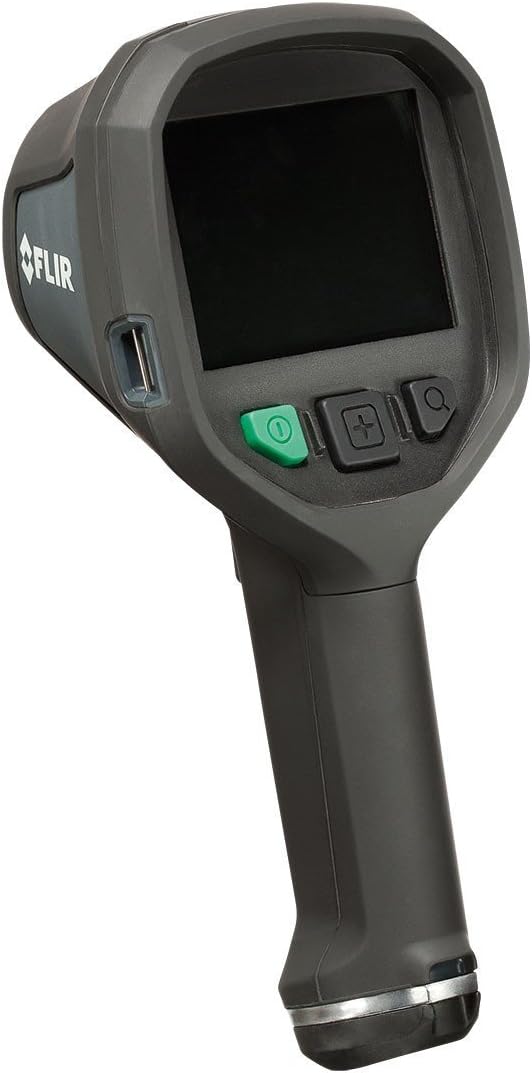
Figura 2: Față view of the FLIR K45 camera, showing the screen and control buttons.

Figura 3: Față view of the FLIR K45, highlighting the thermal lens.
Înființat
1. Încărcarea bateriei
The FLIR K45 uses a Lithium Ion battery. Before first use, fully charge the battery. Connect the camera to the charging dock or directly via the USB cable to a power adapter.
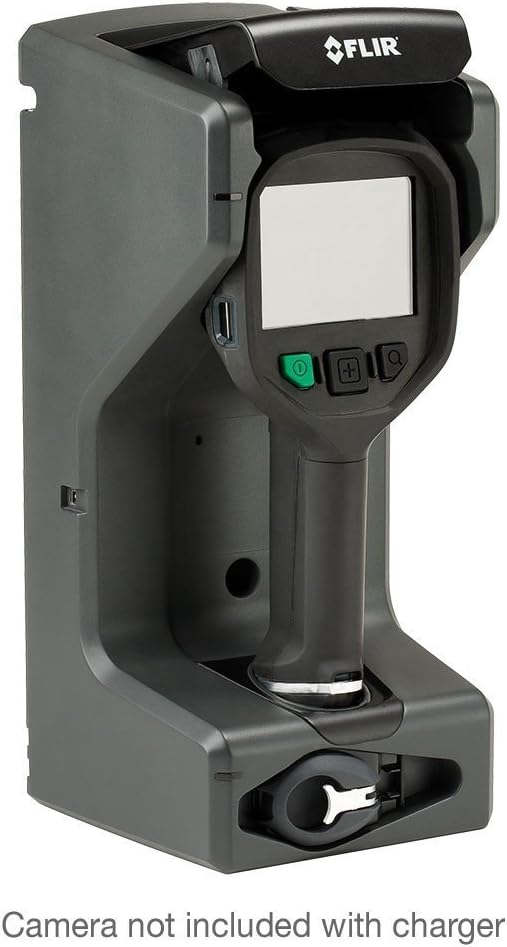
Figure 4: FLIR K45 in its charging dock. Camera not included with charger.
2. Introducerea bateriei
Locate the battery compartment, typically at the base of the handle. Insert the charged Lithium Ion battery, ensuring it clicks into place securely.
3. Pornirea inițială
Press and hold the power button (green button) to turn on the device. The 4-inch screen will illuminate, displaying the FLIR logo followed by the thermal image feed.
Instrucțiuni de operare
1. Operare de bază
Point the camera towards the area of interest. The thermal image will be displayed on the 4-inch screen. The K45 provides a crisp, 240 x 180 pixel thermal image, enhanced by FSX™ Flexible Scene Enhancement for improved detail.

Figura 5: Example of a thermal image captured by the FLIR K45, indicating temperature variations.
2. Moduri de imagine
The FLIR K45 offers several image modes to optimize viewing for different scenarios. Use the mode selection button (often indicated by a plus/minus or menu icon) to cycle through these options:
- IR image: Standard infrared thermal view.
- TI Basic fire-fighting mode: Optimized for general firefighting scenarios.
- Black-and-white fire-fighting mode: Provides a high-contrast monochrome thermal view.
- Fire mode: Specific mode for fire scene analysis.
- Search-and-rescue mode: Enhances visibility for locating individuals.
- Heat detection mode: Highlights areas of significant heat.
- Thumbnail gallery: Permite review of saved images.

Figure 6: Detail of the FLIR K45 control buttons for navigation and mode selection.
3. Capturarea imaginilor
To capture a thermal image, press the designated capture button (refer to the device's physical buttons, often a trigger or a specific button on the control panel). Images are saved to the internal memory or an inserted SD card.
Întreţinere
1. Curățarea camerei
Regularly clean the camera body with a damp cloth. For the lens, use a soft, lint-free cloth specifically designed for optical surfaces. Do not use abrasive cleaners or solvents.
2. Îngrijirea bateriei
To prolong battery life, avoid fully discharging the battery frequently. Store the camera and battery in a cool, dry place when not in use for extended periods.
Depanare
| Problemă | Cauza posibila | Soluţie |
|---|---|---|
| Camera nu pornește. | Baterie descărcată sau descărcată. | Încărcați complet bateria. |
| Imaginea este neclară sau neclară. | Dirty lens; extreme temperature difference. | Clean the lens; allow camera to acclimate to environment. |
| Cannot save images. | Memory full or no SD card inserted. | Delete old images or insert a compatible SD card. |
Dacă întâmpinați probleme care nu sunt enumerate aici, vă rugăm să consultați secțiunea de asistență pentru asistență suplimentară.
Specificații
| Caracteristică | Detaliu |
|---|---|
| Model | FLIR K45 |
| Rezolutie termica | 240 x 180 pixeli |
| Dimensiunea ecranului | 4 inchi (11 cm) |
| Precizie | ±4°C (±7.2°F) or ±4% of reading (for ambient 10°C to 35°C) |
| Durabilitate | Withstands 2-meter drop, IP67 water resistant |
| Temperatura de operare | Fully operational up to 500°F (5 minutes) |
| Tip baterie | 1 baterie litiu-ion (inclusă) |
| Dimensiunile produsului | 4.7 x 4.9 x 11 inci |
| Greutatea articolului | 1 kilogram |
| Tip media | Card SD |
Informații despre garanție
The FLIR K45 camera is protected by FLIR's 2-5-10 Warranty:
- 2 ani pentru baterii.
- 5 ani pentru cameră.
- 10 ani pentru detector.
For detailed warranty terms and conditions, please refer to the official FLIR website-ul sau contactați asistența pentru clienți.
Asistență pentru clienți
For technical assistance, service, or additional information regarding your FLIR K45 Thermal Imaging Camera, please contact FLIR customer support or visit the official FLIR website-ul.
De asemenea, puteți vizita FLIR Store on Amazon pentru informații despre produse și resurse.
Videoclipuri cu produse
Nu au fost furnizate videoclipuri oficiale ale produsului de la vânzător în datele disponibile pentru încorporarea în acest manual.


