1. Introducere
The Jakcom R3 Smart Ring is an innovative wearable electronic component designed to enhance your mobile experience and well-being. It integrates NFC technology, allowing seamless interaction with NFC-enabled devices such as door locks and mobile phones for unlocking, payments, information sharing, and various mobile functions. Crafted from pure medical titanium and incorporating health modules, this ring offers both advanced functionality and potential health benefits without requiring charging.

Figura 1: De sus în jos view of the Jakcom R3 NFC Smart Ring, highlighting the NFC, ID, and M1 module markings.
2. Informații de siguranță
Please read the following safety information carefully before using your Jakcom R3 Smart Ring to ensure safe and optimal performance.
- Rezistenta la apa: The ring is designed to be highly waterproof. However, avoid prolonged submersion in extreme depths or exposure to high-pressure water jets.
- Temperatură: The ring is designed to operate within a temperature range of -50°C to +80°C. Avoid exposing the ring to temperatures outside this range.
- curatenie: Use a soft, dry cloth for cleaning. Avoid abrasive materials or harsh chemicals that could damage the ring's surface.
- Dispozitive medicale: If you have a medical implant (e.g., pacemaker), consult your doctor before using the ring, especially concerning its magnetic and energy stone components.
- Copii: Keep the ring out of reach of small children to prevent accidental ingestion.
3. Conținutul pachetului
Verificați dacă toate articolele sunt prezente în ambalajul produsului:
- 1 x Jakcom R3 NFC Smart Ring
- 1 x Manual de utilizare (acest document)

Figure 2: The Jakcom R3 NFC Smart Ring as packaged, showing the ring in its clear case and the product box.
4. Configurare
4.1 Compatibilitate
The Jakcom R3 Smart Ring is compatible with Android and Windows Phone devices that feature NFC functionality. Please ensure your device supports NFC before attempting to use the ring. Some phones with NFC hardware may require root access to activate NFC functions fully.
4.2 Initial Pairing and Configuration
The Jakcom R3 Smart Ring does not require charging or traditional "pairing" like Bluetooth devices. Its NFC functions operate passively. To configure the ring for specific tasks (e.g., unlocking a door, sharing information, making payments), you will typically use a dedicated application on your NFC-enabled smartphone or the settings of the NFC reader device.
- Activați NFC pe smartphone-ul dvs.: Go to your phone's settings and ensure NFC is turned on.
- Download Necessary Applications: For advanced features like sharing contact information, app launching, or specific payment functions, you may need to download a compatible NFC application from your phone's app store (e.g., Google Play Store for Android). Caută "NFC Tools" or "NFC Writer" applications.
- Program the Ring: Open the NFC application on your phone. Follow the app's instructions to write data to the ring's NFC module. This usually involves holding the ring near the NFC antenna of your phone until the data transfer is complete.
- Using with NFC Readers: For door locks or payment terminals, follow the instructions provided with those specific NFC readers to register your Jakcom R3 Smart Ring. This process varies by device.

Figura 3: Detaliu view of the Jakcom R3 NFC Smart Ring, highlighting the NFC module engraving.
5. Operating the Jakcom R3 Smart Ring
The Jakcom R3 Smart Ring offers multiple functionalities through its integrated modules and materials.
5.1 NFC Module Functions (ID, M1, NFC)
The ring contains ID, M1, and NFC modules that can be programmed for various tasks:
- Deblocarea ușii: Register the ring with compatible NFC-enabled door locks to gain access.
- Funcții telefon mobil: Use the ring to unlock your phone, launch applications, or perform specific actions by tapping it against your phone's NFC area.
- Partajarea informațiilor: Program the ring to share contact information, website links, or other data with another NFC-enabled device.
- Plăți: In regions and with systems that support NFC payments via smart rings, the ring can be configured for contactless transactions.
To activate these functions, simply bring the ring close to the NFC reader or the NFC antenna of your smartphone. The effective range is approximately 1.5 cm.
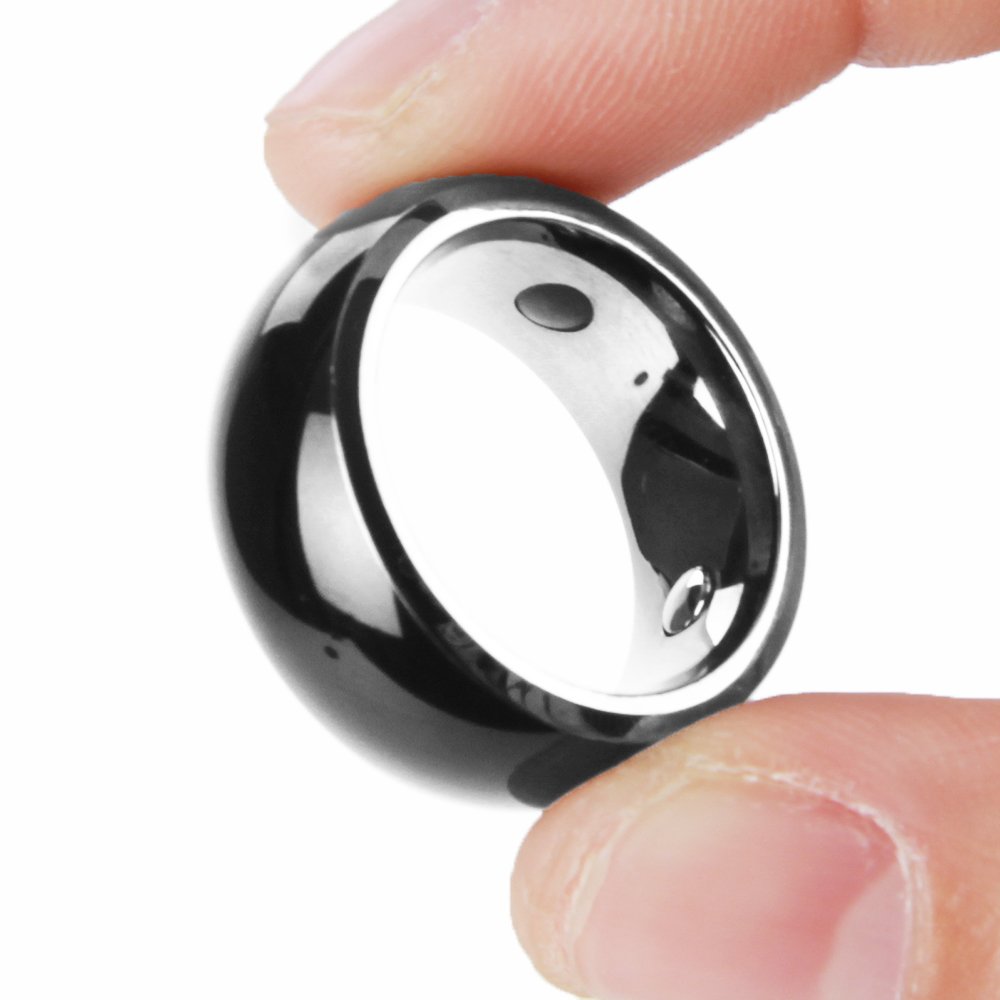
Figure 4: The Jakcom R3 NFC Smart Ring being held, illustrating its compact size.
5.2 Health Modules and Materials
The Jakcom R3 Smart Ring incorporates several natural materials known for their potential health benefits:
- Germanium: A rare metal believed to improve overall well-being and address symptoms related to lack of exercise, stress, and pollution.
- Cotopaxi Volcanic Magmatic Stone: Possesses properties that may help with relieving convulsions, soothing nerves, calming the liver, improving vision and hearing, and alleviating asthma.
- FIR Energy Stone: Releases pure Far Infrared Ray, Scalar Energy, and negative ions, which are thought to improve the Krebs Cycle, thereby enhancing energy, endurance, and strength. It may also help in resisting electromagnetic waves from electronic devices.
These health modules operate passively and continuously as long as the ring is worn.
6. Întreținere
To ensure the longevity and optimal performance of your Jakcom R3 Smart Ring, follow these maintenance guidelines:
- curatenie: Wipe the ring regularly with a soft, lint-free cloth to remove dirt and fingerprints. For stubborn marks, a slightly damp cloth can be used, followed by immediate drying. Do not use harsh chemicals, abrasive cleaners, or ultrasonic cleaners.
- Depozitare: When not in use, store the ring in a clean, dry place, away from direct sunlight and extreme temperatures.
- Evitați impactul: While durable, avoid dropping the ring or subjecting it to strong impacts, which could damage its internal components or outer finish.
7. Depanare
If you encounter issues with your Jakcom R3 Smart Ring, refer to the following common problems and solutions:
| Problemă | Cauza posibila | Soluţie |
|---|---|---|
| Ring not detected by phone/reader. | NFC is off on the device; Ring not positioned correctly; Device not compatible; NFC module damaged. | Ensure NFC is enabled on your phone. Try different positions/angles when tapping the ring (NFC antenna location varies by device). Verify your phone/reader supports NFC. If issues persist, the module may be damaged. |
| Data not writing to ring. | Incorrect NFC app settings; Ring moved during writing; Insufficient permissions (Android/Windows Phone). | Ensure the NFC app is configured correctly. Keep the ring steady during the writing process. Some Android/Windows phones may require root access for certain NFC functions. Try a different NFC writing application. |
| Health benefits not perceived. | Subjective experience; Not a medical device. | The health benefits are based on traditional beliefs and material properties. Individual experiences may vary. The ring is not a medical device and should not replace professional medical advice. |
If you continue to experience problems, please contact Jakcom customer support.
8. Specificații
| Caracteristică | Detaliu |
|---|---|
| Model | JAKCOM-R3 |
| Frecvenţă | 13.56 MHz |
| Raza efectivă | 1.5 cm |
| Temperatura de operare | -50°C până la +80°C |
| Material | Pure Medical Titanium, Germanium, Cotopaxi Volcanic Magmatic Stone, FIR Energy Stone |
| Compatibilitate | Android/Windows Phone with NFC function |
| Sursa de alimentare | Passive (No battery required) |
| Impermeabil | High waterproof rating |
| Greutatea articolului | 37 g |
| Dimensiuni pachet | 7.8 x 5.7 x 4.3 cm |

Figure 5: The Jakcom R3 NFC Smart Ring displayed on a dark background, showcasing designul său elegant.
9. Garanție și asistență
For warranty information and customer support, please refer to the official Jakcom website-ul web sau contactați punctul de vânzare. Păstrați dovada achiziției pentru solicitări de garanție.
Resurse online: For the latest information, FAQs, and software updates, visit the official Jakcom website. (Specific URL not provided in source data, so general statement is used).
Serviciu clienți: If you require further assistance, please contact Jakcom customer service through their official channels.
