1. Introducere
Mulțumesc pentru achizițieasing the Sharp HT-SB140MT 2.0 150W Soundbar. This soundbar is designed to enhance your audio experience, providing clear and powerful sound for your television, music, and other media. With its sleek design and versatile connectivity options, including Bluetooth, HDMI ARC/CEC, Optical, and Auxiliary inputs, it integrates seamlessly into any home entertainment setup. This manual provides essential information for safe and effective use, including setup, operation, maintenance, and troubleshooting.
2. Informații de siguranță
- Sursa de alimentare: Asigurați-vă că sursa de alimentare voltage matches the requirements specified on the soundbar. Use only the provided power cable.
- Ventilare: Do not block any ventilation openings. Maintain adequate space around the soundbar for proper airflow.
- Apă și umiditate: Do not expose the soundbar to dripping or splashing water. Do not place objects filled with liquids, such as vases, on the apparatus.
- Căldură: Do not place the soundbar near heat sources such as radiators, heat registers, stoves, or other apparatus (including ampliificatori) care produc căldură.
- curatenie: Unplug the soundbar from the power outlet before cleaning. Use a dry, soft cloth for cleaning. Do not use liquid cleaners or aerosol cleaners.
- Service: Nu încercați să reparați singur acest produs. Consultați toate lucrările de service către personalul calificat de service.
- Baterii: The remote control uses a CR2 battery. Ensure correct polarity when inserting batteries. Do not mix old and new batteries.
3. Conținutul pachetului
Vă rugăm să verificați dacă toate articolele sunt prezente în colet:
- Sharp HT-SB140MT Soundbar
- Telecomanda
- Cablu de alimentare
- Manual de utilizare (acest document)
4. Produs terminatview

Figura 4.1: Față View
The front of the soundbar features the Sharp logo and LED indicators for source selection and status. Control buttons for power, input, and volume are located on the top panel.
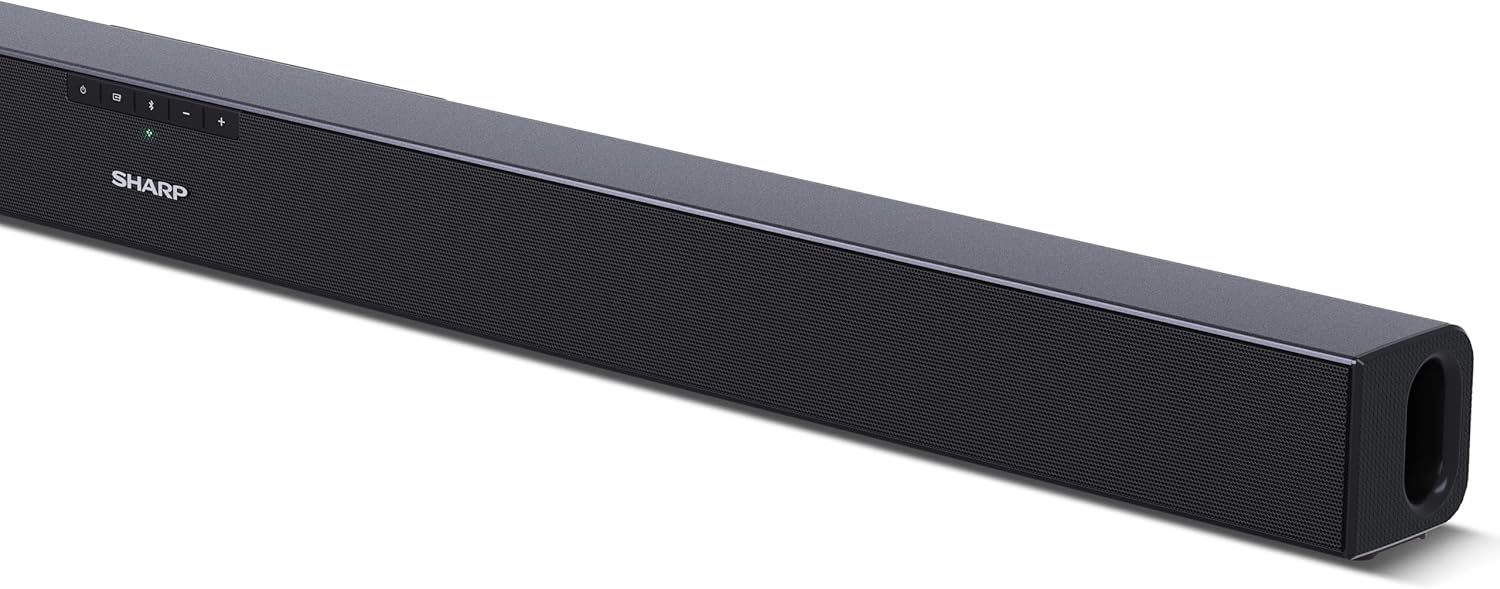
Figura 4.2: Spate View (Conexiuni)
The rear panel provides all necessary connection ports: HDMI ARC, Optical (S/PDIF), and Auxiliary (3.5mm) input, along with the power input.

Figura 4.3: Telecomandă
The included remote control allows for convenient operation of the soundbar, including power, input selection, volume, bass, and treble adjustments.
5. Configurare
5.1 Plasarea
The Sharp HT-SB140MT Soundbar can be placed on a flat surface, such as a TV stand, or wall-mounted. Its slim profile of 6 cm allows it to fit easily under most TV screens without obstructing the view.

Figure 5.1: Soundbar Placement
The soundbar is ideally positioned directly in front of your television for optimal sound projection.
5.2 Conectarea la televizor
Alegeți una dintre următoarele metode de conectare:
- HDMI ARC/CEC (Recommended): Connect an HDMI cable (not included) from the HDMI ARC port on your TV to the HDMI ARC port on the soundbar. This allows your TV remote to control the soundbar's volume and power. Ensure HDMI ARC/CEC is enabled in your TV's settings.
- Digital Optical Audio (S/PDIF): Connect an optical cable (not included) from the Optical Out port on your TV to the OPTICAL IN port on the soundbar. Select the Optical input on the soundbar.
- Auxiliar (AUX): Connect a 3.5mm audio cable (not included) from the headphone jack or AUX Out port on your TV to the AUX IN port on the soundbar. Select the AUX input on the soundbar.
5.3 Conexiune la alimentare
After connecting the audio cable, plug the power cable into the soundbar's power input and then into a wall outlet (220-240V / 50Hz).
6. Instrucțiuni de utilizare
6.1 Pornire/Oprire
Apăsați butonul de pornire/oprire de pe soundbar sau de pe telecomandă pentru a porni sau a opri unitatea.
6.2 Selectarea sursei
Press the Input button on the soundbar or the remote control repeatedly to cycle through the available input sources: HDMI ARC, Optical, AUX, and Bluetooth. The LED indicator on the soundbar will change to reflect the selected source.
6.3 Reglarea volumului
Use the Volume Up (+) and Volume Down (-) buttons on the soundbar or the remote control to adjust the sound level.
6.4 Asociere Bluetooth
Pentru a conecta un dispozitiv Bluetooth:
- Select Bluetooth input on the soundbar. The Bluetooth LED indicator will flash, indicating pairing mode.
- On your smart device (smartphone, tablet, etc.), enable Bluetooth and search for available devices.
- Select "SHARP HT-SB140MT" from the list of devices.
- Once connected, the Bluetooth LED indicator will stop flashing and remain solid. You can now stream audio wirelessly to the soundbar.
6.5 Moduri de sunet (Egalizator)
The soundbar features an equalizer with different sound modes to optimize audio for various content types. Use the EQ button on the remote control to cycle through these modes (e.g., Movie, Music, News). You can also adjust Bass and Treble levels using dedicated buttons on the remote.
7. Întreținere
7.1 Curățare
To clean the soundbar, unplug it from the power outlet. Use a soft, dry, lint-free cloth to wipe down the surfaces. Do not use abrasive cleaners, waxes, or solvents as they may damage the finish.
7.2 Depozitare
If you plan to store the soundbar for an extended period, disconnect it from the power supply and store it in a cool, dry place, away from direct sunlight and extreme temperatures.
8. Depanare
Dacă întâmpinați probleme cu soundbar-ul, consultați următoarele probleme și soluții comune:
| Problemă | Cauza posibila | Soluţie |
|---|---|---|
| Niciun sunet de la bara de sunet. | Bara de sunet este oprită sau cu sunetul dezactivat. Sursă de intrare selectată greșit. Cablurile nu sunt conectate corect. Setările de ieșire audio ale televizorului sunt incorecte. | Asigurați-vă că soundbar-ul este pornit și nu este dezactivat sunetul. Select the correct input source (HDMI ARC, Optical, AUX). Check all cable connections (HDMI, Optical, AUX). Verify your TV's audio output settings are set to external speakers or the correct digital output. |
| Dispozitivul Bluetooth nu se poate conecta. | Bara de sunet nu este în modul de asociere. Dispozitivul este în afara razei de acoperire. Interferențe de la alte dispozitive. | Ensure the soundbar is in Bluetooth input mode and the LED is flashing. Move your Bluetooth device closer to the soundbar (within 10 meters). Turn off other Bluetooth devices nearby. Try unpairing and re-pairing. |
| Telecomanda nu funcționează. | Battery is low or inserted incorrectly. Obstrucție între telecomandă și soundbar. Remote control is faulty. | Replace the CR2 battery and ensure correct polarity. Remove any obstructions between the remote and the soundbar's sensor. Dacă problemele persistă, contactați asistența pentru clienți. |
9. Specificații
| Numele modelului | HT-SB140(MT) |
| Tip difuzor | Soundbar |
| Configurare canal de sunet surround | 2.0 |
| Putere maximă de ieșire a difuzorului | 150 wați |
| Raspuns in frecventa | 60 Hz |
| Tehnologia de conectivitate | Bluetooth, HDMI ARC/CEC, Digital Optical Audio (S/PDIF), 3.5mm Auxiliary (AUX) |
| Tehnologia comunicațiilor fără fir | Bluetooth |
| Rază maximă de acțiune (Bluetooth) | 10 metri |
| Metoda de control | Telecomanda |
| Sursa de alimentare | AC (Mains) |
| Vol. De intraretage | 220-240 volți |
| Culoare | Negru |
| Material | Plastic, Metal |
| Tip de montare | Suport de perete, de masă |
| Dimensiuni produs (L x l x H) | 95 x 6 x 6 cm |
| Greutatea articolului | 1.5 kilograme |
| Componente incluse | Telecomanda |
| Baterie necesară | 1 baterie CR2 |
| Impermeabil | Nu |
| Disponibilitatea pieselor de schimb | 5 ani |
| Actualizări de software garantate până la | Informații nu sunt disponibile |
10. Garanție și asistență
The Sharp HT-SB140MT Soundbar comes with a Limited Warranty. Please refer to the warranty card included in your package for specific terms and conditions. Spare parts are available for up to 5 years from the date of purchase.
For technical support, service, or warranty claims, please contact Sharp customer service through their official website or the contact information provided in your product documentation. When contacting support, please have your product model number (HT-SB140(MT)) and purchase details ready.


